Hello! Welcome to your next lesson in the "Advanced SQL for Business Analytics" module.
In our last lesson, we focused on Common Table Expressions (CTEs) and how they help structure complex queries into readable, logical steps. We saw that their real power comes from breaking down a multi-step analysis. Today, we're going to learn about one of the most powerful tools you'll use inside those CTEs: window functions.
Imagine your manager asks, "What were our top 3 performing ad campaigns in each country last month?" or "Show me the month-over-month growth of user sign-ups for each marketing channel." A simple GROUP BY can't answer these questions because it aggregates rows into a single output row. Window functions, however, allow you to perform calculations across a set of related rows while still keeping the individual rows. They let you look at a "window" of data (like all campaigns for a specific country) to calculate a value for each row within that window.
By the end of this lesson, you will be able to apply window functions like ROW_NUMBER() and RANK() along with the PARTITION BY clause to perform sophisticated ranking and segmentation—a skill that is essential for advanced analysis and a common feature in BA technical interviews.
What is a Window Function?
At its core, a window function performs a calculation over a specific set of table rows, or a "window," that are related to the current row. The magic happens within the OVER() clause, which defines this window.
To build the concept from the ground up, let's see how a familiar aggregate function like MAX() can be used as a window function.
SQL Window Function | How to write SQL Query using RANK, DENSE RANK, LEAD/LAG | SQL Queries Tutorial
This video from techTFQ provides a great introduction. It first shows a standard GROUP BY and then contrasts it with using MAX() as a window function to achieve a different goal: showing the max salary within each department alongside individual employee data.
Watch from 1:31 to 6:18. Pay close attention to these key ideas: The OVER() clause is what turns MAX() into a window function. An empty OVER() clause creates a window over the entire dataset. PARTITION BY department_name is the crucial part. It breaks the data into separate 'windows' for each department, and the MAX() function is calculated independently for each one.
As the video demonstrated, the syntax is function() OVER (PARTITION BY ... ORDER BY ...).
function(): The calculation you want to perform (e.g.,SUM(),AVG(),MAX(), or a specialized window function likeROW_NUMBER()).PARTITION BY column_name: This is the segmentation part. It divides the rows into groups (partitions). The window function is then applied independently to each partition and resets for the next. This is how you answer "in each country" or "for each department."ORDER BY column_name: This sorts the rows within each partition. It's essential for ranking functions, as the rank depends on the order.
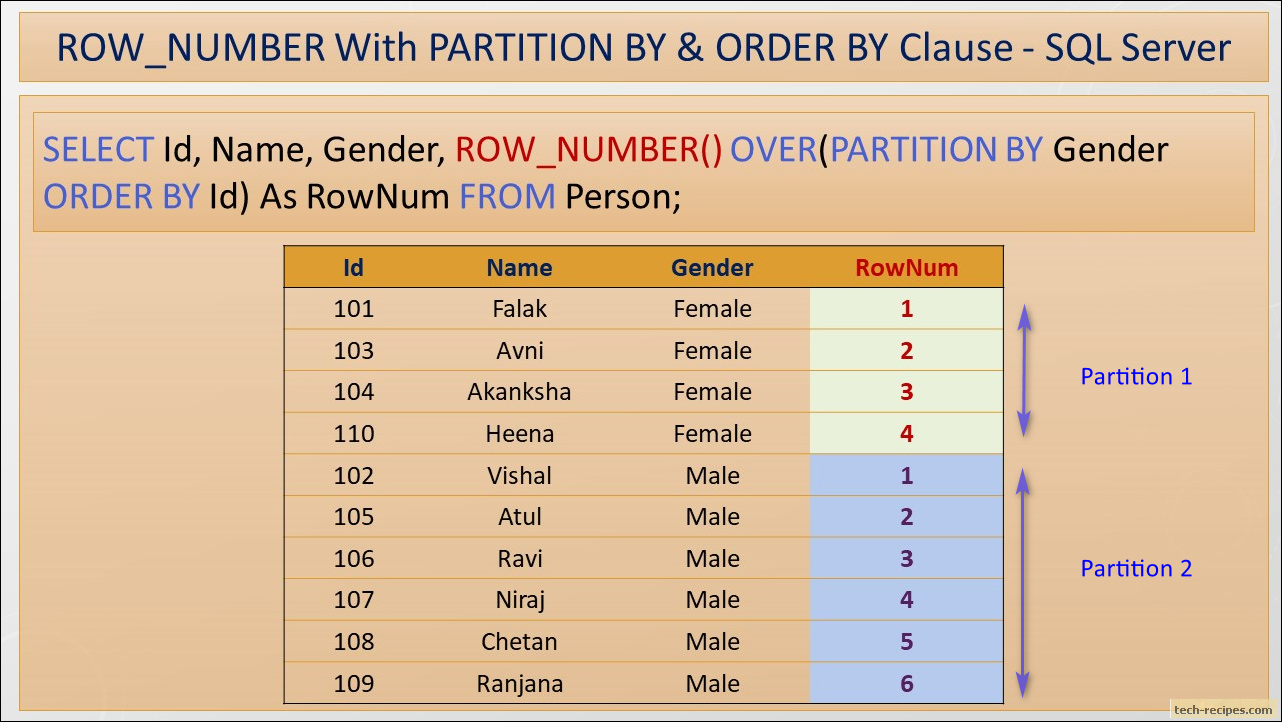
Ranking Functions: ROW_NUMBER, RANK, and DENSE_RANK
The most common use of window functions is for ranking. SQL provides three primary functions for this, and knowing the difference is critical.
ROW_NUMBER(): Assigns a unique, sequential number to each row within the partition (e.g., 1, 2, 3, 4, 5). It gives different numbers to tied values.RANK(): Assigns a rank based on theORDER BYclause. If there's a tie, tied rows get the same rank. However, it then skips the next rank(s). (e.g., 1, 2, 2, 4).DENSE_RANK(): Similar toRANK(), it gives the same rank to tied rows, but it does not skip ranks. (e.g., 1, 2, 2, 3).
Choosing the right function depends on your business requirement. "Do we want a strict top 5 list, or should we include all items that tie for 5th place?"
SQL Window Functions | Clearly Explained | PARTITION BY, ORDER BY, ROW_NUMBER, RANK, DENSE_RANK
This video from Maven Analytics provides a very clear and concise comparison of these three ranking functions.
Watch from 1:20 to 6:46. The video first introduces ROW_NUMBER(), then compares it with RANK() and DENSE_RANK(), and finally shows how PARTITION BY is used to apply these ranks within specific groups (e.g., ranking names separately for boys and girls).

For a quick textual reference on the differences, this article from DataLemur is excellent.
SQL Ranking Window Functions With Examples
This article provides a simple, clear definition of the three main ranking functions and shows examples.
Read the sections 'ROW_NUMBER vs. RANK vs. DENSE_RANK' and 'Window Function Ranking with PARTITION BY and ORDER BY'. This will reinforce the concepts from the video with clear text and a different example.
The Power Pattern: Ranking in a CTE and Filtering
Now, let's combine what you learned in the last lesson with today's topic. A very common analytical pattern is to:
- Use a CTE to calculate a rank for your rows using a window function.
- Use the main query to filter the results from the CTE based on that rank.
Why this two-step process? You cannot use a window function directly in a WHERE clause. You must first compute the rank in the SELECT list (ideally within a CTE for clarity) and then filter on that computed column in an outer query.
Let's see this pattern in action to find the "Top N rows in every group."
SQL Window Functions Tutorial for Business Analysis
This article from the Cube.dev blog has a fantastic, business-oriented example of finding the top 2 orders for every month. It perfectly demonstrates the CTE + window function pattern.
Read the section 'Top N rows in every group'. Notice how they first create a CTE named orders_ranked to calculate the row_number(), and then the final SELECT statement simply filters WHERE row_number <= 2.
This pattern is fundamental for solving many business requests and is a staple of technical interviews for data-heavy roles.
Test your understanding!
You are a Business Analyst at an AdTech company. You have a table ad_performance with columns: campaign_id, ad_id, date, and ctr (click-through rate).
Your manager wants to see the top 2 performing ads (by CTR) for each campaign. If two ads have the same CTR, they should both be included, and no ranks should be skipped.
Which window function would you use and why? How would you structure the query using a CTE?
Show answer
You should use DENSE_RANK().
- Why? The requirement is to include tied ads and not skip ranks, which is exactly what
DENSE_RANK()does.RANK()would skip ranks after a tie, andROW_NUMBER()would arbitrarily assign different ranks to tied ads.
The query structure would be:
- A CTE (
ranked_ads) that usesDENSE_RANK() OVER (PARTITION BY campaign_id ORDER BY ctr DESC)to calculate the rank of each ad within its campaign. - A main query that selects from
ranked_adswhere the calculated rank is<= 2.
WITH ranked_ads AS (
  SELECT
    campaign_id,
    ad_id,
    ctr,
    DENSE_RANK() OVER (PARTITION BY campaign_id ORDER BY ctr DESC) as ad_rank
  FROM
    ad_performance
)
SELECT
  campaign_id,
  ad_id,
  ctr,
  ad_rank
FROM
  ranked_ads
WHERE
  ad_rank <= 2;
Beyond Ranking: Other Business Applications
Ranking is just the beginning. The PARTITION BY concept can be applied with other functions to answer a huge range of business questions. This is where you can really start to provide deep insights as a BA.
Consider these common BA tasks that are made simple with window functions:
- Deduplication: Use
ROW_NUMBER() OVER (PARTITION BY unique_id ORDER BY timestamp DESC)to find the most recent record for each ID and filter out duplicates. - Calculating Period-over-Period Growth: Use
LAG()to get a value from a previous row (e.g., last month's sales) to calculate growth. - Running Totals: Use
SUM() OVER (...)to calculate cumulative values, like a running total of revenue for the year.
SQL Window Functions Tutorial for Business Analysis
Let's revisit the Cube.dev blog post to see how these other applications work. This will broaden your understanding of the power of window functions.
Read the sections 'Revenue growth' (which uses LAG) and 'Dealing with duplicate data' (which uses ROW_NUMBER). These are highly practical examples of a BA's daily work.
Finally, since your goal is to land a BA role, it's worth knowing that questions involving window functions are extremely common in interviews.
The DataLemur article you looked at earlier concludes with several real-world interview questions. You don't need to solve them all now, but reviewing them will show you how these concepts are tested.
Conclusion
Today, you've added one of the most powerful tools in SQL to your analytical arsenal. Window functions allow you to move beyond simple aggregations and perform complex segmentation and ranking that is at the heart of business analysis. By combining them with CTEs, you can write clean, readable, and highly effective queries.
Key Takeaways:
- Window functions perform calculations on a "window" of rows defined by the
OVER()clause. PARTITION BYis the key to segmentation. It divides data into groups, and the function is applied independently to each group.ROW_NUMBER(),RANK(), andDENSE_RANK()are used for ranking, each handling ties differently.- The most common pattern is to calculate a rank in a CTE and then filter on that rank in the main query.
- Window functions have many applications beyond ranking, including calculating growth, running totals, and data cleaning.
Preview of the Next Lesson:
In our next lesson, "Define and calculate key performance indicators (KPIs) relevant to business objectives using SQL," we will put these skills to immediate use. Many KPIs, such as "market share per region" or "year-over-year growth by product line," rely heavily on the ranking and segmentation capabilities of window functions. You are now well-equipped to translate complex business metrics into powerful SQL queries.