Hello! Welcome back to our module on Business Process and System Modeling.
In our last lesson, you learned how to model the sequence of activities in a process using BPMN's core elements: tasks, events, and gateways. You now know how to map what happens and in what order. Today, we will add a crucial layer of clarity to our process models by answering the question: who is responsible for each step?
This lesson focuses on representing roles and responsibilities using BPMN swimlanes. By the end, you will be able to structure a process diagram to clearly show how different people, departments, or even entire organizations collaborate to get work done. This is a fundamental skill for creating formal process documentation that is easy for all stakeholders to understand, a key part of your goal to master professional BA practices.
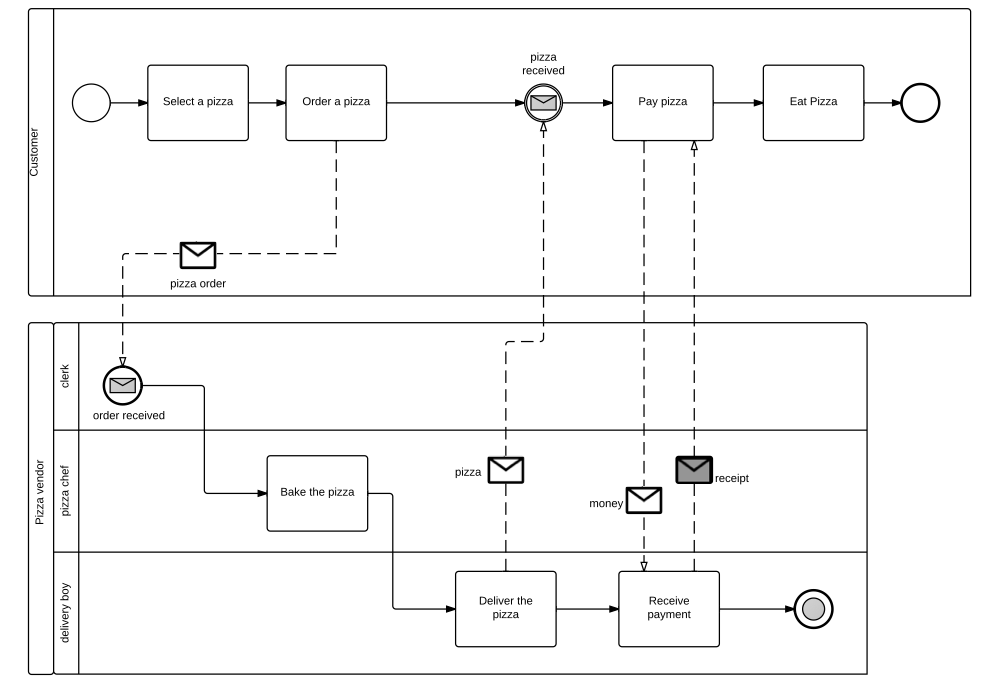
Let's look at a simple example. This diagram shows the process of ordering a pizza. Notice how the diagram is divided into horizontal sections for the "Customer," "Clerk," "Pizza Chef," and "Delivery Boy." This is the power of swimlanes.
Understanding Pools and Lanes
The general term for these organizational containers is swimlanes, but BPMN makes a critical distinction between two types: Pools and Lanes. Getting this right is essential for creating accurate and professional diagrams.
To start, let's watch a short, clear video that defines and contrasts these two elements.
The video 'BPMN Pools and Lanes' by Orbus Software provides a concise and clear explanation of what pools and lanes are and when to use them.
Please watch the entire video (it's only about 2 minutes). Pay close attention to the distinction it makes: A Pool represents a participant and contains a full process. A Lane is a sub-division within a pool to categorize activities.
As the video explained, the distinction is about organizational boundaries.
- Pools: Represent separate business entities or participants in a process. Think of them as different organizations (e.g., "Your Company," "The Customer," "A Supplier") or completely independent departments. A Pool is a self-contained process container.
- Lanes: Are subdivisions inside a single Pool. They are used to organize activities by role ("Manager," "Analyst"), department ("Sales," "Finance"), or system ("CRM," "ERP") within that one participant.
This distinction has a critical impact on how you connect activities in your diagram.
Sequence Flow vs. Message Flow
In the last lesson, you used Sequence Flow (a solid line with an arrow) to connect tasks. The most important rule to remember is:
Sequence Flow can NEVER cross the boundary of a Pool.
Activities inside a Pool (whether in the same lane or different lanes) are connected with Sequence Flow. But what if you need to show communication between two separate participants, like a customer sending an order to your company?
For this, you use a Message Flow, which is represented by a dashed line with an open arrow.
To solidify your understanding of these core concepts, let's turn to a practical article.
Pools and Lanes in BPMN: Clearly Defining Responsibilities
The article 'Pools and Lanes in BPMN: Clearly Defining Responsibilities' from HEFLO provides excellent, practical definitions and examples.
Please read the following sections: 'What Is a Pool?' and 'What Are Lanes?': This will reinforce the definitions we just covered. 'Sequence Flow vs. Message Flow': Focus on this section. It clearly explains the rule about connecting activities within and between pools. 'Types of Pool: Black Box and White Box': This introduces an important concept for controlling the level of detail in your diagrams.
A black box pool is a particularly useful concept. You use it to represent an external participant (like a customer or government agency) when you don't need or want to model their internal process. You only show the messages going to or coming from them. This helps keep your diagrams focused on the process you are actually analyzing.
Practical Application: Modeling an Ordering Process
Now it's time to apply this knowledge, which is the best way to prepare for practical interview tasks. We'll use a case study to practice identifying the correct pools and lanes from a business scenario.
Introduction to BPMN Part II - Swimlanes
This case study, from the 'Introduction to BPMN Part II - Swimlanes' tutorial by Visual Paradigm, describes a simple water ordering process. First, you'll read the scenario and try to identify the roles yourself.
Please read only the section titled 'Case Study: The True Aqua Distilled Water Company.' Focus on the narrative description of the process in the table. As you read, make a mental list of all the different actors (people, departments, customers) involved.
Now that you've read the process description, let's put your understanding to the test.
Test your understanding!
Based on the description of the True Aqua ordering process, identify the participants and roles.
- Which entities are distinct participants that should be in separate Pools?
- Which roles or departments exist within The True Aqua Distilled Water Company and should be represented as Lanes?
Show answer
- Pools: There are two main participants: the Customer and The True Aqua Distilled Water Company. They are separate entities that communicate with each other.
- Lanes: Within the company, several roles and departments are mentioned: the Customer Service Assistant, the Logistics Department, the Manager (within Logistics), and the Worker (also within Logistics). These would all be lanes within the company's pool.
Now, let's see how the tutorial translates this structure into a BPMN diagram.
Introduction to BPMN Part II - Swimlanes
Let's continue with the same resource. The next section walks through how to create the swimlane structure for the case study.
Now, read the section that follows the case study (it starts with step 5). This will show you exactly how the roles and participants you just identified are mapped to a BPMN structure with one pool for the 'Customer' and another pool for 'The True Aqua Distilled Water Company,' containing several lanes and even nested lanes.
This exercise shows the systematic way a business analyst translates a real-world process description into a formal, structured diagram. Notice the use of nested lanes (Manager and Worker inside the Logistics Department). This is a great way to show organizational structure within the process.
Best Practices for Professional Diagrams
To succeed in a BA role, it's not enough to just know the rules; you also need to know the conventions and best practices that professionals follow. This is what separates a confusing diagram from a clear one and is something interviewers will look for.
The HEFLO article we looked at earlier has an excellent section on this.
Pools and Lanes in BPMN: Clearly Defining Responsibilities
Let's revisit the HEFLO article to focus on professional best practices and common questions. This is directly aligned with your goal of preparing for interviews.
Please read two final sections from this article: '✅ Best Practices': Pay special attention to the advice on naming lanes (e.g., using roles like 'Finance Manager' instead of a person's name like 'John Smith'). 'Frequently Asked Questions': This section clarifies common points of confusion and will help you answer technical questions with confidence.
One of the most important best practices is to name lanes by role or function, not by an individual's name. Processes should outlast the people currently in those roles. Naming a lane "Marketing Manager" is robust; naming it "Sarah Jones" is not, as the diagram becomes obsolete the moment Sarah leaves the company.
Conclusion
Today you've added the critical "who" dimension to your process modeling toolkit. By using Pools and Lanes correctly, you can create diagrams that clearly communicate responsibilities and interactions across complex business processes.
Key Takeaways:
- Swimlanes are used to organize activities and assign responsibility.
- Pools represent distinct participants (e.g., different companies, or a company and its customer). Communication between pools requires Message Flow (dashed line).
- Lanes represent roles, departments, or systems within a single pool. Flow between lanes uses Sequence Flow (solid line).
- Black Box Pools are used to represent external participants whose internal processes are not relevant to your model.
- Following best practices, like naming lanes by role, is crucial for creating professional and durable process documentation.
Preview of the Next Lesson:
So far, we've focused on how to create an 'as-is' process model—a map of how things work today, showing both the flow of work and who is responsible. In the next lesson, we will learn how to analyze 'as-is' process models to identify inefficiencies and improvement opportunities. This is where the true value of business analysis begins: not just documenting the present, but designing a better future.