Welcome to your fourth lesson in Networking Basics. In our last session, we explored network topologies, which are the "blueprints" describing how networks are laid out. We saw that designs like the star topology rely on central devices to connect everything together.
Today, we'll zoom in on those devices. You'll learn to identify the essential hardware that forms the building blocks of any network. We'll examine the specific roles of switches, routers, modems, access points, and firewalls. Understanding what each device does is fundamental to grasping how data travels from your computer to a server across the globe and is a crucial step toward your goal of mastering cloud infrastructure.
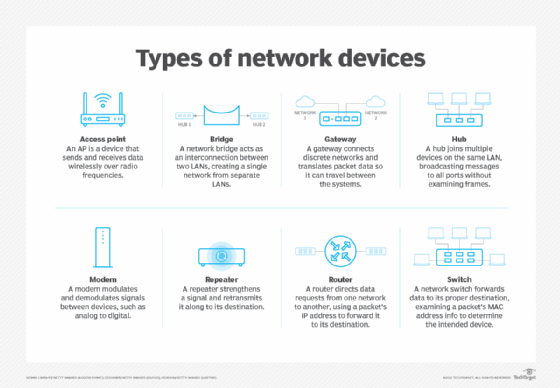
Let's begin by looking at the cast of characters we'll be discussing.
The Core of the Network: Hubs, Switches, and Routers
To start, it's vital to understand the difference between the three most fundamental devices that direct traffic: hubs, switches, and routers. They may look similar, but their methods for handling data are vastly different, which has huge implications for network performance and security.
A hub is the simplest and oldest of the three. It's essentially a multiport repeater. When a data packet arrives on one port, the hub simply copies it and broadcasts it out to every other port, regardless of the intended recipient. This is inefficient and insecure.
A switch is a more intelligent device. It inspects the data it receives to determine the specific destination device and forwards the data only to the port connected to that device. This creates a much faster and more secure local network.
A router has a different job altogether. While hubs and switches are used to create a single network (a LAN), a router's purpose is to connect different networks together. It's the device that allows your home network to communicate with the internet.
This animated video provides an excellent explanation of these differences.
Hub, Switch, & Router Explained - What's the difference?
The video "Hub, Switch, & Router Explained" from PowerCert Animated Videos clearly illustrates the distinct roles of these three core devices.
Please watch the following segments: The Hub: Pay attention to how it broadcasts data to all devices, creating unnecessary traffic. The Switch: Note how the switch learns MAC addresses to send data only to the correct destination. This is a key concept. The Router: Focus on how the router uses IP addresses to forward data between different networks, acting as a gateway to the internet.
Layered Logic: How Switches and Routers Make Decisions
As you saw in the video, the key difference between a switch and a router lies in the type of address they use to make decisions. This is a concept we'll explore deeply in the next module, but let's introduce it now.
-
Switches operate at Layer 2 (the Data Link Layer) of the OSI model. They build a table of MAC addresses (unique hardware identifiers) for devices on the local network. When a frame of data arrives, the switch looks at the destination MAC address and forwards it to the corresponding physical port. Its world is confined to the local network.
-
Routers operate at Layer 3 (the Network Layer). They use IP addresses (logical addresses that can represent any device on any network globally). A router inspects the destination IP address of a packet to determine if it's for the local network or for a different network. If it's for another network, the router consults its routing table to find the best path to forward the packet toward its final destination.
Think of it this way:
- A switch is like a mailroom clerk inside an office building. The clerk knows which person (MAC address) sits at which desk (port) and delivers mail internally.
- A router is like the local post office. It looks at the street address (IP address) on a letter to decide whether to deliver it within the same city or send it to another city (another network).
For a textual summary and a handy comparison table, please review the following resource.
This article from GeeksForGeeks provides concise definitions of network devices, helpfully categorizing them by the network layer at which they operate.
Please read the following sections: Hub: Review the function and drawbacks of a hub. Switch: Reinforce your understanding of how a switch intelligently forwards data. Router: Read the description of a router's role in connecting networks. Finally, study the summary table at the end. It's an excellent quick reference for the key distinctions.
Getting Connected: Modems and Access Points
Now that we understand how data is directed, let's look at the devices that provide the actual connection to the internet and to wireless devices.
-
Modem (Modulator-Demodulator): This device acts as a translator. Your computer network speaks in digital signals, but the infrastructure from your Internet Service Provider (ISP)—whether it's a cable line, phone line (DSL), or fiber optic—uses a different type of signal (often analog). The modem modulates outgoing digital signals into the ISP's format and demodulates incoming signals back into digital format for your network. It is your network's bridge to the outside world.
-
Access Point (AP): An access point allows wireless devices (like laptops and phones) to connect to a wired network. It acts as a central transmitter and receiver of wireless radio signals. In essence, an AP provides the functionality of a switch, but for wireless devices. Most "wireless routers" you find in homes are actually combination devices that include a router, a switch, and an access point in one box.
-
Firewall: A firewall is your network's security guard. It stands between your internal network and the internet, monitoring all incoming and outgoing traffic. Based on a defined set of security rules, it permits or blocks traffic to protect your network from unauthorized access and malicious threats. Like access points, basic firewall functionality is often built into modern routers.
This next video provides a brief overview of these devices.
Network Devices Explained: Routers, Switches, Hubs & More | Networking Basics
The video "Network Devices Explained" by WhiteboardDoodles offers simple, clear explanations of these additional components.
Watch these short segments: Modem: Understand its role as a translator for your ISP. Access Point: See how it extends the network for wireless devices. Firewall: Grasp its basic function as a security barrier.
Putting It All Together
Let's trace the path of a request from your computer to the internet to see how these devices work in concert.

Imagine you are on the Laptop in this diagram and you want to visit a website:
- Your laptop sends the request wirelessly. The Access Point receives the wireless signal and converts it into a signal for the wired network.
- The Access Point is connected to a Switch. The switch receives the data and, knowing the router is the gateway to the internet, forwards it to the port connected to the Router.
- The Router inspects the packet, sees the destination IP address is outside the local network, and forwards it to the Modem. The router's built-in firewall rules are checked to ensure this outgoing traffic is allowed.
- The Modem translates the digital packet from your network into the appropriate signal for your ISP's network.
- The request travels across the Internet to the destination server. The response comes back following the reverse path.
Conclusion
You have now identified the core components of a computer network and understand the distinct and vital role each one plays. This knowledge is the hardware foundation upon which all other networking concepts are built.
Here are the key takeaways:
- Hubs are obsolete devices that broadcast data to all ports, creating inefficient and insecure networks.
- Switches create local networks by intelligently forwarding data to specific devices based on their MAC addresses (Layer 2).
- Routers connect different networks by forwarding data between them based on their IP addresses (Layer 3).
- Access Points act as a bridge, allowing wireless devices to connect to a wired network.
- Modems translate signals between your digital network and your ISP's infrastructure.
- Firewalls act as security guards, filtering traffic based on predefined rules.
In our next lesson, we will shift from hardware back to concepts, exploring the two primary architectural models for how devices communicate on a network: client-server and peer-to-peer.