Hello! Welcome to your seventh lesson.
In our previous lesson, we concluded our first module by untangling the const volatile combination, a concept directly applicable to your work with read-only hardware registers. We established that const and volatile are orthogonal keywords, addressing separate concerns of code contract and compiler optimization.
Today, we begin a new module: Pointers, const, and Core Operations. We'll start with the most fundamental concept of all, which is the cornerstone for every advanced pointer topic. While you use pointers daily, the goal here is to refine your ability to explain their mechanics with precision—a skill essential for interviews.
Our learning outcome is to explain the difference between a pointer's value (an address) and the value it points to. We will break this down using memory diagrams and code analysis to build an unshakeable mental model.
1. The Core of Pointers: Indirection
At the most basic level, every variable in C has two attributes:
- Its value: The data it holds.
- Its address: The location in memory where that value is stored.
Usually, we're only concerned with the value. If we have int var = 10;, we think of var as being 10.
A pointer introduces a layer of indirection. It's a special type of variable designed not to hold a data value directly, but to hold the address of another variable.
- The address-of operator (
&) is used to get the memory address of a variable.&vargives us the address where10is stored. - The dereference operator (
*) is used to access the value at the address a pointer is holding.
Let's start with a foundational reading that explains this relationship.
Understanding Pointers vs References with Memory Diagrams
This article, 'Understanding Pointers vs References with Memory Diagrams', provides a clear, concise explanation of the relationship between values, addresses, and indirection. It's a great refresher to frame our thinking.
Please read the first two sections: 'Values, Addresses, and Indirection' and 'What a Pointer Is and How It Behaves'. Focus on how the author defines a pointer as a variable that stores an address, and how the * operator is used to follow that address.
2. Visualizing the Pointer in Memory
A clear mental model of memory is the key to mastering pointers. Let's visualize the concepts from the article.
Consider this simple code:
int a = 30;
int *ptr = &a;
Here's what this looks like in memory:
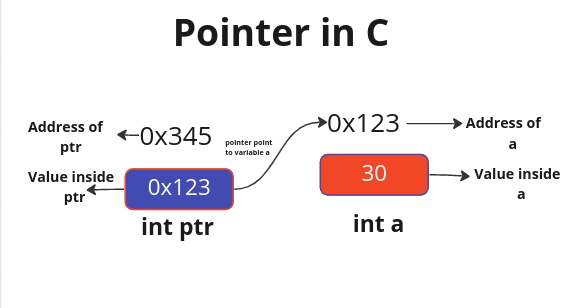
From this diagram, we can make the crucial distinctions an interviewer is looking for:
a: The value is30.&a: The address ofais0x123.ptr: The value of the pointerptris0x123. Printingptrwould show this address.*ptr: The value at the addressptrpoints to. The pointer holds0x123, and the value at that address is30.&ptr: The address of the pointer variable itself is0x345. The pointer, being a variable, also has its own location in memory.
This second diagram expands on the idea, showing how different data types, including a pointer, are laid out in memory. Notice how the ptrSum variable's content is the address of the sum variable.
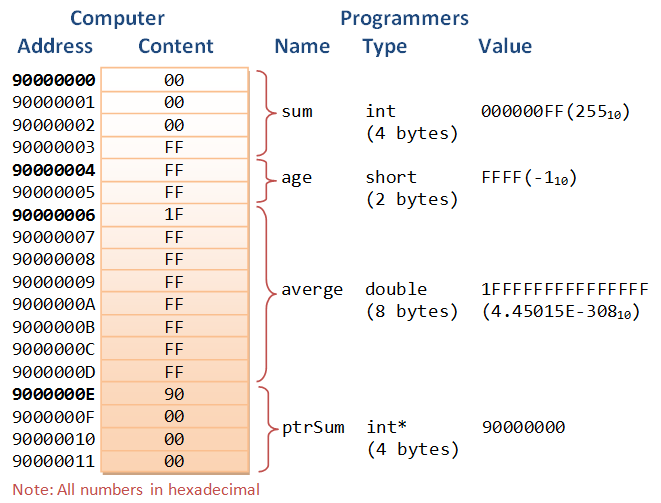
To solidify this with code, let's turn to another resource that demonstrates how to print these different values.
The article 'Pointers in C' from GeeksforGeeks provides simple, executable code examples that explicitly show the difference between printing a pointer's value and the value it's pointing to.
Read the sections explaining pointer declaration, initialization, and dereferencing. Pay close attention to the code snippets. Note the use of the %p format specifier, which is the correct, portable way to print addresses.
3. Code Analysis: A Practical Walkthrough
Now let's trace the flow of pointers through a function call. This is a common pattern and a great way to test your understanding. Given your familiarity with C++, you'll recognize this as the C-style equivalent of passing by reference.
Analyze the following code. Before running it, predict what each printf statement will output.
#include <stdio.h>

// This function takes a pointer to an integer as its argument.
void modify_value(int *p_num) {
    printf("\n--- Inside modify_value ---\n");
    printf("Value of the pointer p_num (the address it holds): %p\n", (void*)p_num);
    printf("Value at the address p_num points to (*p_num):    %d\n", *p_num);

    // Now, we dereference the pointer and change the value AT THAT ADDRESS.
    *p_num = 250;

    printf("New value at the address p_num points to (*p_num): %d\n", *p_num);
    printf("--- Exiting modify_value ---\n\n");
}

int main() {
    int my_var = 42;

    printf("--- In main (before call) ---\n");
    printf("Value of my_var:    %d\n", my_var);
    printf("Address of my_var:  %p\n", (void*)&my_var);

    // We pass the ADDRESS of my_var to the function.
    modify_value(&my_var);

    printf("--- In main (after call) ---\n");
    printf("Value of my_var:    %d\n", my_var);

    return 0;
}
Analysis Breakdown:
-
In
main, before the call:my_varis initialized to42.&my_varwill print the memory address ofmy_var(e.g.,0x7ffc...).
-
The function call
modify_value(&my_var):- The value being passed to the function is the address of
my_var. - The function parameter
p_numis a new local variable on the stack, but its value is initialized with the address ofmy_var. So,p_numnow "points to"my_var.
- The value being passed to the function is the address of
-
Inside
modify_value:printfingp_numwill show the same address as&my_varfrommain. This confirms the pointer's value is the address we passed in.printfing*p_numwill show42, the value at that address.- The line
*p_num = 250;is the critical step. It says: "Go to the address stored inp_numand change the value there to250." This directly modifiesmy_varin themainfunction's scope. - The final
printfinside the function will confirm that*p_numis now250.
-
In
main, after the call:- When we print
my_varagain, its value will be250. The change made via the pointer inmodify_valuepersists because we weren't operating on a copy of the value, but on the original variable's memory location.
- When we print
This example cleanly separates the pointer p_num (which holds an address) from the data *p_num (which is the integer at that address).
Conclusion
Mastering this distinction is non-negotiable for C programming. It is the foundation upon which pointer arithmetic, dynamic memory, data structures, and the complex callback mechanisms you use in AUTOSAR are built.
Key Takeaways:
- A pointer's value is always a memory address. It answers the question, "Where is the data?"
- The value a pointer points to is the data located at that memory address. It is accessed using the dereference operator (
*). - The address-of (
&) and dereference (*) operators are complements. For a variablevar,*(&var)evaluates tovar. - Passing an address to a function allows that function to modify the original variable in the caller's scope, a technique known as "pass-by-pointer."
In our next lesson, we will build directly on this foundation. Now that we understand a pointer's value is an address (which is essentially an integer), we will explore pointer arithmetic: how to perform mathematical operations like addition and subtraction on pointers and why the pointer's data type is crucial for these calculations.