Hello! Welcome to your first lesson.
Given your goal of sharpening your C knowledge for interviews, we'll start with a foundational topic that underpins many others: how a C program organizes its memory. Understanding this is crucial for answering questions about pointers, variable lifetimes, and performance.
Today, we'll focus on diagramming the memory layout of a C program and identifying where different types of variables are stored. This will provide a solid mental model for the more complex topics we'll tackle later.
1. The Five Main Memory Segments
When a C program is executed, the operating system allocates a virtual address space for it, which is typically organized into five main segments. Having a clear picture of these segments is fundamental.
To get a quick and clear overview, please watch the first four minutes of the following video. It introduces the five key segments we'll be discussing.
This video, 'Memory Segments in C/C++', provides a concise introduction to the five main memory regions.
Watch from the beginning until the end of the 'Stack' segment explanation. Focus on the name and primary purpose of each of the five segments: Text, Initialized Data, Uninitialized Data (BSS), Heap, and Stack.
The layout discussed in the video can be visualized with this classic diagram:
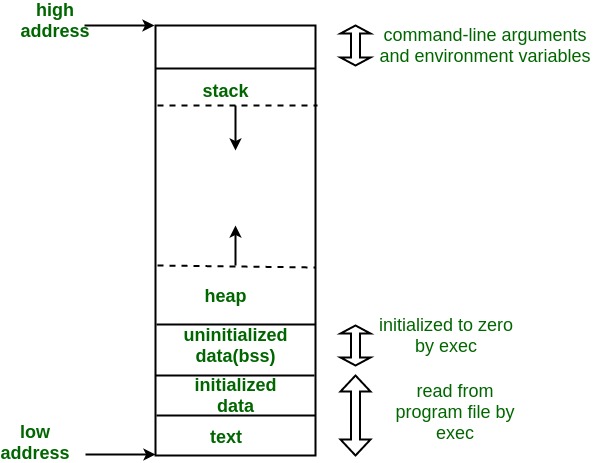
Let's break down each of these segments.
-
Text Segment (or Code Segment)
- What it is: This is where the compiled machine code of your program resides. It contains the instructions for all your functions (like
main, and any other functions you've written or linked from libraries). - Key Property: It is typically marked as read-only. This is a security feature to prevent a program from accidentally or maliciously modifying its own instructions during execution.
- What it is: This is where the compiled machine code of your program resides. It contains the instructions for all your functions (like
-
Initialized Data Segment (often just called
.data)- What it is: This segment stores all global,
static, andexternvariables that are initialized with a non-zero value when you declare them. - Example:
int max_connections = 100;orstatic float PI = 3.14159; - The initial values for these variables are stored directly in the executable file on disk.
- What it is: This segment stores all global,
-
Uninitialized Data Segment (or BSS Segment)
- What it is: BSS stands for "Block Started by Symbol," a historical name from an old assembler. This segment holds all global and
staticvariables that are not explicitly initialized, or are initialized to zero. - Example:
int global_counter;orstatic char command_buffer[1024]; - Key Property: The C standard guarantees that variables in this segment are automatically initialized to zero by the C runtime system before
main()is called. - Interview Tip: A common interview question is, "Why have a separate BSS segment instead of just putting everything in the data segment?" The reason is efficiency. For a large uninitialized array like
int big_array[100000];, the executable file doesn't need to store 400KB of zeros. It only needs to record the size of the BSS segment. The operating system then allocates a block of zero-filled memory at runtime, keeping the executable file much smaller.
- What it is: BSS stands for "Block Started by Symbol," a historical name from an old assembler. This segment holds all global and
-
Heap
- What it is: This region is for dynamic memory allocation. It's the memory you, the programmer, manage manually using functions like
malloc(),calloc(), andfree(). - Key Property: The heap is flexible and grows as you request memory. In the standard memory model, it grows upward (towards higher memory addresses). You are responsible for freeing any memory you allocate; failing to do so results in a memory leak.
- What it is: This region is for dynamic memory allocation. It's the memory you, the programmer, manage manually using functions like
-
Stack
- What it is: This segment is used to manage function calls. Each time a function is called, a "stack frame" is pushed onto the stack. This frame contains the function's local variables, its parameters, and the return address (where to go back to when the function finishes).
- Key Property: The stack is managed automatically in a Last-In, First-Out (LIFO) manner. It grows and shrinks as functions are called and return. It's very fast, but its size is limited. On most systems, it grows downward (towards lower memory addresses).
2. Seeing It in Action: Where Variables Live
Let's solidify this with a comprehensive code example. The following reading contains a well-commented C program that declares variables of every kind and then prints their memory addresses, allowing you to see the memory layout in action.
Understanding Functions, Memory, and Pointers in C
This article, 'Understanding Functions, Memory, and Pointers in C', provides an excellent, practical demonstration of memory layout.
Please read section '4.2 A Complete Example: Where Does Everything Go?' and study the memory_layout.c code. Then, read '4.3 Detailed Breakdown of Each Segment' to review the segment breakdown and study the summary table in '4.4 Visual Summary'. Pay close attention to how the code's variables map to the text, data, BSS, heap, and stack segments described.
This table summarizes the key distinctions for interview purposes:
| Declaration Type | Location | Lifetime | Initial Value (if not specified) |
|---|---|---|---|
int global = 5; (outside func) |
Data Segment | Entire program | 5 |
int global; (outside func) |
BSS Segment | Entire program | 0 (guaranteed) |
static int s = 5; (inside func) |
Data Segment | Entire program | 5 (initialized only once) |
static int s; (inside func) |
BSS Segment | Entire program | 0 (initialized only once) |
int local; (inside func) |
Stack | Function call | Garbage (undefined) |
int *p = malloc(...) |
Heap (*p) |
Until free() |
Garbage (undefined) |
int *p = calloc(...) |
Heap (*p) |
Until free() |
0 (guaranteed) |
3. From Abstract Model to Embedded Reality
The model we've discussed is the abstract C standard. Your experience in AUTOSAR and embedded systems programming gives you a practical perspective that is very valuable. In embedded systems, these abstract segments are physically mapped onto hardware, typically Flash (ROM) and RAM.
This next video bridges that gap. It's quite detailed, but we'll focus on the parts that are most relevant to your background.
Understanding the C runtime memory model
The video 'Understanding the C runtime memory model' from Feabhas Ltd explains how the abstract C model maps to real embedded hardware.
Please watch the section on the startup code. This part explains what happens before main() is called, which is a classic embedded interview topic. Focus on how the .bss segment is zeroed out and how the .data segment is copied from a non-volatile medium (like Flash) into RAM.
This startup process is a key difference between a program running on a host OS (like Windows/Linux) and a bare-metal or RTOS-based embedded system. Knowing this demonstrates a deep understanding that goes beyond textbook C.
- Executable Image in Flash: The
.text(code),.rodata(read-only data likeconstvariables and string literals), and the initial values for the.datasegment are stored in non-volatile Flash memory. - Runtime in RAM: At boot, the startup code (which runs before
main):- Copies the contents of the
.datasegment from Flash to RAM. - Zeros out the entire
.bsssegment in RAM. - Sets up the stack pointer.
- Initializes the heap, if used.
- Finally, calls
main().
- Copies the contents of the
4. Self-Assessment
Let's test your understanding. For the following C code snippet, identify which memory segment each numbered variable or piece of data is stored in.
#include <stdio.h>
#include <stdlib.h>

const int FIRMWARE_VERSION = 2;       // 1. Where is 2 stored?
char* status_message = "OK";          // 2. Where is the pointer `status_message`?
                                      // 3. Where is the string literal "OK"?

long event_counter;                   // 4. Where is `event_counter`?

void process_event(int event_id) {
    static int processed_count = 0;   // 5. Where is `processed_count`?
    char local_buffer[32];            // 6. Where is `local_buffer`?

    int* log_data = malloc(16);       // 7. Where is `log_data` (the pointer itself)?
                                      // 8. Where is the 16-byte block of memory it points to?

    // ... function logic
    free(log_data);
}
Click to see the answers and explanations
FIRMWARE_VERSION: As aconstglobal, it's typically placed in a read-only data segment (often called.rodata), which is a subsection of the data segment loaded from the executable. On an embedded system, this would live in Flash.status_message(the pointer): This is an initialized global pointer, so the pointer variable itself is stored in the Initialized Data Segment (.data)."OK"(the string literal): String literals are read-only. They are stored in the read-only data segment (.rodata).event_counter: This is an uninitialized global variable, so it's stored in the BSS Segment. It will be automatically initialized to 0.processed_count: It's astaticlocal variable with an initializer. It resides in the Initialized Data Segment (.data). Its value persists across calls toprocess_event.local_buffer: This is a regular local variable, so it is allocated on the Stack.log_data(the pointer): The pointerlog_datais itself a local variable, so it lives on the Stack.- The 16-byte memory block: The memory allocated by
malloccomes from the Heap.
Conclusion
In this lesson, we've reviewed the canonical memory layout of a C program.
Key Takeaways:
- A C program's memory is segmented into Text, Data, BSS, Heap, and Stack.
- The storage duration (lifetime) and scope of a variable are determined by where it is declared and what keywords (
static, etc.) are used, which in turn determines its memory segment. - Globals and statics live for the entire program duration (in
.dataor.bss). - Locals live only for the duration of a function call (on the
stack). - Dynamically allocated memory lives until manually freed (on the
heap). - In embedded systems, these segments are physically mapped to hardware like Flash and RAM, with a specific startup routine handling initialization before
main().
This mental model is the foundation for almost every other topic in our course. In the next lesson, we will zoom in on the Stack and explore the function call mechanism, stack frames, and the passing of parameters in more detail.