Hello! Welcome back.
In our last lesson, we explored how to use a double pointer (type **p) to enable a function to modify a pointer variable in its calling scope. This is a fundamental pattern for managing resources in C.
Today, we'll build on that by looking at a closely related but distinct concept: arrays of pointers. This data structure is a cornerstone of idiomatic C programming, especially for handling collections of strings efficiently. We'll examine its declaration, memory layout, and primary use cases, including the classic example of command-line arguments.
Your learning outcome for this lesson is to: Declare and use an array of pointers (e.g., char *argv[]) for managing a collection of strings.
This is a critical topic for your interviews, as it tests your understanding of memory management, pointers, and data structuring in C.
From a Pointer to a Pointer to an Array of Pointers
In the previous lesson, char **p represented a single pointer that pointed to another pointer. The primary goal was to change what that single pointer pointed to.
Now, consider the declaration char *arr[10];. This declares an array of 10 pointers to char. Each element arr[i] is an independent variable of type char *.
This structure is exceptionally useful for managing a collection of strings of varying lengths. Instead of forcing all strings into a fixed-size 2D array, which can be wasteful, we can store pointers to strings that are located elsewhere in memory.
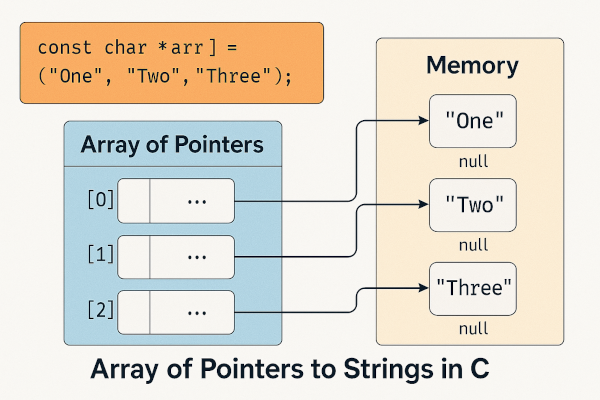
The key benefit is flexibility and efficiency. The strings themselves don't need to be contiguous, and they can be of any length.
The Canonical Example: Sorting Text Lines
A powerful demonstration of this concept is a program that sorts lines of text. If you were to store each line in a large 2D array, swapping two lines during the sort would involve copying many bytes. By using an array of pointers, you only need to swap the pointers, which is significantly faster.
Let's study the classic implementation from "The C Programming Language" by Kernighan and Ritchie.
Chapter 5 - Pointers and Arrays
This section from K&R's book explains how an array of pointers can be used to efficiently handle variable-length text lines. Focus on the data structure choice and how it simplifies the sorting logic.
Read the section titled '5.6 Pointer Arrays; Pointers to Pointers'. Pay close attention to the declaration char *lineptr[MAXLINES] and the logic within the qsort and swap functions. Notice that the swap function is exchanging char * elements, not the strings themselves.
As you saw in the reading, the sorting process becomes much more efficient:
- Storage: Lines are read from input and stored in a large buffer. The
readlinesfunction allocates memory for each line and stores a pointer to it in thelineptrarray. - Sorting: The
qsortfunction is passedlineptr. When it needs to exchange two out-of-order lines, theswapfunction is called. - The Swap:
Here,/* swap: interchange v[i] and v[j] */ void swap(char *v[], int i, int j) { char *temp; temp = v[i]; v[i] = v[j]; v[j] = temp; }vis an array of character pointers (char *v[]). Thetempvariable is achar *. The operation swaps two pointers (typically 4 or 8 bytes each), not the potentially very long strings they point to. This is the core advantage.
Command-Line Arguments: main(int argc, char *argv[])
Perhaps the most famous use of an array of pointers is in the main function signature, which is a frequent topic in C interviews.
int main(int argc, char *argv[])
argc(argument count): Anintrepresenting the number of command-line strings. It's always at least 1, because the program's name is the first argument.argv(argument vector): An array of pointers to characters. Each elementargv[i]is achar *that points to a null-terminated string.argv[0]points to the program's name.argv[1]points to the first argument.- ...
argv[argc-1]points to the last argument.- The standard requires that
argv[argc]must be aNULLpointer.
This structure allows the operating system to pass a variable number of string arguments to your program efficiently.
Let's examine how to process these arguments.
Chapter 5 - Pointers and Arrays
This next section from K&R demonstrates how to access command-line arguments using argv both as an array and as a pointer that can be incremented. Understanding both methods is key.
Read the section '5.10 Command-line Arguments'. Focus on the two versions of the echo program. The first uses array indexing (argv[i]), and the second uses pointer arithmetic (*++argv). Trace how the pointer argv is moved in the second version.
char *argv[] vs. char **argv
You might have noticed that the second version of echo increments argv directly (++argv). This is possible because when an array is passed as a function parameter, it "decays" into a pointer to its first element.
Therefore, in a function signature, these two declarations are equivalent:void my_func(char *arr[])void my_func(char **arr)
In both cases, arr inside the function is a variable of type char **. It holds the address of the first element of the original array of pointers. This is the direct link to our previous lesson on double pointers. While the syntax char *argv[] more clearly communicates the intent to treat argv as an array, the compiler treats it as a char **.
This distinction can be a subtle but important point in an interview.
argv pointer to an array of pointers - Stack Overflow
This Stack Overflow discussion is excellent for solidifying your understanding of why char *argv[] is equivalent to char **argv in a function parameter context, and how it differs from a true 2D array.
Read the first three answers. The first answer (by AnT) clarifies the formal vs. informal meaning of 'pointer to an array'. The second (by sh1) confirms the equivalence for function parameters. The third (by kfsone) provides a crucial code example comparing meats (an array of char*) with vegetables (a 2D char array) to show why they are not type-compatible.
Practice Question
Let's bring this together with a practical scenario you might encounter in your work. Imagine you need to map CAN frame IDs (which are integers) to human-readable names for logging purposes. The mappings are fixed at compile time.
You're given the following two options for storing the names:
Option A: 2D Array
const char FAULT_NAMES_A[][32] = {
    "ENGINE_OVERHEAT",
    "BRAKE_SYSTEM_FAILURE",
    "LOW_OIL_PRESSURE"
};
Option B: Array of Pointers
const char *FAULT_NAMES_B[] = {
    "ENGINE_OVERHEAT",
    "BRAKE_SYSTEM_FAILURE",
    "LOW_OIL_PRESSURE"
};
An interviewer asks: "Compare these two data structures. Discuss the trade-offs in terms of memory usage, flexibility, and how you would pass them to a logging function void log_faults(const char **names, int count)."
Think about this for a moment before revealing the answer.
Answer and Explanation
Here's a breakdown of the comparison:
-
Memory Usage:
- Option A (2D Array): Allocates a single, contiguous block of memory of size
3 * 32 = 96bytes. Each string, regardless of its actual length, occupies 32 bytes. For "LOW_OIL_PRESSURE" (19 chars + null), this is fine, but for shorter strings, it wastes space. For example, if a name was "ABS_FAIL" (9 chars), over 20 bytes would be unused padding. - Option B (Array of Pointers): Allocates memory for the array of pointers itself (e.g.,
3 * sizeof(char*), so 12 or 24 bytes on 32/64-bit systems). The string literals ("ENGINE_OVERHEAT", etc.) are stored separately in the read-only data section of the program. This approach is more memory-efficient if the string lengths vary significantly, as no space is wasted on padding within the strings themselves.
- Option A (2D Array): Allocates a single, contiguous block of memory of size
-
Flexibility:
- Option A: Inflexible. All strings are limited to a maximum length of 31 characters (plus null terminator). Changing one string to be longer than 31 characters requires changing the array's definition.
- Option B: Flexible. Each string can have a different, arbitrary length. Adding or changing strings is easier as long as you update the array of pointers.
-
Passing to
log_faults(const char **names, int count):log_faults(FAULT_NAMES_A, 3);would result in a compilation error.FAULT_NAMES_A, a 2D arrayconst char[3][32], decays to a pointer to its first element, which is a pointer to an array of 32 chars (const char (*)[32]). This type is not compatible withconst char **.log_faults(FAULT_NAMES_B, 3);compiles and works correctly.FAULT_NAMES_B, an array ofconst char *, decays to a pointer to its first element, which is aconst char **. The types match.
This last point is a crucial interview question that directly tests your understanding of pointer decay rules for different array types.

Conclusion
In this lesson, we have explored the declaration and use of arrays of pointers, a powerful and efficient C data structure.
Key Takeaways:
- An array of pointers, like
char *my_strings[], stores a collection of memory addresses. - This structure is ideal for managing collections of variable-sized data, particularly strings, because it avoids wasted memory and makes operations like sorting more efficient by moving small pointers instead of large data blocks.
- The
main(int argc, char *argv[])function signature is the most common example, providing a flexible way to pass command-line arguments to a program. - When passed to a function, an array of pointers
type *arr[]decays into a pointer to a pointer,type **arr, making your knowledge from the previous lesson directly applicable.
In our next lesson, we will dive deeper into the topic we just touched on: comparing the memory layout and access patterns of a 2D array vs. an array of pointers. This will formalize the trade-offs and give you a complete picture of when to use each structure.