Hello! Welcome to the first lesson in our module on Data Management & Algorithms.
In the previous module, we covered essential mathematical concepts that underpin data science, culminating in our discussion on Taylor series for function approximation. We are now making a significant but crucial shift from the theoretical foundations of analysis to the practical foundations of data handling. Before we can apply any of the complex models from the GATE syllabus, we first need to understand how data is organized, stored, and retrieved efficiently.
This lesson addresses the learning outcome: Explain the core concepts of the relational model (ER diagrams, tables, keys) and SQL. We will explore the most common and enduring paradigm for data management—the relational model. You will learn how to design a database conceptually using ER diagrams, how to enforce data integrity with keys, and how to communicate with a database using the standard language, SQL.
1. The Relational Model: Organizing Data in Tables
At its heart, the relational model is a straightforward way to represent data: in tables. Think of a simple spreadsheet. This model, proposed by Edgar F. Codd in 1970, provides a formal structure for this idea.
To get familiar with the basic terminology, let's look at a visual example.
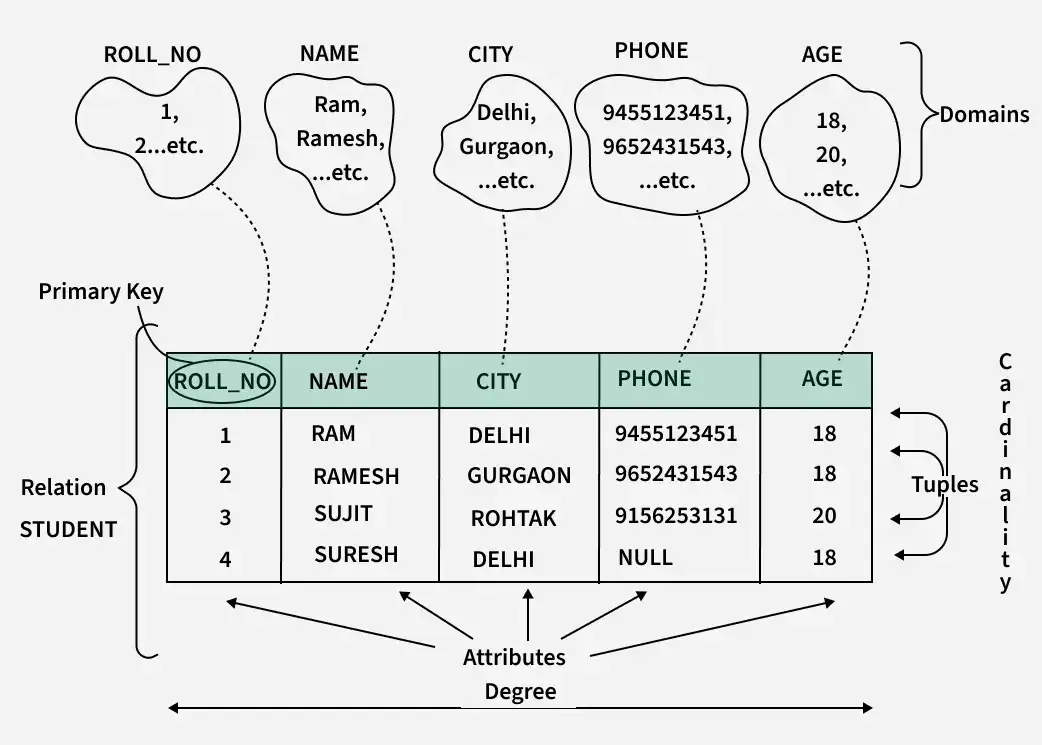
The key idea is that data is stored in these relations, and relationships between different sets of data (like students and the courses they take) can be represented by linking these tables.
2. ER Diagrams: The Blueprint for a Database
Before building tables, a database designer first creates a blueprint. In database management, this blueprint is the Entity-Relationship (ER) Diagram. It's a visual way to figure out what data we need to store and how different pieces of data relate to each other.
The following video provides a great tutorial on the components of an ER diagram.
ER Diagram | Entity Relationship Diagram Tutorial | ER Diagram In DBMS | SQL Tutorial | Simplilearn
This video from Simplilearn introduces ER diagrams and their fundamental building blocks. It will help you understand how to model a real-world scenario, like a school database, before any tables are actually created.
Watch the video from 00:56 to 09:28. As you watch, focus on understanding the purpose and visual representation of: Entities (01:28): Real-world objects (e.g., Student, Course). Represented by rectangles. Attributes (05:16): Properties of an entity (e.g., student_id, name). Represented by ovals. Key Attributes (05:43): Attributes that uniquely identify an entity. The text is underlined. Relationships (07:24): How entities are associated (e.g., a Student studies a Course). Represented by diamonds. Cardinality of Relationships (07:50): The number of instances involved (one-to-one, one-to-many, many-to-many).
To summarize the key takeaways from the video:
- Entities: Nouns, like
Student,Car,Product. - Attributes: Properties of those nouns, like
Name,Color,Price. - Relationships: Verbs that connect entities, like
Enrolls in,Owns,Purchases. - Cardinality: Defines the numerical relationship, such as "one student can enroll in many courses" (one-to-many).
An ER diagram allows stakeholders to agree on the database structure before a single line of code is written, which is far more efficient than making changes later.
3. Keys: Enforcing Uniqueness and Connecting Tables
You saw the term "key attribute" in the last video. Keys are one of the most critical concepts in the relational model. Their primary job is to uniquely identify each row in a table. Without them, you could have two identical rows for two different employees, leading to chaos when trying to update a specific person's salary.
The following video from Neso Academy does an excellent job explaining why keys are needed and defining the different types.
This video explains the practical need for keys and then walks through the hierarchy of different key types. Understanding this hierarchy is essential for both database design and for answering questions on exams like GATE.
Please watch the following segments: Why do we need keys? (00:00 - 03:30): This part provides the core motivation for using keys to avoid ambiguity. Super Key & Candidate Key (03:55 - 12:37): Learn the definitions of a Super Key (any set of attributes that uniquely identifies a row) and a Candidate Key (a minimal Super Key). Primary Key & Alternate Key (12:37 - 18:12): Understand how a Primary Key is chosen from the Candidate Keys, and what the remaining Candidate Keys are called. Foreign Key (20:09 - 22:28): This is a crucial concept. A Foreign Key is a key in one table that refers to the Primary Key of another table, creating a link between them.
Let's consolidate these definitions with a clear visual summary.

Key Hierarchy Summary:
- Super Key: Any attribute (or set of attributes) that can uniquely identify a tuple.
- Candidate Key: A minimal super key (no attribute can be removed). A table can have multiple candidate keys.
- Primary Key: The single candidate key chosen by the database designer to be the main identifier for the table. It cannot contain NULL values.
- Alternate Key: Any candidate key that was not chosen to be the primary key.
- Foreign Key: An attribute in one table that references the primary key of another table. This is how relationships are implemented.
4. SQL: The Language of Relational Databases
Now that we know how to design a database (with ER diagrams) and structure its tables (with keys), how do we actually retrieve or manipulate the data? The answer is SQL (Structured Query Language).
SQL is the standard language for interacting with relational database management systems (RDBMS). Its syntax is designed to be somewhat readable, resembling English. The most fundamental SQL statement is the SELECT query.
To understand its structure, it's helpful to know that SQL is a practical implementation of a more formal theory called Relational Algebra. Let's review a brief document that connects the theory to the practice.
Database Management System - Physics Wallah
This PDF from Physics Wallah provides a very concise summary of the core SQL clauses and how they map to relational algebra operators. This is a very efficient way to understand the building blocks of a SQL query.
Please read section '3.8.2 Relational Query and SQL query' and '3.8.3 Basic SQL Clauses' on page 10.19. This will only take a few minutes. Focus on this mapping: SELECT clause in SQL corresponds to Projection (π) in relational algebra (choosing columns). FROM clause corresponds to Cross-product (×) (combining tables). WHERE clause corresponds to Selection (σ) (filtering rows).
A basic SQL query has the following structure:
SELECT column1, column2, ...
FROM table_name
WHERE condition;
SELECT: Specifies the columns you want to see.FROM: Specifies the table you are querying from.WHERE: Filters the rows based on a given condition.
For example, using the EMPLOYEE table from the BYJU'S resource, if we wanted to find the names and ages of employees who live in Delhi, the query would be:
SELECT NAME, AGE
FROM EMPLOYEE
WHERE ADDRESS = 'DELHI';
This would return the names and ages for Riya and Preeti.
Conclusion
In this whirlwind tour, we've covered the entire lifecycle of basic data management in a relational world: from conceptual design to practical querying.
Key Takeaways:
- Relational Model: Data is organized into tables called relations, with rows called tuples and columns called attributes.
- ER Diagrams: These are the visual blueprints for a database, defining the entities, their attributes, and the relationships between them.
- Keys: They are fundamental for data integrity. The Primary Key uniquely identifies each record in a table, while the Foreign Key creates links between tables.
- SQL: This is the standard language used to
SELECT(query),INSERT,UPDATE, andDELETEdata in a relational database.
Preview of the Next Lesson:
Now that we know how to create tables, a new question arises: is our design good? A poorly designed set of tables can lead to data redundancy and update anomalies. In the next lesson, we will address this by covering database normalization and indexing, which are techniques to improve the structure and performance of our database.