Hello! Let's dive into the next lesson.
In our previous session, we did the heavy lifting of modifying our FSM module to support hierarchical states. We now have the tools to create super-states and sub-states, handle recursive updates, and manage hierarchical transitions.
Today, we'll apply that powerful new capability to a practical problem. Our goal is to refactor the NPC AI by creating a 'Combat' super-state that contains 'Chase' and 'Attack' as sub-states. This will take our flat, sometimes-repetitive AI logic and transform it into a more organized, scalable, and intuitive structure.
Why Refactor? The Problem with a Flat FSM
Let's quickly review the "flat" FSM design we used for our NPC AI. It likely looked something like this:
Idle <--> Patrol <--> Chase <--> Attack
  ^           ^         ^          ^
  |           |         |          |
  +-----------+---------+----------+-----> Flee
While functional, this structure has some pain points:
- Redundant Transitions: To transition from combat back to patrolling, you need a "player lost" check in both the
Chasestate and theAttackstate. - Code Duplication: To handle a 'Flee' condition (e.g., low health), you again need to add that logic to both
ChaseandAttack. If you add a new combat-related state like "Evade", you'd have to add the same checks there, too. This is not scalable and is prone to bugs.
This "transition explosion" is a classic sign that a hierarchical approach might be better.
The Hierarchical Solution: A "Combat" Super-state
We will refactor our AI to use a super-state. This new structure will look more like a tree:
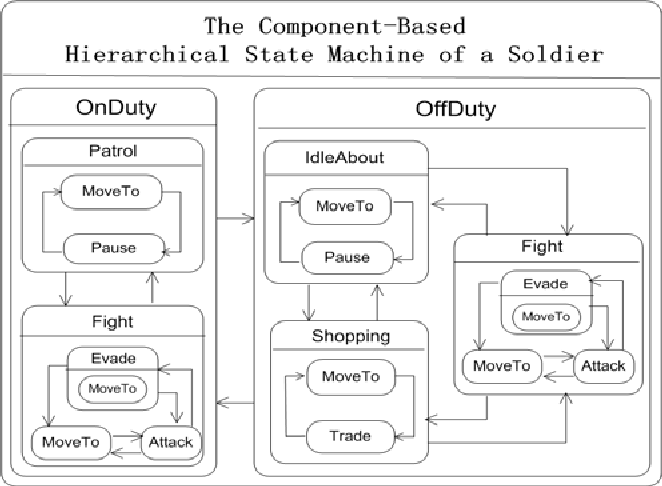
Our new design will be:
IdlePatrolFleeCombat(Super-state)Chase(Sub-state, initial)Attack(Sub-state)
With this structure, the logic becomes much cleaner:
- Transitions into combat (from
PatrolorIdle) go to theCombatstate. The FSM will automatically handle entering the initial sub-state,Chase. - Transitions out of combat (e.g., player is lost, health is low) are handled in one place: the
Combatsuper-state's update logic. - Transitions within combat (from
ChasetoAttackand back) are simple "sibling" transitions that don't affect the parentCombatstate.
Let's begin the refactoring process.
Step 1: Redefine the State Hierarchy
First, we need to update our state definition table to reflect this new hierarchy. Using the structure we enabled in the last lesson, we'll nest the Chase and Attack state definitions inside a new Combat state.
-- In the script where you define your NPC's states

local states = {
    Idle = {
        -- ... enter, update, exit for Idle ...
    },
    Patrol = {
        enter = function(npc) print(npc.Name, "is now Patrolling.") end,
        update = function(dt, npc, fsm)
            if npc:IsPlayerVisible() then
                fsm:transition("Combat")
            end
        end,
        exit = function(npc) print(npc.Name, "stopped Patrolling.") end,
    },
    Flee = {
        -- ... enter, update, exit for Flee ...
    },

    -- NEW: The Combat Super-state
    Combat = {
        -- This state will contain logic that applies to ALL combat situations.
        -- We'll add its update logic in the next step.
        enter = function(npc) print(npc.Name, "has entered COMBAT!") end,
        exit = function(npc) print(npc.Name, "is leaving combat.") end,

        -- Define the nested sub-states
        substates = {
            Chase = {
                enter = function(npc) print(npc.Name, "is now Chasing.") end,
                update = function(dt, npc, fsm)
                    npc:ChasePlayer(dt) -- Assumes you have a function for this

                    -- OLD LOGIC WE WILL REMOVE:
                    -- if not npc:IsPlayerVisible() then fsm:transition("Patrol") end
                    -- if npc:IsHealthLow() then fsm:transition("Flee") end

                    if npc:IsPlayerInAttackRange() then
                        fsm:transition("Attack") -- Transition to sibling state
                    end
                end,
                exit = function(npc) print(npc.Name, "stopped Chasing.") end,
            },
            Attack = {
                enter = function(npc) print(npc.Name, "is now Attacking.") end,
                update = function(dt, npc, fsm)
                    npc:AttackPlayer(dt) -- Assumes you have a function for this

                    -- OLD LOGIC WE WILL REMOVE:
                    -- if not npc:IsPlayerVisible() then fsm:transition("Patrol") end
                    -- if npc:IsHealthLow() then fsm:transition("Flee") end

                    if not npc:IsPlayerInAttackRange() then
                        fsm:transition("Chase") -- Transition back to sibling state
                    end
                end,
                exit = function(npc) print(npc.Name, "stopped Attacking.") end,
            }
        },

        -- Define the default sub-state to enter when Combat starts
        initial = "Chase"
    }
}
This structure clearly defines Chase and Attack as children of Combat. Notice the initial = "Chase" line, which tells our FSM to automatically enter the Chase state whenever it transitions into the Combat state.
Step 2: Centralize Shared Logic in the Parent
Now for the main benefit. We can remove the redundant transition checks from Chase and Attack and move them into the Combat super-state's update function.
Because of the recursive update we implemented, the Combat state's update will run every frame as long as the NPC is in any of its sub-states (Chase or Attack).
-- In your state definitions, update the Combat state:

Combat = {
    enter = function(npc) print(npc.Name, "has entered COMBAT!") end,

    update = function(dt, npc, fsm)
        -- This logic now applies to both Chase and Attack!
        print("Combat update check...")

        -- 1. Check for Flee condition (highest priority)
        if npc:IsHealthLow() then
            fsm:transition("Flee")
            return -- Stop further processing
        end

        -- 2. Check for "player lost" condition
        if not npc:IsPlayerVisible() then
            fsm:transition("Patrol")
            return
        end
    end,

    exit = function(npc) print(npc.Name, "is leaving combat.") end,

    substates = {
        -- ... sub-state definitions from Step 1 ...
    },
    initial = "Chase"
}
This is a huge improvement! If we ever need to add a third combat sub-state, like Evade, it will automatically inherit this logic for free.
Step 3: Simplify the Sub-states
With the shared logic moved to the parent, the Chase and Attack states become much simpler. Their only responsibility now is to perform their specific action and check for transitions between each other.
Here is the final, clean code for the sub-states:
-- Inside the substates table of the Combat state

Chase = {
    enter = function(npc) print(npc.Name, "is now Chasing.") end,
    update = function(dt, npc, fsm)
        -- The ONLY job of Chase is to chase and check if it's time to attack.
        npc:ChasePlayer(dt)
        if npc:IsPlayerInAttackRange() then
            fsm:transition("Attack")
        end
    end,
    exit = function(npc) print(npc.Name, "stopped Chasing.") end,
},
Attack = {
    enter = function(npc) print(npc.Name, "is now Attacking.") end,
    update = function(dt, npc, fsm)
        -- The ONLY job of Attack is to attack and check if the player moved away.
        npc:AttackPlayer(dt)
        if not npc:IsPlayerInAttackRange() then
            fsm:transition("Chase")
        end
    end,
    exit = function(npc) print(npc.Name, "stopped Attacking.") end,
}
This code is now much more focused and adheres to the Single Responsibility Principle. Chase handles chasing, Attack handles attacking, and Combat handles the overall state of being in a fight.
Verification: Tracing the Flow
To see our new HFSM in action, you can use the print() statements we've added. When you run your game and interact with the NPC, you should see an output log like this:
-
Player is spotted while NPC is patrolling:
NPC stopped Patrolling.
NPC has entered COMBAT!
NPC is now Chasing.
(Note the top-down enter order:
Combat->Chase) -
NPC gets into attack range:
NPC stopped Chasing.
NPC is now Attacking.
(A clean sibling transition. The
Combatstate is unaffected and itsupdatecontinues to run). -
Player moves out of attack range:
NPC stopped Attacking.
NPC is now Chasing.
(Another sibling transition).
-
Player gets away and is no longer visible:
NPC stopped Chasing.
NPC is leaving combat.
NPC is now Patrolling.
(Note the bottom-up exit order:
Chase->Combat. The transition was triggered from theCombatstate'supdatefunction).
Conclusion
Congratulations! You have successfully refactored a flat FSM into a more robust and scalable Hierarchical FSM. By creating a Combat super-state, we've seen firsthand how HFSMs help us organize complex logic, eliminate redundant code, and make our AI systems easier to read and maintain.
Key Takeaways:
- Super-states are perfect for grouping related behaviors (
Chase,Attack) under a common context (Combat). - Shared logic, like checking for global transitions out of combat, should live in the parent state's
updatefunction. - Sub-states can then be simplified to focus only on their specific tasks and transitions to their siblings.
- This pattern of "behavioral inheritance" is a cornerstone of building complex, yet manageable, AI in games.
Next Lesson Preview:
While HFSMs are incredibly powerful, they are not the only tool for the job. For extremely complex AI with many interacting and interruptible behaviors, another pattern sometimes proves superior. In our final lesson of this module, we will explore this alternative by asking: what is a Behavior Tree, and in which scenarios is it preferred over a Finite State Machine?