Hello! Welcome back to our journey into advanced FSM patterns.
In our last lesson, we explored the theory behind Hierarchical Finite State Machines (HFSMs). We learned that by nesting states within other states (creating super-states and sub-states), we can solve the common problems of code duplication and "transition explosion," leading to much cleaner, more scalable game logic.
Now it's time to put that theory into practice. This lesson is all about the "how." Our goal is to modify the reusable FSM module we built in Module 3 to support nested sub-states. We will adapt our existing Luau code to handle parent-child state relationships, recursive updates, and hierarchical transitions.
Let's get started.
A Quick Recap: The Core Idea
Remember the key benefits of a hierarchy:
- Behavioral Inheritance: Logic in a parent state (e.g.,
Combat) automatically applies to all its children (e.g.,Chase,Attack). - Simplified Transitions: A single transition from a parent state (e.g.,
Combat -> Patrol) can replace many transitions from each of its children.
To achieve this, our FSM needs to understand and manage this new tree-like structure.
Part 1: Evolving the State and FSM Structure
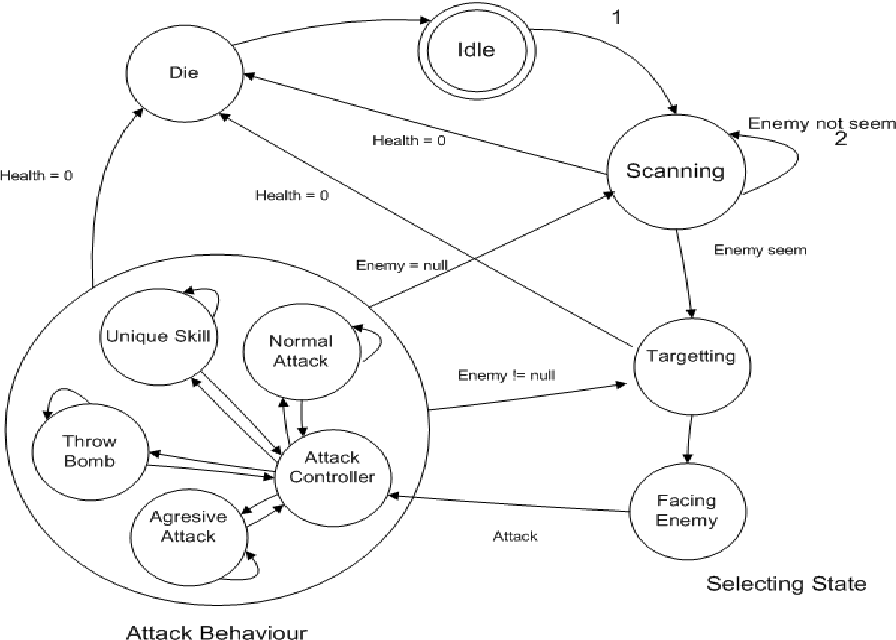
Our current FSM module thinks of the "current state" as a single entity. In an HFSM, the machine is always in a state configuration—a path from the root of the tree to the current leaf state (e.g., [Grounded, Walking]).
To support this, we need to make two key changes to our FSM module's structure:
- State Definitions: Our state tables need a way to declare their position in the hierarchy.
- FSM Instance: The FSM object needs to track not just one current state, but the entire active branch of the hierarchy.
Let's start by modifying how we define states. A state that is a parent (a super-state) needs to know which of its children is the default. We can add an initial property to its list of substates.
Here is how our FSM:define_states method might look after modification. Imagine we're defining a Grounded state with Idle and Walk as children.
New State Definition Structure:
-- In a separate script, where we define our states
local states = {
    Grounded = {
        -- This state has children
        substates = {
            -- Define the child states directly inside
            Idle = {
                enter = function() print("Entering Idle") end,
                exit = function() print("Exiting Idle") end
            },
            Walk = {
                enter = function() print("Entering Walk") end,
                exit = function() print("Exiting Walk") end
            }
        },
        initial = "Idle", -- The default sub-state for Grounded

        enter = function() print("Entering Grounded") end,
        update = function(dt) print("Grounded is updating") end,
        exit = function() print("Exiting Grounded") end,
    },
    Airborne = {
        enter = function() print("Entering Airborne") end,
        exit = function() print("Exiting Airborne") end
    }
}
To handle this, our FSM constructor needs to process this nested structure. When it finds a state with substates, it must recursively process those children, establishing the parent-child links.
Inside our FSM module, we can modify the constructor (Fsm:new()) or the state definition method to flatten this structure while preserving the hierarchy. Each state object will now have a parent property.
-- Inside your FSM ModuleScript

-- A helper function to recursively process state definitions
local function process_states(states_table, parent)
    local processed = {}
    for name, state_def in pairs(states_table) do
        state_def.name = name
        state_def.parent = parent
        processed[name] = state_def

        if state_def.substates then
            -- Recursively process children, passing the current state as the parent
            local child_states = process_states(state_def.substates, state_def)
            for child_name, child_state in pairs(child_states) do
                processed[child_name] = child_state
            end
        end
    end
    return processed
end

function Fsm:new(states, initial_state_name)
    local self = setmetatable({}, Fsm)

    -- Use the helper to process the hierarchical definition
    self.states = process_states(states)

    -- Current state needs to track the full hierarchy
    self.current_state = nil -- This will be set by transition()

    -- ... other initialization

    return self
end
With this change, every state object in self.states now knows its name and has a reference to its parent object, which is the foundation of our hierarchy.
Part 2: The Recursive Update
This is where behavioral inheritance comes to life. Instead of just updating a single state, we need to update the entire active branch, from the root down to the leaf.
The video below explains this concept clearly. While it uses Unity/C#, the principle of a recursive UpdateStates function is universal.
How to Program in Unity: Hierarchical State Machine Refactor [Built-In Character Controller #5]
This clip from the iHeartGameDev channel demonstrates how to create a recursive update function that ensures both the parent and its active child are updated each frame.
Watch from 26:36 to 28:28. Pay close attention to how the UpdateStates method calls its own UpdateState and then calls UpdateStates on its sub-state. This creates the cascade.
Let's implement this in our FSM module. First, a parent state needs to know which of its children is currently active. We can add a current_substate property to our state objects. Then, we modify the main update method of our FSM.
-- In your FSM ModuleScript

function Fsm:update(dt)
    if not self.current_state then return end

    local function update_recursive(state)
        -- Call the parent's update function first
        if state.update then
            state.update(dt)
        end

        -- If this state has an active sub-state, recurse
        if state.current_substate then
            update_recursive(state.current_substate)
        end
    end

    -- Start the recursion from the top-level current state
    update_recursive(self.current_state)
end
This simple recursive function ensures that if our machine is in the Walk state, the update functions for both Grounded (the parent) and Walk (the child) are called, in that order.
Part 3: Hierarchical Enter, Exit, and Transitions
Transitions are the most complex part to adapt. When we transition from State A to State B:
- We must exit all states from
State Aup to the common ancestor. - We must enter all states from the common ancestor down to
State B.
Enter/Exit Order
The order is critical:
- Entering: Parent
enteris called before the childenter. - Exiting: Child
exitis called before the parentexit.
This ensures parent states can set up prerequisites for their children, and children can clean up before their parents are torn down.
The following video discusses the fundamental logic for setting up parent-child relationships and managing their lifecycle, which we will adapt.
How to Program in Unity: Hierarchical State Machine Refactor [Built-In Character Controller #5]
This clip from iHeartGameDev covers the core logic of connecting states hierarchically with SetSubState and SetSuperState, which is essential for our transition logic.
Watch from 24:18 to 26:36. Focus on how a parent state is responsible for initializing its sub-state and how the parent-child link is established.
Let's modify our transition function. It needs to handle entering a new state and, if that state is a parent, recursively entering its initial sub-state.
-- Inside your FSM ModuleScript

-- Add two helper functions to handle the recursive enter/exit
local function exit_state(state)
    if not state then return end

    -- Exit the sub-state first (bottom-up)
    if state.current_substate then
        exit_state(state.current_substate)
        state.current_substate = nil -- Clear the active sub-state
    end

    -- Then exit the state itself
    if state.exit then
        state.exit()
    end
end

local function enter_state(state)
    if not state then return end

    -- Enter the state itself first (top-down)
    if state.enter then
        state.enter()
    end

    -- If it has an initial sub-state, recursively enter it
    if state.initial then
        local sub_state_name = state.initial
        local sub_state = state.substates[sub_state_name]
        state.current_substate = sub_state
        enter_state(sub_state)
    end
end
Now we can rewrite the main transition function to use these helpers. For simplicity, we'll start by only handling transitions between top-level states.
-- A simplified transition for top-level states
function Fsm:transition(new_state_name)
    -- You should add validation here to ensure the transition is allowed

    local new_state = self.states[new_state_name]
    if not new_state or new_state.parent then
        warn("Cannot transition to '", new_state_name, "'. It's a sub-state or doesn't exist.")
        return
    end

    if self.current_state then
        -- Use the recursive exit helper
        exit_state(self.current_state)
    end

    self.current_state = new_state

    if self.current_state then
        -- Use the recursive enter helper
        enter_state(self.current_state)
    end
end
This logic correctly handles entering Grounded and then immediately entering its initial sub-state, Idle. It also correctly exits Idle and then Grounded when we transition away.
Handling Sub-State Transitions
What about transitioning from Idle to Walk? This shouldn't re-enter the Grounded state. This is a special case: a transition between siblings. This logic should be handled within the parent state.
A common pattern is for a state's update function to check for conditions and trigger a transition. For an HFSM, it can request its parent to switch its active sub-state.
-- Example of how the Idle state's logic might work
-- This code wouldn't be in the FSM module, but in the script using it.

-- In your state definition for Idle:
Idle = {
    enter = function() print("Entering Idle") end,
    update = function(dt, fsm) -- The FSM instance is passed to update
        if player_is_moving then
            -- Request a transition to a sibling state
            fsm:transition("Walk")
        end
    end
}
Our transition function needs to be smarter. It must detect if the transition is between siblings and handle it differently.
-- A more advanced transition function in the FSM ModuleScript
function Fsm:transition(new_state_name)
    local target_state = self.states[new_state_name]
    if not target_state then warn("Target state not found:", new_state_name) return end

    -- Find the current leaf state
    local current_leaf = self.current_state
    while current_leaf and current_leaf.current_substate do
        current_leaf = current_leaf.current_substate
    end

    if current_leaf and current_leaf.name == new_state_name then return end -- Already in this state

    -- Case 1: Transition between siblings (share the same parent)
    if current_leaf and current_leaf.parent and current_leaf.parent == target_state.parent then
        local parent = current_leaf.parent
        exit_state(current_leaf) -- Only exit the leaf
        parent.current_substate = target_state
        enter_state(target_state) -- Only enter the new leaf
        return
    end

    -- Case 2: Deeper transition (find lowest common ancestor, etc.)
    -- For now, we will reset from the root for simplicity.
    -- A full implementation would find the LCA to be more efficient.
    exit_state(self.current_state)
    self.current_state = self.states[target_state.name] -- Find the root of the target state
    while self.current_state.parent do
        self.current_state = self.current_state.parent
    end
    enter_state(self.current_state)

    -- To truly enter the target state, we must traverse down to it.
    -- This part is complex and a full implementation would use the LCA.
    -- But for a start, this structure provides the foundation.
    -- For now, we will assume our simple example mostly transitions between siblings or top-level states.
end
The logic for handling arbitrary transitions can get very complex, often involving finding the "Lowest Common Ancestor" between the current and target states. For our purposes, handling sibling transitions and top-level transitions covers many use cases and provides a solid foundation.
Conclusion
We've taken a significant step today by refactoring our FSM module to support a hierarchical structure. This is a powerful upgrade that will allow us to build much more organized and scalable game logic.
Key Takeaways:
- Hierarchical State Definitions: We can define states with a
substatestable and aninitialproperty, creating parent-child relationships. - Recursive Processing: Our FSM now processes these definitions recursively, storing
parentreferences to build the tree structure internally. - Cascading Updates: By using a recursive
updatefunction, we ensure that logic from the entire active state branch (parent and children) is executed every frame. - Ordered Enter/Exit: We implemented helper functions to handle the critical top-down
enterand bottom-upexitorder for state stacks. - Smarter Transitions: Our
transitionlogic now understands the difference between a simple sibling swap and a larger, top-level state change.
You have now built the core engine for running hierarchical state machines in Luau!
Next Lesson Preview:
With our upgraded module complete, we're ready to put it to the test. In the next lesson, we will refactor the NPC AI by creating a 'Combat' super-state that contains 'Chase' and 'Attack' as sub-states. We'll see firsthand how this new hierarchical structure cleans up our code and makes the AI's logic much easier to manage.