Welcome to your first lesson in the Leptos course! To build powerful web applications with a framework like Leptos, it's essential to first understand the fundamental stage on which they perform: the web itself. This lesson will introduce you to the core principles that make the web work.
We'll start by exploring the client-server model, the architectural backbone of the internet. Then, we will follow the journey of a webpage, from the moment you request it in your browser to the point it appears on your screen, a process known as browser rendering. Grasping these two concepts is the crucial first step before we begin writing any code, as Leptos is specifically designed to operate within this client-server and browser environment.
1. The Client-Server Model: The Web's Foundational Dialogue
At its heart, the web operates on a simple but powerful concept: a conversation between two parties. On one side, you have the client, and on the other, the server.
- The Client is the requestor. In the context of web browsing, your web browser (like Chrome, Firefox, or Safari) is the primary client. It's the software that asks for information.
- The Server is the responder. It's a powerful computer somewhere in the world that stores website files (HTML, CSS, images, etc.) and "serves" them to clients upon request.
To get a clear definition of these roles and understand the important distinction between "client-side" and "server-side", let's dive into our first resource.
Client Side vs. Server Side in Web Development
This article from Fullstack Foundations provides a clear, beginner-friendly introduction to the client-server model. It explains the roles of each party and, crucially, introduces the idea of where code actually runs.
Please read the following sections: Start with "What is the client-server model?" to understand the formal definition and the roles of client and server. Next, read the section on "client-side" vs. "server-side". This distinction between what a device is (its role) and where code executes is fundamental for understanding web frameworks. Finally, review the section on communication, which introduces the idea of protocols like HTTP.
The key takeaway is this: "client-side" code runs in the user's browser, while "server-side" code runs on the remote server. Given your background in Rust and Python, you can think of it this way: a server might run a Python or Rust application to handle logic and data, but it sends files like HTML, CSS, and JavaScript to the browser to be executed there. Leptos is unique because it allows you to write Rust for both the server and the client (by compiling it to a format the browser understands).
The following diagram illustrates this entire flow, from the initial request to the final response.

2. From URL to Pixels: The Life of a Webpage
Now that we understand the roles of the client and server, let's trace the complete lifecycle of a single web page request. What exactly happens when you type youtube.com into your address bar and hit Enter?
The following video from ByteByteGo provides a concise and clear visual walkthrough of this process.
What happens when you type a URL into your browser?
This video breaks down the initial steps of communication between your browser and a web server. It's a great overview of the networking side of the client-server interaction.
Please watch the video from the beginning until the end. Pay attention to these key steps: DNS Lookup (this segment): Translating the human-readable domain name (like example.com) into a machine-readable IP address (like 93.184.216.34). TCP Connection (this segment): Establishing a stable connection between the client and the server. HTTP Request & Response (this segment): The browser formally asks for the content, and the server sends it back, starting with an HTML file.
After the server sends its response, the browser's real work begins. It has received a bundle of files—primarily HTML, CSS, and JavaScript—and now it must turn that code into the visual, interactive webpage you see and use. This is the browser rendering process.
The flowchart below gives a high-level overview of the stages involved.
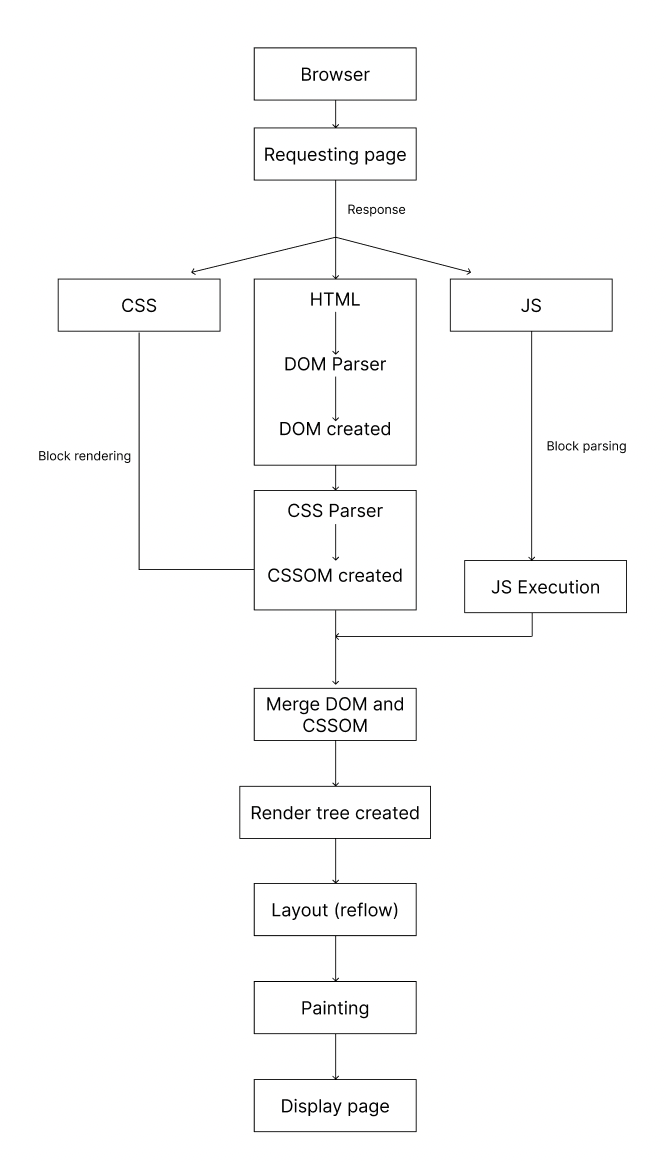
Let's break down these steps.
Parsing: From Text to Trees
The first thing the browser does is read, or parse, the HTML and CSS files. It doesn't understand them as plain text; it needs to convert them into a structured format it can work with.
-
DOM (Document Object Model): The browser parses the HTML file and creates a tree-like data structure called the DOM. Each HTML element (
<h1>,<p>,<div>) becomes a "node" in this tree, representing the page's content and structure. This is the in-memory representation of your HTML. -
CSSOM (CSS Object Model): The browser does the same for the CSS, creating another tree structure called the CSSOM. This tree represents the styles associated with each DOM node (e.g., color, font size, margins).
To understand this transformation from raw text to object models in more detail, let's turn to a more in-depth video.
How does a browser work ? | Engineering side
In this video, Hitesh Choudhary walks through the intricate details of how a browser's rendering engine processes HTML and CSS files.
Watch the following two segments: First, watch the section explaining how HTML is converted into the DOM. It details the journey from raw bytes on a disk to character encoding, tokenization, and finally, the structured Document Object Model. Next, see how a similar process applies to CSS in the segment on building the CSSOM.
Rendering: From Trees to Pixels
Once the browser has the DOM and CSSOM, it can begin the process of actually drawing the page.
Populating the page: how browsers work - MDN Web Docs
This MDN article is a comprehensive guide to the browser's rendering pipeline. We'll focus on the sections that describe how the DOM and CSSOM are used to create the final image on your screen.
Please read the following sections: Begin with the section on "Parsing". This will reinforce what you saw in the video about the creation of the DOM and CSSOM. Then, move to the section on "Render". Focus on the four key steps described here: Style: The browser combines the DOM and CSSOM to create a Render Tree. This tree contains only the visible elements with their final, calculated styles. Layout: The browser calculates the exact geometry—size and position—of every element in the render tree. Paint: The browser draws the pixels for each element onto the screen. Compositing: The browser organizes the page into layers to manage painting efficiently, especially for animations or overlapping elements.
The Role of JavaScript
You might be wondering where JavaScript fits in. JavaScript is a powerful language that can dynamically change both the DOM (e.g., add or remove elements) and the CSSOM (e.g., change an element's style).
Because of this power, when the browser's HTML parser encounters a <script> tag, it typically pauses rendering to download and execute the JavaScript. If the script is large or on a slow network, this can lead to a blank screen or an unresponsive page. This "render-blocking" nature of JavaScript is a central challenge in web performance and a primary reason that frameworks like Leptos, and the techniques they use, are so valuable.
Conclusion
In this introductory lesson, we've covered the two most fundamental concepts of the web.
Key Takeaways:
- The web is built on the client-server model, where clients (browsers) request resources from servers.
- Code execution is split: server-side code runs on the server, while client-side code (HTML, CSS, JS, and WebAssembly) is sent to the browser to be executed.
- Browsers render pages through a pipeline: they parse HTML and CSS into the DOM and CSSOM, combine them into a Render Tree, calculate the Layout of each element, and finally Paint the pixels to the screen.
- JavaScript execution can pause this rendering process, creating performance bottlenecks.
With this foundational knowledge of the environment, we are now ready to start learning the language of that environment.
Next Up:
In our next lesson, we will dive into HTML (HyperText Markup Language). You'll learn how to write a basic HTML document, creating the structure that the browser will parse into the DOM we discussed today.