Hello! Welcome back to our journey in building a C++ ray tracer.
In the previous lesson, we implemented the powerful Möller-Trumbore algorithm, which allowed us to intersect rays with individual triangles. This was a massive step, unlocking our ability to render complex mesh geometry. You'll recall that the algorithm gave us not only the intersection distance t, but also two other values, u and v, which we used to check if the intersection point was inside the triangle's boundaries.
Today, we're going to focus on those u and v values. Our goal is to fully understand and compute the barycentric coordinates of the intersection point on a triangle. While the Möller-Trumbore algorithm already calculates them, this lesson will explore what they represent geometrically and, crucially, how we can use them. This is the conceptual key that unlocks techniques like smooth shading and texture mapping, which are fundamental to the production renderers like Arnold and Karma that you use in your VFX work.
1. What Are Barycentric Coordinates?
At their core, barycentric coordinates are a set of three weights, often denoted , , and , that describe the position of a point relative to the three vertices of a triangle (, , ). The position is simply a weighted average of the vertices:
These weights have a very important property: they always sum to one.
This means if you know any two of the coordinates, you can always find the third (e.g., ).
The real magic is what these values tell us about the point's location:
- If are all between 0 and 1, the point is inside the triangle (or on one of its edges).
- If one of the coordinates is 1 (and the others are 0), the point is exactly at one of the vertices. For instance, if , then .
- If any coordinate is negative, the point is outside the triangle.
This is precisely why we used u and v in our Möller-Trumbore implementation to test if the intersection was valid!
Let's read a formal introduction to this concept.
Ray-Tracing: Rendering a Triangle
The Scratchapixel article 'Ray-Tracing: Rendering a Triangle' provides an excellent and detailed explanation of barycentric coordinates. We will focus on the first part, which introduces the core concepts.
Read the section titled 'Barycentric Coordinates'. Pay close attention to the primary equation relating the point P to the vertices, the normalization property (u+v+w=1), and the conditions for a point to be inside the triangle. Also, note the discussion about the 'pairing' of coordinates to vertices, as this is an important detail.
The Pairing Problem
As the article mentions, the association between the coordinates () and the vertices () is not standardized. The formula might be written as or , among other permutations. The convention used by the Möller-Trumbore algorithm we implemented is:
This means the u we calculate is the weight for vertex , v is the weight for vertex , and 1-u-v is the weight for vertex . Keeping this straight is essential when we start interpolating data.
2. A Geometric View: Area Ratios
Beyond the algebraic solution provided by Möller-Trumbore, there is a beautifully intuitive geometric way to understand barycentric coordinates. They can be seen as ratios of areas.
Imagine a point inside a triangle . This point splits the main triangle into three smaller sub-triangles: , , and . The barycentric coordinate corresponding to a vertex is the ratio of the area of the sub-triangle opposite that vertex to the total area of the main triangle.
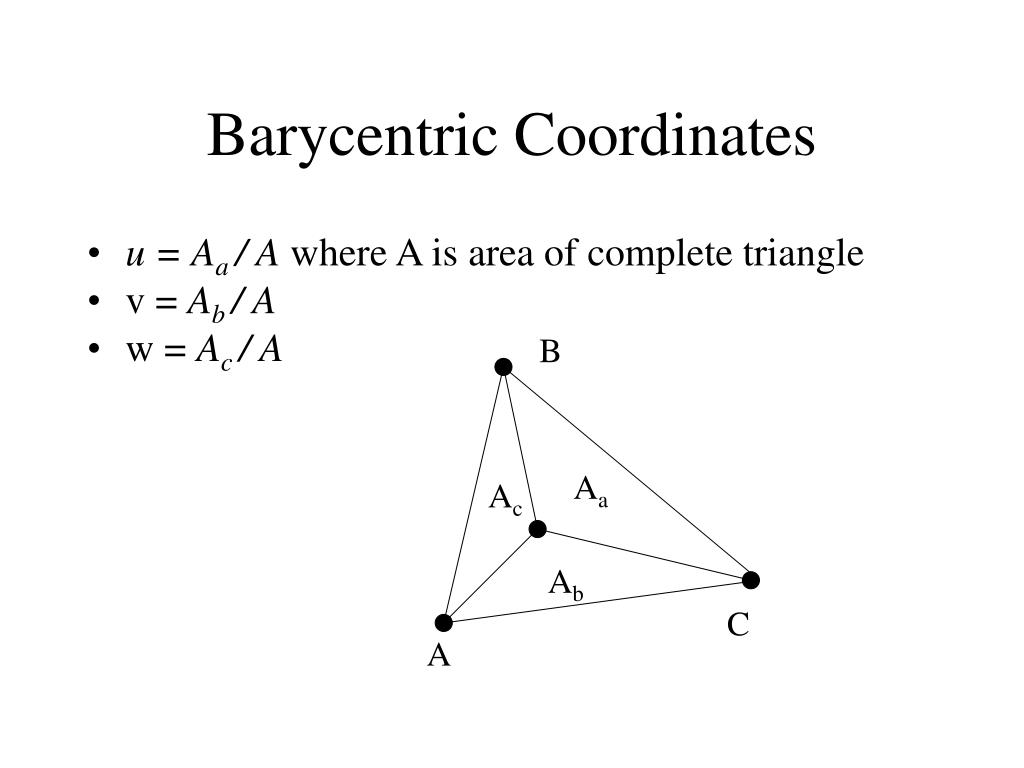
So, using the vertex naming from our code ():
- The weight for is
- The weight for is
- The weight for is
Your linear algebra background makes the next part easy: the area of a triangle formed by two vectors (e.g., edges) is half the magnitude of their cross product. This gives a direct geometric method to compute the coordinates.
Ray-Tracing: Rendering a Triangle
Let's return to the Scratchapixel article to see how this area-ratio concept is formally derived and calculated.
First, read the beginning of the article until you find the section 'Using Barycentric Coordinates' to understand the 'areal coordinates' concept and see the area formulas. Then, jump to the section 'Optimizing The Computation Of Barycentric Coordinates' to see how cross products are used to compute these areas and how the calculation can be optimized using the scalar triple product.
While this area-based method is a valid way to compute barycentric coordinates, the Möller-Trumbore algorithm is generally preferred for ray-triangle intersection because it solves for and simultaneously in a very efficient manner. The value of understanding the area-ratio method is the strong geometric intuition it provides.
3. The Power of Interpolation
Now for the most important part: why do we care so much about these coordinates?
Barycentric coordinates are the key to interpolating any data defined at a triangle's vertices across its entire surface.
This is a profound concept. If you know a value at each vertex—be it a color, a normal vector, or texture coordinates (UVs)—you can find the smooth, interpolated value for that attribute at any point inside the triangle using the exact same weighted average formula:
Attribute_at_P =
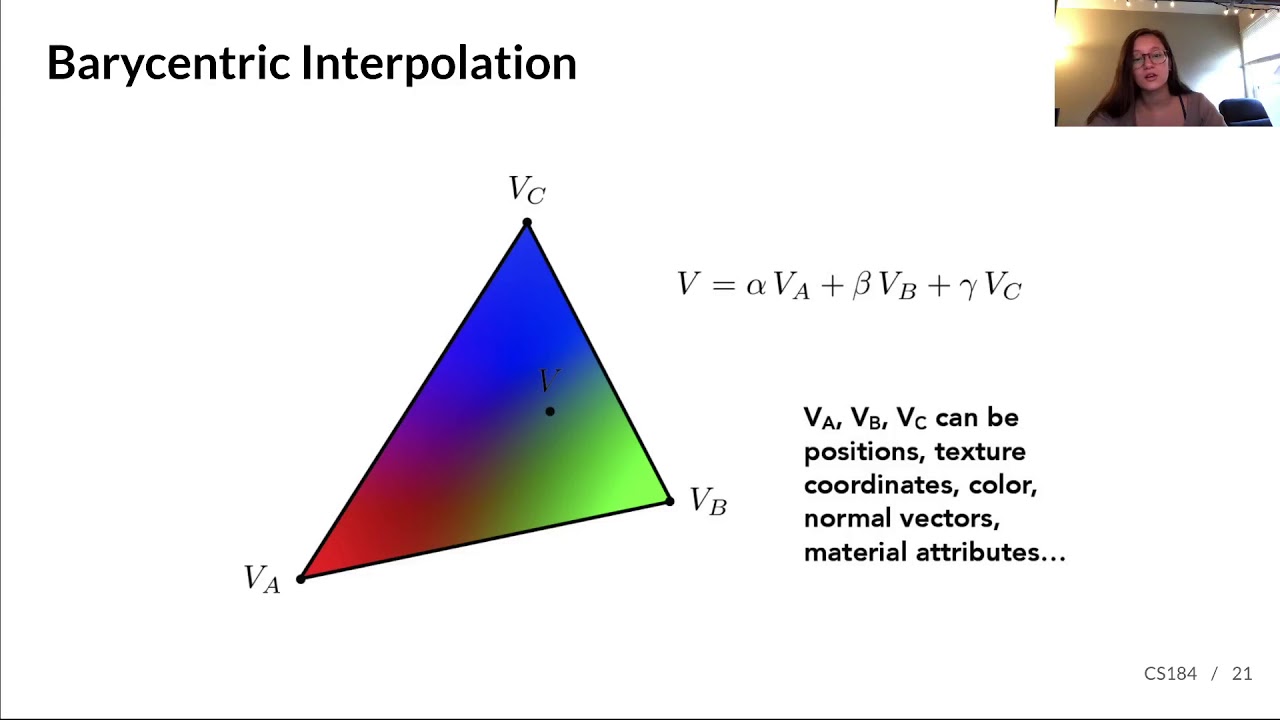
This is the core principle behind smooth shading. A 3D model might be composed of flat triangles, but if we assign a different normal vector to each vertex and then interpolate the normal at the intersection point, we can create the illusion of a smoothly curving surface. This is exactly how production renderers create smooth surfaces from polygonal meshes.
Ray-Tracing: Rendering a Triangle
The Scratchapixel article has a fantastic section on this application. It provides the context and a clear code example.
Read the section 'Using Barycentric Coordinates'. It directly explains how these coordinates are used for shading and provides a simple code example for interpolating vertex colors.
Test your understanding!
Imagine a triangle with vertices . A ray intersects the triangle exactly at the midpoint of the edge between and . What are the barycentric coordinates of this intersection point? (Remember our convention: for , for , for ).
Show answer
Since the point is on the edge between and , it has no "influence" from . Therefore, the weight for , which is , must be 0.
Because it's the exact midpoint, it's influenced equally by and . This means their weights must be equal: .
Since , and we know , we have . With , this gives , so . Therefore, is also 0.5.
The coordinates are .
4. Updating Our Code
The great news is that our triangle::hit function already computes u and v! All we need to do is store them in the hit_record so they can be used later for shading calculations.
First, let's add u and v members to our hit_record struct:
// In your hit_record.h or equivalent header file
#pragma once

#include "rtweekend.h"

class material;

struct hit_record {
    point3 p;
    vec3 normal;
    shared_ptr<material> mat_ptr;
    double t;
    double u; // Barycentric coordinate
    double v; // Barycentric coordinate
    bool front_face;

    inline void set_face_normal(const ray& r, const vec3& outward_normal) {
        front_face = dot(r.direction(), outward_normal) < 0;
        normal = front_face ? outward_normal : -outward_normal;
    }
};
Now, in your triangle::hit method, when you find a valid intersection, simply save the u and v you calculated into the hit_record.
// Within your triangle class's hit method
bool triangle::hit(const ray& r, double t_min, double t_max, hit_record& rec) const {
    vec3 e1 = p1 - p0;
    vec3 e2 = p2 - p0;

    vec3 pvec = cross(r.direction(), e2);
    double det = dot(e1, pvec);

    const double epsilon = 1e-8;
    if (fabs(det) < epsilon)
        return false;

    double inv_det = 1.0 / det;

    vec3 tvec = r.origin() - p0;
    double u = dot(tvec, pvec) * inv_det;

    if (u < 0.0 || u > 1.0)
        return false;

    vec3 qvec = cross(tvec, e1);
    double v = dot(r.direction(), qvec) * inv_det;

    if (v < 0.0 || u + v > 1.0)
        return false;

    double t = dot(e2, qvec) * inv_det;

    if (t > t_min && t < t_max) {
        // This is the point where we store our results
        rec.t = t;
        rec.p = r.at(t);
        rec.mat_ptr = mat_ptr;
        rec.u = u; // Store the barycentric u
        rec.v = v; // Store the barycentric v

        vec3 outward_normal = unit_vector(cross(e1, e2));
        rec.set_face_normal(r, outward_normal);

        return true;
    }

    return false;
}
With this small change, our ray tracer is now capturing the necessary information from every triangle intersection to perform advanced shading.
Conclusion
In this lesson, we took a deeper look at the u and v values from our ray-triangle intersection test, understanding them as barycentric coordinates.
Key Takeaways:
- Barycentric coordinates () are weights that define a point on a triangle as a weighted average of its vertices.
- They must sum to 1 (), and for a point to be inside the triangle, all coordinates must be in the range [0, 1].
- The most powerful application of barycentric coordinates is interpolating vertex data, such as normals, colors, or texture coordinates, across the surface of the triangle.
- Our Möller-Trumbore implementation already provides the
uandvcoordinates we need; we simply have to store them in ourhit_recordfor later use.
Next Steps
We now have all the pieces in place. The intersection point, the material, and the barycentric coordinates. In the next lesson, we will finally implement smooth shading by interpolating vertex normals. We will define triangles that store a unique normal at each vertex, and at render time, we'll use the u and v we just saved to compute a smoothly varying normal across the triangle's face. This will dramatically improve the visual quality of our renders, transforming faceted objects into apparently smooth surfaces.