Hello! Welcome to the next lesson in our ray tracing journey.
In the last lesson, we implemented smooth shading by interpolating vertex normals. This was a huge step up in visual quality, but it also highlighted a practical bottleneck: manually defining the vertices and normals for every triangle is not feasible for anything more complex than a few polygons.
Today, we'll solve that problem. This lesson addresses the learning outcome: Create a basic parser to load triangle mesh data from an OBJ file. As a pipeline TD familiar with DCC applications like Houdini, you've certainly exported or worked with OBJ files before. This lesson will pull back the curtain on that format, showing you how to read its data and construct geometry within our own C++ application.
By the end of this lesson, you'll be able to load complex 3D models into your ray tracer, a crucial step toward rendering truly interesting scenes. This will also set the stage for our next topic: performance. Loading a model with thousands of triangles will expose just how slow our current "check every object" approach is, motivating the need for acceleration structures.
1. Understanding the Wavefront OBJ File Format
The OBJ format is one of the oldest and simplest 3D geometry file formats. It's a plain text file, which means you can open it in any text editor and see exactly how the model is defined.
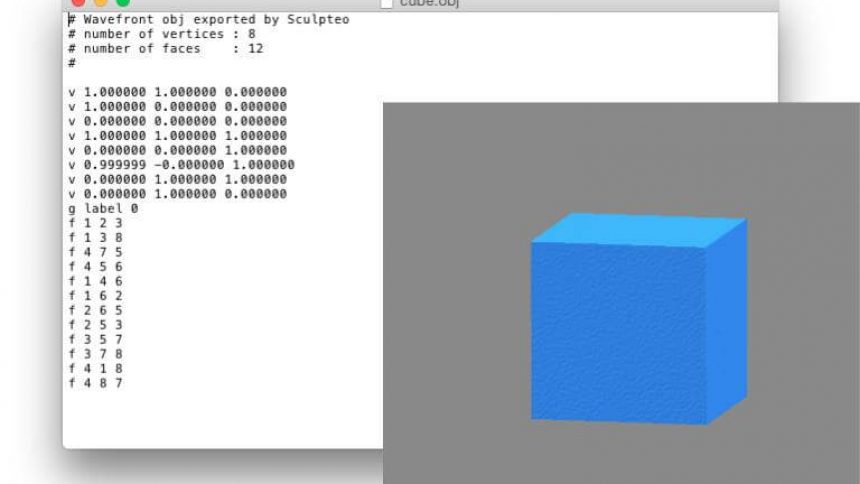
The format uses simple keywords (or tags) to define geometry. For our purposes, we're interested in three main tags:
v: Defines a vertex's position in 3D space (x, y, z).vn: Defines a vertex normal vector (nx, ny, nz). These are what we need for smooth shading.f: Defines a face by listing the indices of the vertices (and normals) that form it.
To get a feel for the structure, let's watch a short video that walks through a simple crate.obj file.
Understanding the Wavefront OBJ File Format
The video 'Understanding the Wavefront OBJ File Format' by Dr. Andrew Garcia provides an excellent, diagram-supported explanation of the format's core components.
Watch from 01:53 to 08:00. The first part (until 04:48) explains the v, vn, and vt lines. The second part explains the f (face) line, which is the most complex part. Pay close attention to how a single f line uses indices to reference the previously defined vertices and normals.
As you saw, the file is essentially a list of all the geometric data followed by a list of instructions on how to connect that data to form polygons.
For a more detailed reference, the following webpage provides a concise summary.
The webpage 'OBJ Viewer (C++)' on songho.ca has a fantastic, clear table summarizing the key OBJ tags.
Read the section titled 'OBJ Format'. Focus on the table that describes the v, vn, and f tags. Note the different ways a face can be defined (e.g., f v/vt/vn or f v//vn). We will focus on the v//vn format, which provides vertex and normal indices—exactly what we need for our smooth-shaded triangles.
There are two critical details to remember for implementation:
- Face Index Syntax: A face line like
f 1/1/1 2/2/1 3/3/1means the face is made of vertices {1, 2, 3}, uses texture coordinates {1, 2, 3}, and uses normals {1, 1, 1}. Since we don't handle textures yet, we will focus on thef 1//1 2//1 3//1syntax, which skips texture coordinates. - 1-Based Indexing: The OBJ format uses 1-based indices. The first vertex in the file is vertex
1, not0. When we read these indices into our C++ program, which uses 0-based arrays (std::vector), we will need to subtract 1 from every index.
2. A Strategy for Parsing
Now that we understand the format, how do we write a program to read it? A robust and easy-to-understand method is a "two-pass" approach, though we can implement it in a single pass over the file.
The strategy is:
- Read the entire file line by line.
- As we read, populate temporary storage lists: one for vertex positions (
std::vector<point3>) and one for vertex normals (std::vector<vec3>). - When we encounter a face (
f) line, we parse its indices. - Using these (1-based) indices, we retrieve the corresponding vertex and normal data from our temporary lists (remembering to subtract 1).
- With the retrieved data, we construct a
triangleobject and add it to our scene.
This approach neatly separates data collection from object construction.
The Scratchapixel article on the OBJ format discusses a C++ implementation strategy that is perfect for our needs. It advocates for a simple, line-by-line approach using the C++ Standard Library.
Read the sections 'Code Discussion' and the subsequent section that details face parsing. Focus on the core ideas: reading the file line by line, using std::istringstream to parse tokens from each line, and the logic for handling v, vn, and f tags. Don't worry about the g (group) tag for now; we'll build a simplified parser that treats the whole file as one object.
3. Implementation in C++
Let's write a function to load an OBJ file. We'll assume the file contains a single object and has already been triangulated (i.e., all faces have exactly 3 vertices).
We can create a helper function in our main.cpp or a new utility header. Its signature could look like this:
void load_obj(const std::string& filepath, hittable_list& world, shared_ptr<material> mat);
Step 1: File Reading and Initial Setup
Inside this function, we'll open the file and create our temporary storage vectors.
#include <fstream>
#include <sstream>
#include <vector>

void load_obj(const std::string& filepath, hittable_list& world, shared_ptr<material> mat) {
    std::vector<point3> temp_vertices;
    std::vector<vec3> temp_normals;

    std::ifstream file(filepath);
    if (!file.is_open()) {
        std::cerr << "ERROR: Could not open file " << filepath << std::endl;
        return;
    }

    std::string line;
    while (std::getline(file, line)) {
        // Parsing logic goes here...
    }
}
Step 2: Parsing v and vn Lines
Inside the while loop, we'll use std::istringstream to easily extract the data.
// Inside the while loop...
std::istringstream iss(line);
std::string keyword;
iss >> keyword;

if (keyword == "v") {
    point3 v;
    iss >> v.e[0] >> v.e[1] >> v.e[2];
    temp_vertices.push_back(v);
} else if (keyword == "vn") {
    vec3 n;
    iss >> n.e[0] >> n.e[1] >> n.e[2];
    temp_normals.push_back(n);
} else if (keyword == "f") {
    // Face parsing logic...
}
Step 3: Parsing f (Face) Lines
This is the most involved part. A face line will look something like f 7//1 5//1 8//1. We need to parse three of these v//vn chunks.
// Inside the "f" block
vec3 p_indices, n_indices;
char slash; // To consume the slash characters

for (int i = 0; i < 3; ++i) {
    // Example chunk: "7//1"
    iss >> p_indices[i] >> slash >> slash >> n_indices[i];
}

// Now, p_indices contains the 1-based indices of the vertices.
// And n_indices contains the 1-based indices of the normals.
// Let's create the triangle.

// Remember to convert from 1-based to 0-based index!
point3 p0 = temp_vertices[p_indices[0] - 1];
point3 p1 = temp_vertices[p_indices[1] - 1];
point3 p2 = temp_vertices[p_indices[2] - 1];

vec3 n0 = temp_normals[n_indices[0] - 1];
vec3 n1 = temp_normals[n_indices[1] - 1];
vec3 n2 = temp_normals[n_indices[2] - 1];

world.add(make_shared<triangle>(p0, p1, p2, n0, n1, n2, mat));
Note: The simple parsing iss >> ... shown above works for v//n format but can be brittle. A more robust solution would read each v//n token as a string and parse it manually, but for our learning purposes, this approach is clear and functional for well-formed files.
Test your understanding!
You are parsing an OBJ file. Your temporary storage contains 10 vertices and 4 normals. You encounter the following line:f 5//2 9//2 2//3
What parameters will you use to call the triangle constructor? (Assume the triangle constructor takes points p0, p1, p2 and normals n0, n1, n2).
Show answer
-
Parse Indices:
- Vertex indices (1-based):
5,9,2 - Normal indices (1-based):
2,2,3
- Vertex indices (1-based):
-
Convert to 0-based and Look Up Data:
p0 = temp_vertices[5 - 1]which istemp_vertices[4]p1 = temp_vertices[9 - 1]which istemp_vertices[8]p2 = temp_vertices[2 - 1]which istemp_vertices[1]n0 = temp_normals[2 - 1]which istemp_normals[1]n1 = temp_normals[2 - 1]which istemp_normals[1]n2 = temp_normals[3 - 1]which istemp_normals[2]
The triangle will be constructed using the 5th, 9th, and 2nd vertices from the file, and will use the 2nd normal for its first two vertices and the 3rd normal for its last vertex.
Step 4: Putting it all Together
In your main() function, you can now call this loader to populate your world. You can find many free, triangulated OBJ models online (e.g., on sites like TurboSquid or Free3D). Look for the classic "Utah Teapot" or "Stanford Bunny" for a good test case. Make sure the model you download includes vertex normals.
// In main.cpp
int main() {
    hittable_list world;

    auto ground_material = make_shared<lambertian>(color(0.5, 0.5, 0.5));
    world.add(make_shared<sphere>(point3(0,-1000,0), 1000, ground_material));

    // Load a model
    auto model_material = make_shared<lambertian>(color(0.8, 0.2, 0.2));
    load_obj("path/to/your/model.obj", world, model_material);

    // ... setup camera and render ...
}
Conclusion
You have now built a foundational tool for any 3D renderer: a mesh loader. While third-party libraries like tinyobjloader (mentioned in one of the video resources) are often used in larger projects for convenience and robustness, writing your own parser provides an invaluable understanding of how geometry data is structured and processed.
Key Takeaways:
- The OBJ format uses human-readable tags like
v(vertex),vn(vertex normal), andf(face) to define 3D meshes. - A practical parsing strategy involves storing vertex and normal data in temporary lists and then using face indices to construct triangle primitives.
- OBJ indices are 1-based and must be converted to 0-based indices for use with C++ vectors.
- Standard C++ libraries like
<fstream>for file I/O and<sstream>for string parsing are powerful tools for this task.
Next Steps
Go ahead and render a scene with a loaded model containing hundreds or thousands of triangles. You will quickly notice a significant increase in render time. This is because our ray tracer is naively testing every ray against every single triangle in the scene. This approach does not scale.
In our next lesson, we will confront this performance problem head-on by exploring why acceleration structures are essential for rendering complex scenes. We'll then begin implementing the most common of these structures: the Bounding Volume Hierarchy (BVH). This is a core component of all production renderers and will make your ray tracer dramatically faster.