Hello! Welcome to the final lesson of our first module, "AI Fundamentals for Business Decisions."
In our last session, we walked through the six-phase lifecycle of an AI project. This gave you a high-level roadmap to explain to managers how an idea moves from a business problem to a deployed solution. A key part of that first phase, "Business Understanding," is making a crucial decision: is AI even the right tool for the job?
Today, we'll focus on exactly that. Our learning outcome is to recognize when AI is appropriate versus when simpler solutions suffice. For the managers in your workshop, this is one of the most important practical skills you can teach them. It will help them avoid chasing expensive, complex AI solutions when a straightforward spreadsheet or a simple rule would work just as well.
We'll break this down into a decision-making framework that you can directly adapt for your workshop.
The Fundamental Difference: Explicit Rules vs. Learned Patterns
Before we can decide which tool to use, we need to understand the fundamental difference in how they work. Traditional software, including most standard Excel functions, operates on explicit rules. A human tells it exactly what to do. AI, on the other hand, learns patterns from data.
To get a clear grasp of this distinction, let's watch a short video from IBM.
AI Systems vs Traditional Coding
This video, titled 'AI Systems vs Traditional Coding,' clearly explains the core difference between traditional, rule-based programming and modern AI systems that learn from data.
Please watch from 03:08 to 07:07. Pay close attention to the comparisons the speaker makes regarding stability vs. scalability, control vs. transparency, and how each approach handles data and learning.
As the video explains, the two approaches have different strengths:
| Feature | Traditional Software (e.g., Excel Formulas) | AI Systems (e.g., Power BI Forecasting) |
|---|---|---|
| Logic | Based on explicit, pre-defined rules (IF/THEN). | Learns patterns and relationships from data. |
| Stability | High. Gives the same output every time for the same input. | Lower. Outputs can vary; models need retraining. |
| Scalability | Low. Handling more complexity requires manually writing more rules. | High. Can handle vast, complex datasets and adapt automatically. |
| Transparency | High ("White Box"). The logic is fully visible and understandable. | Often low ("Black Box"). The internal reasoning can be difficult to interpret. |
| Data Needs | Works well with structured, clean data. | Thrives on large volumes of data, including unstructured data (images, text). |

For your workshop, the key takeaway for managers is that there is a trade-off. A simple, rule-based system is predictable and easy to understand but rigid. An AI system is powerful and adaptive but can be less predictable and harder to explain.
A Manager's Framework for Choosing the Right Approach
So, how does a manager choose? The decision shouldn't be based on the technology itself, but on the nature of the business problem.
Dr. George Westerman from MIT offers a practical set of questions that managers can use to guide their thinking. His framework helps match the right technique to the right problem.
Integrating Generative AI Into Business Strategy: Dr. George Westerman
In this segment from 'Integrating Generative AI Into Business Strategy,' Dr. Westerman provides an excellent decision-making framework. He outlines four categories of AI and, more importantly, gives a list of questions to ask to determine which approach is suitable.
Watch the section from 14:49 to 28:05. Focus on the questions he proposes around accuracy, explainability, consistency, and the nature of the data. These questions form the basis of a decision-making checklist for your managers.
Based on the video, you can equip the managers in your workshop with the following "Problem-Fit Checklist":
1. How accurate does the solution need to be, and what is the cost of being wrong?
- Simpler Solution: Use when "good enough" is acceptable and the cost of an error is low (e.g., sending a slightly mistargeted marketing email).
- AI Solution: Consider when high accuracy is critical and provides significant value (e.g., forecasting demand to avoid costly stockouts) or when the cost of an error is high (e.g., fraud detection).
2. Do you need to explain how the decision was made?
- Simpler Solution: Essential when you need 100% transparency and auditability (e.g., calculating sales commissions based on a fixed formula). The rules are clear.
- AI Solution: Can be used when the outcome is more important than the reasoning, but be aware of the "black box" problem. The AI features in Power BI, like "Key Influencers," are designed to make the reasoning more understandable, bridging this gap.
3. Do you need the exact same answer every time?
- Simpler Solution: Yes. A formula-based system is deterministic and will always give the same output for the same input.
- AI Solution: Not necessarily. Some AI models, especially generative AI, are designed to produce varied outputs. Predictive models will be more consistent but may change as they are retrained on new data.
4. What does your data look like?
- Simpler Solution: Works best for smaller, structured datasets that fit neatly into a spreadsheet.
- AI Solution: Necessary for very large datasets ("big data"), unstructured data (text, images), or when you need to combine many different data sources to find hidden patterns.
The Practical Choice: When to Move Beyond Excel
For your audience, the choice often boils down to a very practical question: "Can I do this in Excel, or do I need something more powerful like Power BI?" The following resources provide an excellent guide for this specific decision.
AI in Excel vs. AI-Powered Business Intelligence
This article, 'AI in Excel vs. AI-Powered Business Intelligence,' directly compares the capabilities of Excel with modern BI platforms. It's perfect for framing the practical choice your managers will face.
Please read the sections titled 'When to use AI in Excel vs. AI in BI platforms,' 'AI in data: Industry use cases,' and 'Choosing the right AI solution for your data analysis needs.' Focus on the concept of a 'tipping point' that signals a business has outgrown spreadsheets.
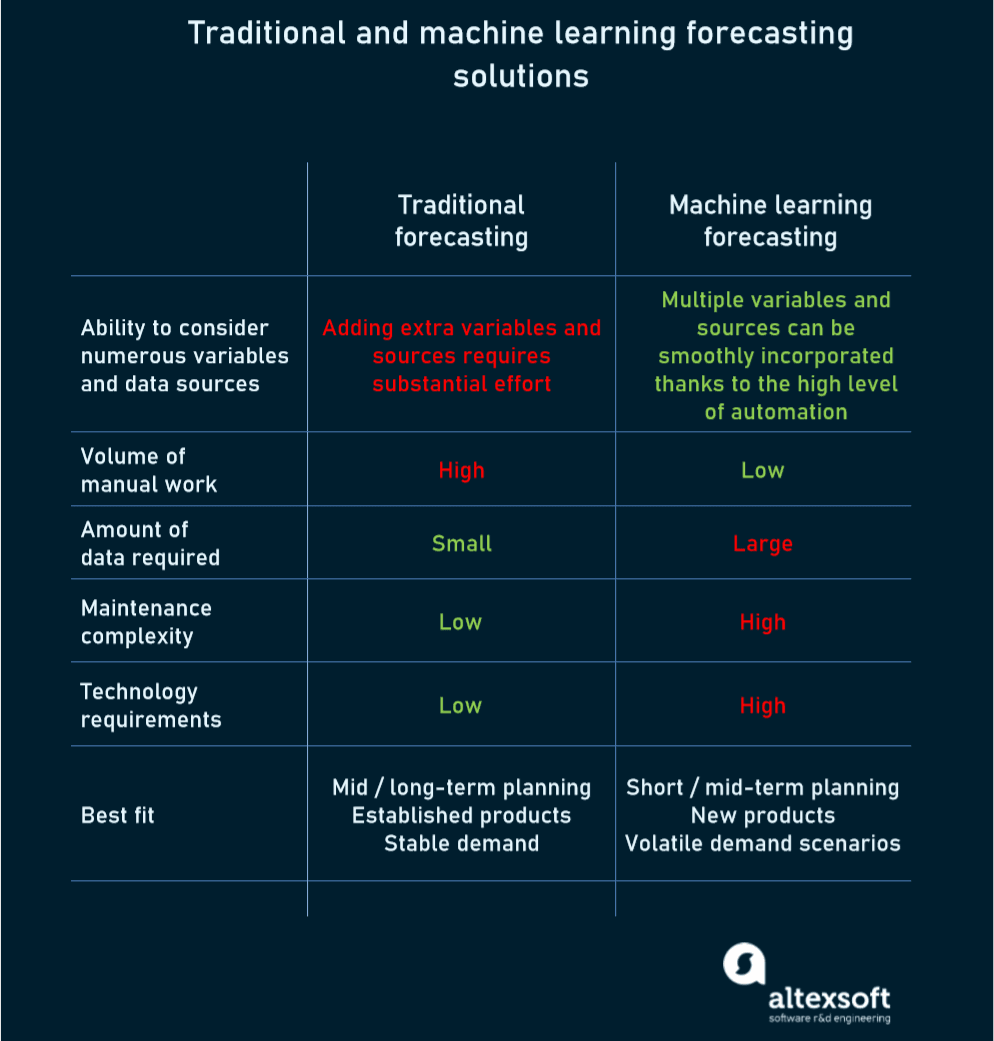
To reinforce this with a specific example, let's look at demand forecasting—a common business task.
Is AI Demand Forecasting Better Than Excel?
This article provides a focused comparison for demand forecasting, a task where the limitations of Excel often become very clear.
Read the sections 'Making the Right Choice: When to Stick with Excel vs. Switch to AI' and 'Tipping Points: Signs You’ve Outgrown Spreadsheets.' Note the specific, clear signs that indicate a spreadsheet-based approach is no longer sufficient.
From these readings, you can create a simple two-column guide for your workshop:
Stick with a simpler solution (like Excel) when:
- You are a small business with a few products and stable demand.
- Your dataset is small, clean, and manageable.
- You need a quick, one-off analysis.
- The team is small, and collaboration on the data is not a major issue.
- Your budget is very limited, and you have no historical data for an AI to learn from.
Move to an AI-powered solution (like Power BI) when:
- Your forecasting accuracy is consistently poor, leading to stockouts or overstocking.
- Your team spends more time cleaning and managing data than analyzing it.
- Your datasets are too large for Excel to handle without crashing.
- You need to analyze data from multiple sources (e.g., sales, marketing, and web analytics) together.
- You need to respond quickly to market changes (e.g., new competitor actions, viral trends).
- Multiple people need to access and collaborate on the same up-to-date data.
Test your understanding!
For each scenario below, decide whether a simpler solution (like a standard Excel model) or an AI-powered solution (like using Power BI's AI features) would be more appropriate. Justify your choice based on the framework we've discussed.
- A small café owner wants to track her total monthly sales for the past year to see the general trend.
- A large e-commerce company wants to recommend personalized products to each of its 2 million customers based on their individual browsing history, past purchases, and what similar users have bought.
- A department manager needs to calculate the quarterly bonus for his 10-person team based on a fixed, company-wide formula that uses two inputs: sales target achievement % and customer satisfaction score.
- A logistics firm wants to predict delivery times for thousands of daily shipments by analyzing real-time traffic data, weather forecasts, driver schedules, and historical delivery performance across different routes.
Show answer
- Simpler Solution (Excel). The data volume is small, the goal is a simple trend analysis, and the process is straightforward. There's no complex prediction needed.
- AI Solution (Power BI or a more advanced system). The scale is massive (2 million customers), the data is complex (behavioral), and the goal is personalization, which requires finding complex patterns that are impossible to define with manual rules.
- Simpler Solution (Excel). The problem is governed by a fixed, explicit rule. It needs to be 100% transparent and deterministic. An AI is unnecessary and inappropriate here.
- AI Solution (Power BI or a more advanced system). This is a classic AI problem. It involves prediction based on multiple, dynamic variables (traffic, weather). The complexity is far too high for a simple rule-based model to be accurate.
Conclusion
You now have a solid framework for teaching managers how to make one of the most fundamental decisions in any data project: whether to use a simple tool or embrace the power of AI.
Key Takeaways for Your Workshop:
- AI is not always the answer. The best tool depends on the problem's complexity, scale, and need for explainability.
- Traditional tools like Excel are great for well-defined, smaller-scale problems with clear rules.
- AI-powered tools like Power BI shine when dealing with large, complex datasets, making predictions, and finding hidden patterns that humans can't see.
- The "tipping point" to move from Excel to AI often involves growing data volume, increasing complexity, and the need for automation and collaboration.
Preview of the Next Module:
We've now completed our first module on the fundamentals of AI. We've defined what it is, where it can be used, how projects work, and when it's the right choice. The common thread through all of this is data. In our next module, "Understanding Data for AI," we will start digging into the raw material of all AI systems. Our first lesson will focus on a foundational concept: distinguishing between structured and unstructured data.