Introduction
Welcome back! In our previous lesson, you created a social media content strategy designed to build a local community and showcase the unique in-store experience of your beauty mini-market. We focused on turning followers into fans through organic content.
Today, we'll build on that foundation by addressing the learning outcome: Plan a targeted local advertising campaign on a social media platform to drive foot traffic.
Your background in digital marketing means you're already proficient with paid advertising for e-commerce. The core principles of defining an audience and creating compelling ads remain the same. However, the strategy for driving foot traffic to a physical store requires a specific set of adjustments. We'll focus on adapting your skills to target hyperlocal audiences, utilize campaign objectives designed for in-store visits, and measure success without a simple "Add to Cart" conversion.
This lesson will walk you through the four key steps of planning your first local ad campaign:
- Choosing the Right Objective
- Defining Your Local Audience
- Crafting Action-Oriented Creative
- Budgeting and Measuring Offline Impact
Step 1: Choosing the Right Campaign Objective
For a women's beauty brand, the Meta ecosystem (Facebook and Instagram) is the ideal place to start. Its visual nature and powerful targeting options are perfectly suited to your goals.
In an e-commerce context, you would typically optimize for 'Sales' or 'Conversions'. For a physical store, the goal is different. You need to tell Meta's algorithm that your primary goal is to get people to visit your physical location.
Local Meta Ads: Drive More In-Store Visits - Straight North
The article 'Local Meta Ads' provides an excellent overview of the different campaign objectives. Let's start by understanding which ones are most relevant for driving foot traffic.
Please read the section titled 'Start With the Right Campaign Objective'. Pay close attention to the description of the 'Store Traffic' and 'Awareness' objectives.
As the article explains, the Store Traffic objective is purpose-built for your goal. It uses location data and user behavior to show your ads to people most likely to visit a physical store. While an 'Awareness' campaign can be great for a grand opening, 'Store Traffic' is your go-to for day-to-day promotion.
Now, let's see how to implement this in practice.
How to Run Facebook Ads for Local Businesses: Driving Foot Traffic
This video, 'How to Run Facebook Ads for Local Businesses', gives a clear, step-by-step walkthrough of setting up a local campaign in Meta Ads Manager.
Watch the segment from 00:59 to 02:10. The presenter shows exactly how to select the 'Store Traffic' campaign objective and complete the initial campaign setup. Note how you need to have your business location set up on your Facebook Page first.
Step 2: Defining Your Target Audience for a Local Store
This is where the strategy diverges most significantly from national e-commerce campaigns. You're no longer targeting millions of people; you're focused on a small, geographically-defined audience. This requires a different approach to targeting.
Location Targeting: Your Digital Neighborhood
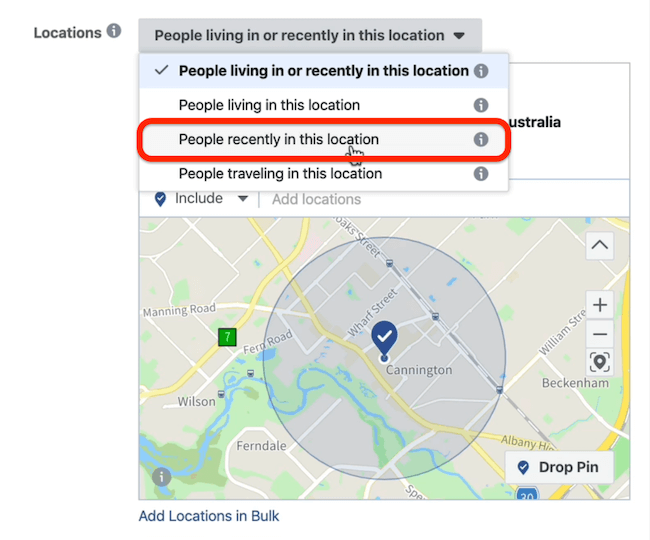
The foundation of your local ad campaign is precise location targeting. Instead of targeting a whole country, you'll target a small radius around your store.

When setting up your location, you also have a crucial choice to make about who within that area to target.
Audience Size and Interest Targeting
In e-commerce, you might narrow a large audience with very specific interests (e.g., "cruelty-free cosmetics" AND "organic skincare"). For a local campaign, this approach can shrink your audience to an ineffective size. The key is to start broader.
The RIGHT Way To Do Facebook Targeting For Local Businesses
The video 'The RIGHT Way To Do Facebook Targeting For Local Businesses' explains this strategic shift perfectly.
Please watch the sections from 01:21 to 08:56. The presenter covers: How to set your location radius based on your business type. Why you should keep age and gender settings relatively broad. The critical importance of using broader interest categories (e.g., 'Marketing' instead of 'Social Media Marketing') to maintain a workable audience size for local campaigns.
For your beauty mini-market, this means instead of targeting niche brands, you might start with broader interests like:
- Cosmetics
- Skincare
- Beauty Salons
- Sephora (as an interest, to target people who shop at competitors)
Advanced Audiences: A Look Ahead
Once your store is open and you've gathered some data, you can use more advanced targeting, just as you would in e-commerce. The video from Ben Heath also touches on these (from 08:56 onwards), and you can explore them later:
- Lookalike Audiences: Create an audience similar to your best customers (from an uploaded customer list).
- Retargeting (Warm) Audiences: Target people who have already engaged with your Instagram or Facebook page. This is a highly effective, low-cost way to stay top-of-mind.
Step 3: Crafting Ad Creative That Drives Action
Your ad needs to give people a compelling reason to stop scrolling and a reason to visit your store. Much of the high-performing organic content you planned in the last lesson can be repurposed into effective ads.
Local Meta Ads: Drive More In-Store Visits - Straight North
Let's revisit the 'Local Meta Ads' article for a great checklist on creating effective ad creative for local businesses.
Read the sections 'Craft Creative That Drives Real-World Action' and 'Make the Most of Meta’s Local Ad Tools'. Focus on the tips for adding a tangible promotion and using action-oriented copy.
Key takeaways for your ad creative:
- Show, Don't Just Tell: Use video tours of your store, beautiful images of your product displays, or clips of happy customers.
- Add a Tangible Offer: A simple, compelling offer is the single best way to drive immediate visits.
- Example: "Visit us this week and show this ad to get 10% off your purchase."
- Use a Clear, Local Call to Action (CTA): Your CTA button should facilitate a visit.
The 'Get Directions' CTA is one of the most powerful tools for a local business. Let's see how to set it up.
How to Run Facebook Ads for Local Businesses: Driving Foot Traffic
We'll return to the 'How to Run Facebook Ads for Local Businesses' video to see the ad creation process in action.
Watch the segment from 04:39 to 06:37. The presenter demonstrates how to upload an image, write ad copy with an offer, and—most importantly—how to select the 'Get Directions' call to action, which dynamically uses your store's address.
Step 4: Budgeting and Measuring Offline Impact
Measuring the ROI of an ad campaign that drives in-store traffic is the classic challenge of local marketing. Since there's no online pixel to track a physical purchase, we must use other methods.
Budgeting
As a starting point, it's wise to begin with a small daily budget (e.g., $5-$10 per day) and scale up as you find what works. You can set this during the initial campaign setup shown in the first video.
Measuring Success
The video you just watched mentioned a simple, "old school" tracking method: asking staff to note down every time a customer mentions the Facebook ad. This is a great starting point. Here are a few other methods:
Local Meta Ads: Drive More In-Store Visits - Straight North
The 'Local Meta Ads' article outlines several robust methods for connecting your online ads to offline sales.
Read the section 'Track Offline Results and Store Impact'. Pay attention to the practical ideas like 'Promo Codes' and 'Store Visit Estimates'.
Your measurement toolkit:
- Verbal Mentions: The simplest method. "Just mention this ad to your cashier."
- Unique Promo Codes: Assign a specific code to your ad (e.g., "INSTA10"). Track redemptions at your point-of-sale.
- Meta's Store Visit Estimates: In your Ads Manager reports, Meta provides an estimated number of store visits based on location data from users who saw your ad. It's a modeled metric, but useful for comparing the performance of different ads and audiences.
- Customer Questions: Simply make it part of your checkout process to ask, "How did you hear about us today?"
Your Campaign Plan Template
To put this all together, here is a simple template you can use to plan your first campaign.
- Campaign Objective: Store Traffic
- Audience:
- Location: [e.g., 3-mile radius around your store address]
- Demographics: [e.g., Women, Ages 25-55]
- Interests (Broad): [e.g., Cosmetics, Skincare, Beauty]
- Ad Creative:
- Visual: [e.g., A short video tour of the store interior]
- Headline: [e.g., "Your New Local Beauty Destination is Here!"]
- Ad Copy & Offer: [e.g., "Discover the best in indie beauty right in your neighborhood. ✨ Visit us this week and show this ad to get a free gift with any purchase!"]
- Call to Action: Get Directions
- Budget: [e.g., $10/day]
- Measurement Method: [e.g., Track redemptions of the 'free gift' offer at the POS.]
Conclusion
You now have a complete framework for adapting your digital marketing expertise to the world of local retail advertising. By focusing on the right objectives, adjusting your targeting strategy for smaller audiences, and using creative that inspires real-world action, you can effectively turn online ads into in-store foot traffic.
Key Takeaways:
- Use the 'Store Traffic' Objective: This tells Meta to optimize for in-person visits.
- Target Broadly, Geo-Target Narrowly: Keep your interest targeting broad to maintain audience size, but be precise with your location radius.
- Create an Irresistible Offer: A tangible, time-sensitive promotion is the best way to convert ad views into store visits.
- Use the 'Get Directions' CTA: This removes friction and makes it easy for customers to find you.
- Track Offline Conversions: Use promo codes, verbal mentions, and Meta's estimates to measure the real-world impact of your campaigns.
Preview of the Next Lesson:
A successful ad campaign often promotes a specific event or offer. In our next lesson, we will focus on how to design and outline the execution plan for an in-store promotion, from objective setting to performance tracking. This will allow you to create compelling offers that you can then amplify using the local advertising strategies you learned today.