Introduction
Welcome back! In our previous lesson, we outlined the core components of your local marketing plan, identifying the Google Business Profile (GBP) as your store's "digital front door" and the most critical tool for attracting local customers.
Today's lesson directly follows that conclusion. We will focus on the learning outcome: Optimize a Google Business Profile to drive in-store visits and highlight physical store features.
Your expertise in digital marketing will be a great asset here. Many concepts, like optimizing for search and analyzing performance, will be familiar. Our focus will be on applying those skills to the specific goal of local commerce: converting online searches into physical foot traffic for your beauty mini-market. We'll go through the process step-by-step, from initial setup to advanced optimization, ensuring your store stands out on Google Search and Maps from day one.
This is what an optimized, high-performing profile looks like. It acts as a comprehensive snapshot of your business right within the search results, making it easy for customers to find you, trust you, and visit you.
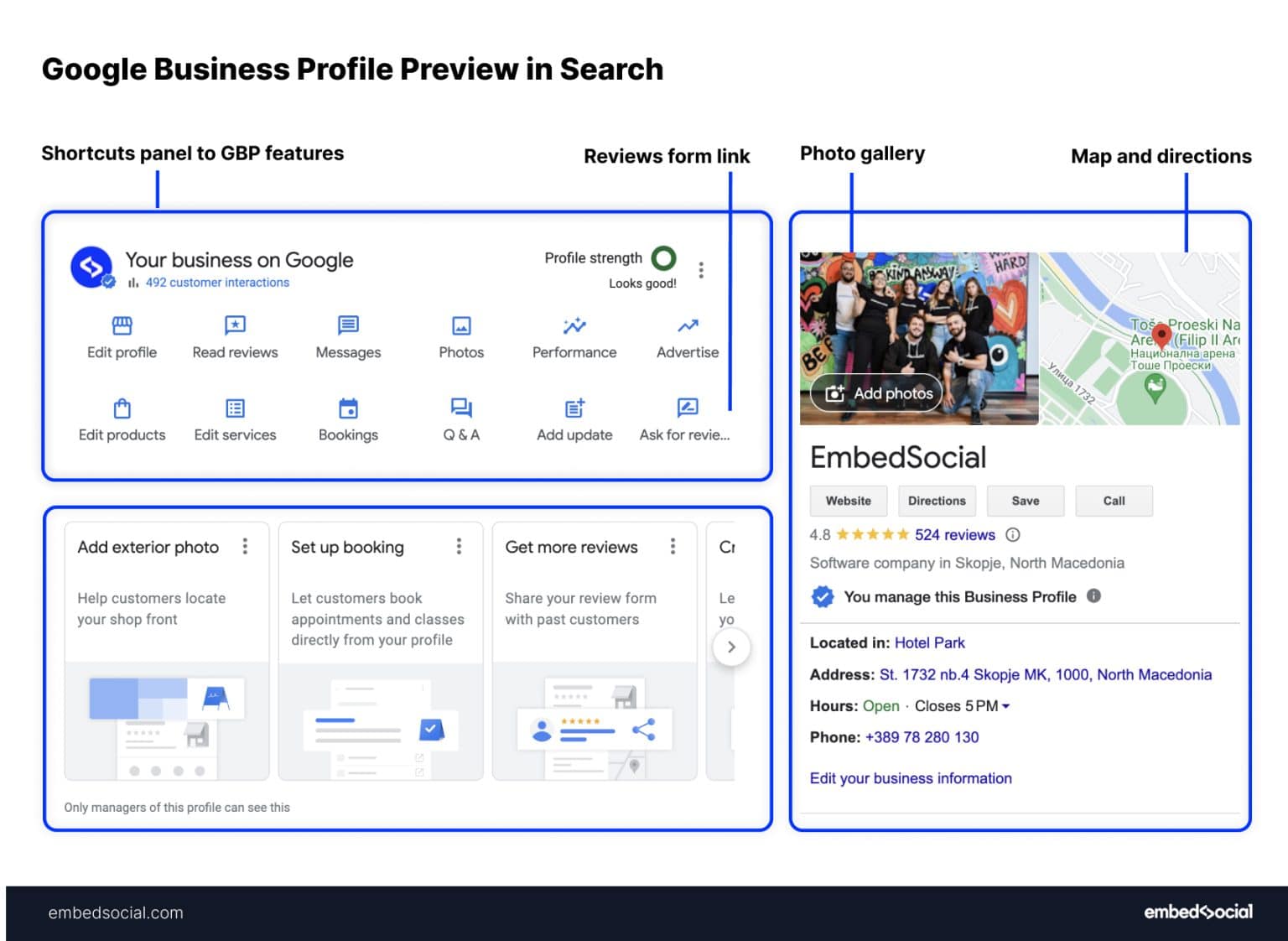
1. Setting Up Your Profile: The Foundation
Before you can optimize, you need a profile. Since your store is not yet open, you will be creating a new listing. The first step is to visit google.com/business to start the process.
Let's begin with a video that walks through these initial steps. It's important to get the fundamentals right, especially your business name and primary category.
✅ Google Business Profile Set Up: How To Put Your Business on Google in 2026 (Updated)
This video, 'Google Business Profile Set Up', provides a clear walkthrough of the initial creation process. Pay close attention to the guidance on choosing a business category.
Watch the segments from 02:03 to 06:15. This covers creating a profile, choosing your business name, selecting a category, adding a location, and the verification process. Don't worry about the 'service areas' part as you are a storefront business.
As the video emphasizes, your primary category is a critical ranking factor.
- Think like your customer: What would they search for? "Beauty supply store" or "Cosmetics store" are strong starting points.
- Pro Tip: Research your local competitors on Google Maps. See what primary category the top-ranking beauty stores are using. This is a simple yet effective competitive analysis you can do right away.
The final setup step is verification. Google needs to confirm you are a legitimate business at your stated address. You'll be presented with options, which can include a postcard mailed to your address, a phone call, or even a video verification where you show your storefront and business documents.
For a detailed, text-based guide on this initial setup and verification, you can refer to the resource below.
Ultimate Google My Business Optimization Checklist
This 'Ultimate Google My Business Optimization Checklist' from the Local Marketing Institute provides a comprehensive breakdown of the initial steps. It's a great reference to ensure you've covered all your bases.
Briefly review the sections 'Claim / Create a Google My Business Listing' and 'Verify Your Google My Business Listing'. This will reinforce the steps shown in the video and provide additional detail on the verification methods.
2. Optimizing Your Core Business Information
Once your profile is created and verified, the next step is to complete and optimize all the core information fields. Consistency here is key. This is often referred to as your NAP (Name, Address, Phone number) data.

Let's watch a detailed video on filling out these crucial profile settings.
How To Optimize A Google Business Profile (Free Checklist For 2025)
The video 'How To Optimize A Google Business Profile' walks through each of the core settings. The section on website UTM tracking will be particularly relevant given your digital marketing background.
Watch the segment from 09:51 to 13:30. This covers the description, phone number, website URL, social profiles, address, and hours. Pay special attention to the part about adding UTM tracking to your website URL (starting around 11:30).
Here's a breakdown of the key takeaways from the video and how they apply to your beauty mini-market:
- Business Name: Use your real-world business name. Do not add keywords like "Best Beauty Store in [Your City]". This is against Google's guidelines.
- Address & Phone Number: Ensure these are 100% accurate and are identical to what you list on your website and other directories.
- Hours: Be meticulous. List your regular hours and use the "special hours" feature for holidays or events.
- Website URL with UTM Tracking: This is where your digital marketing skills shine. By adding UTM parameters to your website link, you can track exactly how many visitors are coming to your site from your GBP listing within Google Analytics. This allows you to measure its direct impact.
- Example URL:
https://yourbeautystore.com/?utm_source=google&utm_medium=organic&utm_campaign=gmb
- Example URL:
3. Highlighting Your Physical Store and Products
This is the most important part of optimizing for a retail store. Your goal is to use GBP features to make customers want to visit in person.
Photos and Videos
For a beauty store, visuals are everything. They build trust and give customers a preview of the experience.
- What to upload:
- Logo & Cover Photo: Your brand identity.
- Exterior: At least 3 photos of your storefront from different angles and times of day, so people can easily spot it.
- Interior: At least 3 photos showcasing the layout, the lighting, product displays, and the general ambiance.
- Products: High-quality shots of your hero products on the shelves.
- Team: Photos of you and your staff create a personal connection.
- Key Principle: Use real, high-quality photos, not stock images. Businesses with photos receive significantly more requests for driving directions.
Business Description
You have 750 characters to tell your story.
- Do: Use the first ~250 characters to highlight what makes your store unique. Are you women-owned? Do you specialize in indie brands? Do you offer personalized consultations?
- Don't: Don't waste space on promotions or sales. Do not stuff it with keywords or add URLs.
Attributes
Attributes are quick, searchable tags that highlight specific features.
- Go to Info > Attributes.
- Select all that apply. For your store, the "Women-owned" attribute is a powerful differentiator. Other relevant attributes could include "Wheelchair accessible entrance" or "LGBTQ+ friendly."
Products
This is a game-changer for retailers. You can build a mini-catalog of your products directly on your Google profile.
A Complete Guide To Google Business Profile for Retailers
Let's read a guide specifically for retailers that explains how to use these optimization features, especially the 'Products' section.
Read the sections from '1. Maintain Accurate and Up-to-Date Information' through '6. Add Product Listings'. This will provide a concise overview of optimizing your description, categories, attributes, photos, and especially your product catalog.
As the article describes, the Products feature turns your profile into a virtual storefront.
- Create collections for your main categories (e.g., "Skincare," "Makeup," "Haircare").
- Add individual products with high-quality photos, prices, and descriptions.
- This allows customers looking for specific items to see that you carry them before they even visit.
4. Driving Engagement and Building Trust
An optimized profile is not static. Ongoing activity signals to Google that your business is active and engaged, which helps your ranking.
Reviews
Reviews are one of the most powerful factors for both ranking and customer conversion.
- Generate Reviews: Make it a part of your process to ask happy customers for reviews. You can get a direct link from your GBP dashboard to share.
- Respond to ALL Reviews: Reply to positive reviews to show appreciation. More importantly, respond professionally to negative reviews to show that you care about customer feedback and are willing to solve problems.
Q&A (Questions & Answers)
This feature allows customers to ask questions, but you can also use it proactively.
- Pre-populate Q&A: Think of the top 5-10 questions a new customer might have and post them yourself, then answer them immediately.
- Example Question: "Do you offer samples of foundations?"
- Example Answer: "Yes! We'd be happy to provide you with a sample to make sure you find your perfect match. Just ask one of our team members in-store."
Posts
Posts are like mini-updates or social media posts that appear directly on your profile. Use them to announce new product arrivals, highlight a special event, or share a blog post.
Let's see a final video that reinforces the importance of these engagement features.
How To Optimize A Google Business Profile (Free Checklist For 2025)
This video covers how to strategically use Q&A, Posts, and especially Reviews to build trust and improve your ranking.
Watch the segments from 18:08 to 20:53 (covering Q&A and Posts) and from 21:09 to 23:53 (covering Reviews). Note the strategic advice on responding to reviews and pre-populating questions.
Conclusion
Today, we've transformed the concept of a Google Business Profile from a simple listing into a powerful, dynamic marketing tool designed to drive customers to your physical store.
Key Takeaways:
- Foundation is Key: Start with accurate and consistent Name, Address, and Phone (NAP) data, and a well-researched primary category.
- Show, Don't Just Tell: Use high-quality photos, detailed product listings, and specific attributes ("Women-owned") to highlight your unique physical store and inventory.
- Track Your Impact: Leverage your digital marketing skills by using UTM tracking on your website URL to measure the direct traffic from your GBP.
- Engagement is Ongoing: Continuously build trust and signal relevance to Google by actively managing reviews, pre-populating Q&A, and using Posts to share updates.
Your Google Business Profile is your hardest-working employee, promoting your store 24/7. By following these steps, you've given it everything it needs to succeed.
Preview of the Next Lesson:
With your "digital front door" now fully optimized, our next step is to drive traffic to it. We will move on to the next major digital channel for local businesses. In the next lesson, we will focus on how to "Adapt social media content strategy to focus on in-store experiences, local events, and driving foot traffic."