Hello! Welcome to the second module of our course, Core ES6+ Syntax and Patterns.
In the last module, you did an excellent job mastering modern array methods and capped it off by building a practical data filtering and sorting utility. We focused on how to process and transform data effectively.
Now, we're shifting our focus from data manipulation to the core mechanics of the JavaScript language itself. This module will equip you with the modern syntax that is foundational for building any contemporary JavaScript application, especially with frameworks like React.
We'll start with a topic that you've mentioned can be tricky: the this keyword. Its behavior is a frequent source of bugs and confusion. Today's lesson is designed to demystify it completely by focusing on one key learning outcome: to contrast the behavior of this in traditional vs. arrow functions.
Understanding this distinction is not just academic; it's essential for writing predictable, bug-free code, particularly in the event-driven world of frontend development and React components.
1. The Dynamic this in Regular Functions
In many object-oriented languages, this (or a similar keyword) predictably refers to the instance of the class it's in. JavaScript is different. With traditional function declarations, the value of this is dynamic—it's determined not by where the function is written, but by how the function is called.
Let's explore the most common scenarios.
The Rule of Thumb: The Call Site
For a regular function, this refers to the object that the function is called on. A simple way to think of it is "the object to the left of the dot."
this Keyword in JS | this in Regular functions vs Arrow Functions |JavaScript Interview Series: EP-4
To see this in action, let's watch a section of the video 'this Keyword in JS' from CodeWellTech. It clearly demonstrates how the call site determines the value of this.
Watch from 00:00:15 to 00:05:22. Pay close attention to these points: Global Call (0:15 - 2:03): When a function is called in the global scope (like displayAge()), this defaults to the global window object in browsers. Method Call (2:03 - 3:34): When the same function is assigned to an object and called as a method (person.displayAge()), this now refers to the person object. Nested Method Call (3:34 - 5:22): This reinforces the rule. Even with nested objects, this refers to the immediate object that called the function (nestedPerson).
This dynamic behavior is powerful because it allows a single function to be reused in different contexts. However, it also leads to a very common problem, especially with callbacks.
The "Lost" this Context
What happens when a method is passed as a callback to another function, like setTimeout or an event listener? The connection to its original object is broken. When the callback is eventually executed, it's called without an object "to the left of the dot." In this case, this will default to the window object (or undefined in strict mode).
This is a critical concept to grasp.
JavaScript ES6 Arrow Functions Tutorial
The video 'JavaScript ES6 Arrow Functions Tutorial' by Web Dev Simplified provides a perfect, classic example of this problem using a Person class and setTimeout.
Watch from 00:05:36 to 00:07:39. Focus on the difference between printNameArrow and printNameFunction. Notice how inside printNameFunction, the regular function passed to setTimeout loses its context, and this.name becomes undefined because this no longer refers to the Person instance.
This "losing this" problem was so common in older JavaScript that developers used workarounds like const self = this; or the .bind() method. Fortunately, ES6 arrow functions provide a much more elegant solution.
2. The Lexical this in Arrow Functions
Arrow functions (=>) revolutionize how this works. The rule is simple but profound:
Arrow functions do not have their own this binding.
Instead, they inherit this from their parent scope at the time they are defined. This is called lexical scoping. The value of this is determined by where the function is located in the code, not how it is called.
Let's see how this elegantly solves our previous problem.
JavaScript ES6 Arrow Functions Tutorial
Let's revisit that same Web Dev Simplified video to see the solution.
Rewatch the same segment from 00:05:36 to 00:09:04, but this time focus on why the printNameArrow function works. The arrow function () => { console.log(...) } doesn't create a new this. It captures the this from its surrounding scope—the printNameArrow method—which correctly points to the Person instance. It just works, intuitively.
Because the arrow function "closes over" the this of its surrounding lexical context, it behaves exactly as you might expect coming from a more traditional object-oriented background.
Let's reinforce this with one more excellent resource that walks through several examples.
Arrow Functions vs Regular Functions in JavaScript
The article 'Arrow Functions vs Regular Functions in JavaScript' from freeCodeCamp provides concise code snippets that illustrate this contrast.
Read the section titled '2. Arrow functions do not create their own this binding'. Compare the three code blocks: Regular function as a method: this is the object. Nested regular function: The inner print2 loses its context, and this becomes the Window object. Nested arrow function: The inner print2 is now an arrow function. It inherits this from the outer print function, which correctly points to the obj object. This directly mirrors the video examples.
The MDN Web Docs, the official reference for JavaScript, describe this behavior by stating that arrow functions create a closure over the this value of their enclosing scope. This means this is effectively "locked in" when the function is created.
3. Summary and Practical Guidelines
The difference boils down to one key question: How is this determined?
- Regular Function: Dynamically, by how the function is called (
obj.method()vs.method()). - Arrow Function: Lexically, by where the function is defined in the code.
This table provides a great visual summary of the key differences.
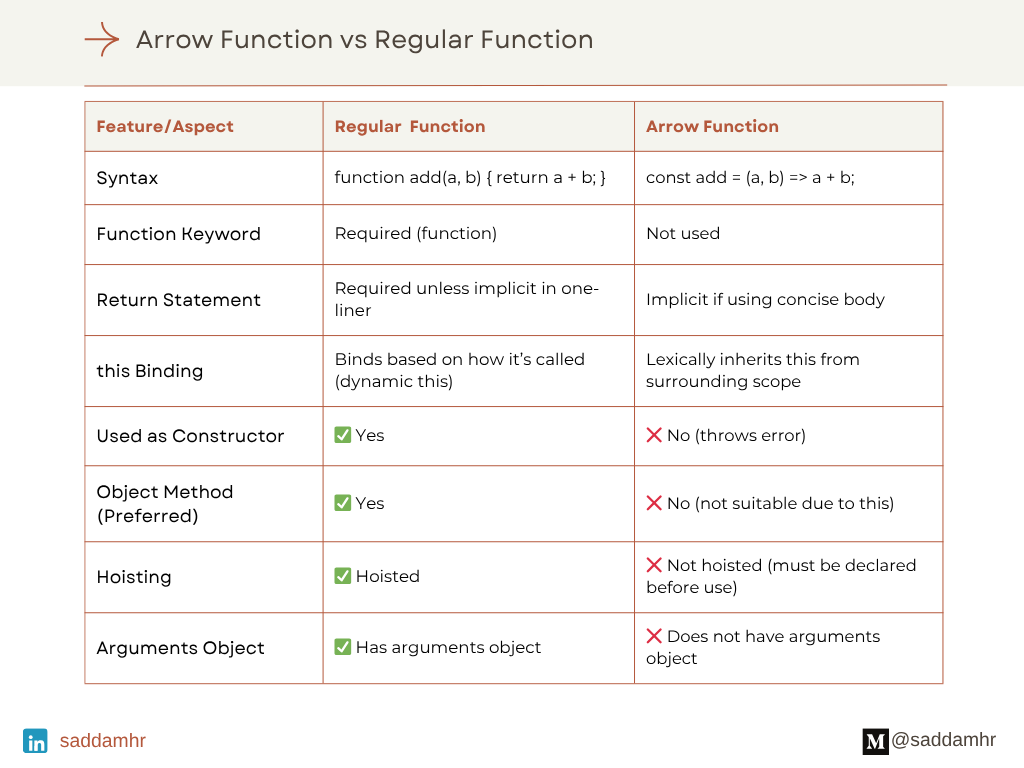
When to Use Which?
-
Use Arrow Functions (
=>) for most cases, especially:- Callbacks: For
setTimeout,addEventListener, or array methods (.map,.filter). This preserves yourthiscontext automatically. - React Class Components (older style): To define methods that will be used as event handlers, ensuring
thiscorrectly refers to the component instance. In modern functional components with hooks, this is less of a concern.
- Callbacks: For
-
Use Regular Functions (
function) when:- Defining methods on an object literal: If you want the method to refer to the object itself, a regular function is the direct way to do it.
const myObject = { name: 'My Object', logName: function() { // 'this' here refers to myObject console.log(this.name); } }; - Creating constructors (pre-ES6 classes): Regular functions are necessary to serve as constructors with the
newkeyword, as arrow functions cannot be used as constructors.
- Defining methods on an object literal: If you want the method to refer to the object itself, a regular function is the direct way to do it.
Conclusion
You've now tackled one of the most historically confusing parts of JavaScript. By understanding the contrast between dynamic and lexical this, you can write more predictable and robust code.
Key Takeaways:
- Regular functions have a dynamic
this, determined by how they are called (the "call site"). This can lead to the "lostthis" problem in callbacks. - Arrow functions have a lexical
this, inheriting it from the surrounding scope where they are defined. They don't have their ownthis. - This lexical behavior makes arrow functions the ideal choice for callbacks and event handlers to prevent context-related bugs.
This knowledge is especially important for your goal of learning React. When you pass functions down to child components or use them as event handlers, you'll rely on arrow functions to ensure this behaves as you expect.
In our next lesson, we'll continue exploring ES6 by looking at destructuring. It's another powerful feature that helps you write cleaner, more expressive code by easily extracting values from objects and arrays—something you'll do constantly in React.