Hello! Let's continue our React journey.
Introduction
In our last lesson, we learned how to make our components reusable by passing data through props. We successfully created multiple, unique ProfileCard components, but we had to write the JSX for each one by hand.
This approach isn't scalable. Imagine you have an array with hundreds of users from an API. You certainly don't want to write hundreds of <ProfileCard /> tags. Today, we'll solve this exact problem.
Our learning outcome is to render lists of data by mapping over arrays and assigning unique keys. This is one of the most common and essential patterns in React. It directly uses the ES6 map method you're looking to master and applies it to a real-world UI challenge. For you as a Laravel developer, this will feel very similar to using a @foreach loop in a Blade template to render items from a collection.
Transforming Data into Components with .map()
The core idea is to take an array of data (like user objects) and transform it into an array of React components (like <ProfileCard /> components). The perfect tool for this job is JavaScript's built-in Array.prototype.map() method.
Let's start by watching a short video that demonstrates this fundamental technique.
How to render LISTS in React 📃
The video "How to render LISTS in React" from Bro Code clearly explains how to use the .map() method to turn an array of data into a list of JSX elements.
Watch from the beginning until 06:58. The first part (up to 03:15) shows how to map a simple array of strings. The second part (03:29 to 06:58) demonstrates the more common pattern of mapping over an array of objects and introduces the concept of the key prop. Pay close attention to this part, as it's exactly what we need for our ProfileCard.
As the video showed, the process is straightforward:
- You have an array of data.
- You call
.map()on this array inside your JSX (within curly braces{}). - In the
mapcallback function, you return a JSX element for each item in the array.
This generates a new array of JSX elements, which React then renders to the DOM.
Why React Needs keys
You probably noticed the video and your browser's console mentioning a key prop.
Warning: Each child in a list should have a unique "key" prop.
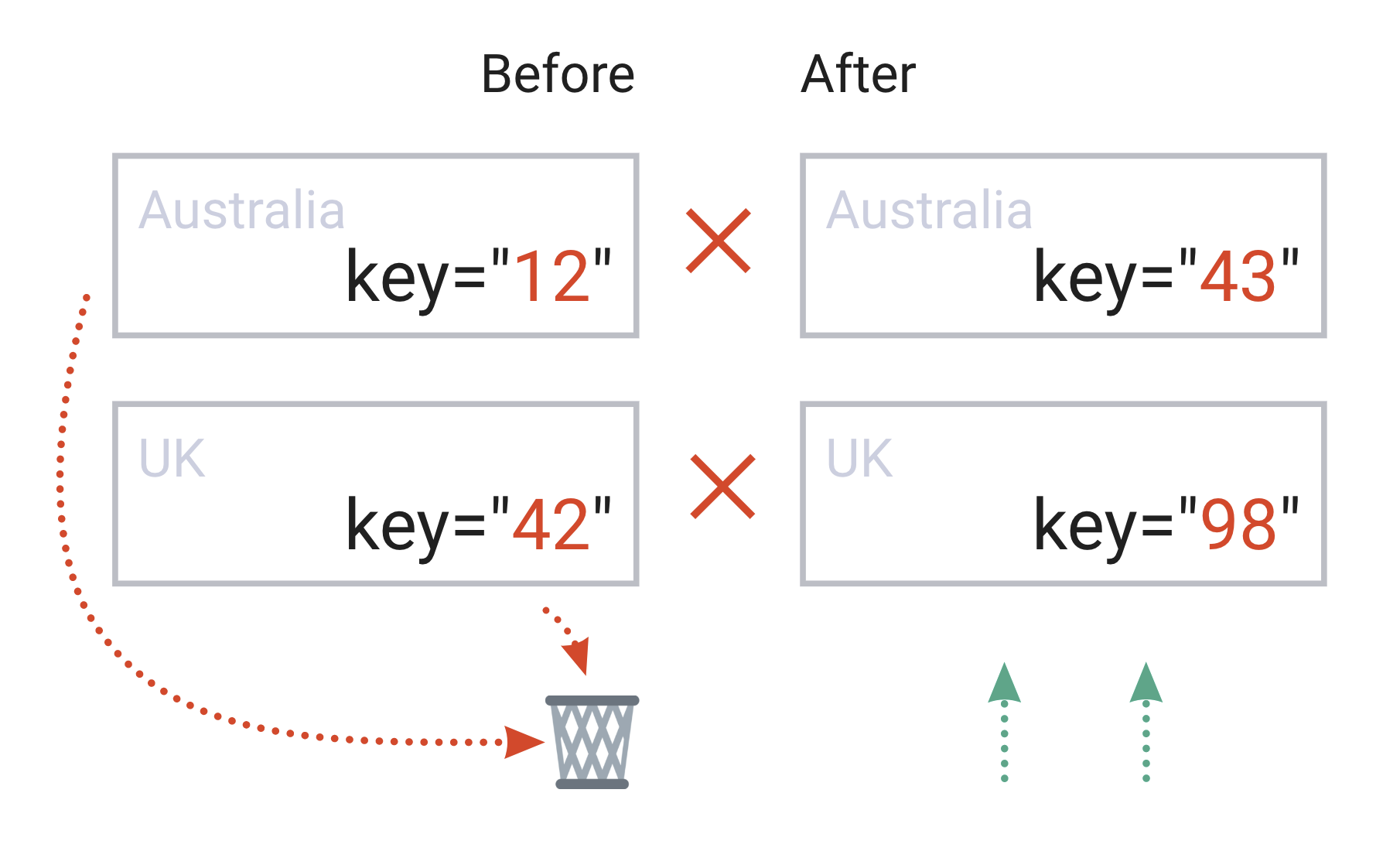
This warning is not just a suggestion; it's crucial for performance and correctness. The key is a special string or number attribute you need to include when creating lists of elements. React uses these keys to identify which items have changed, been added, or been removed.
To understand why this is so important, let's watch a video that provides an excellent visual demonstration of React's rendering process with and without proper keys.
React Keys and Lists - Complete Tutorial!
This tutorial, "React Keys and Lists" from Cosden Solutions, brilliantly illustrates the performance implications of using keys correctly.
Watch the following segments: 00:21 - 01:15: See how the entire list re-renders when an item is removed without keys. 01:51 - 02:19: See how only the relevant part of the DOM is affected when proper keys are used. 02:19 - 03:24: Understand the concept of keys as unique identifiers. 03:31 - 05:42: Learn why using the array index as a key is a common but dangerous anti-pattern.
Rules for Keys
The videos and official documentation make the rules for keys very clear:
- Keys must be unique among siblings: Two items in the same list cannot have the same key, but it's fine for items in different lists to share keys.
- Keys must be stable: A key should not change between re-renders. It should be permanently associated with the data item. This is why generating keys with
Math.random()or using the arrayindexis a bad idea. An item's index can change if the list is sorted or filtered, which would confuse React.
The best key is a unique ID that comes from your data, such as a database primary key.

For a definitive guide, you can refer to the official React documentation.
The official React documentation on "Rendering Lists" provides a comprehensive explanation of mapping arrays and the rules for keys. It's an excellent resource to solidify your understanding.
Read the sections "Rendering data from arrays", "Filtering arrays of items", and "Keeping list items in order with key". This will reinforce what you learned from the videos and provide clear code examples.
Let's Build a List of Profiles
Now, let's apply this to our project. We'll replace our manually coded <ProfileCard /> components with a dynamic list rendered from an array.
-
Create an array of user data in
src/App.jsx. Make sure each object has a uniqueid.// src/App.jsx // ... imports const users = [ { id: 1, name: 'Hedy Lamarr', bio: 'Inventor and Actress', imageUrl: 'https://i.imgur.com/yXOvdOSs.jpg', }, { id: 2, name: 'Grace Hopper', bio: 'Computer Scientist & US Navy Admiral', imageUrl: 'https://i.imgur.com/Mk3eW3As.jpg', }, { id: 3, name: 'Katherine Johnson', bio: 'NASA Mathematician', imageUrl: 'https://i.imgur.com/MK3eW3A.jpg' } ]; function App() { // ... } -
Use
.map()to render the list. Inside thereturnstatement of yourAppcomponent, map over theusersarray. For eachuserobject, return a<ProfileCard />.Remember to provide the
keyprop! We'll useuser.idfor this. We can also use the spread syntax (...) we learned in the last lesson to pass all the user data as props.// Inside App.jsx's return statement function App() { return ( <> <Header /> <main> <h1>Notable Scientists</h1> <div className="profile-list"> {users.map(user => ( <ProfileCard key={user.id} {...user} imageSize={90} /> ))} </div> </main> <Footer /> </> ); }
Your app should now display three profile cards, all generated from a single, clean block of code. You can now easily add, remove, or reorder users just by changing the users array, and React will handle the rendering for you.
Conclusion
Fantastic work! You've just learned one of the most fundamental patterns in React development. Being able to dynamically render lists of components from data is the foundation for building almost any complex application, from a social media feed to an e-commerce product grid.
Key Takeaways:
- Use the
Array.prototype.map()method to transform an array of data into an array of JSX elements. - Always provide a
keyprop to the top-level element inside yourmap(). - A good key must be unique among its siblings and stable across re-renders.
- The best source for a key is a unique ID from your data (e.g., from a database).
- Avoid using the array index or random values as keys, as this can lead to performance issues and bugs.
Preview of Next Lesson:
Our UI is becoming more dynamic, but right now we're always rendering the entire list. What if we want to show a message like "No users found" if the array is empty? In the next lesson, we will learn how to apply conditional rendering using ternary operators and the logical && operator to show or hide JSX based on certain conditions.