Hello! Welcome to the first lesson in our module on building React components.
Introduction
In our last lesson, we built a small application to fetch data from an API and display it on the page. We did this by manually selecting DOM elements and updating their content with JavaScript. While this works for simple cases, you can probably imagine that for a complex e-commerce site, manually managing hundreds of UI updates would quickly become tangled and difficult to maintain.
This is the problem that frontend libraries like React solve. They provide a more structured and efficient way to build user interfaces. But before we can write our first line of React code, we need to understand the modern development environment that powers it.
Today's lesson will describe the roles of Node.js, npm, and Vite in a modern React development environment. Think of these as the essential tools in your workshop. Understanding what each tool does is the first step toward building professional, scalable applications.
1. Node.js: The JavaScript Runtime
First, let's talk about Node.js. In all our previous lessons, your JavaScript code ran inside a web browser. The browser has its own JavaScript "engine" that executes the code.
Node.js is a runtime environment that allows you to run JavaScript code outside of a web browser.
As a Laravel developer, you're familiar with running PHP on a server to handle backend logic. Node.js provides a similar capability for JavaScript. However, in the context of frontend development with React, its primary role isn't to run our application's backend. Instead, we use Node.js to run our development tools. The build tools, servers, and package managers we'll discuss next are all programs written in JavaScript, and Node.js is what executes them on your machine.
React 19 Setup with Vite: Fast Setup in Minutes - DEV Community
The article "React 19 Setup with Vite" gives a great, concise explanation of Node.js's role in the development process.
Read the section titled Installing Node.js. Focus on the paragraphs that describe what Node.js is and why it's needed before you can use Vite and React. The author describes it as the 'engine that powers the entire development process.'
2. npm: The Node Package Manager
When you install Node.js, it comes bundled with a crucial command-line tool called npm (Node Package Manager).
If you've used Composer in your Laravel projects to manage PHP packages, you'll find npm very familiar. It serves the exact same purpose for the JavaScript ecosystem.
npm has two main parts:
- A command-line interface (CLI): The
npmcommand you run in your terminal to install and manage packages. - An online registry: A massive public database of open-source JavaScript packages that you can install and use in your projects.
The heart of an npm project is the package.json file. This file is the equivalent of Laravel's composer.json. It lists all the project's dependencies and defines scripts that can be run.
To understand these concepts in more detail, let's watch a few clips from an excellent video on the topic.
This video from Kevin Powell, "npm for absolute beginners", breaks down the core concepts of npm clearly and concisely. We'll watch a few key segments.
Please watch the following four segments from the video: Installing Node and npm (00:22 - 01:25): This confirms that npm comes bundled with the Node.js installation. The package.json file (07:07 - 09:31): This is the most important part. Pay close attention to the explanation of the scripts and devDependencies sections, and what happens when you run npm install (populating the node_modules folder). dependencies vs. devDependencies (09:48 - 12:14): This explains the critical difference between packages needed for development and those needed for the final, live application. React, for example, is a dependency, while Vite is a devDependency. Running Scripts (13:42 - 14:57): This shows how the npm run command is used to execute scripts defined in your package.json, like starting a development server.
To summarize the key points from the video:
package.json: Defines your project and its dependencies.npm install: Readspackage.jsonand downloads the required packages into anode_modulesfolder.dependencies: Packages required for your application to run in production (e.g.,react).devDependencies: Packages only needed during development (e.g., a testing library or a build tool like Vite).npm run <script-name>: Executes a command shortcut defined in thescriptssection ofpackage.json.
3. Vite: The Build Tool and Dev Server
So, why do we need all these tools? Why can't we just write our React code in a .js file and include it in an HTML script tag, like we did in the last lesson?
Modern JavaScript applications rely on features that aren't natively supported by browsers, such as JSX (the syntax we'll use to write React components). We also want to optimize our code for production by bundling it into smaller, more efficient files. Furthermore, for a smooth development workflow, we want a server that can show us our changes instantly without needing a full page refresh.
This is where a build tool comes in. And for modern React development, Vite is the leading choice.
Vite (pronounced "veet," French for "fast") is a build tool that does two main things:
- Provides a lightning-fast Development Server: When you run
npm run dev, Vite starts a local server. It uses modern browser features to serve your files incredibly quickly. When you save a change, it updates your application in the browser almost instantly using a feature called Hot Module Replacement (HMR). - Bundles Your Code for Production: When you're ready to deploy your site, you run
npm run build. Vite takes all your JavaScript files, JSX, CSS, and other assets, and bundles them into a few highly optimized files that are ready to be uploaded to a production server.
Since you have experience with Laravel, you might have used Laravel Mix or even Vite with Laravel before. The concept is the same: Vite is responsible for processing and bundling your frontend assets.
React 19 Setup with Vite: Fast Setup in Minutes - DEV Community
The same article from earlier also gives an excellent summary of why Vite is now preferred over older tools and what its role is.
Please read two sections from this article: Why Vite Over Create React App in 2025?: This section explains the benefits of Vite, focusing on its speed, modern tooling, and better developer experience. It will give you context on why it has become the standard. How Vite Builds & Serves Your Code: This section clearly separates Vite's two main roles: how it works in development mode (npm run dev) versus production mode (npm run build).
Putting It All Together
Let's visualize how these three tools work together in a typical development setup.
- You install Node.js once on your machine. This gives you the JavaScript runtime and the npm command.
- For a new project, you use npm to initialize it and create a
package.jsonfile. - You use
npm install reactto add React as a dependency, andnpm install --save-dev viteto add Vite as a development dependency. - You run
npm run devin your terminal. This command tells npm to look inpackage.jsonfor a script named "dev". - The "dev" script executes the
vitecommand, which starts the Vite development server. - You open your browser to the local address provided by Vite, and you can start building your React application.
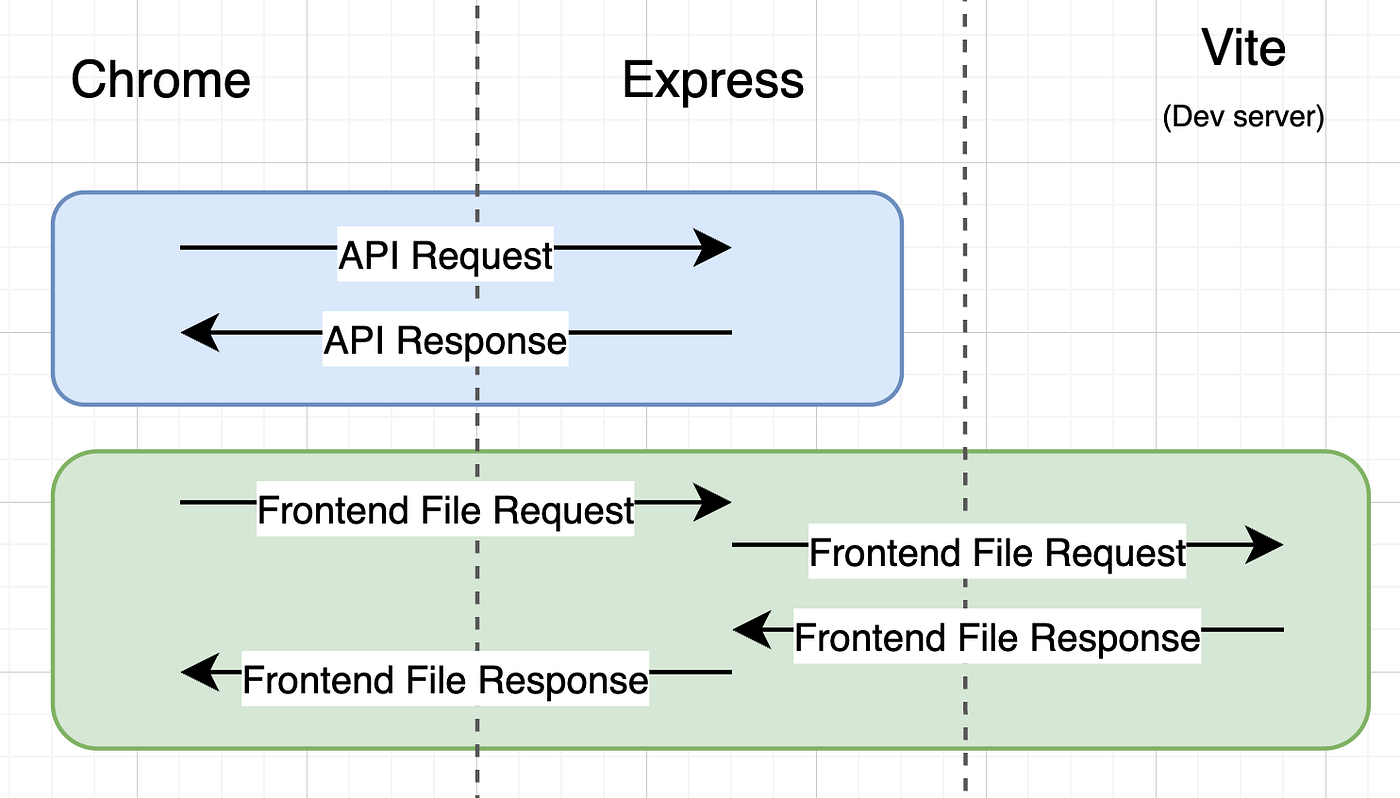
The following diagram illustrates the role of the Vite dev server. It sits between you and the browser, serving your frontend files, while a separate backend server (like your Laravel API) would handle API requests.
Conclusion
In this lesson, we've unpacked the essential toolkit for modern React development. You now understand the specific role each piece plays in the ecosystem.
Key Takeaways:
- Node.js is the JavaScript runtime that executes our development tools outside the browser.
- npm is the package manager (like PHP's Composer) used to install and manage project dependencies listed in the
package.jsonfile. - Vite is the modern build tool and development server that compiles features like JSX, provides a fast development experience with Hot Module Replacement, and bundles your code for production.
These tools form the foundation upon which we will build our React applications. Don't worry if you don't feel like you've mastered them yet; you will become very familiar with them as we use them in every subsequent lesson.
Preview of Next Lesson:
Now that we understand the purpose of our tools, it's time to use them! In the next lesson, we will set up a new React project using Vite and explore the basic file and folder structure it generates.