Welcome back!
In our last lesson, we explored the useState hook, the fundamental tool for making our components dynamic and interactive. We learned how to initialize state, update it with a setter function, and we briefly introduced a critical pattern for when the new state depends on the old one.
Today, we're going to focus entirely on that pattern. Our goal is to master updating state based on the previous state value using the functional updater pattern. Understanding this concept is crucial for preventing subtle but common bugs, especially as your applications grow in complexity. It's the difference between code that seems to work and code that is genuinely robust.
The "Stale State" Problem
Let's begin by understanding the problem this pattern solves. In React, state updates are not always synchronous. When you call a state setter function (like setCount(1)), you are not immediately changing the count variable. Instead, you are telling React, "Please schedule an update to count, and after you're done, re-render the component."
This can lead to a situation known as "stale state," where your code is referencing an old value of state from a previous render.
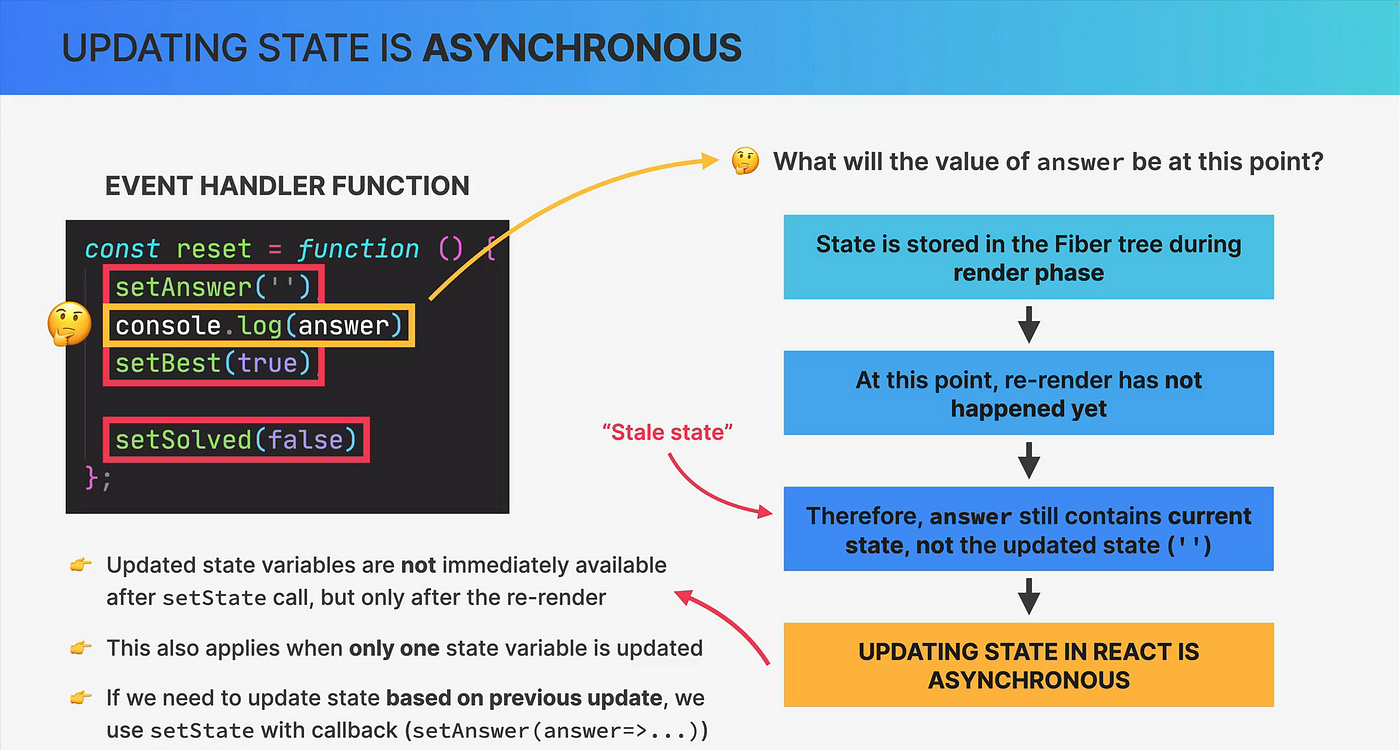
This isn't just a console.log quirk; it has real implications. Let's see a practical example of how this can cause a bug.
React Hooks Tutorial - 3 - useState with previous state
The video "React Hooks Tutorial - 3 - useState with previous state" by Codevolution has a perfect demonstration of this problem. The instructor tries to create a button that increments a counter by 5 by calling the setter function five times in a loop.
Watch from 02:28 to 04:07. Observe what happens when the "Increment 5" button is clicked. Notice that even though setCount(count + 1) is called five times, the count only increases by one. Why do you think this is happening?
The issue here is that within the increment5 function, the count variable's value is fixed—it's a snapshot from when the component rendered. If the initial count is 0, every one of the five setCount(count + 1) calls is effectively setCount(0 + 1). React sees five requests to set the state to 1 and correctly obliges, resulting in a final state of 1, not 5.
The Solution: The Functional Updater Pattern
To solve this, React provides an alternative way to use the state setter function. Instead of passing the new state value directly, you can pass a function. This function automatically receives the most up-to-date, or "pending," state as its first argument and must return the new state.
The syntax looks like this: setCount(previousCount => previousCount + 1).
React puts these updater functions into a queue. When it processes the updates, it runs each function in order, feeding the result of one function as the input to the next.
Now, let's see how this fixes our "Increment 5" button.
React Hooks Tutorial - 3 - useState with previous state
Let's continue with the Codevolution video to see the solution in action.
Watch from 04:07 to 05:05. The instructor refactors the code to use the functional updater pattern. Notice how React now correctly processes the five queued updates, leading to the expected result.
This concept is so fundamental that it's worth seeing it from multiple angles. The official React documentation provides a very clear, text-based explanation of the same principle.
The official React documentation is the ultimate source of truth. Let's read their explanation on this topic.
Read the section titled "Updating state based on the previous state". It uses a similar example of calling setAge three times and explains exactly how React queues the updater functions to arrive at the correct final state.
Reinforcing the Pattern with Another Example
Let's watch one more quick video to solidify the concept. Seeing the same pattern in a slightly different context helps build a strong mental model.
Learn useState In 15 Minutes - React Hooks Explained
In the last lesson, we watched a video from Web Dev Simplified. Let's revisit it for his take on this specific issue. He demonstrates the same problem by calling setCount twice in a row.
Watch from 06:15 to 08:23. This is another excellent, concise demonstration of the stale state problem and how the functional updater (setCount(prevCount => prevCount - 1)) solves it.
Applying the Pattern to Objects and Arrays
This pattern is not just for simple counters. It's even more important when dealing with complex state like objects or arrays. In the previous lesson, you learned that you must replace objects and arrays in state, not mutate them, often using the spread syntax (...).
Combining the functional updater pattern with the spread syntax is the standard, safe way to update a piece of an object in state.
Imagine you have a user object in state and you want to update just their name:
const [user, setUser] = useState({ id: 1, name: 'Alex', role: 'developer' });

// In an event handler...
const handlePromote = () => {
  // Safe and correct way to update the user's role
  setUser(previousUser => {
    return { ...previousUser, role: 'lead developer' };
  });
};
By using previousUser, you guarantee you are working with the most recent state. By using the spread syntax ...previousUser, you ensure you don't accidentally lose the id and name properties.
Let's read a short article that puts this all together.
useState in React: A complete guide - LogRocket Blog
The LogRocket blog post we saw last lesson has a great section that combines these two concepts: functional updates and object immutability.
Read the part of the section "Implementing an object as a state variable with useState Hook" that starts with the line "You can replicate the behavior of setState() by using the function argument...". This shows the exact syntax for using the updater function (prevState => ...) with the spread syntax to safely update an object.
Conclusion
You've now taken a deep dive into one of the most important patterns for state management in React. While a direct update like setCount(count + 1) might seem simpler, it opens the door to bugs that can be difficult to trace. Adopting the functional updater pattern makes your components more predictable and robust.
Key Takeaways:
- State as a Snapshot: State variables are constant within a given render. Calling
setStateschedules an update for the next render. - The Stale State Problem: When multiple state updates are triggered in the same event, referencing the state variable directly can lead to using an old, "stale" value.
- The Functional Updater Solution: Passing a function to your state setter (e.g.,
setState(prevState => ...)) guarantees you receive the most current pending state, allowing you to reliably calculate the next state. - Rule of Thumb: If your new state depends in any way on the previous state, always use the functional updater pattern.
Preview of Next Lesson:
We now have a solid foundation for managing state. In the next lesson, we will put this knowledge to practical use as we learn to build controlled form inputs (text, select, checkbox) using useState. This is a core skill for building any application that takes user input, from login forms to e-commerce checkouts.