Hello! In our last lesson, you successfully made your first programmatic API call to a large language model. You've established a direct line of communication from your Python script to the LLM, a crucial first step. So far, our prompts have been simple, consisting of a single user message.
Today, we will build on that foundation to achieve a much higher degree of control over the LLM's responses. This lesson focuses on structuring prompts using system and user roles to control LLM behavior. You'll learn to move beyond simple questions and start giving the LLM a persona, a set of rules, and a specific purpose. Mastering this is fundamental for building predictable and reliable AI applications, including the RAG systems that are our ultimate goal.
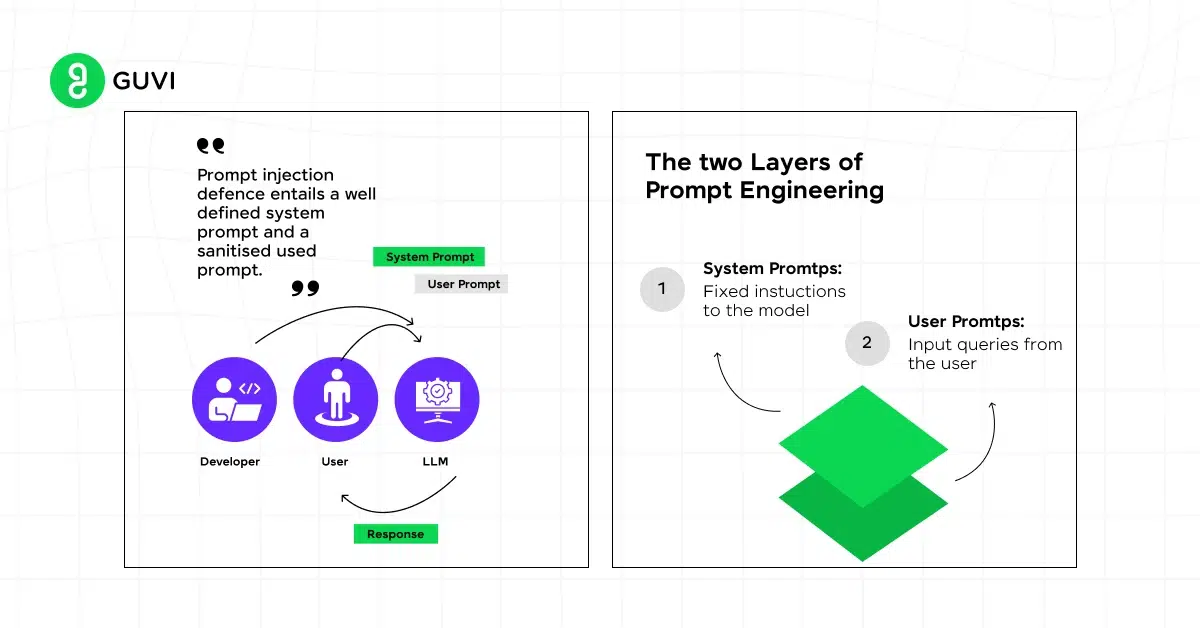
The Two Layers of Prompting: System and User
When you interact with a chat model's API, the messages you send are not just a single string. They are a structured list of dictionaries, each with a role and content. In the last lesson, we used the user role. Now, we'll introduce the system role.
- System Prompt: This is a high-level instruction that sets the stage for the entire conversation. It's where you define the AI's persona, its rules, constraints, and the overall objective. Think of it as the configuration file or the "constitution" for your AI assistant. It's typically set once at the beginning and remains constant.
- User Prompt: This is the specific question or command for the current turn of the conversation. It's the immediate task you want the LLM to perform.
To see a practical demonstration of this concept, let's watch a short video from the WafaStudies channel that clearly explains the difference and shows its impact on the model's output.
System Prompt vs User Prompt in Prompt Engineering | #AI #promptengineering #prompt #openai #LLM
This video provides a concise explanation of system versus user prompts and demonstrates the effect of adding a system prompt to an API call.
Please watch two segments from this video: First, watch the conceptual explanation from the beginning, where the presenter defines each prompt type. Then, skip ahead and watch the demonstration from this section. Notice how the output format changes dramatically once a specific system prompt is provided.
As you saw, the system prompt gives you the power to enforce a specific tone and output structure, making the model's behavior much more predictable.
From Code to Conversation: Implementing Roles
Let's translate this concept into the Python code you were working with in the last lesson. To implement a system prompt, you simply add another dictionary to the messages list with the role set to system.
The OpenAI Playground often visualizes this separation clearly. A developer message corresponds to the system role, while the user message is self-explanatory. The resulting assistant message shows the output.

Let's implement this pirate persona in Python. Modify the script from our previous lesson to look like this:
import os
from openai import OpenAI
from dotenv import load_dotenv

load_dotenv()

try:
    client = OpenAI()

    chat_completion = client.chat.completions.create(
        model="gpt-4o-mini",
        messages=[
            {
                "role": "system",
                "content": "You are a helpful AI assistant. Answer the user with a swashbuckling pirate personality!",
            },
            {
                "role": "user",
                "content": "What is the purpose of a 'system' message in the OpenAI API?",
            }
        ],
    )

    response_content = chat_completion.choices[0].message.content
    print("\nLLM Response:")
    print(response_content)

except Exception as e:
    print(f"An error occurred: {e}")
When you run this script, you'll see the LLM adopt the persona you defined, answering the question as a pirate. This simple example demonstrates the power you now have to direct the model's behavior.
Building Multi-Turn Conversations
Beyond a single exchange, you can maintain a coherent conversation by including the history of the interaction in the messages list. This involves appending not just the new user message but also the previous assistant responses.
To understand the formal structure, let's consult the "Prompt Engineering Guide". It provides a clear example of how SYSTEM, USER, and ASSISTANT messages work together in a multi-turn context.
This resource shows the standard format for multi-turn conversations expected by chat models.
Please read the section titled "Multi-turn Conversations". Pay close attention to the input format and how it maps to the Python API call shown at the end of the section. You'll see the list of messages includes a system instruction, a user question, and an assistant response to provide context for the final user query.
This pattern of appending messages to a list is the standard way to build chatbots and other conversational applications. For a complete video walkthrough of building a stateful chatbot that remembers the conversation, you can revisit the Shaw Talebi video from our last lesson.
The OpenAI (Python) API | Introduction & Example Code
This segment shows how to create a custom chatbot by defining a system message, providing few-shot examples, and appending the conversation history to the messages list.
Watch the section from this timestamp. It's a practical demonstration of how the messages list is constructed and updated in a loop to create a continuous conversation.
Advanced Control: System Prompts as Task Definitions
The system prompt is capable of much more than just setting a persona. You can use it to define complex tasks, specify output formats, and enforce strict rules. For a RAG system, this is where you will eventually put instructions like, "Answer the user's question based only on the provided documents."
The notes from the "ChatGPT Prompt Engineering for Developers" course by DeepLearning.AI offer several powerful tactics for structuring your prompts.
ChatGPT Prompt Engineering for Developers by DL.AI | Site of Thi
This resource details professional-grade tactics for writing effective prompts, including how to define a complex persona and task using the system role.
First, review the tactics under "Principle 1 - write clear and specific instructions". Pay special attention to: Tactic 1, which is crucial for separating instructions from content—a technique we'll use heavily in RAG. Tactic 2, which shows how to force the LLM to return data in a machine-readable format like JSON. Next, scroll down to the "Chatbot" section and examine the code block that defines the context for the "OrderBot". The system content here is a fantastic example of a complex prompt that defines the entire workflow for a pizza-ordering assistant, including its persona, task sequence, and even its menu knowledge. Read through this system prompt carefully to appreciate the level of control you can achieve.
Conclusion
In this lesson, you've learned to wield one of the most important tools for controlling LLMs: role-based prompting. By understanding and using the system, user, and assistant roles, you can guide the model's behavior with much greater precision.
Here are the key takeaways:
- System prompts define the LLM's persona, rules, and overall task. They provide high-level, persistent instructions.
- User prompts are the specific, turn-by-turn questions or commands.
- Assistant prompts are used to maintain conversational history, giving the model context for follow-up questions.
- The
messagesparameter in the API call is a list of these roles, which collectively shape the conversation. - Effective use of system prompts is essential for building robust applications, from simple chatbots to complex RAG systems where you must constrain the LLM to answer from provided text.
You now have control over the structure of the prompt. In our next lesson, we'll explore how to fine-tune the generation process itself by adjusting parameters like temperature and max_tokens to further influence the creativity, randomness, and length of the LLM's output.