Welcome to the first lesson of your journey into building Retrieval-Augmented Generation (RAG) systems. Your experience as a software engineer provides an excellent foundation for what's to come. So far, you've likely interacted with Large Language Models (LLMs) through user interfaces like ChatGPT. This course will shift your perspective from being a user to being a builder, enabling you to integrate the power of LLMs directly into your applications.
Our first module focuses on the foundational skill of programmatic interaction. In this lesson, we will tackle the first and most crucial step: making API calls to a large language model using Python. By the end of this session, you'll be able to send a prompt from a Python script to an LLM and receive its response, setting the stage for building more complex RAG pipelines.
From Web Interface to API
At its core, an Application Programming Interface (API) is a contract that allows different software systems to communicate. When you use a web app like ChatGPT, you're interacting with the LLM through a graphical user interface. The API allows you to bypass that interface and communicate with the model directly from your code.
This unlocks a new level of control and automation. You can build applications that dynamically generate prompts, process LLM outputs, and integrate them into a larger workflow—all essential components of a RAG system.
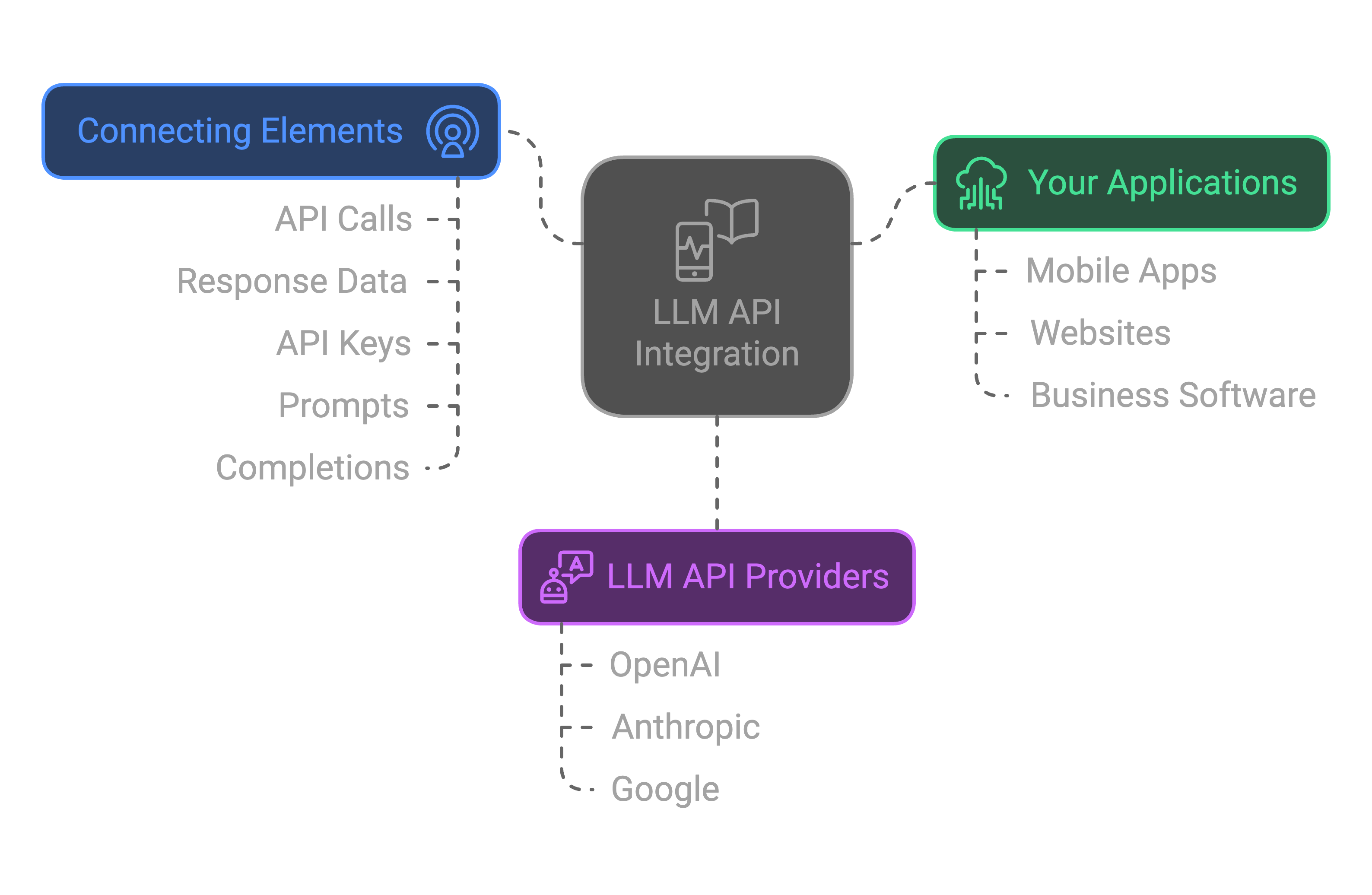
This diagram illustrates how your applications connect to LLM providers via an API. Our focus today is on the "Connecting Elements"—specifically, making that initial API call.
Interacting with an LLM via its API offers several advantages over the web UI, such as the ability to customize the model's behavior, process inputs and outputs programmatically, and integrate the model into automated workflows.
To understand these benefits more clearly, please watch a short segment from the video "The OpenAI (Python) API | Introduction & Example Code" by Shaw Talebi.
The OpenAI (Python) API | Introduction & Example Code
This clip highlights the unique features and advantages of using the API, which are not available through the standard ChatGPT interface.
Watch the section from here, which discusses customizable system messages, adjustable parameters, and other powerful capabilities exclusive to the API.
Two Paths to an API Call
As a software engineer, you know there are often multiple ways to achieve the same result. Interacting with LLM APIs in Python is no different. The two primary methods are:
- Direct HTTP Requests: Using a general-purpose library like
requeststo manually construct and send HTTP requests. This gives you full control and helps you understand the underlying protocol. - Provider-Specific SDKs: Using a Software Development Kit (SDK) provided by the LLM company (e.g., OpenAI, Anthropic, Google). SDKs are libraries that wrap the API in convenient, language-specific functions, abstracting away the low-level HTTP details.
For most application development, the SDK is the preferred path due to its convenience and robustness. However, understanding what the SDK does under the hood is valuable. The following reading from APXML's course provides an excellent overview of both approaches.
Making LLM API Requests with Python
This article clearly contrasts making API calls with the requests library versus a provider SDK. It will solidify your understanding of the mechanics before we focus on the SDK method.
Please read the entire article. Pay close attention to: The introduction explaining the two methods. The detailed example of using the requests library. Note the manual setup of the URL, headers, and payload. The corresponding example using the OpenAI SDK. See how the SDK simplifies the process. The final section summarizing when to choose each approach.
Setting Up Your Environment
Now, let's get your hands dirty. To make our first API call, we need to set up your development environment. We'll use OpenAI's API as our example, as it's widely used and well-documented.
The setup involves three main steps:
- Obtaining an API key.
- Installing the required Python libraries.
- Storing your API key securely.
The video below provides a clear, step-by-step walkthrough of creating an OpenAI account, navigating the billing settings, and generating your first secret API key.
The OpenAI (Python) API | Introduction & Example Code
Follow along with this guide to get your OpenAI API key.
Watch the segment from this timestamp. It covers creating an account, adding a payment method (a small credit is needed, but initial experiments are very cheap), setting usage limits (highly recommended!), and creating and copying your secret API key. Remember to copy your key and save it somewhere safe immediately, as OpenAI will not show it to you again.
With your API key in hand, the next step is to set up your Python project.
OpenAI API Python Tutorial — Chat Completions, Streaming & Error Handling - machinelearningplus
This guide provides concise instructions for installing the necessary packages and securely configuring your API key using an environment file.
Follow the instructions in the "Setup" section. Specifically, focus on: The pip install command for the required libraries. The process of creating a .env file to store your API key. This is a critical security practice to avoid exposing your key in your source code.
Your First Programmatic API Call
You are now ready to write the code. We will use the OpenAI Python SDK, which you just installed. It provides a clean and Pythonic way to interact with the API.
The process involves:
- Importing the
OpenAIclient andos/dotenvfor key management. - Loading the environment variables from your
.envfile. - Initializing the
OpenAIclient, which automatically finds the key from the environment. - Calling the
client.chat.completions.create()method with your prompt. - Printing the response from the model.
Let's look at the code.
OpenAI API Python Tutorial — Chat Completions, Streaming & Error Handling - machinelearningplus
This part of the tutorial will walk you through initializing the client and making your very first API call.
Read the sections "Initialize the Client" and "Your First Chat Completion". First, review the code for initializing the client. Then, carefully study the code for your first API call. Notice the two key arguments passed to chat.completions.create(): model and messages. The messages argument is a list of dictionaries, which is how you provide the prompt.
Here is a complete, runnable script you can use. Create a file named main.py in the same directory as your .env file, and paste this code into it.
import os
from openai import OpenAI
from dotenv import load_dotenv

# Load environment variables from .env file
load_dotenv()

# The OpenAI client automatically looks for the OPENAI_API_KEY
# in the environment variables.
try:
    client = OpenAI()
    print("OpenAI client initialized successfully.")

    # Make the API call
    print("Sending request to the API...")
    chat_completion = client.chat.completions.create(
        model="gpt-4o-mini",  # A fast and cost-effective model
        messages=[
            {
                "role": "user",
                "content": "Explain what an API is to a software engineer in one sentence.",
            }
        ],
    )

    # Extract and print the response
    response_content = chat_completion.choices[0].message.content
    print("\nLLM Response:")
    print(response_content)

    # You can also inspect the full response object
    # print("\nFull response object:")
    # print(chat_completion)

except Exception as e:
    print(f"An error occurred: {e}")
    print("Please check if your OPENAI_API_KEY is set correctly in the .env file.")
Run this script from your terminal: python main.py.
If everything is configured correctly, you will see a response from the LLM printed to your console. Congratulations, you have successfully made your first programmatic API call to a large language model!
Conclusion
In this lesson, you've made the pivotal transition from a GUI user to an API-empowered developer. You now understand the "why" and "how" of programmatic LLM interaction.
Here are the key takeaways:
- LLM APIs provide the control and automation necessary to build sophisticated AI applications.
- Setup involves getting an API key, installing the provider's SDK (
openai), and securely managing the key using environment variables (.envfile). - The OpenAI Python SDK simplifies interaction, allowing you to make a chat completion request with the
client.chat.completions.create()method. - A basic request requires specifying a
modeland amessageslist containing the prompt.
You've built the fundamental block. In our next lesson, we will build upon this foundation. You'll learn how to structure your prompts more effectively using system and user roles to better control the LLM's personality and behavior. This will give you more fine-grained command over the conversations you orchestrate in your code.