Hello! Welcome to your first lesson. This course is designed to sharpen your Core Java, Spring Boot, and Microservices knowledge for mid-to-senior level technical interviews. We'll focus on building a deep, articulable understanding of how things work under the hood.
This first module focuses on the bedrock of the Java platform: Core Java and JVM internals. While you have extensive hands-on experience with Java and Spring Boot, top-tier interviews often probe these fundamental concepts to gauge the depth of your knowledge.
Today's lesson addresses the first learning outcome: Explain the differences between JDK, JRE, and JVM and their roles in application execution. We'll break down these core components, clarify their individual responsibilities, and see how they work together to bring your Java code to life.
The Journey from Source Code to Execution
At the heart of Java is the principle of "Write Once, Run Anywhere" (WORA). This means you can write and compile your Java code on one operating system (like Windows) and run it without modification on another (like Linux or macOS). The magic behind this is the Java Virtual Machine (JVM).
The overall process looks like this:
- You write human-readable source code in a
.javafile. - You use a compiler to transform your source code into a platform-independent format called bytecode, which is stored in a
.classfile. - The JVM, which is specific to each operating system, takes this bytecode and executes it.
To get a feel for this process, let's watch a short segment from the video "#4 How Java Works" by Telusko.
This video provides a great visual walkthrough of the compilation and execution flow in Java. It clearly explains how source code is converted to bytecode, which is then run by the JVM.
Watch the following segments: 00:16 - 02:41: This part introduces the JVM and its role in achieving platform independence. 02:41 - 03:55: Focus on the explanation of compiling .java source code into .class bytecode. 08:19 - 09:25: Observe the practical demonstration of using javac to compile and java to run the code.
Now that you've seen the high-level flow, let's break down each component—JVM, JRE, and JDK—in detail.
The Core Components: JVM, JRE, and JDK
While the terms are often used together, they represent distinct layers of the Java platform. Understanding their relationship is fundamental. For a quick and clear breakdown, watch the following video from the "Coding with John" channel.
JVM, JRE, and JDK - Fully Explained in 5 Minutes
This video, 'JVM, JRE, and JDK - Fully Explained in 5 Minutes', offers a concise and accurate explanation of each component and how they fit together.
Watch the video from 00:27 to 05:10. Pay close attention to: The definition of the JRE and its contents (Java Standard Library). The role of the JVM in memory management, garbage collection, and platform independence. The components of the JDK, especially the compiler (javac). The final summary that recaps the hierarchy.
Let's solidify those concepts.
1. JVM (Java Virtual Machine)
The JVM is the abstract machine that provides the runtime environment in which Java bytecode can be executed. It's the core component responsible for making "Write Once, Run Anywhere" possible.
- Primary Role: To load, verify, and execute Java bytecode.
- Key Functions:
- Memory Management: Manages memory areas like the heap and stack. (We will dive deep into this in a later lesson).
- Garbage Collection: Automatically reclaims memory used by objects that are no longer needed.
- Platform Independence: While your Java code is platform-independent, the JVM itself is not. There are specific JVM implementations for Windows, Linux, and macOS. The JVM is the bridge that translates universal bytecode into native machine instructions for the underlying hardware and OS.
- Analogy: Think of the JVM as the "engine" of a car. It's what actually does the work of running the vehicle, but it needs the rest of the car's systems (the JRE) to function.
2. JRE (Java Runtime Environment)
The JRE is the software package that provides the necessary components to run Java applications. If a user only needs to run a pre-compiled Java program, they only need to install the JRE.
- Primary Role: To provide the environment for executing compiled Java applications.
- Composition: It's a superset of the JVM.
- JVM: The execution engine itself.
- Java Class Libraries: A set of standard libraries that your code can use at runtime (e.g.,
java.lang,java.utilfor collections,java.iofor input/output).
- Analogy: The JRE is the "car" itself, but without any of the tools you'd need to build or repair it. It has the engine (JVM) and all the necessary parts (libraries) to drive, but that's it.
3. JDK (Java Development Kit)
The JDK is the full-featured software development kit for creating Java applications. As a Java developer, this is what you install and use.
- Primary Role: To provide all the tools necessary to compile, debug, and run Java applications.
- Composition: It's a superset of the JRE.
- JRE: Everything needed to run the applications you're developing.
- Development Tools:
javac: The Java compiler.java: The launcher for Java applications (which starts up the JVM).jdb: The Java debugger.jar: The archiver, which packages class files into.jarfiles.javadoc: The documentation generator.
- Analogy: The JDK is the entire "auto-shop". It includes the car (JRE), the engine (JVM), and all the tools (compiler, debugger) needed to build, maintain, and fix cars.
Visualizing the Relationship
The relationship between these three components is hierarchical. The following diagram illustrates this clearly:
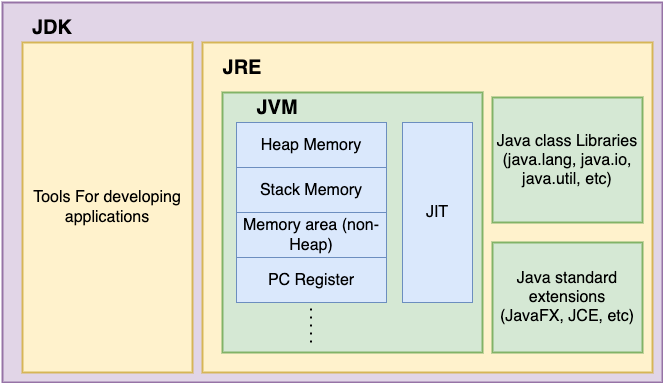
Test your understanding!
A non-technical project manager on your team is setting up a new server that will only be used to run the production build of your Spring Boot application (a .jar file). They ask you whether they should install the JDK or the JRE. What is your recommendation and why?
Show answer
You should recommend installing the JRE (Java Runtime Environment).
The JRE contains everything necessary to run a compiled Java application, including the JVM and the standard libraries. The JDK, on the other hand, is for developing applications and includes tools like the compiler (javac), which are unnecessary on a production server that is only executing pre-compiled code. Installing only the JRE is more efficient, secure (a smaller attack surface), and uses fewer system resources.
Answering in an Interview Context
In an interview, you need to be clear and concise. A common question is, "What is the difference between JDK, JRE, and JVM?". The following reading from Baeldung provides an excellent, structured answer that you can adapt.
The article 'Java Interview Questions' from Baeldung has a specific section that directly answers this common interview question. It's a great summary to help you structure your own response.
Read section Q5, titled 'What Is the Difference Between JDK, JRE, and JVM?'. Focus on how it clearly distinguishes the purpose of each component: JDK for development, JRE for running, and JVM for execution.
A Quick Word on JIT (Just-In-Time) Compilation
You may also be asked about the JIT (Just-In-Time) compiler. This is a component of the JVM that improves the performance of Java applications at runtime.
- The JVM initially interprets the bytecode, which is relatively slow.
- The JIT compiler identifies "hot spots" in your code—parts that are executed frequently.
- It then compiles these hot spots directly into native machine code, which can be executed much faster by the processor.
This is a performance optimization that happens transparently. The article from Medium, "Top 140 Java Interview Questions," briefly mentions this in its answer.
Top 140 Java Interview Questions Answers for 3 to 5 Years ...
This article provides a list of common interview questions. We'll look at one specific question that defines all four acronyms together.
Find and read the answer to question 39: 'What is the difference between JRE, JDK, JVM and JIT?'. This will reinforce your understanding and add the JIT compiler to your mental map.
Summary
Let's recap the key points of this lesson:
- JDK (Java Development Kit): For developing Java applications. It contains the JRE plus development tools like the compiler (
javac). - JRE (Java Runtime Environment): For running Java applications. It contains the JVM and the necessary Java class libraries.
- JVM (Java Virtual Machine): The core "engine" that executes compiled Java bytecode. It is platform-specific and provides features like memory management and garbage collection.
- Execution Flow: You use the JDK to write and compile
.javafiles into.classbytecode. To run the application, the JRE provides the JVM and libraries to execute that bytecode.
Mastering these fundamentals is the first step toward excelling in a senior-level Java interview. It shows you understand the platform, not just the language.
In our next lesson, we will peel back the layers of the JVM itself to explore its internal architecture, including its runtime data areas, the class loading mechanism, and the execution engine.