Hello! Welcome to the third lesson in our Core Java module.
In the last lesson, we explored the internal architecture of the JVM, including its runtime data areas. We learned that the Heap is the memory space where all Java objects are allocated. This lesson will build directly on that knowledge.
Today, we'll focus on one of the most fundamental and frequently discussed topics in Java interviews: the String class. Our learning outcome is to compare String, StringBuilder, and StringBuffer, explaining string immutability and the String pool.
Mastering this topic is non-negotiable for senior developer interviews. It demonstrates your understanding of memory management, performance optimization, and thread safety—three pillars of robust software engineering. We will cover not just what these classes do, but why they are designed the way they are.
Part 1: The Immutability of String
The single most important characteristic of the Java String class is its immutability. This means that once a String object is created, its content cannot be changed. Any operation that appears to modify a String actually creates a brand-new String object.
Let's see this in action and understand the mechanism behind it.
String Immutability & String Pool Explained with Examples | Java Interview Guide
The following video from the CodeSnippet channel provides a clear demonstration of what string immutability means and introduces the concept of the String Pool, a special area within the Heap.
Watch the segment from 01:18 to 06:21. Focus on: How the concat() method doesn't change the original string. The definition of the String Pool (also called the string constant pool or intern pool) as a special storage area within the Java Heap. How creating a string with a literal (e.g., String s = "abc";) causes the JVM to check the pool first.
Key Concepts: Immutability and the String Pool
As the video explained, when you write code like this:
String s1 = "Java";
s1.concat(" is great"); // This creates a NEW string object
System.out.println(s1); // This will still print "Java"
The original String object containing "Java" remains untouched. The concat() method returns a new String object containing "Java is great", which is then discarded unless you assign it to a new reference:
String s2 = s1.concat(" is great");
System.out.println(s2); // Prints "Java is great"
This behavior is enabled by the String Pool. As we learned in the last lesson, objects live on the Heap. The String Pool is a special, optimized area of the Heap where Java stores String literals.
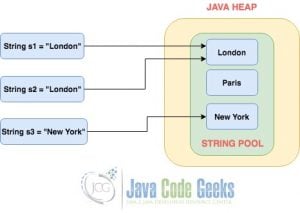
When the JVM encounters a string literal like "Java", it does the following:
- It checks the String Pool to see if a string with this value already exists.
- If it exists, the JVM returns a reference to that existing object in the pool.
- If it doesn't exist, a new
Stringobject is created in the pool, and a reference to it is returned.
This is a powerful memory optimization technique.
Part 2: Creating Strings: Literals vs. new Keyword
How you create a string has significant implications for memory. You can create a string as a literal or by explicitly using the new keyword.
// s1 refers to an object in the String Pool
String s1 = "Test";

// s2 also refers to the SAME object in the String Pool
String s2 = "Test";

// s3 refers to a NEW object created directly on the Heap
String s3 = new String("Test");
Let's watch a video segment that clarifies this distinction and introduces the intern() method, a way to manually interact with the String Pool.
String Immutability & String Pool Explained with Examples | Java Interview Guide
This next segment from the same video explains the crucial difference between creating strings with literals versus the new keyword and how the intern() method bridges this gap.
Watch from 06:21 to 08:03 and then from 12:04 to 13:55. Pay close attention to: Where new String("...") creates an object (on the Heap, outside the pool). The purpose of the intern() method: to get a reference to the string from the pool, adding it if it's not already there.
To summarize:
String s = "literal";uses the String Pool.String s = new String("literal");bypasses the pool and always creates a new object on the heap.s.intern()on a heap-allocated string will check the pool. If an equivalent string exists, the pooled reference is returned. If not, the string is added to the pool.
This difference is a classic interview trap, often tested with questions about the == operator versus the .equals() method.
==compares object references (memory addresses)..equals()compares the actual content of the strings.
Test your understanding!
What will the following code print? Explain your reasoning for each line.
public class StringComparison {
    public static void main(String[] args) {
        String s1 = "SpringBoot";
        String s2 = "SpringBoot";
        String s3 = new String("SpringBoot");
        String s4 = s3.intern();

        System.out.println("s1 == s2: " + (s1 == s2));
        System.out.println("s1 == s3: " + (s1 == s3));
        System.out.println("s1.equals(s3): " + s1.equals(s3));
        System.out.println("s1 == s4: " + (s1 == s4));
    }
}
Show answer
The output will be:
s1 == s2: true
s1 == s3: false
s1.equals(s3): true
s1 == s4: true
Reasoning:
s1 == s2:true. Boths1ands2are string literals. The JVM finds"SpringBoot"in the String Pool fors1, and when it seess2with the same value, it returns the same memory reference from the pool.s1 == s3:false.s1points to the object in the String Pool.s3is created with thenewkeyword, so it's a new object on the heap, at a different memory address.s1.equals(s3):true. The.equals()method compares the character sequences inside the strings, which are identical.s1 == s4:true.s3.intern()checks the String Pool for"SpringBoot". It finds the object thats1is already pointing to and returns that reference, which is then assigned tos4. Therefore,s1ands4point to the exact same object.
Part 3: Why Are Strings Immutable?
This is a cornerstone interview question. The decision to make String immutable in Java was deliberate and provides several key benefits.
String Immutability & String Pool Explained with Examples | Java Interview Guide
Let's explore the critical reasons behind Java's decision to make strings immutable. Understanding these reasons is key to demonstrating deep conceptual knowledge in an interview.
Watch the segment from 08:03 to 12:04. The video explains the three primary motivations for string immutability. As you watch, try to formulate your own answer to the question, "Why are strings immutable?"
Here is a summary of the reasons, perfect for an interview response:
-
String Pool & Performance: Immutability is what makes the String Pool possible. If strings were mutable, one reference variable could change the string's value, which would affect all other references pointing to that same object in the pool. This would be chaotic. By being immutable, strings can be safely shared, saving significant memory.
-
Thread Safety: Because a
Stringobject's state can never change after creation, it is inherently thread-safe. You can pass strings between threads without any need for synchronization, which simplifies concurrent programming. -
Security: Strings are widely used for sensitive information like database connection URLs, usernames, passwords, and file paths. If strings were mutable, a malicious piece of code could potentially change the value of a string after a security check has been performed, leading to serious vulnerabilities.
-
Hashcode Consistency:
Stringis a very common key inHashMap. AHashMaprelies on the key'shashCode()remaining constant. SinceStringis immutable, itshashCode()is calculated once and cached. If strings were mutable, the hash code could change, making it impossible to retrieve the value associated with that key from the map.
Part 4: The Mutable Alternatives - StringBuilder and StringBuffer
If every string modification creates a new object, what happens when you need to build a string through many modifications, like in a loop?
// Inefficient code
String logMessage = "";
for (String part : logParts) {
    logMessage += part; // Creates a new String object in every iteration!
}
This is extremely inefficient. It creates a large number of intermediate String objects that need to be garbage collected. To solve this, Java provides two mutable alternatives: StringBuilder and StringBuffer.
Let's watch a video that compares these classes and explains when to use them.
String vs StringBuilder vs StringBuffer | What is Immutability? | Java String Operations | Geekific
The Geekific channel video below compares String, StringBuilder, and StringBuffer, highlighting the performance implications of using immutable strings for concatenation.
Watch these two segments: First, watch from 00:14 to 02:45. This part introduces StringBuilder and StringBuffer and contrasts their mutability with String's immutability. Next, watch from 04:07 to 05:10 and 05:49 to 06:47. This explains why StringBuilder is more efficient for concatenation, touching on the time complexity.
Here's the breakdown of the three classes:
| Feature | String |
StringBuilder |
StringBuffer |
|---|---|---|---|
| Mutability | Immutable | Mutable | Mutable |
| Thread Safety | Thread-safe (by nature of immutability) | Not thread-safe | Thread-safe (methods are synchronized) |
| Performance | Slower for frequent modifications | Faster (no synchronization overhead) | Slower (due to synchronization overhead) |
| When to Use | When the string value will not change. Good for HashMap keys, configuration parameters. |
Default choice for string building in a single-threaded environment (e.g., inside a method). | For building a string that is modified by multiple threads. This is less common today. |
The efficient way to write the previous loop example is with StringBuilder:
// Efficient code
StringBuilder logBuilder = new StringBuilder();
for (String part : logParts) {
    logBuilder.append(part); // Modifies the internal buffer, no new objects created
}
String logMessage = logBuilder.toString(); // Creates the final String once
Conclusion
You've now covered one of the most fundamental topics in Core Java. A deep understanding of how String, StringBuilder, and StringBuffer work is a strong signal to interviewers that you have a solid grasp of Java's design principles.
Key Takeaways:
Stringis immutable: Its value cannot change after creation. This provides thread safety, security, and enables performance optimizations like the String Pool.- The String Pool: A special area in the heap that stores string literals to conserve memory by reusing objects with the same value.
"literal"vs.new String(): Literals use the pool, whilenewalways creates a new object on the heap.StringBuilderandStringBufferare mutable alternatives for when you need to perform many modifications to a string.StringBuilderis the standard choice for most use cases (single-threaded).StringBufferis its slower, thread-safe counterpart.
In our next lesson, we will dive deeper into a related topic: implementing the equals() and hashCode() contract. We briefly touched on hashcode consistency as a reason for string immutability, and next time, we'll explore exactly what that contract entails and why it's so critical for collections like HashMap.