Hello! Welcome to the first lesson in our final module, "CI/CD & System Design Interview Practice."
In the last module, you mastered the art of deploying, managing, and scaling a Spring Boot application on Kubernetes. We manually applied configurations to deploy our app, set resource limits, and even configured Horizontal Pod Autoscaling. The next logical step, and a crucial aspect of modern software engineering, is to automate this entire process.
Today, we'll focus on the first and most fundamental part of that automation: Continuous Integration (CI). We will tackle the process of taking your source code from a Git repository and reliably turning it into a verified, packaged artifact, ready for deployment.
This lesson covers the learning outcome: Create a CI/CD pipeline using GitHub Actions to build, test, and package a Spring Boot application. This is a core competency for any mid-to-senior level developer and a frequent topic in technical and system design interviews.
1. The Anatomy of a GitHub Actions Workflow
Before we write any code, let's understand the core concepts of GitHub Actions, the platform we'll use to build our CI pipeline. A workflow is triggered by an event and is composed of one or more jobs, which in turn contain a series of steps.
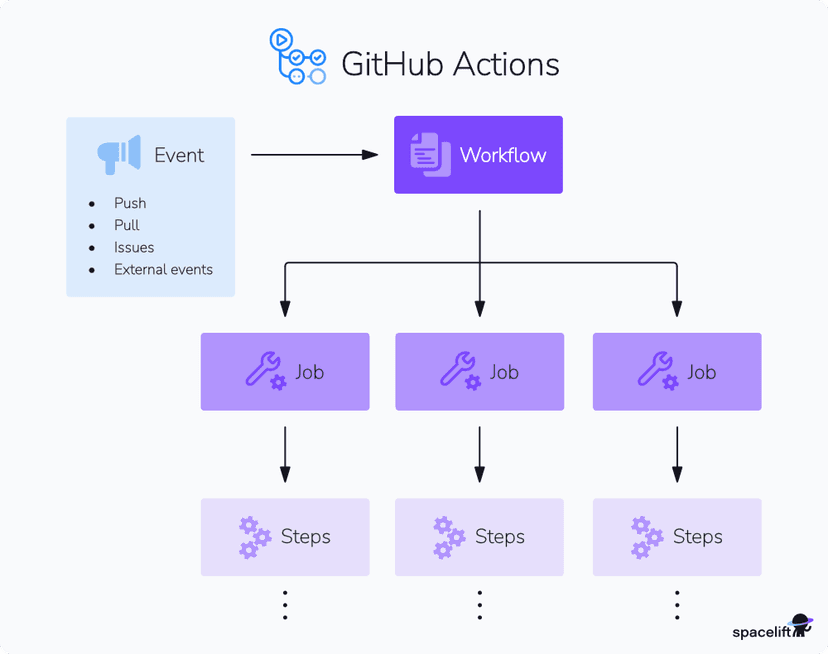
Here are the key terms:
- Workflow: An automated process defined by a YAML file in your repository's
.github/workflowsdirectory. - Event: A specific activity that triggers a workflow, such as a
pushto a branch or the creation of apull_request. - Job: A set of steps that execute on the same runner. By default, jobs run in parallel. You can configure jobs to run sequentially if one depends on another.
- Step: An individual task that can run commands (
run) or use a reusable piece of code called an Action (uses). - Action: A pre-built, reusable command that you can include in your workflow to avoid writing repetitive code. Examples include checking out your repository (
actions/checkout) or setting up a specific version of Java (actions/setup-java). - Runner: A server (managed by GitHub or self-hosted) that executes your workflow's jobs.
2. A Foundational CI Pipeline for Spring Boot
Let's build our first CI pipeline. The goal is to create a workflow that automatically compiles our Spring Boot application, runs its tests, and packages it into a JAR file every time we push new code or open a pull request.
To see how these concepts are put into practice, we'll examine a real-world example.
Deploy a SpringBoot application using GitHub Actions
The article 'Deploy a SpringBoot application using GitHub Actions' by Teric Cabrel provides a complete workflow. We will start by focusing on the initial Continuous Integration (CI) part, which is self-contained in a single job.
Please read two sections of the article: Start with 'Initialize the GitHub Actions file' to understand where the workflow file lives and how it's triggered. Then, jump to the subsection 'The "Project build" job' to see the YAML for the first job that compiles, tests, and packages the application. Focus on the purpose of each step within the project-build job.
The project-build job from the article provides an excellent foundation. Let's analyze its structure.
# A typical CI job for a Maven project
jobs:
  build-and-test:
    runs-on: ubuntu-latest
    steps:
    - name: Checkout repository
      uses: actions/checkout@v3

    - name: Set up JDK 17
      uses: actions/setup-java@v3
      with:
        java-version: '17'
        distribution: 'temurin' # A popular OpenJDK distribution

    - name: Cache Maven packages
      uses: actions/cache@v3
      with:
        path: ~/.m2/repository
        key: ${{ runner.os }}-maven-${{ hashFiles('**/pom.xml') }}
        restore-keys: |
          ${{ runner.os }}-maven-

    - name: Build, Test, and Package
      run: mvn --batch-mode verify
Let's break down the key steps:
actions/checkout@v3: This Action checks out your repository's code onto the runner, so the job can work with it.actions/setup-java@v3: This Action installs a specified version of the JDK on the runner.actions/cache@v3: This is a critical optimization step often discussed in interviews. It caches your downloaded Maven dependencies (.m2/repository). Thekeyis generated from a hash of yourpom.xmlfile. If thepom.xmlhasn't changed, the cache is restored, saving significant time and network bandwidth on subsequent runs.run: mvn --batch-mode verify: This is the core command. In Maven's lifecycle, theverifyphase does everything we need: it compiles the code (compile), runs the tests (test), and packages the application into a JAR file (package). Usingverifyis a concise way to accomplish all three goals of our learning outcome.
3. Interview Focus: Designing a Scalable Pipeline
The single-job approach is effective, but for larger projects, a more structured pipeline is often preferred. Senior engineering interviews will probe your ability to design systems for clarity, maintainability, and efficiency.
A common interview question might be: "How would you structure a CI pipeline to provide faster feedback and allow for more complex stages?"
A great answer involves breaking the monolithic job into smaller, single-responsibility jobs that depend on each other. For example: compile, test, and package.

Let's explore how to implement this using a powerful GitHub Actions feature: reusable workflows.
The Power of Reusable Workflows for Clean, Scalable CI/CD
The article 'The Power of Reusable Workflows for Clean, Scalable CI/CD' by Nipun Jayasanka demonstrates an elegant solution to building modular pipelines. It shows how to separate the 'compile', 'test', and 'build' phases into distinct jobs.
Please read the following parts of the article: 'What We’re Building' to understand the goal of a refactored pipeline. 'The Reusable Workflow: setup-java-maven.yml' to see how a generic Java/Maven setup can be created. 'The Main Pipeline: cicd-pipeline.yml' to see how this reusable workflow is called for each distinct stage (compile, test, build). Focus on how the uses, with, and needs keywords create a clean, multi-stage pipeline.
Key Concepts from the Scalable Design
From the article, we can extract a superior design pattern:
-
Main Workflow (
cicd-pipeline.yml): This file defines the high-level logic. It's clean and readable.name: Spring Boot CI Pipeline on: [push, pull_request] jobs: compile: name: Compile Project uses: ./.github/workflows/reusable-maven.yml with: maven-command: compile test: name: Test Application needs: compile # Ensures compilation happens first uses: ./.github/workflows/reusable-maven.yml with: maven-command: test package: name: Package Application needs: test # Ensures tests pass before packaging uses: ./.github/workflows/reusable-maven.yml with: maven-command: package -DskipTests # We skip tests here because they already ran in the 'test' job -
Reusable Workflow (
reusable-maven.yml): This file contains the boilerplate steps like checkout, Java setup, and caching. It accepts an input to decide which Maven command to run.
This modular design offers several advantages, which are excellent points to raise in an interview:
- Clarity & Maintainability: Each job has a single, clear purpose. The main pipeline reads like a high-level summary of your process.
- Faster Feedback: You can see exactly which stage failed (
compile,test, orpackage) without parsing long log files. - Parallelism: While our example is sequential, this structure allows for running independent jobs (e.g.,
lintandtest) in parallel to shorten the feedback loop. - Reusability (DRY Principle): The common setup logic is defined once and reused, making updates (like changing the Java version) trivial.
Test your understanding! (Interview Question)
You are reviewing a colleague's GitHub Actions workflow for a Spring Boot project. You see the following snippet:
jobs:
  build:
    runs-on: ubuntu-latest
    steps:
      - uses: actions/checkout@v3
      - uses: actions/setup-java@v3
        with:
          java-version: '17'
      - name: Install Dependencies and Run Tests
        run: |
          mvn install
          mvn test
The pipeline works, but you see room for improvement. What are two concrete suggestions you would make to improve this workflow's performance and correctness, and why?
Show answer
Here are two key suggestions:
-
Add Dependency Caching: The current workflow downloads all Maven dependencies from scratch on every run. This is slow and inefficient. I would add the
actions/cache@v3step to cache the~/.m2/repositorydirectory. This would dramatically speed up build times, especially for projects with many dependencies, by only downloading new or updated libraries. -
Use the Correct Maven Lifecycle Phase: The
runstep executesmvn installfollowed bymvn test. This is redundant. Theinstallphase already executes thetestphase as part of its lifecycle. A better approach would be to use a single command likemvn verifyormvn install.mvn verifyis often preferred in CI as it runs all phases up to and including packaging without installing the artifact to the local repository, which is usually unnecessary in a CI environment. This makes the pipeline more idiomatic and slightly faster by avoiding redundant test execution.
Conclusion
In this lesson, you've learned how to automate the crucial first stage of a CI/CD process for a Spring Boot application using GitHub Actions. You can now create a workflow that builds, tests, and packages your code, ensuring that every change is automatically validated.
Key Takeaways:
- Continuous Integration (CI) is the practice of automating the
build,test, andpackagestages to provide rapid feedback to developers. - GitHub Actions workflows are defined in YAML and consist of a hierarchy of Workflows, Jobs, and Steps.
- A basic CI pipeline for a Maven project involves checking out code, setting up Java, caching dependencies, and running
mvn verify. - For interview-level discussions and real-world scalability, designing a modular pipeline with separate, dependent jobs (e.g.,
compile,test,package) using techniques like reusable workflows is a superior pattern.
Preview of the Next Lesson:
We've successfully packaged our application into a JAR file. But in a modern microservices architecture, we deploy containers, not JARs. In our next lesson, "Automate the building and pushing of a Docker image to a container registry within a CI/CD pipeline," we will extend our workflow. We'll add a new stage that takes our packaged JAR, builds an optimized Docker image around it, and pushes that image to a central registry like Docker Hub, making it ready for deployment.