Hello! Welcome back to our module on Functional Java.
In our last lesson, we built the foundation by understanding functional interfaces, lambda expressions, and method references. We saw how they provide a concise and powerful syntax for expressing behavior. You learned that a lambda's target must be a functional interface and how method references can make your code even more readable.
Today, we'll use that foundation to explore the main event of functional programming in Java: the Stream API. Our learning outcome is to describe the key principles of the Stream API, including lazy evaluation and intermediate vs. terminal operations. This is a cornerstone of modern Java development and a frequent topic in senior-level interviews. We'll uncover not just what streams are, but how they work under the hood to achieve remarkable efficiency.
1. The Stream Pipeline: A Mental Model
First, it's crucial to understand that a Java Stream is not a data structure. It doesn't store data. Instead, think of it as a conveyor belt or a pipeline for data that flows from a source (like a List or an array). You can place "stations" along this pipeline to process the data as it flows by.
A stream pipeline consists of three parts:
- A Source: Where the elements come from (e.g.,
myList.stream()). - Zero or more Intermediate Operations: These are the processing stations. Each station takes in a stream of elements, processes them, and outputs another stream for the next station. Examples include
filter(),map(), andsorted(). - One Terminal Operation: This is the final station at the end of the pipeline. It consumes the elements and produces a final result (like a
List, alongcount, or simply performs an action for each element). Examples includecollect(),count(), andforEach().
This image provides a great visual analogy:

2. Intermediate vs. Terminal Operations
The distinction between intermediate and terminal operations is the most fundamental concept in the Stream API.
- Intermediate Operations always return a new
Stream. They are always lazy. This means invoking an intermediate operation doesn't actually start the processing; it just adds another step to the pipeline's blueprint.- Examples:
filter(Predicate),map(Function),distinct(),sorted(),limit(long).
- Examples:
- Terminal Operations either produce a non-stream result (like a primitive, an
Optional, or a collection) or a side-effect (like printing to the console). They are eager. When you call a terminal operation, you are signaling that you want the final result, which triggers the processing of the entire pipeline.- Examples:
forEach(Consumer),collect(Collector),reduce(),count(),findFirst().
- Examples:
The following video provides a concise summary of these differences.
Intermediate and terminal operation in Stream Java 8 Interview Questions | Difference | Code Decode
This video from 'Code Decode' clearly defines and contrasts intermediate and terminal operations, which is essential for understanding the rest of this lesson.
Watch the following segments: 00:00 - 00:20: Definition of intermediate operations. 04:09 - 04:32: Definition of terminal operations. 10:22 - 12:00: A summary table comparing the key differences. This is a great recap for interviews.
An important rule: A stream pipeline can have only one terminal operation, and once it's called, the stream is considered "consumed" and cannot be reused. If you need to process the same source data again, you must create a new stream from the source.
3. Lazy Evaluation: The Secret to Efficiency
Now we arrive at the most powerful principle of streams: lazy evaluation.
In simple terms, intermediate operations are not executed until a terminal operation is invoked. The stream pipeline is like a blueprint for the work to be done. The actual construction work doesn't start until you give the final command (the terminal operation).
Understanding Lazy Evaluation in Java Streams
This article from DZone provides a clear definition of lazy evaluation in the context of Java Streams.
Read the short sections 'What Is Lazy Evaluation?' and 'Lazy Evaluation in Java Streams' to get a formal definition.
This diagram visually captures the concept. The intermediate operations build up a plan, and only the terminal operation triggers the execution.
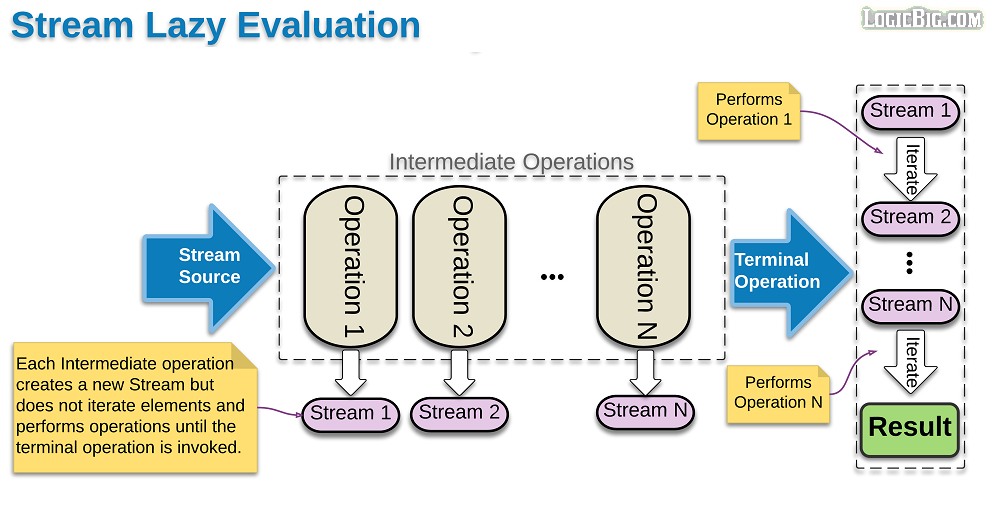
Let's see this in action. The video below uses a debugger to make the concept of lazy evaluation crystal clear.
Java Streams API Explained (with examples)
This video from 'Visual Computer Science' provides an excellent demonstration of lazy evaluation using a debugger. It shows precisely when the code inside an intermediate operation is executed.
Watch the segment from 06:54 to 08:30. Pay close attention to the execution order. Notice how the code inside the .filter() operation is not executed until the .count() terminal operation is called.
This lazy behavior is highly efficient. It allows the Stream API to combine or "fuse" operations and process data in a single pass.
4. How Streams Really Process Data
A common misconception is that streams process data "horizontally" — that is, filter() completes for all elements, then map() completes for all filtered elements, and so on. This would be inefficient, requiring multiple passes over the data.
In reality, for stateless operations, streams process data "vertically". An element is taken from the source and passed through the entire pipeline, and only then is the next element processed.
However, some intermediate operations are stateful (e.g., sorted(), distinct()). These operations need to see the entire input before they can produce an output. They act as a barrier, forcing the stream to process all elements up to that point before proceeding.
For a senior-level interview, understanding this internal behavior is key. This article provides a fantastic explanation of the vertical processing model and the difference between stateless and stateful operations.
Read the 'Execution' section. Focus on the diagrams that contrast the expected 'horizontal' execution with the actual 'vertical' execution for stateless pipelines. Then, observe how a stateful operation like sorted() changes this behavior.
5. Short-Circuiting: The Payoff
A direct benefit of lazy evaluation and vertical processing is short-circuiting. Some operations don't need to process the entire stream to determine the result.
For example, if you are looking for the first element that matches a condition (findFirst()), the pipeline can stop processing as soon as a match is found. Similarly, limit(10) will stop after processing 10 elements. This makes it possible to work with infinite streams!
Consider this example:
Optional<String> firstLongName = names.stream()
                                      .filter(name -> {
                                          System.out.println("Filtering: " + name);
                                          return name.length() > 5;
                                      })
                                      .findFirst(); // Short-circuiting terminal operation
If the first name in the list has more than 5 characters, the filter will only be applied to that one name, and the stream will terminate immediately. No other elements will be processed.
Test your understanding!
Given the following code, what will be printed to the console?
import java.util.stream.Stream;

public class StreamTest {
    public static void main(String[] args) {
        Stream.of("apple", "banana", "apricot", "cherry")
              .filter(s -> {
                  System.out.println("Filtering: " + s);
                  return s.startsWith("a");
              })
              .map(s -> {
                  System.out.println("Mapping: " + s);
                  return s.toUpperCase();
              })
              .limit(2)
              .forEach(s -> System.out.println("Final Result: " + s));
    }
}
Think about the order of operations, vertical processing, and the effect of limit().
Show answer
The output will be:
Filtering: apple
Mapping: apple
Final Result: APPLE
Filtering: banana
Filtering: apricot
Mapping: apricot
Final Result: APRICOT
Explanation:
- "apple": It passes the filter (
startsWith("a")), is mapped to "APPLE", andlimit(2)is not yet satisfied. - "banana": It fails the filter. The map operation is never called for it.
- "apricot": It passes the filter, is mapped to "APRICOT".
- At this point, the
limit(2)condition is met. The stream short-circuits, and "cherry" is never even processed by the filter. This demonstrates both vertical processing and short-circuiting.
Conclusion
You've now covered the theoretical backbone of the Java Stream API. Understanding these principles is what separates a casual user from a developer who can write truly efficient, modern Java code.
Key Takeaways for Your Interview:
- A Stream is a pipeline for processing a sequence of elements from a source.
- Intermediate Operations (
filter,map) are lazy and return a new stream, building up a blueprint of operations. - Terminal Operations (
collect,forEach) are eager, trigger the execution of the entire pipeline, and produce a final result. - Lazy Evaluation is the core principle: no work is done until a terminal operation is called. This enables significant performance optimizations.
- Streams process data vertically (element by element), not horizontally (operation by operation), which allows for short-circuiting operations like
limit()andfindFirst()to terminate early.
Preview of the Next Lesson:
Now that we've mastered the "how," it's time to focus on the "what." In the next lesson, we will put this theory into practice and solve data transformation problems using core stream operations like filter, map, and reduce. We'll move from principles to practical, interview-style problems.