Hello! Welcome to the third lesson in our "Functional Java with Streams & Lambdas" module.
In our last session, we dissected the core principles of the Stream API: the distinction between lazy intermediate operations and eager terminal operations, the efficiency of lazy evaluation, and the "vertical" processing model that enables short-circuiting.
Today, we shift from theory to practice. Our goal is to solve data transformation problems using the core stream operations: filter, map, and reduce. These three operations are the fundamental building blocks for the vast majority of stream-based interview questions you will encounter. By mastering them, you'll be able to deconstruct complex requirements into a clear, functional pipeline.
1. The Core Transformation Toolkit
Think of filter, map, and reduce as your primary tools for manipulating data streams. Let's look at each one.
filter(Predicate<T>): The Selector
The filter operation is used to select elements from a stream that match a specific condition. It takes a Predicate (a function that returns a boolean) and produces a new stream containing only the elements for which the predicate returned true. In the context of your development experience, you can think of it as the stream equivalent of a SQL WHERE clause.
Java Streams API Explained (with examples)
To see a practical demonstration, watch this segment from the 'Java Streams API Explained' video by Visual Computer Science. It shows how filter is used to select cars of a specific type from a list.
Watch from 00:16 to 03:12. Notice how a List<Car> is turned into a Stream<Car>, filtered, and then collected back into a List<Car>.
map(Function<T, R>): The Transformer
The map operation transforms each element of a stream into another object. The output stream will have the same number of elements as the input stream, but their type and value can be completely different. This is analogous to a SQL SELECT clause where you might transform columns (e.g., SELECT price * 1.2 FROM products).
Java Streams API Explained (with examples)
The same video provides an excellent explanation of map, showing how to transform a stream of Car objects into a stream of Strings representing their makes.
Watch from 03:12 to 04:50. Pay attention to how the type of the stream's elements changes from Car to String after the map operation.
reduce(identity, accumulator): The Aggregator
The reduce operation is one of the most powerful terminal operations. It combines all elements of a stream into a single result. It takes two main arguments:
identity: An initial value for the reduction. This is the value the accumulator starts with and the default result if the stream is empty.accumulator: ABinaryOperator(a function that takes two arguments of the same type and returns a result of that same type). It's applied repeatedly to combine the current accumulated result with the next element in the stream.
For example, to find the product of all integers in a list:
List<Integer> numbers = List.of(1, 2, 3, 4, 5);

int product = numbers.stream()
                     .reduce(1, (subtotal, element) -> subtotal * element);

// How it works:
// subtotal starts at 1 (the identity)
// 1. subtotal = 1 * 1 = 1
// 2. subtotal = 1 * 2 = 2
// 3. subtotal = 2 * 3 = 6
// 4. subtotal = 6 * 4 = 24
// 5. subtotal = 24 * 5 = 120
// Final result: 120

System.out.println("Product: " + product);
This example comes from the "100 Java Streams Interview Questions" article, which is a great resource for quick examples of common operations.
2. Chaining Operations: Building the Pipeline
The real power of streams comes from chaining these operations together to form a processing pipeline. Each intermediate operation feeds its output to the next, allowing for elegant and readable data transformations.
Let's look at an example that combines filter and map before a terminal operation.
Java Stream Hard Interview Questions
This article, 'Java Stream Hard Interview Questions,' contains a concise example of a stream pipeline. We'll focus on the code snippet that demonstrates chaining.
Find the code block under the question 'How do you implement a stream pipeline that performs multiple transformations and aggregations?'. Analyze how it first filters for even numbers, then maps them to doubles multiplied by 2, and finally calculates the average.
The code you just reviewed demonstrates a typical pipeline:source.stream().filter(...).map(...).terminalOperation()
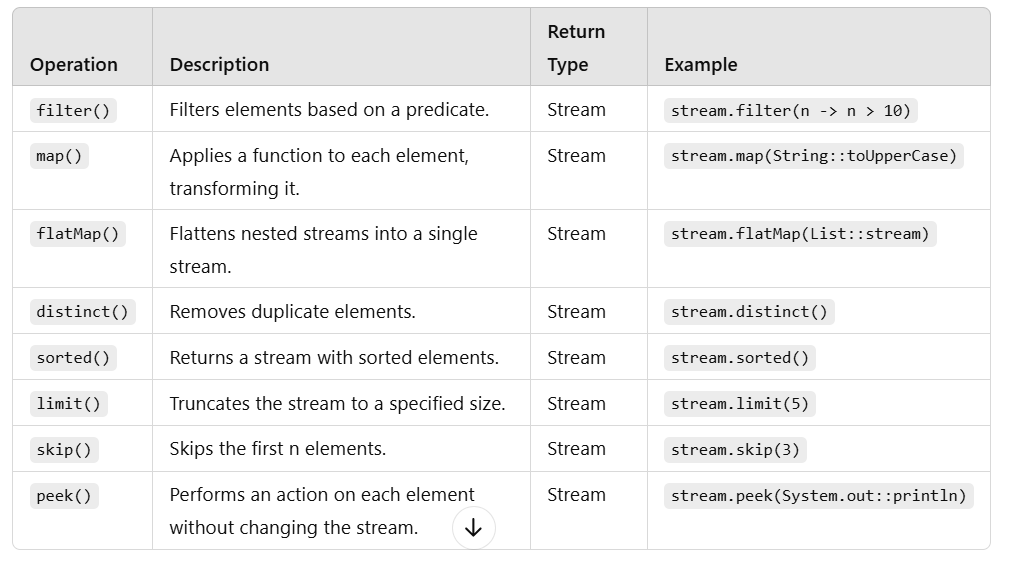
This pattern is central to solving interview problems. Here is a quick reference table summarizing common intermediate operations.
Test your understanding!
Given a List<String> words, write a stream pipeline to calculate the sum of the lengths of all words that contain the letter 'a'.
Show answer
import java.util.List;

public class Test {
    public static void main(String[] args) {
        List<String> words = List.of("apple", "banana", "cherry", "date");

        int totalLength = words.stream()
                              .filter(word -> word.contains("a")) // Select words with 'a'
                              .mapToInt(String::length)           // Transform to integer lengths
                              .sum();                             // Terminal operation to sum them up

        // The result will be 5 (apple) + 6 (banana) + 4 (date) = 15
        System.out.println(totalLength); // Output: 15
    }
}
Note: mapToInt is a specialized version of map that returns an IntStream, which has convenient terminal operations like sum(), average(), etc.
3. Interview Problem Workshop
Let's apply these concepts to some common interview-style problems. The key is to break down the problem into a sequence of filter, map, and reduce steps.
Java Stream Interview Questions 💡 Level Hard | Part 1
The following problems are from the 'Java Stream Interview Questions' video by CodeSnippet. It's a fantastic resource for seeing how these core operations are used to solve non-trivial problems.
We will tackle two problems from this video.
Problem 1: Find the Longest Word in a Sentence
The Task: Given a string (a sentence), find and return the longest word. Ignore punctuation and case.
Before watching the solution, think about how you would model this with streams:
- Source: How do you get a stream of words from a sentence? (Hint:
split()) - Transformation (
map): How do you handle punctuation and case? - Reduction (
reduce): How do you compare all the words to find the one with the maximum length?
Now, let's see an expert solution.
Java Stream Interview Questions 💡 Level Hard | Part 1
Watch this segment to see how to solve the 'longest word' problem.
Watch from 17:54 to 21:20. Pay attention to the pre-processing step using replaceAll and toLowerCase before the stream pipeline begins. The max() operation is a specialized form of reduce designed for finding maximum values.
Key Steps from the Solution:
- Pre-process: The sentence is cleaned using
toLowerCase()andreplaceAll("[^a-zA-Z\\s]", "")to remove punctuation. This is a common and important first step. - Source:
Arrays.stream(sentence.split("\\s+"))creates the initialStream<String>. - Reduction:
.max(Comparator.comparing(String::length))is used to find the longest string. This is more concise than a customreduceoperation for this specific task.
Problem 2: Reverse Each Word in a Sentence
The Task: Given a sentence, reverse each word in its place, but keep the words in their original order.
Again, plan your pipeline:
- Source: Get a stream of words.
- Transformation (
map): For each word, how do you reverse it? - Terminal Operation: How do you join the reversed words back into a single sentence string?
The video demonstrates two ways to approach the mapping step, which is great for showing interviewers your flexibility.
Java Stream Interview Questions 💡 Level Hard | Part 1
Now, let's see how to reverse each word in a sentence.
Watch from 28:34 to 32:43. The first solution uses a map operation with new StringBuilder(word).reverse(). The second, more advanced solution shows how to achieve the reversal using a nested stream and a reduce operation, which is a great technique to have in your toolkit.
Key Steps from the Solutions:
- Solution 1 (Simpler):
map(word -> new StringBuilder(word).reverse().toString()): A straightforward transformation.collect(Collectors.joining(" ")): A powerful terminal operation that joins the elements of the stream into a single string.
- Solution 2 (Advanced, no built-in reverse):
map(word -> Arrays.stream(word.split("")).reduce("", (a, b) -> b + a)): This is the clever part. For each word, it creates a new stream of its characters and then usesreduceto prepend each character to an accumulator, effectively reversing the string.
Understanding both approaches shows a deep command of the Stream API.
Conclusion
You have now moved from knowing what streams are to knowing what streams can do. By mastering the functional building blocks of filter, map, and reduce, you can solve a wide array of data transformation problems with code that is both expressive and efficient.
Key Takeaways for Your Interview:
- Deconstruct Problems: When faced with a data processing task, break it down into a pipeline: "First I need to select these items (
filter), then transform each one (map), and finally aggregate them into a result (reduce)." - Know Your Tools:
filterfor selection,mapfor 1-to-1 transformation, andreducefor aggregation are your go-to operations. - Show Flexibility: Be prepared to solve a problem in more than one way, like using
StringBuilder.reverse()vs. a nestedreduce. This demonstrates a deeper understanding. - Don't Forget Pre-processing: Cleaning and preparing your data source (like removing punctuation from a string) is often a crucial first step before even creating the stream.
Preview of the Next Lesson:
We've seen how map handles one-to-one transformations. But what if you need to transform one element into many elements? For example, mapping a List<Sentence> to a List<Word>. This is where our next core operation comes in. In the next lesson, we will solve problems involving nested collections using the flatMap operation.