Hello! Welcome to your next lesson on Spring Data & Transaction Management.
In our last session, we diagnosed and solved the N+1 query problem, a critical performance bottleneck. We learned how to fetch data graphs efficiently using JOIN FETCH and @EntityGraph. Today, we continue our focus on performance by tackling a different scalability challenge: handling massive result sets. Fetching thousands or millions of records in a single request, even with an optimized query, can lead to OutOfMemoryError on the server and a terrible user experience on the client.
Your goal for this lesson is to learn how to implement efficient pagination and sorting for large datasets using Spring Data's Pageable interface. This is a fundamental skill for building scalable applications and a very common topic in technical interviews for mid-to-senior roles, as it directly relates to system performance and API design.
1. The "How" and "Why" of Pagination in Spring
Before we write any code, it's crucial to understand the mechanism that makes pagination in Spring Boot so seamless. In an interview, explaining how it works under the hood is as important as knowing what to write.
At its core, pagination is the process of breaking a large dataset into smaller, discrete chunks called "pages." When a client requests data, instead of returning all 1,000,000 records, you might return the first 20. When the user clicks "next," the client requests the second page of 20 records, and so on.
Spring Boot, in conjunction with Spring Data, automates most of this process. To understand how, let's explore the key components involved.
Paginating API Results with Spring Boot and Spring Data
The article 'Paginating API Results with Spring Boot and Spring Data' provides an excellent explanation of the internal mechanics. Understanding this is key to answering 'how it works' questions in an interview.
Please read the sections 'How Pagination Works in Spring Boot with Spring Data' and 'Sorting Behind the Scenes'. Focus on these key concepts: The role of the Pageable interface. How PageableHandlerMethodArgumentResolver automatically creates a PageRequest object from URL parameters like page, size, and sort. How Hibernate translates this PageRequest into a SQL query with LIMIT and OFFSET clauses.
As you read, you saw that Spring abstracts away the low-level details. Your controller simply asks for a Pageable object, and Spring handles the rest, all the way down to the database query.
2. Implementing Pagination and Dynamic Sorting
Now, let's see a complete, interview-style demonstration of implementing pagination and sorting. We'll build an endpoint that can handle requests for paginated data and allow clients to specify which field to sort by dynamically.
Spring Boot Interview Mastery 🔥 | Question & Answer Guide for Developers | Part-6 | @Javatechie
The video 'Spring Boot Interview Mastery' from the Java Techie channel provides a perfect walkthrough. It addresses the exact scenario an interviewer might pose: 'I have a million records. How do I display them efficiently on the front end?'
Watch the segment from 01:18:56 to 01:34:10. The presenter demonstrates: Sorting: Implementing dynamic sorting based on a field name passed as a request parameter. Pagination: Implementing pagination using PageRequest.of(offset, pageSize). Combined: Combining pagination and sorting in a single, powerful endpoint. Pay close attention to how the Pageable and Sort objects are constructed and passed to the repository's findAll method.
This video gave you a concrete example of how to build a flexible data retrieval endpoint. The key takeaways are:
- Your repository interface (e.g.,
EmployeeRepository) already supports pagination and sorting if it extendsJpaRepositoryorPagingAndSortingRepository. - The
findAll(Pageable pageable)method is the primary entry point. - You construct the
Pageableobject usingPageRequest.of(pageNumber, pageSize, sort). - The
Sortobject can be built dynamically usingSort.by(direction, fieldName).
3. Choosing the Right Return Type: Page vs. Slice
When you perform a paginated query, Spring Data offers different return types. The two most important are Page<T> and Slice<T>. Choosing the right one has performance implications.
-
Page<T>: This is the most common return type. It provides the list of records for the current page and crucial metadata, including the total number of records and the total number of pages. To get this total count, Spring Data must execute a separateCOUNT(*)query.- Use case: Traditional UI pagination where you need to display links like "Page 1, 2, 3... 10".
-
Slice<T>: This is a lighter-weight alternative. It provides the list of records for the current page and simply knows whether a next slice of data is available. It does not perform the extraCOUNT(*)query.- Use case: "Infinite scroll" or "Load more" UIs where the user doesn't need to know the total number of pages. This is more performant for very large tables where a
COUNT(*)can be slow.
- Use case: "Infinite scroll" or "Load more" UIs where the user doesn't need to know the total number of pages. This is more performant for very large tables where a
Offset and Keyset Pagination with Spring Data JPA
This article from Thorben Janssen, a well-known expert in the JPA/Hibernate space, clearly explains the difference between Page and Slice and shows the generated SQL for each.
Read the sections 'Offset Pagination with Spring Data JPA' and 'Pagination in Derived Queries'. Note the difference in the generated SQL when the method returns a Page versus when it returns a Slice.
Knowing this distinction is a sign of a senior developer who thinks about performance trade-offs. For most standard cases, Page is fine, but for high-performance systems with massive datasets, avoiding the extra count query by using Slice can be a valuable optimization.
4. API Design and Best Practices
Implementing the backend logic is only half the story. A well-designed API is crucial for the consumers of your service.
Customizing the Response
Returning the raw Page object directly from a @RestController is generally not recommended. It tightly couples your API contract to Spring Data's internal structure and exposes details you might not want clients to depend on. A much better practice is to wrap the Page object in your own custom DTO (Data Transfer Object).
Paginating API Results with Spring Boot and Spring Data
Let's return to the 'Paginating API Results' article to see how to create a clean, stable API response.
Read the sections 'Building a Paginated API with Metadata in the Response' and 'Customizing Page Defaults at the API Level'. Focus on: Why you should create a wrapper class (e.g., PaginatedResponse). How to map the data from the Page object to your custom response. How to use the @PageableDefault annotation to provide sensible defaults for your endpoint.
Using a custom response DTO and @PageableDefault makes your API more robust, easier for clients to consume, and insulated from backend implementation changes.
Test your understanding!
An interviewer asks: "In our application, we have a feature for an admin to browse through millions of user audit logs. The current implementation fetches all logs at once and the server often crashes with an OutOfMemoryError. How would you re-design the API endpoint and the data access layer to fix this?"
Show answer
Here is a structured, senior-level answer:
-
Problem Identification: "The
OutOfMemoryErrorindicates that we are trying to load a massive dataset into the application's heap memory. This is a classic use case for server-side pagination." -
API Layer Redesign: "I would modify the REST controller endpoint. Instead of returning a
List<AuditLog>, it would accept aPageableparameter. This allows the client to specify which page they want and how many records per page."- Signature:
public PaginatedResponse<AuditLogDto> getAuditLogs(Pageable pageable) - Defaults: "I would use the
@PageableDefaultannotation to set a sensible default page size, like 25 records, and a default sort order, likely by the log timestamp in descending order, e.g.,@PageableDefault(size = 25, sort = \"timestamp\", direction = Sort.Direction.DESC)." - Response: "The endpoint would return a custom
PaginatedResponseDTO. This DTO would contain the list ofAuditLogDtos for the current page, plus metadata likecurrentPage,totalPages, andtotalItems. This gives the UI everything it needs to build pagination controls."
- Signature:
-
Data Access Layer Implementation:
- "In the service layer, I would call the repository's
findAll(pageable)method, passing thePageableobject from the controller." - "The
findAllmethod returns aPage<AuditLog>object. I would then map thisPageobject and its contents to myPaginatedResponse<AuditLogDto>wrapper to be returned by the controller. This mapping ensures the API contract is decoupled from the persistence layer."
- "In the service layer, I would call the repository's
-
Performance Consideration: "Since there are millions of logs, the
COUNT(*)query executed byPageto calculatetotalPagescould be slow. If the UI can be designed with 'Next' and 'Previous' buttons instead of numbered page links (like an 'infinite scroll' model), I would change the repository method's return type toSlice<AuditLog>. This avoids the expensive count query and improves performance."
5. Advanced Topic: Offset vs. Keyset Pagination
What you've learned so far is offset pagination. The database fetches pages using OFFSET (how many records to skip) and LIMIT (how many records to return). This is simple and works well for most cases.
However, for very deep pagination (e.g., requesting page 100,000 of a 200,000,000-record table), offset pagination becomes inefficient. The database still has to scan and discard all the records specified in the OFFSET clause (e.g., OFFSET 2,000,000 LIMIT 20), which can be very slow.
A more advanced and performant technique for deep pagination is keyset pagination (also known as cursor-based pagination). Instead of telling the database how many rows to skip, you tell it where to start from. This is done using a WHERE clause on a unique, sorted key (like the primary key or a timestamp).
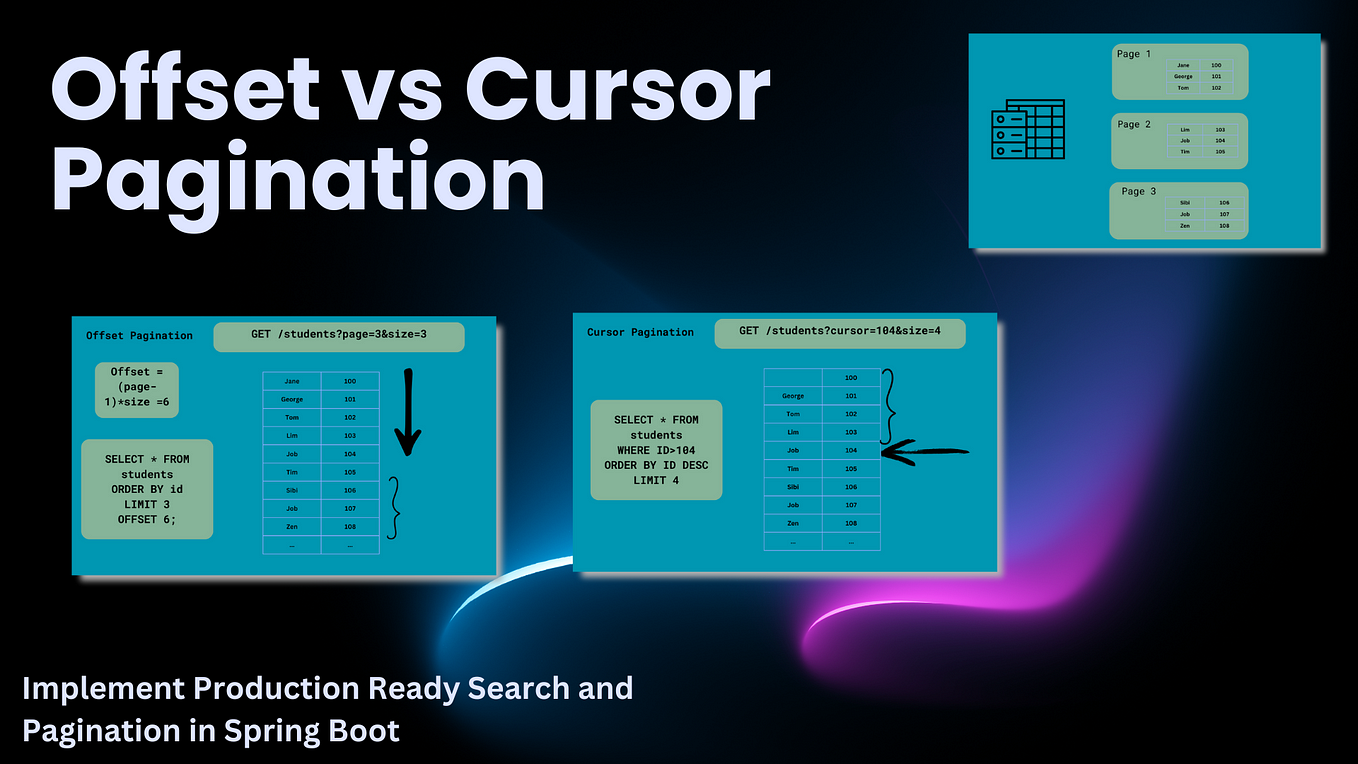
Spring Data JPA does not support keyset pagination out of the box, but understanding the concept is a major differentiator in a senior-level interview. It shows you think about scalability at a deeper level. For now, it's enough to know the concept and its performance benefits. The article by Thorben Janssen we looked at earlier also provides an implementation if you're curious to dive deeper.
Conclusion
You've now mastered another fundamental aspect of building high-performance, scalable Spring applications. You can confidently handle large datasets without overwhelming your server or your users.
Key Takeaways:
Pageableis the core Spring Data interface for pagination and sorting. Spring automatically creates it from request parameters (page,size,sort).- The repository's
findAll(pageable)method translates the request into a SQL query usingLIMITandOFFSET. Page<T>returns page content plus total counts (triggers aCOUNTquery), whileSlice<T>returns content and only knows if a next page exists (noCOUNTquery, more performant).- It's a best practice to wrap the
Pageobject in a custom DTO for a clean API and to use@PageableDefaultfor sensible defaults. - For very deep pagination, keyset pagination is more performant than the default offset-based approach.
Preview of the Next Lesson:
We've discussed how to fetch data efficiently, both in terms of graph traversal (N+1) and result set size (pagination). Next, we'll shift our focus to data integrity in concurrent environments. We will learn how to implement optimistic locking using @Version to prevent lost updates when multiple users try to modify the same data simultaneously.