Hello! Welcome to your next lesson in the "Spring Data & Transaction Management" module.
In the previous lesson, we explored transaction isolation levels, focusing on how to maintain data consistency (the "I" in ACID) during concurrent operations. We saw how choosing the right isolation level is a trade-off between consistency and performance. Today, we're diving deep into another critical performance topic that is a frequent subject in senior developer interviews: the N+1 query problem.
Your goal for this lesson is to learn how to solve N+1 query problems using JOIN FETCH and @EntityGraph. Mastering this will demonstrate your ability to write efficient data access code and diagnose performance bottlenecks, a key skill expected in senior roles.
1. The N+1 Query Problem: A Hidden Performance Killer
At its core, the N+1 problem is a performance anti-pattern that occurs when your application makes far more database calls than necessary. It's particularly common when using Object-Relational Mapping (ORM) frameworks like Hibernate (which Spring Data JPA uses by default).
The problem arises from lazy loading. By default, when you have a one-to-many or many-to-many relationship (e.g., a Customer with a list of Orders), JPA uses FetchType.LAZY. This is generally a good thing—it means when you load a Customer, you don't immediately load all their Orders. The Orders are only fetched from the database when you explicitly access the getOrders() collection.
The issue occurs when you do this for a list of customers.
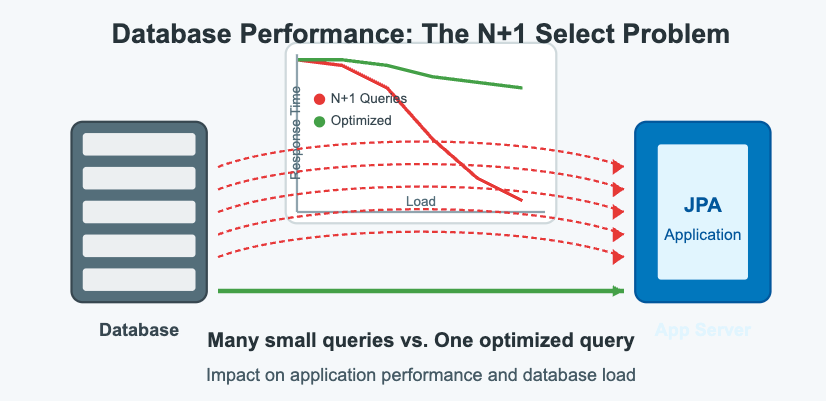
- You execute 1 query to get a list of N customers.
- You then loop through these N customers. Inside the loop, you access each customer's orders.
- This triggers N additional queries, one for each customer, to fetch their respective orders.
In total, you've made N+1 queries to get data that could have been retrieved in a single, optimized query.
To get a clear, conceptual understanding of this, let's watch a short segment that explains the problem with a simple Customer and Address example.
Interview Q&A | Hibernate N+1 Problem & Fix - The Bug You Didn’t Know You Had @Javatechie
The video 'Interview Q&A | Hibernate N+1 Problem & Fix' by Java Techie starts with a perfect explanation of what the N+1 problem is and why it's named that way.
Watch from 00:52 to 05:05. This section will walk you through the concept using a one-to-many relationship and clearly explain how the query count explodes.
2. Seeing the Problem in Action
The first step to fixing a problem is knowing how to find it. In a Spring Boot application, you can enable SQL logging to see the exact queries Hibernate generates. Add this to your application.properties or application.yml:
# application.yml
spring:
  jpa:
    show-sql: true # Shows the SQL queries
    properties:
      hibernate:
        format_sql: true # Makes the queries more readable
Now, let's see a practical demonstration. The same video will now set up a Spring Boot project and run code that triggers the N+1 problem, showing the resulting console logs.
Interview Q&A | Hibernate N+1 Problem & Fix - The Bug You Didn’t Know You Had @Javatechie
Continuing with the Java Techie video, this part will demonstrate the N+1 problem with actual code. Pay close attention to the console output to see the multiple SQL queries being fired.
Watch from 05:05 to 08:57. The presenter calls a findAll() on a customer repository and then you'll see the initial SELECT * FROM customer query, followed by a separate SELECT query for the addresses of each customer.
As you saw, a simple call to customerRepository.findAll() followed by accessing the lazy collection resulted in four separate queries for three customers (1 to get customers + 3 to get their addresses). Imagine if you had 100 customers!
3. Solving the N+1 Problem
Now that we can identify the problem, let's fix it. We will explore the two most common and effective solutions you'll be expected to know in an interview: JOIN FETCH and @EntityGraph.
Solution 1: JPQL JOIN FETCH
The JOIN FETCH clause is an extension to JPQL (Java Persistence Query Language) that tells the persistence provider to not only join two tables but also to initialize the related collection or entity in the same query.
You use it within a custom query defined with the @Query annotation in your repository.
// In your CustomerRepository
@Query("SELECT c FROM Customer c LEFT JOIN FETCH c.addresses")
List<Customer> findAllWithAddresses();
By changing the query and calling this new method, Hibernate will generate a single SQL query that joins the customer and address tables, loading all the required data at once.
Let's see this implemented.
Interview Q&A | Hibernate N+1 Problem & Fix - The Bug You Didn’t Know You Had @Javatechie
The Java Techie video demonstrates how to implement a custom query using JOIN FETCH to solve the problem.
Watch from 11:52 to 14:05. The presenter writes a custom JPQL query with JOIN FETCH, runs the application again, and shows in the console that only one single SQL LEFT JOIN query is now executed.
An important consideration: Cartesian Product
When you fetch a to-many relationship (like List<Address>), a JOIN can produce a Cartesian product, meaning you get duplicate parent entities in your result set (e.g., a Customer row for each of their Address rows). JPA handles this by default, but it's good practice to add the DISTINCT keyword to your JPQL query to make your intent clear and ensure you get unique parent entities in your List<Customer>.
@Query("SELECT DISTINCT c FROM Customer c LEFT JOIN FETCH c.addresses")
List<Customer> findAllWithAddresses();
This is a detail that interviewers appreciate, as it shows a deeper understanding of how SQL joins work under the hood.
Solution 2: @EntityGraph
While JOIN FETCH is powerful, it couples your fetching strategy to a specific JPQL query. JPA 2.1 introduced Entity Graphs, which Spring Data makes incredibly easy to use via the @EntityGraph annotation. This allows you to define a "fetch plan" for a query without writing custom JPQL.
You can apply it directly to a repository method, specifying the relationships to fetch eagerly in attributePaths.
// In your CustomerRepository

// This tells Spring Data to override the default fetch plan for findAll()
// and eagerly fetch the 'addresses' attribute.
@Override
@EntityGraph(attributePaths = {"addresses"})
List<Customer> findAll();
Now, a standard findAll() call will generate the optimized single query. This approach is often cleaner as it separates the what (find all customers) from the how (fetch them with their addresses).
Let's watch the implementation.
Interview Q&A | Hibernate N+1 Problem & Fix - The Bug You Didn’t Know You Had @Javatechie
The first solution shown in the Java Techie video is actually @EntityGraph. Let's watch that section now.
Watch from 08:57 to 11:52. The presenter adds the @EntityGraph annotation to the findAll() method and re-runs the code, showing the same optimized single-query result.
For more complex or reusable fetch plans, you can define a @NamedEntityGraph on the entity itself and reference it by name. This is great for maintaining consistency across different queries.
The N+1 Query Problem in Spring Data JPA
The article 'The N+1 Query Problem in Spring Data JPA' provides excellent code examples for both solutions. Let's review its sections on @EntityGraph and JOIN FETCH to solidify your understanding with a textual reference.
Read the sections '1. Eager Fetching with @EntityGraph' and '2. JOIN FETCH in JPQL Queries'. Pay attention to the syntax for both approaches and the examples of fetching nested associations (e.g., orders.orderItems.product).
4. Choosing the Right Strategy
So, when should you use JOIN FETCH versus @EntityGraph?
@EntityGraphis often preferred for its cleanliness and reusability. It keeps your repository methods free of JPQL and allows you to apply fetch plans to derived queries (e.g.,findByStatus(...)) and standard methods likefindAll().JOIN FETCHis necessary when you need more complex query logic (e.g., complexWHEREclauses) that can't be expressed with a derived query method name.
The article we just read has a fantastic "Query Strategy Selection Matrix" that serves as a great cheat sheet for interviews.
The N+1 Query Problem in Spring Data JPA
Let's look at a summary of best practices from the same article.
Review the section 'Best Practices and Recommendations', focusing on the 'Query Strategy Selection Matrix'. This table provides a concise guide on when to use each strategy (Lazy Loading, JOIN FETCH, EntityGraph, DTO Projections).
Test your understanding!
An interviewer says: "You've joined a project and you notice that a page displaying a list of blog posts and their comments is loading very slowly. You enable SQL logging and see a SELECT statement for posts, followed by hundreds of individual SELECT statements for comments. What is this problem called, what is its root cause, and how would you propose to fix it using Spring Data JPA?"
Show answer
- Identify the Problem: "This is the classic N+1 query problem."
- Explain the Root Cause: "The root cause is likely a
Postentity that has a@OneToManyrelationship with aCommententity, with the defaultFetchType.LAZY. The code is fetching a list ofNposts, and then iterating through them, triggering a separate lazy-loading query for the comments of each post. This results in N+1 database queries." - Propose Solutions: "I would propose two primary solutions using Spring Data JPA:"
- "Using
@EntityGraph: My preferred approach for its clarity would be to modify the repository method that fetches the posts. I would add the@EntityGraph(attributePaths = {\"comments\"})annotation. This tells JPA to generate a single query that joins the posts and comments tables, resolving the N+1 issue without changing the query logic." - "Using
JOIN FETCH: Alternatively, if the query is already a custom JPQL query, I would modify it to includeLEFT JOIN FETCH p.comments. I would also add theDISTINCTkeyword to the query (SELECT DISTINCT p ...) to prevent potential duplicatePostobjects in the result list due to the nature of the join."
- "Using
This answer is comprehensive because it correctly names the problem, identifies the technical cause (lazy loading), and provides two concrete, idiomatic solutions with their syntax.
Conclusion
Congratulations! You've tackled one of the most common and critical performance issues in ORM-based applications. Understanding and fixing the N+1 problem is a hallmark of an experienced developer who thinks about the impact of their code on the database.
Key Takeaways:
- The N+1 problem is caused by accessing lazy-loaded collections inside a loop, resulting in one initial query plus N subsequent queries.
- The first step is always diagnosis: enable SQL logging (
spring.jpa.show-sql=true) to observe the generated queries. JOIN FETCHis a JPQL clause that solves the problem by fetching a related collection in a single query. UseDISTINCTto avoid duplicate parent entities.@EntityGraphis a JPA 2.1 feature, simplified by Spring Data, that allows you to specify a fetch plan declaratively on a repository method, often leading to cleaner code.
Preview of the Next Lesson:
We've seen how to fetch data graphs efficiently. But what if the dataset itself is massive? Fetching thousands of customers and all their orders in one go, even with a single query, can still overwhelm your application's memory. In the next lesson, we will learn how to implement efficient pagination and sorting for large datasets using Spring Data's Pageable interface.