Welcome to our third lesson. In our last session, we established a conceptual foundation for DevOps by exploring the CALMS framework. We discussed how Culture, Automation, Lean principles, Measurement, and Sharing work together to break down the silos between development and operations.
Today, we move from the "what" and "why" of DevOps to the "how." We will map those CALMS principles onto the practical, day-to-day process of delivering software. This lesson will describe the key stages of the DevOps lifecycle, illustrating how they connect to form a continuous, iterative loop. For your work in organizational design, understanding this workflow is essential for structuring teams, defining roles, and identifying opportunities for process improvement.
Specifically, we will cover:
- The contrast between chaotic manual releases and a structured DevOps lifecycle.
- The primary stages of the lifecycle: Plan, Code, Build, Test, Release, Deploy, Operate, and Monitor.
- How these stages form the famous DevOps "infinity loop," creating a continuous feedback mechanism.
- A "visual-technical" look at how this process is represented in a CI/CD pipeline and a real-world toolchain.
The Problem: The Pain of Manual Releases
Before diving into the structured DevOps lifecycle, it's useful to understand the chaos it was designed to replace. In traditional software delivery, the release process was often a manual, high-stress, and error-prone event. Teams would work in isolation for weeks or months, leading to a "big bang" integration at the end of a cycle that was fraught with conflicts, bugs, and delays.
To get a vivid picture of this environment, let's watch a short segment from a popular DevOps educator.
CI/CD Explained: The DevOps Skill That Makes You 10x More Valuable
This video from TechWorld with Nana, "CI/CD Explained," begins with a dramatic and relatable story of a manual deployment process. It perfectly captures the friction and anxiety that DevOps aims to solve.
Please watch the introductory story from the beginning. As you watch, notice the numerous manual steps, points of failure, and the general "human-in-the-loop" constraints that make the process so fragile. This is the exact problem we are trying to solve.
This narrative of merge conflicts, broken builds, last-minute testing, and deployment anxiety highlights the need for a more integrated, automated, and continuous approach.
The Solution: The DevOps Lifecycle
The DevOps lifecycle is often visualized as an "infinity loop" to emphasize its continuous and iterative nature. This loop represents the seamless flow of work from an idea's conception all the way to production and back again, with feedback from users and systems informing the next cycle of development.
Each stage in this loop is an opportunity to apply the CALMS principles we discussed previously: automation reduces manual toil, measurement provides feedback, and a culture of sharing ensures smooth handoffs.
As we go through the stages, it's also helpful to see where your interest in AI can enhance the process. This diagram shows a typical DevOps loop with AI integrated into each phase.
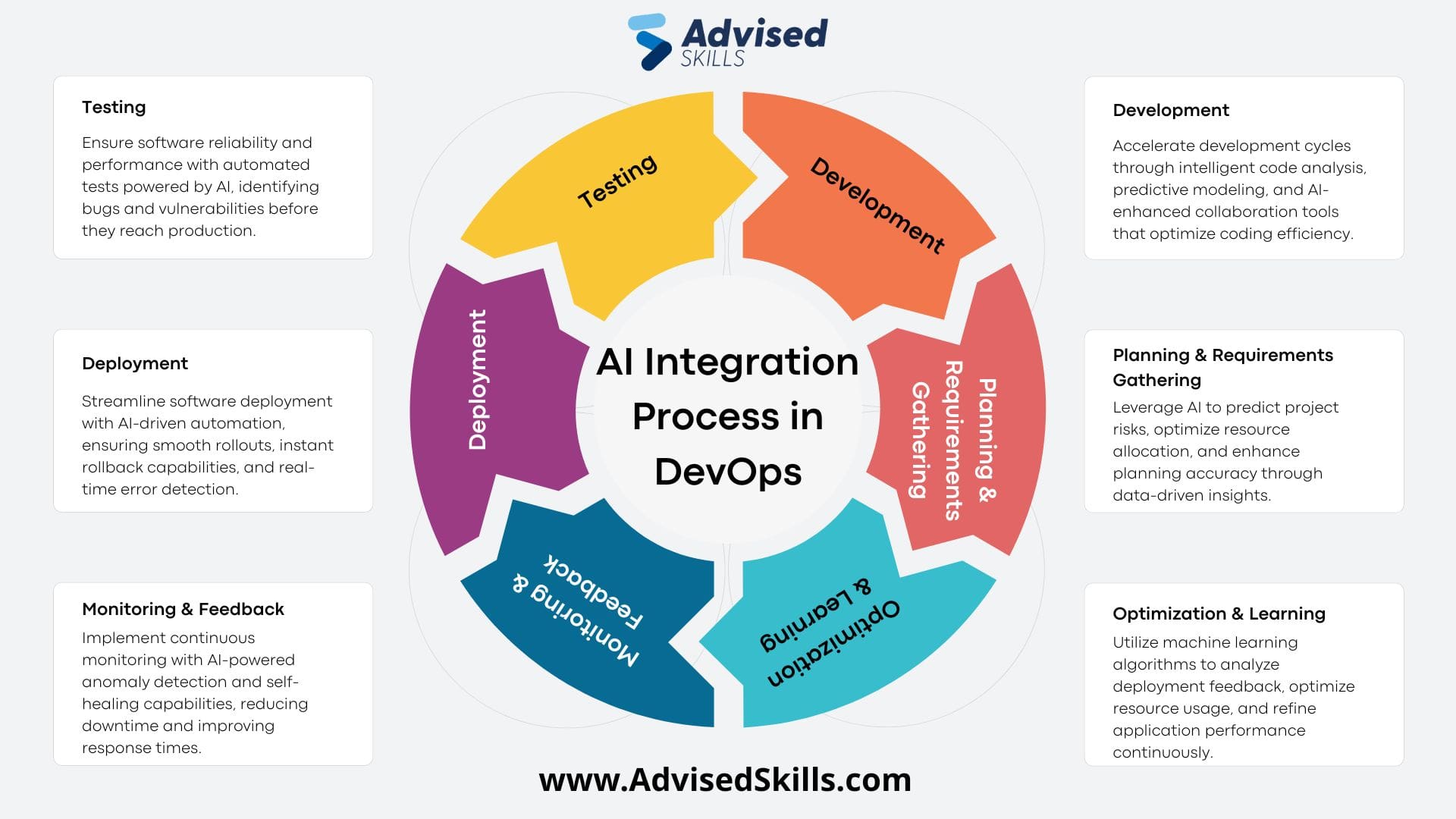
This diagram illustrates the DevOps infinity loop, with each stage—from Planning to Monitoring & Feedback—enhanced by AI capabilities. For example, AI can assist in Planning by predicting risks and in Monitoring through automated anomaly detection.
Let's begin our journey around this loop. We'll use a clear, concise video as our guide and supplement it with readings and other visuals.
The "Left Loop": From Plan to Test
The left side of the infinity loop is traditionally associated with development activities ("Dev"). It's where ideas are turned into tested software components.
This video, "A Complete Overview of DevOps" by ForrestKnight, provides an excellent walkthrough of the entire infinity loop. We'll watch it in sections to align with our discussion.
First, watch the overview of the entire loop and then continue through the descriptions of the Code, Build, and Test phases.
Let's break down what you just saw. The article "What is DevOps?" from Lumenalta provides a great textual summary of these same stages.
This article clearly defines the initial stages of the lifecycle.
As we discuss each phase, you can refer to the corresponding sections in this article for reinforcement. Read the descriptions for Planning, Coding, Building, and Testing.
Here is a summary of those initial phases:
-
Plan: This is where it all begins. Business requirements are defined, features are prioritized, and work is broken down into manageable tasks. Tools like Jira or Asana are used to track this work. This stage embodies the Lean principle, ensuring that the team is focused on delivering value. From an AI perspective (as shown in the diagram), this could involve using machine learning to predict project risks or optimize resource allocation.
-
Code: Developers write code to implement the planned features. Crucially, they use version control systems like Git to manage changes and collaborate. This is a direct application of the Sharing principle. We will dive much deeper into Git in our next lesson.
-
Build: In this phase, the source code written by developers is compiled and packaged into an executable application. This is a key point for Automation. Build tools like Maven (for Java) or npm (for JavaScript) are triggered automatically whenever new code is committed. This process is the first step in what is known as Continuous Integration (CI).
-
Test: Once a build is created, it must be tested. This phase heavily relies on Automation to run a suite of tests (unit, integration, etc.) to catch bugs early. This prevents flawed code from moving further down the pipeline and provides fast feedback to developers, aligning with the Measurement and Lean principles.
Continuous Integration (CI): The Heart of the "Left Loop"
The stages of Code, Build, and Test are tightly bound together in a practice called Continuous Integration (CI). The core idea of CI is that developers merge their code changes into a central repository frequently. Each merge triggers an automated build and test sequence.
This practice solves many of the problems from the manual release story. By integrating small changes often, teams can detect and resolve conflicts and bugs immediately, rather than facing a nightmare of entangled issues right before a release.
CI/CD Explained: The DevOps Skill That Makes You 10x More Valuable
Let's return to the "CI/CD Explained" video, which now explains the solution of Continuous Integration.
Watch the segment from this point to see how CI—testing on every commit and encouraging smaller, frequent changes—transforms the development process from stressful to streamlined.
The "Right Loop": From Release to Monitor
The right side of the loop is traditionally associated with operations ("Ops"). It's about getting the tested software into the hands of users and ensuring it runs reliably.
Now, let's complete the loop with the ForrestKnight video.
Please watch the segments covering the Release and Deploy stages and the final Operate, Monitor, and Feedback stages.
Again, let's supplement this with the text definitions from Lumenalta.
This reading covers the operational side of the lifecycle.
Please read the descriptions for Releasing, Deploying, Operating, and Monitoring.
-
Release & Deploy: After passing all automated tests, the application is ready to be released. Continuous Delivery (CD) is the practice of automatically releasing to a pre-production environment. Continuous Deployment goes a step further, automatically deploying every passing change to production. This is Automation at its peak. Tools like Jenkins, GitHub Actions, Docker, and Kubernetes are central to this stage.
-
Operate: The application is now live and running in the production environment. The operations team (or the dev team, in a "you build it, you run it" culture) is responsible for maintaining the infrastructure, ensuring availability, and managing performance.
-
Monitor: This is the critical feedback mechanism. Teams use tools like Prometheus or Grafana to collect data (logs, metrics, traces) on the application's performance and user behavior. This embodies the Measurement principle. AI plays a huge role here, with AIOps tools performing advanced anomaly detection and predictive analysis to identify issues before they impact users.
The data gathered during monitoring provides the feedback that flows back into the Planning phase, thus completing the infinity loop. Is a new feature being used heavily? Are users encountering errors? Is performance slowing down? The answers to these questions become the input for the next cycle of improvements.
A "Visual-Technical" View of the Pipeline
Now that we understand the stages conceptually, let's look at how they are realized in practice. As per your preference for a "visual-technical" approach, we'll look at two artifacts: a code-based pipeline definition and a toolchain diagram.
The Pipeline as Code
Modern CI/CD pipelines are defined as code, often in a YAML file. This aligns with the DevOps principle of "Everything as Code." You don't need to write this, but reading it helps you see the logic.
️ Complete CI/CD Guide with YAML Pipelines (Azure DevOps ...
This developer guide provides a clear, high-level overview of the components of a CI/CD pipeline defined in YAML.
First, read the brief section "Common Structure of a YAML Pipeline File". This will introduce you to key terms like trigger, stages, jobs, and steps. Then, examine the example under the heading "Multi-Stage Pipeline (Build → Test → Deploy)". Notice how the stages directly correspond to the lifecycle phases we've discussed: Build, Staging (a pre-production test), and Production (Deploy).
The Toolchain
Each stage of the lifecycle is supported by specific tools. A "toolchain" is the set of tools integrated to create the end-to-end automated flow. This diagram shows a complex but realistic toolchain.
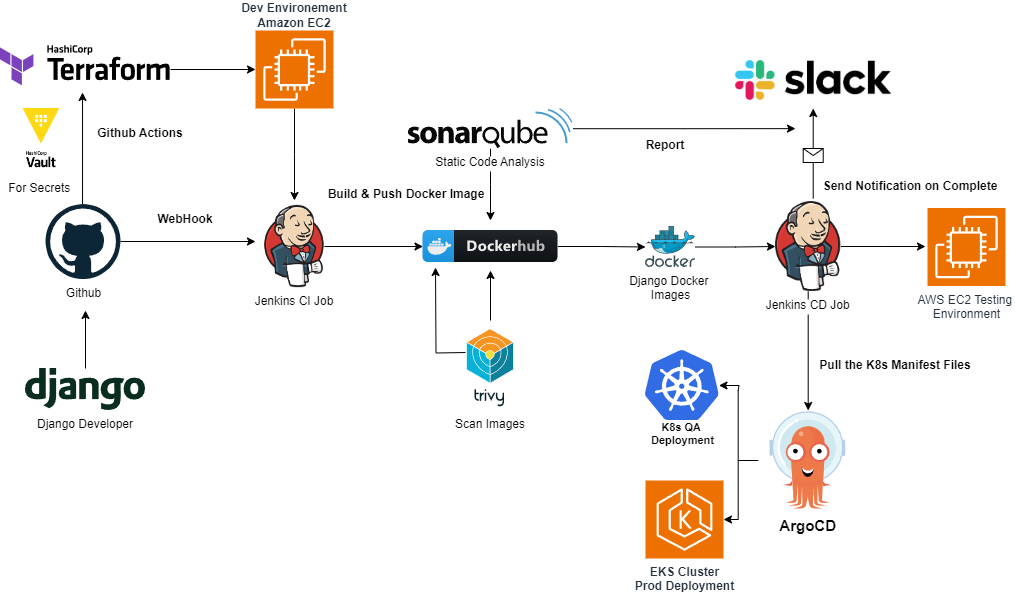
This diagram shows a complete CI/CD pipeline for a Django application. It illustrates how tools like GitHub (Code), Jenkins (Build/Deploy), DockerHub (Artifact Registry), and AWS (Operate) are integrated to automate the delivery process from developer commit to production deployment.
Let's trace the flow:
- A developer pushes code to GitHub.
- A webhook triggers a Jenkins CI job.
- Jenkins builds a Docker image and pushes it to DockerHub, a container registry.
- Another Jenkins CD job pulls the image and deploys it to a testing environment on AWS.
- After successful testing, a tool like ArgoCD could manage the deployment to the production Kubernetes cluster (EKS).
From an organizational design perspective, you can think of this as a value stream map for software delivery. Understanding this flow helps you see where teams interact, where handoffs occur, and where bottlenecks might arise.
Conclusion
In this lesson, we have walked through the entire DevOps lifecycle. We saw how a structured, automated process solves the chaos of manual releases and how each stage connects to form a continuous feedback loop, embodying the CALMS principles in practice.
Your key takeaways are:
- The DevOps lifecycle is an iterative process visualized as an infinity loop, designed to deliver software faster and more reliably.
- The key stages are Plan, Code, Build, Test, Release, Deploy, Operate, and Monitor.
- Continuous Integration (CI) automates the build and test process for every code change, enabling early feedback.
- Continuous Delivery/Deployment (CD) automates the release and deployment process, enabling rapid delivery of value.
- Monitoring provides the critical feedback loop by gathering data from the live application to inform the next planning cycle.
- The entire lifecycle is enabled by an integrated toolchain and is often defined as a pipeline-as-code.
In our next lesson, we will zoom in on the very first step of the automated pipeline: the Code phase. We will explore Git, the version control system that underpins modern collaborative software development, and look at common branching strategies that teams use to manage their work.