Introduction
In our last lesson, we engineered prompts to produce structured, executable test cases. We identified a key challenge: for the generated code to be truly useful, it needs context about the project it's testing. You learned to manually provide this context, but as we discussed, this approach doesn't scale to a real-world codebase.
This lesson directly solves that problem. Today, we'll explore Retrieval-Augmented Generation (RAG), a powerful technique to automatically find and inject relevant information into your prompts. By the end of this lesson, you will be able to apply retrieval-augmented generation (RAG) to ground LLM output in the specific context of a codebase.
You will learn the architecture of a RAG pipeline and see how to implement one in Python. This automates the "Provide Context" step from our previous lesson, transforming a generic LLM into a specialized agent that understands the nuances of a specific software project. This is a critical step toward your goal of building and shipping a production-ready QA tool.
The Core Concept: Retrieval-Augmented Generation
At its heart, RAG prevents a Large Language Model (LLM) from "guessing" or relying solely on its general training data. Instead, it first retrieves relevant information from a specific knowledge base (in our case, a codebase) and then augments the user's prompt with this information before asking the LLM to generate a response.
This process consists of two main phases:
- Preparation (or Indexing): This is an offline process where you prepare your codebase to be searchable. You load all the source files, split them into meaningful chunks, convert those chunks into numerical representations (embeddings), and store them in a special database called a vector database.
- Generation (or Querying): This is the online process that happens when you ask a question. Your question is converted into an embedding, which is used to search the vector database for the most relevant code chunks. These chunks are then combined with your original question into a new, context-rich prompt that is sent to the LLM.
This diagram provides a high-level overview of the entire workflow.
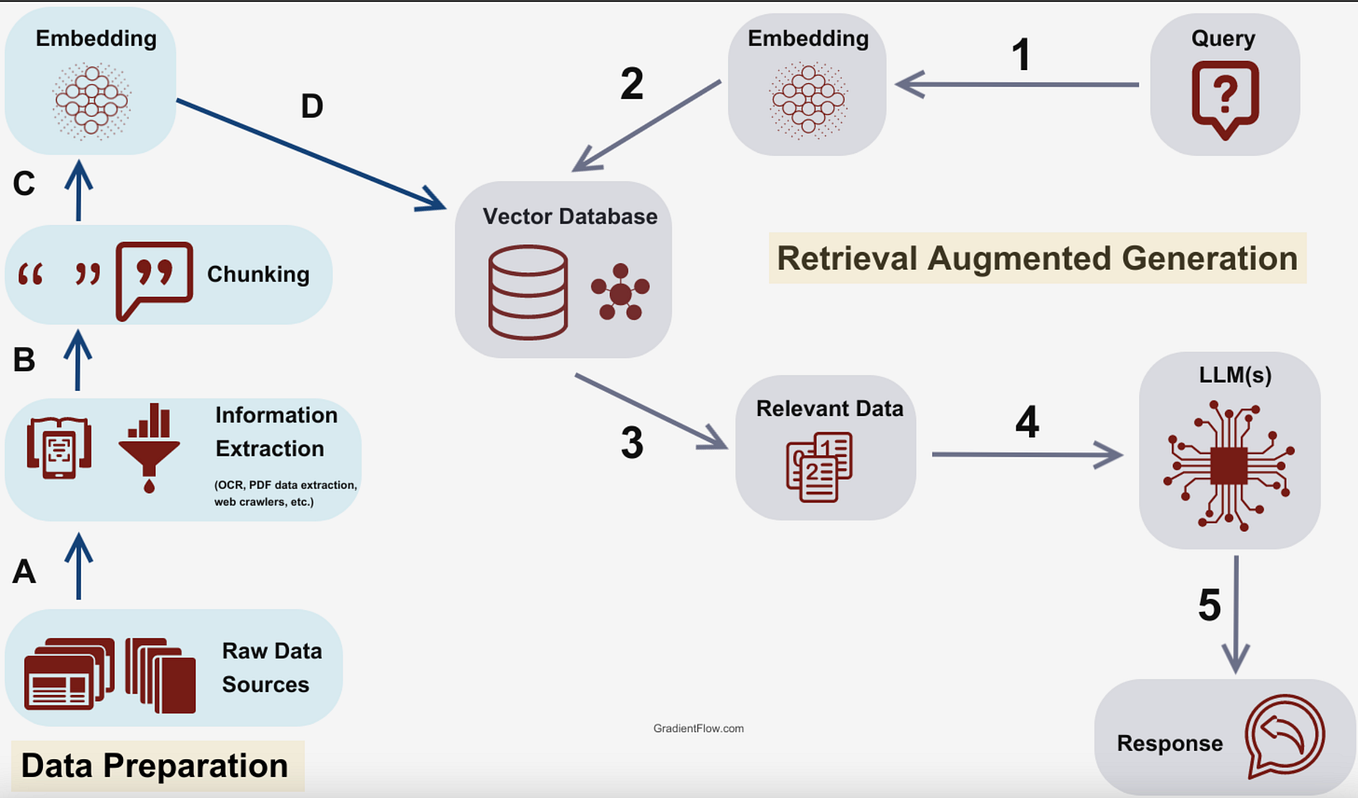
By grounding the LLM's response in actual, retrieved code, RAG dramatically reduces errors and "hallucinations," making the output far more accurate and reliable.
The Architectural Blueprint for Code RAG
To apply RAG to a codebase effectively, we need a more specific architecture than the general diagram above. Code isn't just text; it has syntactic and semantic structure that a robust system must respect.
A great way to think about this is through the three-pillar architecture proposed in the following article.
Build an AI Agent for GitHub Code Analysis with LangChain
The article 'Build an AI Agent for GitHub Code Analysis with LangChain' by ActiveWizards lays out a clear and effective blueprint for a codebase analysis agent. We will focus on its core architectural principles.
Please read the following sections: Start with 'The Architectural Blueprint for Code Comprehension' for a high-level overview of the three pillars. Then, read 'Pillar 2: Language-Aware Code Indexing'. This is the most critical part. Pay close attention to the concept of syntactic chunking using language-specific splitters. This is a key insight for working with code. Finally, read 'Pillar 3: The Context-Aware Reasoning Engine' to understand how the indexed data is used at query time.
Let's break down the key takeaways from that reading.
Pillar 1: Code Ingestion
This is the straightforward first step: getting the code from a source like a Git repository into your system. Using Python's subprocess or a library like GitPython (which you'll encounter in a future lesson) allows your tool to clone any public repository for analysis.
Pillar 2: Language-Aware Indexing
This is the most important pillar. As you read, simply splitting a code file by a fixed number of characters is a poor strategy. Doing so can cut a function or class in half, destroying the context. Your background in programming makes it clear why this would be problematic for comprehension.
The professional approach is language-aware chunking. Libraries like LangChain provide splitters that understand the syntax of languages like Python. They parse the code and split it along logical boundaries—functions, classes, or methods—ensuring that retrieved chunks are complete and coherent.
Once chunked, the process is:
- Embed: Each code chunk is passed to an embedding model (e.g.,
text-embedding-ada-002from OpenAI or an open-source model) to convert it into a vector. - Store: These vectors, along with the original code chunks, are stored in a vector store like FAISS (Facebook AI Similarity Search) for fast and efficient similarity searches.
Pillar 3: Context-Aware Reasoning (The RAG Loop)
This is where the magic happens at query time. When you ask a question like "How is user authentication handled?":
- The question is converted into a vector using the same embedding model.
- Your vector store (FAISS) is queried to find the code chunks whose vectors are most similar to your question's vector.
- A new prompt is constructed, combining the retrieved code chunks (the context) with your original question.
- This context-rich prompt is sent to the LLM, which can now generate an answer based directly on the provided code snippets.
A Practical Implementation with Local Tools
Now let's move from architecture to a concrete implementation. The following tutorial demonstrates how to build a complete RAG system for a codebase using Python and locally-run tools, which is excellent for rapid development and experimentation without API costs.
Ask Your Codebase Anything Using Ollama, Embeddings, and RAG
This article, 'Ask Your Codebase Anything Using Ollama, Embeddings, and RAG,' provides a hands-on Python script to build a functional RAG pipeline. It's a great starting point for your own project.
You can skim the setup instructions for installing Ollama and other libraries. Your focus should be on the Python code in these two sections: Section V, 'Embed the Codebase': Study the embed_and_store function. Note how it loads files, chunks them, generates embeddings with SentenceTransformer, and stores them in FAISS. Section VI, 'Create a Client to Ask Question Using Ollama': Analyze the ask_ollama function. See how it first calls search_similar_chunks to retrieve context and then constructs the final prompt for the LLM.
Let's analyze the code from the tutorial.
Embedding the Codebase
The embed_repo.py script performs the offline indexing phase.
# Key components from the tutorial's embed_repo.py script

def load_code_files(repo_path, extensions=[...]):


    # ... scans a directory for files with given extensions ...

def chunk_text(text, chunk_size=500):


    # ... splits text into chunks of a certain size ...

def embed_and_store(chunks, model_name="all-MiniLM-L6-v2"):
    model = SentenceTransformer(model_name)
    vectors = model.encode(chunks)
    index = faiss.IndexFlatL2(len(vectors[0]))
    index.add(vectors)


    # ... saves the index and chunks to disk ...
A Note on Chunking: The chunk_text function in this tutorial uses a simpler, line-based approach. While easy to implement, contrast this with the more robust language-aware splitting we discussed earlier. For a production-grade tool, using a syntactic chunker is preferable, but this simpler method is perfectly fine for a first implementation.
Querying the Codebase
The client script connects all the pieces for the online generation phase.
# Key components from the tutorial's query script

def search_similar_chunks(query, k=5):


    # ... loads the saved index and chunks ...
    model = SentenceTransformer("all-MiniLM-L6-v2")
    query_vec = model.encode([query])


    # ... searches the FAISS index for the 'k' most similar chunks ...
    distances, indices = index.search(query_vec, k)
    results = [chunks[i] for i in indices[0]]
    return results

def ask_ollama(context_chunks, question):


    # This is the "Augmented Generation" step!
    prompt = "Answer the following question based on the code context..."
    for chunk in context_chunks:
        prompt += f"\n--- SNIPPET ---\n{chunk}\n" # Augmenting the prompt
    prompt += f"\n\nQuestion: {question}"


    # ... sends the combined prompt to the local LLM ...
The ask_ollama function clearly shows the "augmentation" step. It builds a detailed prompt by prepending the retrieved code snippets to the user's question before sending it to the LLM. This is the mechanism that grounds the model in the reality of your codebase.
The end result could be a powerful CLI tool or even a web interface for asking questions about your code.

From Prototype to Production
As you think about building your own tool, remember that moving from a script to a product involves additional considerations.
Build an AI Agent for GitHub Code Analysis with LangChain
Let's revisit the first article to consider the practicalities of deploying a RAG-based tool. This connects directly to your goal of being able to 'build and ship' a product.
Please read the section 'From Architecture to Production: A CTO's Checklist'. Pay attention to the points on cost management, handling private repositories, and the scalability of the vector store.
These production concerns—such as using a scalable vector database like Pinecone instead of an in-memory one like FAISS, or handling authentication for private repos—are exactly the kinds of challenges you'd tackle when turning a prototype into a shippable product.
Conclusion
In this lesson, you've learned how to solve one of the biggest challenges in applying LLMs to code: providing scalable, automatic context. You now understand the complete RAG workflow and have seen a practical implementation.
Key Takeaways:
- RAG Workflow: The process is a two-phase cycle: an offline Indexing phase (chunk, embed, store) and an online Generation phase (embed query, retrieve, augment prompt, generate).
- Chunking is Crucial: For code, naive text splitting is fragile. Language-aware chunking, which respects the syntactic boundaries of functions and classes, is the robust approach.
- Grounding Reduces Hallucinations: By augmenting the prompt with relevant code snippets retrieved from a vector database, you ground the LLM in the specific context of your project, leading to more accurate and reliable outputs.
- Local vs. Cloud: You can start building powerful RAG systems on your local machine using tools like Ollama and FAISS, providing a low-cost environment for development and testing.
Preview of the Next Module:
You have now explored the primary ML and LLM techniques used in modern software quality tools: classical ML models on engineered features, deep learning with code embeddings, structured generation from LLMs, and now, Retrieval-Augmented Generation. You possess the foundational knowledge to approach any of the three project ideas you're interested in.
In the next module, "Project Definition and Scoping," we will pivot from learning techniques to applying them. You will formally evaluate the project directions (Test Case Generation, Flaky Test Detection, Technical Debt Prioritization) against your goals, define a Minimum Viable Product (MVP) for your chosen path, and architect the end-to-end pipeline you will build. It's time to start designing your final project.