Introduction
In our last lesson, you successfully wrote a Python script to call an LLM and generate a simple unit test. This was a crucial first step, moving from the theory of prompting to practical application. However, as you might have guessed, this simple approach has limitations. What happens if the LLM returns conversational text instead of just code? Or if the generated test has a syntax error or calls a function that doesn't exist?
To build a reliable, automated tool, we need to ensure the LLM's output is both predictable and correct. This brings us to today's learning outcome: to design effective prompts that produce structured, executable test case output.
In this lesson, we will explore advanced techniques to constrain and guide LLMs, moving beyond simple text generation to a more robust, engineering-driven approach. You'll learn how to enforce structure using API features and how to provide the necessary context to make the generated code not just syntactically valid, but semantically correct and immediately executable.
The Challenge: From Free-form Text to Reliable Code
Large Language Models excel at generating fluent text, but this strength becomes a liability when we need machine-readable output. An LLM might wrap perfectly good code in explanatory paragraphs, use inconsistent formatting, or generate code that "hallucinates" dependencies. Relying on simple string parsing to handle this is brittle and bound to fail in a production system.
The core challenges are:
- Lack of Structure: The output is a single block of text, making it hard to programmatically extract the parts you need (e.g., the test function name, the setup code, the assertions).
- Lack of Context: The LLM doesn't know about your project's specific conventions, helper functions, or class constructors. This leads to code that looks plausible but fails to compile or run.
To see how the research community addresses this, let's look at a paper that formalizes these problems and proposes a solution.
Injecting Project and Testing Knowledge into LLM-based Unit ... - arXiv
This paper, "Injecting Project and Testing Knowledge into LLM-based Unit Test Generation," introduces KTester, a framework that addresses the very problems we're discussing. It highlights why standard LLM-based methods often produce unreliable tests.
Please read the Introduction section. Focus on the limitations it describes for current LLM-based methods, specifically the lack of "project-specific knowledge" and "testing domain knowledge." The examples in Figures 1-3 are particularly illustrative of the kinds of errors we want to avoid.
As the paper points out, to generate high-quality, executable tests, we need to move beyond simple prompting and start engineering our interactions with the LLM.
Strategy 1: Enforcing Structured Output
Our first goal is to force the LLM to respond in a predictable, machine-readable format. Instead of a block of text, we want a structured object, like JSON, that our program can easily parse and validate.
Basic Structural Prompting
The simplest method is to explicitly ask for a specific structure in your prompt.

While this works surprisingly well, it's not foolproof. The LLM might still add conversational text or make a small mistake that results in invalid JSON. For a robust system, we need more reliable methods.
Using API Features and Validation Libraries
Modern LLM APIs and libraries provide powerful tools to guarantee and validate structured output.
LLM Output Parsing and Structured Generation Guide - Tetrate
The article 'LLM Output Parsing and Structured Generation Guide' provides an excellent overview of practical techniques for ensuring reliable, structured data from LLMs. We'll focus on the most relevant methods for our goal.
Please read the following three sections from the article: JSON Mode and Structured Output APIs: Understand how this API feature constrains the model to only output syntactically valid JSON. Function Calling for Structured Data: Grasp this powerful paradigm where the LLM generates arguments for a function you define. This is an excellent way to enforce a schema. Pydantic and Schema Validation: Since you have a strong Python background, this is a key section. See how Pydantic allows you to define a data model in Python and automatically validate the LLM's JSON output against it.
Let's synthesize these ideas into a practical Python example. Imagine we want the LLM to generate a test case for our is_palindrome function from the previous lesson. Instead of asking for the code directly, we'll ask for a structured representation of the test.
First, we define our desired structure using Pydantic:
from pydantic import BaseModel, Field
from typing import List

class Assertion(BaseModel):
    """Represents a single assertion in a test."""
    input_value: str
    expected_output: bool

class TestCase(BaseModel):
    """Represents a structured test case for the is_palindrome function."""
    test_name: str = Field(description="A descriptive name for the test function, e.g., 'test_palindromes'")
    assertions: List[Assertion] = Field(description="A list of assertions to perform.")
Now, we can use a library like instructor (which works with OpenAI's API) or a similar approach with other providers to request the LLM to generate an output that matches our Pydantic model. The prompt would look something like this:
From the function below, generate a test case containing at least three assertions, including both positive and negative cases.

Function:
def is_palindrome(s: str) -> bool:
    \"\"\"Checks if a string is a palindrome.\"\"\"
    return s == s[::-1]

Your response should be a JSON object that conforms to the following schema:
... (JSON schema of the TestCase model would be inserted here) ...
By using Pydantic, you gain two major advantages:
- You can generate a JSON schema from your Python model to include in the prompt, giving the LLM a precise target.
- You can parse the LLM's JSON response directly into your Pydantic model (
TestCase.model_validate_json(response_json)), which automatically validates the structure, types, and field names. If validation fails, you get a clear error, which you can use to debug your prompt or even ask the LLM to fix its own output.
Strategy 2: Decoupling Design from Implementation
A very powerful strategy, pioneered by frameworks like KTester, is to split test generation into two distinct phases:
- Test Case Design: In this phase, the LLM acts as a QA strategist. You prompt it to think about what to test (e.g., boundary conditions, common inputs, error cases) and to output a plan in a structured format, just like the
TestCasemodel we defined above. - Test Method Transformation: In this phase, you take the structured plan and use a second, simpler prompt to translate each piece of the plan into executable code.
This decoupling makes the process more reliable and controllable. The "design" prompt focuses on creativity and testing knowledge, while the "transformation" prompt focuses on simple, structured code generation.
Injecting Project and Testing Knowledge into LLM-based Unit ... - arXiv
Let's return to the KTester paper to see how this decoupling works in a sophisticated system. This approach is central to producing high-quality tests.
Please read these two key sections: Section 2, paragraph starting 'KTester is designed around the following core principles': Focus on the principles of Testing Knowledge Awareness and Modular Generation Pipeline. This explains the 'why' behind separating design from implementation. Section 2.2.2, 'Test Cases Design': This is the core of the strategy. Pay close attention to the multi-view guidance strategy (functional, boundary, exception) and how the LLM is instructed to output an intermediate machine-readable format (JSON). This is exactly what we are aiming for.
This two-step process—designing structured test plans first, then transforming them into code—dramatically improves the reliability and quality of the final output compared to a single, complex prompt.
Strategy 3: Ensuring Executability with Context and Refinement
Even with a perfect structure, the generated code might not be executable if it lacks project context. To solve this, we need to ensure the LLM has the information it needs and a way to correct its mistakes.
Providing Context in the Prompt
To prevent the LLM from hallucinating, your prompt for the "Test Method Transformation" step should include relevant context from your codebase, such as:
- The full source of the function under test.
- Required import statements.
- The definition of the class containing the function.
- Examples of how to instantiate objects used by the function.
This technique is a manual form of Retrieval-Augmented Generation (RAG), where you retrieve relevant information and augment the prompt with it.
Iterative Refinement via a Feedback Loop
No matter how good your prompt is, the LLM will sometimes generate incorrect code. A robust system anticipates this and builds a feedback loop to automatically fix errors.
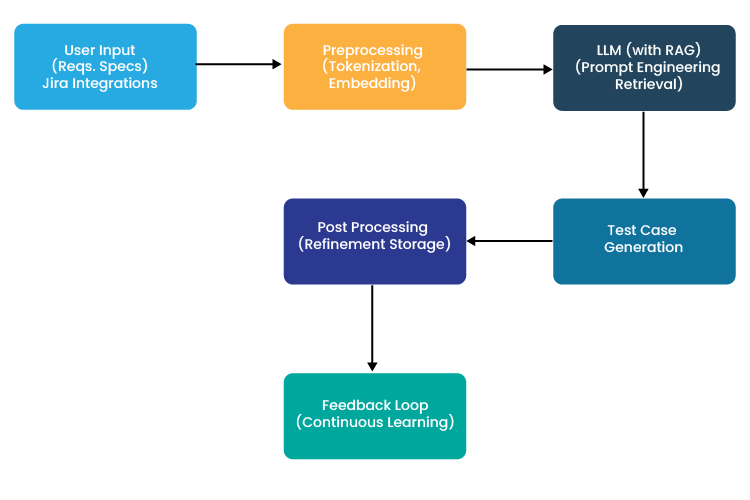
The process is simple but powerful:
- Generate: Prompt the LLM to generate the test code.
- Execute: Attempt to write the code to a file and run it (or simply try to compile it).
- Capture Feedback: If an error occurs (e.g.,
SyntaxError,ImportError,AssertionError), capture the traceback. - Refine: Call the LLM again with a new prompt that includes the original code, the generated (faulty) test, and the error message, instructing it to fix the bug.
This iterative refinement process is essential for moving from "generating plausible code" to "generating guaranteed executable code."
Conclusion
In this lesson, you've moved far beyond basic prompting. You now have a toolbox of engineering techniques to produce structured and executable test cases from an LLM.
Key Takeaways:
- Enforce Structure: Don't rely on parsing free-form text. Use API features like JSON mode or function calling, and validate the output against a schema using a library like Pydantic.
- Decouple Tasks: Separate test generation into two phases: Test Design (generating a structured plan in JSON) and Test Transformation (turning the plan into code). This improves reliability and control.
- Provide Context: To generate executable code, the LLM needs project-specific context, such as class definitions and import statements, included in the prompt.
- Iterate with Feedback: Create a refinement loop where you execute the generated code, capture any errors, and feed them back to the LLM to self-correct.
Preview of the Next Lesson:
We've discussed the importance of providing context in the prompt to ensure the generated code is executable. But how do you find the right context from a large codebase automatically? Manually copying and pasting class definitions isn't scalable. In our next lesson, "Apply retrieval-augmented generation (RAG) to ground LLM output in the specific context of a codebase," you will learn how to build a system that automatically finds and injects the most relevant pieces of your code into the prompt, making your test generation tool truly powerful and context-aware.