Hello! Welcome to the first lesson of our second module, "Data Collection: Mining Software Repositories."
In the last lesson, we concluded our foundational module by comparing your three potential project ideas: technical debt prioritization, flaky test detection, and AI-powered test case generation. We analyzed them through the lenses of data requirements, complexity, and impact. Now, it's time to transition from planning to practice and start gathering the raw data needed to build these tools.
Today's learning outcome is to extract commit history and code churn metrics from a Git repository using GitPython. This is a fundamental skill in Mining Software Repositories (MSR) and will provide the data for many of the features we'll engineer later, particularly for the technical debt and flaky test projects.
Let's get started.
Understanding the Data in a Git Repository
Before we write any code, let's clarify the two types of data we're after:
-
Commit History: This is the metadata for each change saved to the repository. It includes the unique commit hash (its ID), the author's name, the date of the commit, and the commit message explaining the change. This log tells the story of the project's evolution.
-
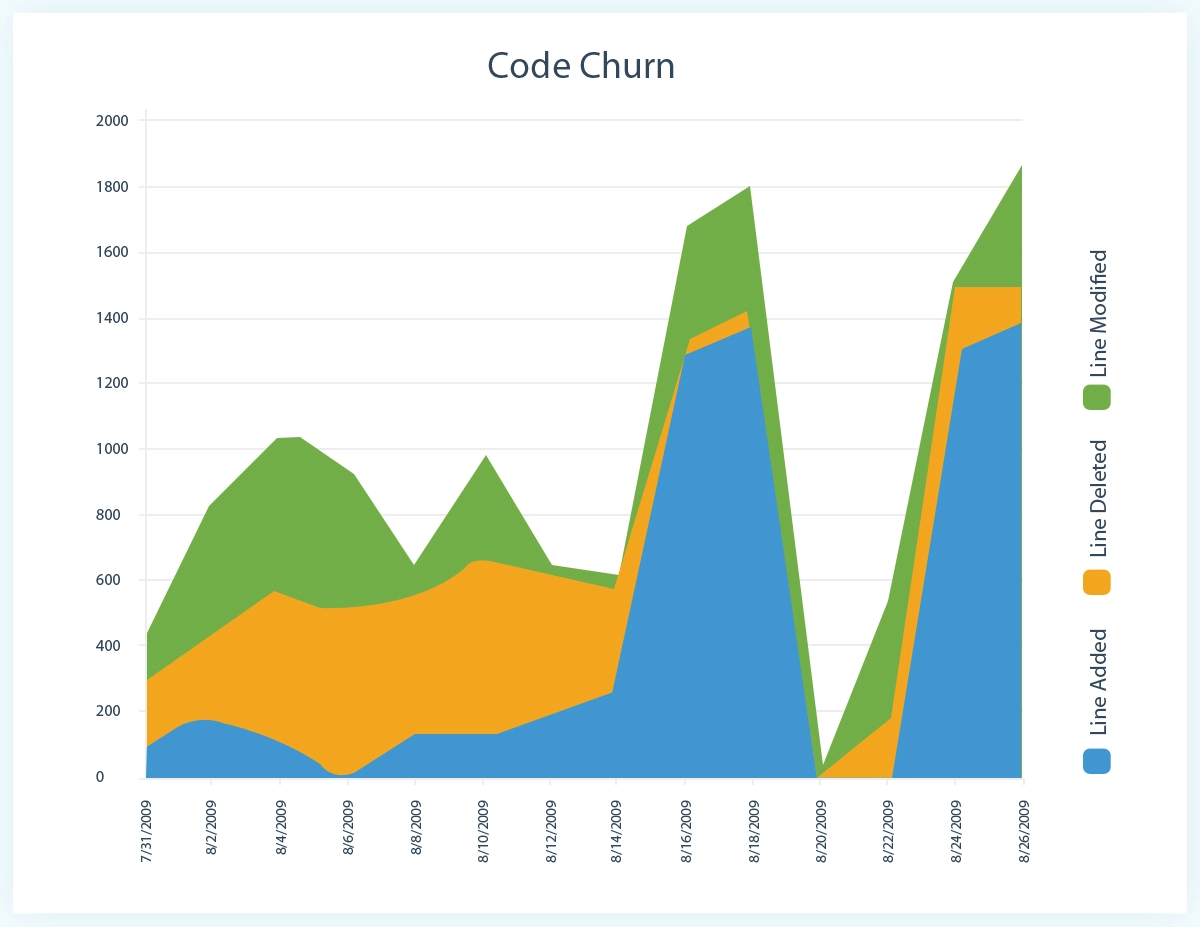
Code Churn: This metric quantifies the volume of change in the code. Typically, it's measured by the number of lines added and deleted in each commit. High churn in a specific file can be an indicator of instability, recent refactoring, or a feature hotspot—all valuable signals for our future ML models.
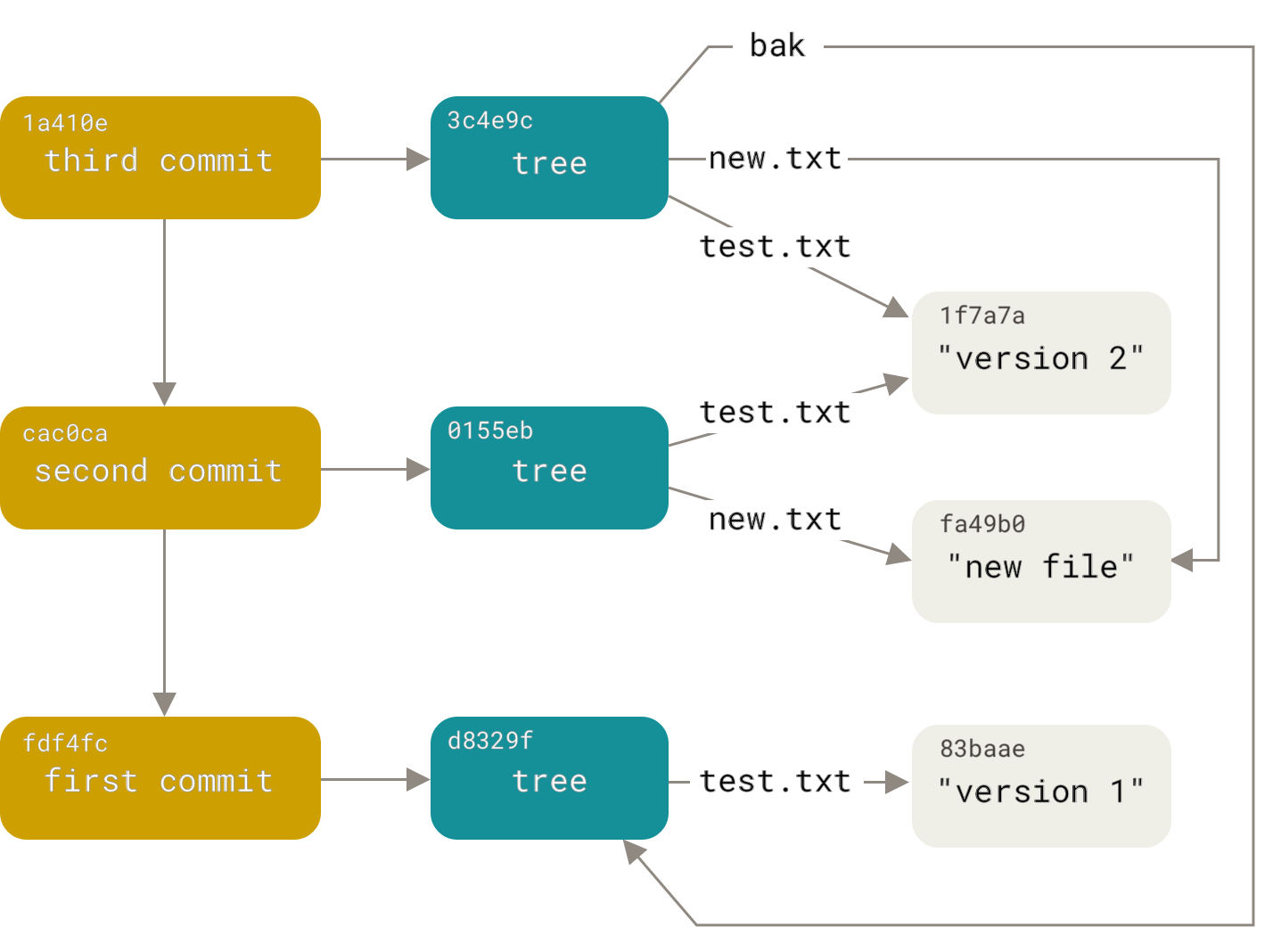
Under the hood, Git stores this information as a linked series of commit objects. Each commit points to a tree which represents the state of all files at that moment.
Setting Up for Extraction with GitPython
To interact with a Git repository programmatically in Python, we'll use a library called GitPython. It provides a clean, object-oriented interface for accessing all the data we just discussed.
First, you'll need to install it. Open your terminal and run:
pip install GitPython
Next, you'll need a local copy of a Git repository to analyze. For our examples, let's use a popular and well-maintained Python project. Please clone the requests library to your local machine:
git clone https://github.com/psf/requests.git
Make a note of the path where you saved this repository.
Extracting Basic Commit History
The core of GitPython is the Repo object, which represents your local repository. From there, you can iterate through all the commits. Our strategy will be to extract the data from each commit and load it directly into a Pandas DataFrame, leveraging your data analysis experience.
The following reading provides a fantastic, hands-on guide for this process.
Storing Git commit information into Pandas' DataFrame
Let's begin the extraction process. The blog post 'Storing Git commit information into Pandas' DataFrame' by feststelltaste offers a practical, step-by-step approach that we will follow.
Please read from the beginning of the article down to the end of the 'Investigate commit data' section. Focus on how git.Repo is used to access a local repository and how to iterate through repo.iter_commits() to access individual Commit objects. Pay attention to the attributes like commit.message, commit.author, commit.committed_date, and commit.stats.
As the article shows, you can easily access attributes from a Commit object. Here's a quick example of how you might start building your script, pointing it to the requests repo you just cloned:
import git
import pandas as pd


# Update this path to where you cloned the requests repo
repo_path = 'path/to/your/requests'
repo = git.Repo(repo_path)


# Get the list of all commits from the main branch
commits = list(repo.iter_commits('main'))


# Extract basic info from the first few commits
for commit in commits[:5]:
    print(f"SHA: {commit.hexsha}")
    print(f"Author: {commit.author.name} <{commit.author.email}>")
    print(f"Date: {commit.committed_datetime}")
    print(f"Message: {commit.message.strip()}")
    print("-" * 20)
This gives us the commit history, but now we need the churn metrics.
Unpacking Code Churn Metrics
The commit.stats attribute is our key to finding code churn. It holds a dictionary where keys are the file paths changed in the commit, and the values are dictionaries containing insertions, deletions, and total lines changed.
For example, commit.stats.files might look like this:
{
  'requests/api.py': {'insertions': 10, 'deletions': 2, 'lines': 12},
  'docs/index.rst': {'insertions': 5, 'deletions': 5, 'lines': 10}
}
Our goal is to transform this nested structure into a "flat" format in our DataFrame, where each row represents a single file change within a single commit. This process can be a bit tricky with Pandas, but it's very powerful once you understand it.
Let's return to the article, which details exactly how to do this.
Storing Git commit information into Pandas' DataFrame
Now for the most important part: extracting the churn data. The commit.stats object contains everything we need. The same blog post demonstrates a clever (though complex) way to unpack this data into our DataFrame.
Read the sections 'Fill the DataFrame with data' and 'Cracking the stats files statistic object'. The author uses some advanced Pandas techniques here. Don't worry if the stack() and apply() logic isn't immediately obvious; we will break down the key steps. The goal is to understand how to transform the nested dictionary of file statistics into a clean, flat table format.
The core idea from the article is to:
- Create a DataFrame column containing the
commit.stats.filesdictionary for each commit. - Use a function with
apply()to transform each dictionary into a multi-indexed Series. - Use
stack()to pivot the file paths from being dictionary keys into a new level of the DataFrame's index. - Unpack the
{'insertions': ..., 'deletions': ...}dictionary into separate columns. - Join everything back together.
Putting It All Together: A Complete Script
Let's consolidate everything into a single, reusable Python script. This script will perform the full extraction process on the requests repository and store the results in a final DataFrame.
import pandas as pd
import git
from tqdm import tqdm


# --- Configuration ---
# Update this path to where you cloned the requests repo
REPO_PATH = './requests'
BRANCH = 'main'


# --- Main Script ---
try:


    # Initialize the repo object
    repo = git.Repo(REPO_PATH, odbt=git.GitDB)
except git.exc.InvalidGitRepositoryError:
    print(f"Error: '{REPO_PATH}' is not a valid Git repository.")
    exit()


# Get the list of all commits
print("Gathering commit data...")
commits = list(repo.iter_commits(BRANCH))


# Create a list of dictionaries, one for each commit
commit_data = []
for commit in tqdm(commits, desc="Processing commits"):
    commit_info = {
        'sha': commit.hexsha,
        'author_name': commit.author.name,
        'author_email': commit.author.email,
        'committed_date': commit.committed_datetime,
        'message': commit.message.strip(),
        'stats': commit.stats.files  # This is the nested dictionary
    }
    commit_data.append(commit_info)


# Create the initial DataFrame
commits_df = pd.DataFrame(commit_data)
print(f"\nExtracted {len(commits_df)} total commits.")


# --- "Crack" the stats object ---
# This part expands the nested 'stats' dictionary into a flat structure.
# Each row will now represent a single file change in a single commit.
print("Expanding file statistics...")
churn_data = []
for index, row in tqdm(commits_df.iterrows(), total=commits_df.shape[0], desc="Analyzing churn"):
    sha = row['sha']


    # For each file in the stats dictionary...
    for file_path, changes in row['stats'].items():


        # Create a new record
        churn_record = {
            'sha': sha,
            'file_path': file_path,
            'insertions': changes['insertions'],
            'deletions': changes['deletions'],
            'lines_changed': changes['lines']
        }
        churn_data.append(churn_record)

churn_df = pd.DataFrame(churn_data)
print(f"Expanded to {len(churn_df)} individual file changes.")


# --- Merge the dataframes ---
# Join the churn data back to the main commit data
final_df = pd.merge(commits_df.drop(columns=['stats']), churn_df, on='sha', how='right')


# --- Display Results ---
print("\nFinal DataFrame structure:")
print(final_df.info())

print("\nSample data (first 5 rows):")
print(final_df.head())


# Example of a simple analysis you can now perform:
print("\nTop 5 files with the most commits:")
print(final_df['file_path'].value_counts().head(5))

print("\nTotal insertions by top 5 authors:")
print(final_df.groupby('author_name')['insertions'].sum().nlargest(5))
Run this script. The output will be a comprehensive DataFrame where each row details a specific file modified in a specific commit, complete with author, date, and the exact code churn. This is the structured dataset we'll use for feature engineering.
Conclusion
In this lesson, you've taken a major step into practical data collection for ML on code. You have learned how to:
- Use the
GitPythonlibrary to programmatically access a Git repository. - Iterate through commit history to extract metadata like the author, date, and message.
- Access the
commit.statsobject to get code churn metrics: lines inserted and deleted. - Combine and structure this data into a clean Pandas DataFrame, ready for analysis.
The script you have now is a powerful tool and a foundational block for your project.
Preview of the Next Lesson:
So far, we've treated source code files as black boxes, only looking at their change history. In the next lesson, "Parse Python source code into Abstract Syntax Trees (AST) using the ast module," we will learn to look inside these files. By parsing the code itself, we can compute metrics like cyclomatic complexity, which are powerful features for predicting technical debt and test flakiness.