Good to see you again. In the previous lesson, you turned experiment settings into typed, validated dataclasses. Those settings include choices such as batch_size, but a batch size is meaningful only if your program can supply examples without first loading an entire image-text dataset into RAM.
This lesson moves from configuration to data flow. You will distinguish iterables, iterators, and generators; then build a typed JSON Lines sample stream and a bounded-memory batching stage. The central design rule is simple: process a sample when it is needed, retain it only as long as it is needed, and deliberately materialize only a batch-sized collection.
A stream is not a collection
Suppose a vision-language training manifest contains records, each of which eventually leads to roughly bytes of decoded text, image, or tensor data.
An eager approach loads every record before training:
all_samples = list(stream_jsonl(manifest_path))
Its memory requirement grows roughly with . This fails quickly when is large, and becomes especially costly once records include decoded images or tokenized text.
A streaming approach keeps only a current batch of examples:
for batch in batched(stream_jsonl(manifest_path), batch_size=8):
    train_on(batch)
The dataset-side memory is instead roughly , plus fixed program overhead. This does not make model activations, optimizer state, or GPU tensors disappear; it prevents the dataset itself from becoming an unnecessary full-memory resident.
Three related Python terms make this possible:
| Term | Contract | Typical examples |
|---|---|---|
| Iterable | Can produce an iterator when passed to iter(...). |
list, tuple, range, a file object |
| Iterator | Has a current position and can produce its next item with next(...). |
iter(a_list), a file iterator |
| Generator | A convenient kind of iterator created by a function containing yield or a generator expression. |
stream_jsonl(...), (x * x for x in values) |
A list is usually an iterable, but not an iterator:
numbers = [10, 20, 30]

iter(numbers)       # Produces a new list iterator.
# next(numbers)     # TypeError: a list is not itself an iterator.
An iterator has state. Each call to next() advances it:
numbers = [10, 20, 30]
iterator = iter(numbers)

print(next(iterator))  # 10
print(next(iterator))  # 20
print(next(iterator))  # 30
# next(iterator)       # Raises StopIteration
A for loop performs this protocol on your behalf. Conceptually, this:
for sample in source:
    process(sample)
behaves like this:
iterator = iter(source)

while True:
    try:
        sample = next(iterator)
    except StopIteration:
        break

    process(sample)
The loop converts an iterable to an iterator once, repeatedly requests one item, and stops cleanly when the iterator is exhausted.
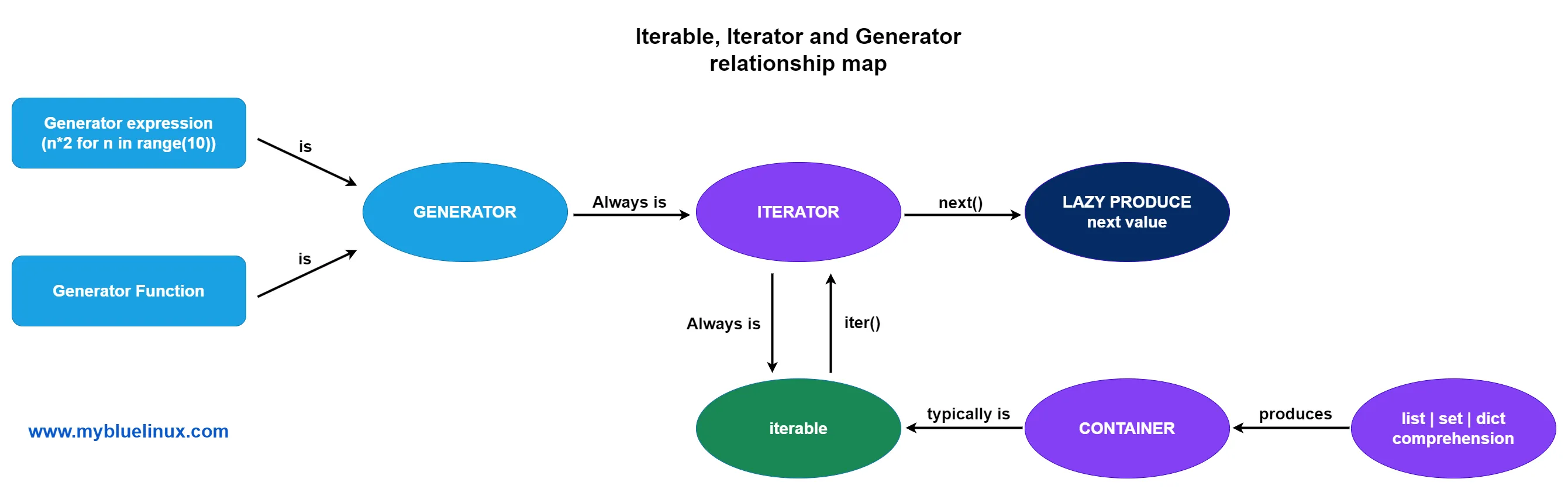
The important operational consequence is that iterators move forward. They are generally not rewindable, indexable, or safely reusable after consumption. If you need another pass over a dataset, create a new iterator rather than attempting to reset the old one.
Python Tutorial: Iterators and Iterables - What Are They and How Do They Work?
Watch Corey Schafer's “Python Tutorial: Iterators and Iterables - What Are They and How Do They Work?” for a concrete view of the protocol that for loops use and of why generators are such a natural fit for streaming.
Start with iterables versus iterators, focusing on why a list can be iterated over but cannot itself be passed to next(). Continue with manual iteration to see iter(), next(), and StopIteration behind a for loop. Then skip the custom-class implementation and watch generator construction, followed by the memory motivation. Notice that a generator computes only when a consumer asks for its next value.
A generator satisfies both roles: it is iterable, because iter(generator) returns it, and it is an iterator, because next(generator) advances it.
yield: suspend now, resume later
A normal function runs until it reaches return. A generator function runs only until it reaches its next yield; then Python suspends the function, preserving its local variables and execution position.
from collections.abc import Iterator


def sample_ids(count: int) -> Iterator[str]:
    for index in range(count):
        yield f"sample-{index:05d}"
Calling this function does not execute the loop to completion:
ids = sample_ids(3)

print(ids)       # A generator object, not a list.
print(next(ids)) # sample-00000
print(next(ids)) # sample-00001
At each yield, execution pauses. The next next(ids) resumes just after that yield.
For a small finite computation, the distinction may seem cosmetic:
values = [1, 2, 3, 4]

squares_list = [value * value for value in values]
squares_stream = (value * value for value in values)
But these expressions create fundamentally different objects:
squares_listcalculates and stores all four results immediately.squares_streamis a generator expression. It calculates one result when a consumer requests it.
For a dataset manifest with millions of entries, square brackets and parentheses can be the difference between an unnecessary memory spike and a stable pipeline.
Generator expressions work well for small, local transformations:
short_prompts = (
    sample
    for sample in stream_jsonl(manifest_path)
    if len(sample.prompt) <= 512
)
This expression holds the source iterator and, at most, its current sample. It does not create a list of all qualifying samples.
A generator function is usually clearer when the transformation has meaningful validation, branching, diagnostics, or multiple intermediate steps. That is the form we will use for the actual dataset reader.
One typing detail connects this to the previous lesson. Use Iterable[Sample] when a function merely needs something it can loop through. Use Iterator[Sample] when it returns or directly advances a one-pass stream.
from collections.abc import Iterable, Iterator


def consume(samples: Iterable[Sample]) -> None:
    for sample in samples:
        print(sample.id)


def produce() -> Iterator[Sample]:
    yield ...
An Iterable[Sample] annotation does not guarantee low memory use: a preloaded list[Sample] also satisfies it. Memory efficiency depends on how the producer is implemented.
Build a streaming JSON Lines reader
A JSON Lines file, commonly called JSONL, stores one JSON object per line. It is a useful manifest format for image-text datasets because a program can parse one record at a time:
{"id": "0001", "image_path": "images/0001.jpg", "prompt": "Describe the image.", "answer": "A bicycle beside a tree."}
{"id": "0002", "image_path": "images/0002.jpg", "prompt": "What is on the table?", "answer": "A red cup."}
Create src/vlm_lab/data.py:
"""Streaming sample readers and bounded-memory batching."""

from collections.abc import Iterator, Mapping
from dataclasses import dataclass
import json
from pathlib import Path


@dataclass(frozen=True, slots=True)
class Sample:
    """One validated image-text training or evaluation example."""

    id: str
    image_path: str
    prompt: str
    answer: str


def _required_text(
    record: Mapping[str, object],
    key: str,
    line_number: int,
) -> str:
    value = record.get(key)

    if not isinstance(value, str) or not value.strip():
        raise ValueError(
            f"line {line_number}: {key!r} must be a non-empty string"
        )

    return value


def stream_jsonl(path: Path) -> Iterator[Sample]:
    """Yield validated samples from a JSON Lines manifest."""

    with path.open(mode="r", encoding="utf-8") as manifest:
        for line_number, raw_line in enumerate(manifest, start=1):
            line = raw_line.strip()

            if not line:
                continue

            try:
                record = json.loads(line)
            except json.JSONDecodeError as exc:
                raise ValueError(
                    f"line {line_number}: invalid JSON"
                ) from exc

            if not isinstance(record, dict):
                raise ValueError(
                    f"line {line_number}: expected a JSON object"
                )

            yield Sample(
                id=_required_text(record, "id", line_number),
                image_path=_required_text(
                    record,
                    "image_path",
                    line_number,
                ),
                prompt=_required_text(
                    record,
                    "prompt",
                    line_number,
                ),
                answer=_required_text(
                    record,
                    "answer",
                    line_number,
                ),
            )
This function is a generator because it contains yield. Its execution timeline matters:
stream_jsonl(path)creates a generator object.- The file is not opened and no JSON is parsed yet.
- The consumer requests a sample with
next(...)or through aforloop. - The generator opens the file, reads one line, parses and validates one record, then yields one
Sample. - The next request resumes at the next line.
The function keeps only:
- the open file handle;
- the current raw line;
- the current decoded JSON object; and
- the current
Sample.
It does not retain every preceding record.
The with statement ensures that the file is released when iteration completes or an exception leaves the block. The details of reliable resource cleanup, including what to consider when a stream is stopped early, are the focus of the next lesson.
You can use the stream directly:
from pathlib import Path

from vlm_lab.data import stream_jsonl


manifest_path = Path("data/train.jsonl")

for sample in stream_jsonl(manifest_path):
    print(sample.id, sample.image_path)
Avoid this unless the dataset is deliberately tiny:
# Defeats streaming by materializing every sample.
all_samples = list(stream_jsonl(manifest_path))
The same warning applies to tuple(...), set(...), sorted(...), and list comprehensions over an entire stream. They consume the iterator and retain the results.
Some operations consume a stream without storing all values. For example, sum(...) can aggregate numeric values in bounded memory, but it still exhausts the iterator. After consumption, the iterator has no remaining samples.
Batch deliberately, not accidentally
Streaming one sample at a time is memory efficient, but model training normally needs batches. A batch is an intentional, bounded materialization: it is correct to hold samples in memory when your configured batch_size is .
Python's itertools.islice takes a limited number of items from any iterable without first converting the full input into a list.
itertools — Functions creating iterators for efficient looping
Read the official Python documentation's itertools.islice entry. It provides the small but important primitive used to turn a one-pass stream into fixed-size batches.
In the “Itertool functions” section, locate the itertools.islice entry, immediately after groupby. Read the selection semantics, then continue through the note explaining that ordinary negative slicing is unsupported. Focus on the fact that islice advances the source only as far as its requested slice.
Add this batching function below stream_jsonl:
from collections.abc import Iterable, Iterator
from itertools import islice
from typing import TypeVar


T = TypeVar("T")


def batched(
    items: Iterable[T],
    batch_size: int,
) -> Iterator[list[T]]:
    """Yield non-empty lists containing at most batch_size items."""

    if batch_size < 1:
        raise ValueError(
            f"batch_size must be positive; got {batch_size}"
        )

    iterator = iter(items)

    while batch := list(islice(iterator, batch_size)):
        yield batch
The crucial line is:
batch = list(islice(iterator, batch_size))
islice requests at most batch_size values from iterator; list(...) then stores only those values. At the end of the manifest, the final batch may be smaller than batch_size, and the next islice call produces an empty list, ending the loop.
Use it with the configuration object from the previous lesson:
from pathlib import Path

from vlm_lab import ExperimentConfig
from vlm_lab.data import batched, stream_jsonl


def train_one_epoch(
    manifest_path: Path,
    config: ExperimentConfig,
) -> None:
    samples = stream_jsonl(manifest_path)

    for batch in batched(
        samples,
        batch_size=config.training.batch_size,
    ):
        # Later: decode only this batch's images, tokenize its prompts,
        # collate tensors, transfer them, and run a training step.
        print(f"processing {len(batch)} samples")
This pipeline is bounded in a useful way:
JSONL file -> one Sample -> batch of Samples -> decode/tokenize batch -> tensors
The batch list is expected. What you must avoid is moving the list conversion upstream:
# Bad: reads the entire manifest before yielding the first batch.
samples = list(stream_jsonl(manifest_path))

for batch in batched(samples, batch_size=8):
    ...
For a vision-language workload, also be precise about where images are decoded. A stream of Sample objects that holds image paths is inexpensive. If a transformation eagerly decodes every image into an array before batching, it reintroduces the memory problem. Decode, tokenize, and collate within the current batch only.
A generator is single-use
This is a common training-loop bug:
samples = stream_jsonl(Path("data/train.jsonl"))

for epoch in range(3):
    for batch in batched(samples, batch_size=8):
        train_on(batch)
The first epoch consumes samples. The second epoch has nothing left.
Create a fresh stream for each epoch:
train_manifest = Path("data/train.jsonl")

for epoch in range(config.training.epochs):
    samples = stream_jsonl(train_manifest)

    for batch in batched(
        samples,
        batch_size=config.training.batch_size,
    ):
        train_on(batch)
Calling a generator function again creates a new generator with a new position at the beginning of the file.
Compose streaming stages
Each stage can consume one sample and yield one transformed sample. For example, this generator expression filters oversized prompts without collecting all accepted examples:
eligible_samples = (
    sample
    for sample in stream_jsonl(train_manifest)
    if len(sample.prompt) <= 512
)

for batch in batched(
    eligible_samples,
    batch_size=config.training.batch_size,
):
    train_on(batch)
As pipelines become more complex, named generator functions are easier to validate and test:
from collections.abc import Iterable, Iterator


def keep_prompts_up_to(
    samples: Iterable[Sample],
    max_characters: int,
) -> Iterator[Sample]:
    for sample in samples:
        if len(sample.prompt) <= max_characters:
            yield sample
Then compose the stages:
samples = keep_prompts_up_to(
    stream_jsonl(train_manifest),
    max_characters=2_000,
)

for batch in batched(samples, batch_size=8):
    train_on(batch)
This is a pipeline, not a dataset copy. Each stage requests input only when the downstream consumer requests output.
Streaming pitfalls worth recognizing
The following rules prevent many subtle dataset-pipeline failures:
- A
forloop is streaming only if its input is streaming. Iterating over a preloaded list does not recover the memory already spent loading it. - Do not reuse an exhausted iterator. Reopen the source or call the generator function again for each epoch.
- Materialize intentionally. A batch list is intentional;
list(stream)for a huge dataset is usually not. - A bounded reader is not automatically a bounded pipeline. Image decoding, tokenization, caching, and tensor collation must also happen per batch.
- Be wary of
itertools.tee. It may buffer unseen values when one of its derived iterators runs ahead of another, so it is not a free way to duplicate a very large stream. - Infinite streams require a stopping policy. Iterators can be infinite; use a bounded loop, a maximum number of samples, or an explicit training-step limit.
At this stage, keep the pipeline synchronous and simple. Later, PyTorch DataLoader workers, shuffling, prefetching, and asynchronous API services will add concurrency concerns. The foundational contract remains unchanged: a consumer asks for the next item, and the producer yields only what is needed.
Key takeaways
You can now describe and use Python's streaming model:
- An iterable can create an iterator; an iterator yields successive values and eventually signals completion with
StopIteration. - A generator is a concise, state-preserving iterator created with
yieldor a generator expression. - Generator functions run lazily: work begins when a consumer requests the next value.
- A JSONL reader can yield and validate one
Sampleat a time rather than loading an entire manifest. itertools.islicelets you deliberately materialize only a batch-sized list.- Generator instances are one-pass streams, so training requires a fresh stream for each epoch.
In the next lesson, you will examine the with statement used in stream_jsonl and learn how context managers release files, devices, and other resources reliably—even when normal execution is interrupted.