Hello! Welcome to the start of a new module.
In our previous lessons, we explored the application layer, focusing on the HTTP protocol. We learned how to use tools like curl and browser developer tools to inspect the communication between a client and a server. Now, we're going to move down the technology stack from the what (the protocol) to the how (the execution environment). When you run your Django application, you're not just running code; you're asking the Operating System to bring that code to life.
Today's Goal: This lesson tackles a fundamental concept in computing: the process. Our learning outcome is to define what a process is and the resources it encapsulates, specifically its memory address space and file descriptors. Understanding this is the absolute bedrock for comprehending how web servers like Gunicorn run your application, handle requests, and interact with the underlying system.
From Static Program to Living Process
Before we can talk about a process, we must first distinguish it from a program. You've written many programs as a developer. A Python script (.py), a compiled C executable, or even the bash shell itself are all programs. They are static collections of instructions and data stored in a file on your disk. They don't do anything on their own.
A process is what you get when you ask the operating system to run a program. It is a program in execution. The OS takes the static instructions from the file and creates a dynamic, living entity that can be scheduled to run on the CPU, allocated memory, and given access to resources.
To get a clear picture of this transformation, let's watch the beginning of this video.
Linux Processes Explained: Process Table, PCB, Memory Maps & More
The video 'Linux Processes Explained' provides a great visual analogy for understanding the difference between a static program on disk and a dynamic, running process in memory.
Watch from the beginning to 01:23. Focus on the distinction made between a program (passive, on disk) and a process (dynamic, in memory).
The Process Control Block: The OS's Ledger
When the OS creates a process, it needs a way to keep track of it. It does this using a special data structure called the Process Control Block (PCB). Think of the PCB as the process's official record or ID card held by the OS. It contains all the metadata the kernel needs to manage the process throughout its lifecycle.
In Linux, the PCB is implemented as a C struct called task_struct. Given your goal to go to the deepest level, it's good to know both the general academic term (PCB) and the specific Linux implementation name (task_struct).
A PCB/task_struct stores crucial information, including:
- Process ID (PID): A unique number that identifies the process.
- Process State: Is the process currently running, waiting for I/O, or stopped?
- CPU Context: The saved state of the CPU registers, including the Program Counter, which points to the next instruction to be executed.
- Memory Management Information: Pointers to the data structures (like page tables) that define the process's memory.
- File Descriptor Table: A list of the files, sockets, and other I/O channels the process has open.
The article below provides an excellent breakdown of these components.
A Deep Dive into Processes in Operating Systems
The article 'A Deep Dive into Processes in Operating Systems' details the anatomy of a process, including a thorough explanation of the PCB.
Read section 3.2, 'The Process Control Block (PCB)'. Pay attention to the list under 'What the PCB Contains', as we will be diving deeper into the memory and file system information it tracks.
Now that we know how the OS keeps track of a process, let's explore the two key resources mentioned in our learning outcome that the PCB points to: the memory address space and file descriptors.
Encapsulated Resource 1: The Memory Address Space
One of the most powerful abstractions the OS provides is process isolation. Your web browser crashing shouldn't bring down your code editor. This is achieved by giving every single process its own private virtual address space.
A process doesn't directly access physical RAM. Instead, it operates in its own virtual world where it thinks it has a large, contiguous block of memory all to itself. The OS, with help from the CPU's Memory Management Unit (MMU), translates these virtual addresses into physical addresses in RAM behind the scenes.
This virtual address space isn't just a random blob of memory; it's highly structured.
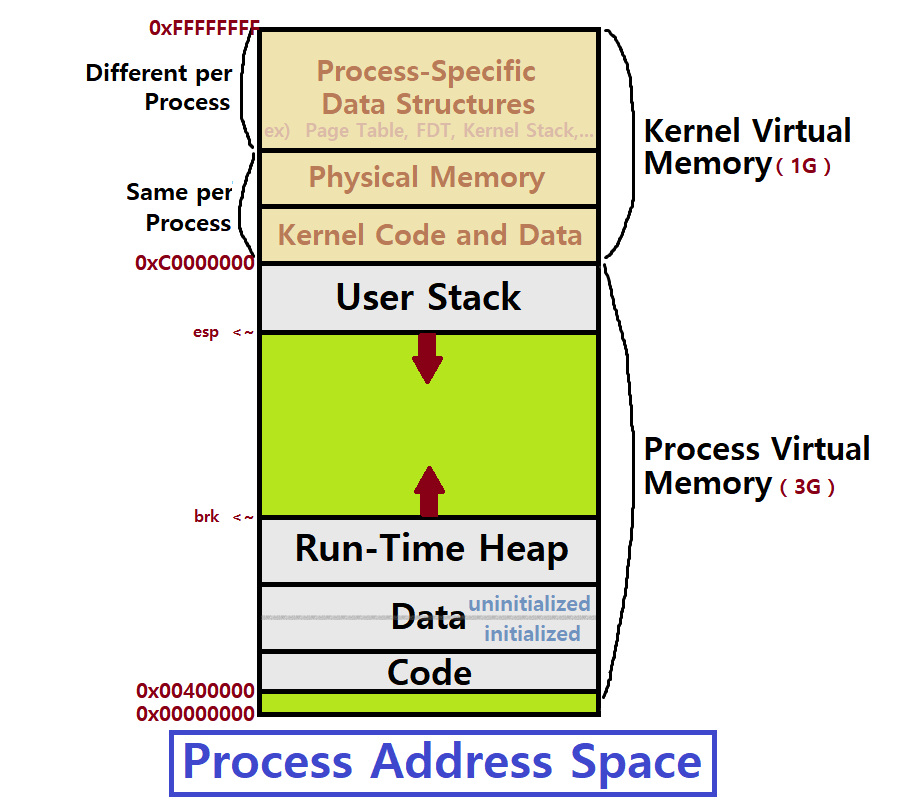
Let's break down these segments:
- Text Segment (
.text): Contains the actual machine code instructions of your program. This area is marked as read-only to prevent a process from accidentally or maliciously modifying its own instructions. - Data Segments (
.dataand.bss):- The
.datasegment holds global and static variables that are initialized with a value in your code (e.g.,count = 10;). - The
.bsssegment holds uninitialized or zero-initialized global and static variables.
- The
- Heap: This is the region for dynamic memory allocation. When your Python code creates a new object (e.g., a dictionary, a list, an instance of a class), the memory for that object is typically allocated on the heap. The heap grows "upwards" from low addresses to high addresses.
- Stack: This is used for managing function calls. Each time a function is called, a "stack frame" is pushed onto the stack to store local variables, arguments, and the return address. When the function returns, its frame is popped off. The stack grows "downwards" from high addresses to low addresses.
The following video and article provide a more detailed look at these memory sections.
Linux Processes Explained: Process Table, PCB, Memory Maps & More
Let's return to the 'Linux Processes Explained' video, which provides a concise explanation of these memory segments.
Watch from 01:23 to 03:11. This segment first introduces the concept of virtual memory and then walks through each of the segments: stack, heap, text, data, and BSS.
For a more in-depth text description that you can refer back to, this article is excellent.
A Deep Dive into Processes in Operating Systems
The article 'A Deep Dive into Processes in Operating Systems' offers a detailed text-based explanation of each component of the process's memory.
Read section 3.1, 'Process Components'. This will solidify your understanding of the Text, Data/BSS, Heap, and Stack segments.
Encapsulated Resource 2: File Descriptors
The second key resource a process encapsulates is its set of file descriptors. In Unix-like operating systems (including Linux and macOS), a core design philosophy is "everything is a file." This means that processes interact with files on disk, network connections (sockets), and inter-process communication channels (pipes) using a unified abstraction: the file descriptor.
A file descriptor is simply a non-negative integer (like 0, 1, 2, 3, ...) that acts as a handle or a ticket. When a process wants to read from or write to a file or a socket, it doesn't use the file's name; it uses its file descriptor number in system calls like read() and write().
By default, every process starts with three standard file descriptors:
- 0: Standard Input (
stdin) - 1: Standard Output (
stdout) - 2: Standard Error (
stderr)
So how does the OS turn a simple integer into a connection to a specific file or socket? It uses a series of tables.
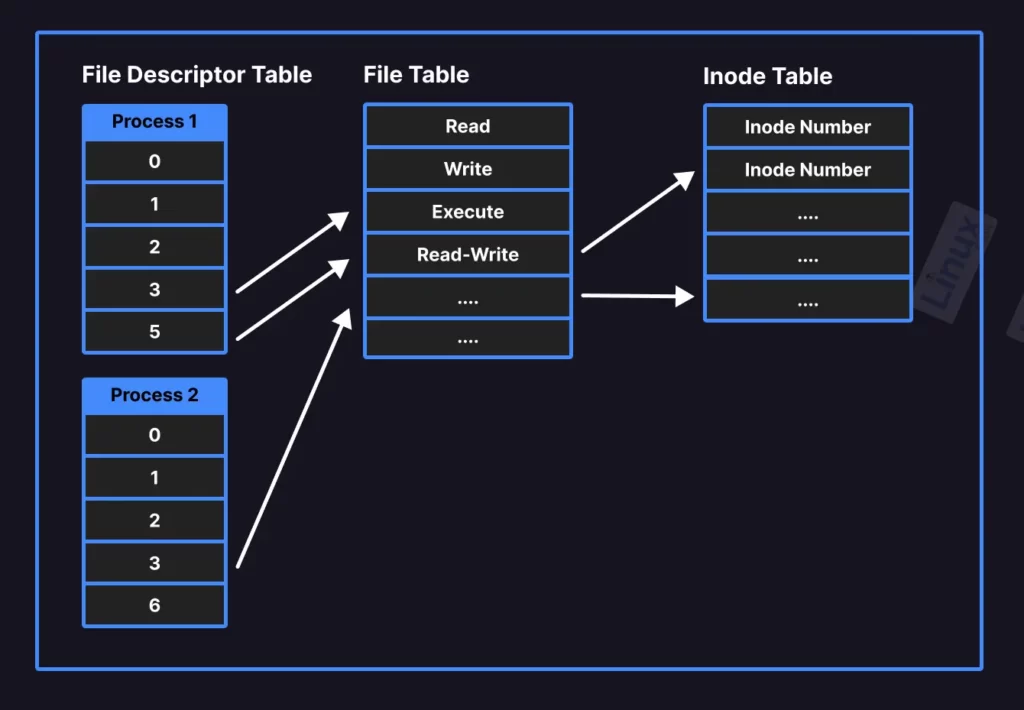
This is a crucial concept for understanding how servers work:
- File Descriptor Table (Per-Process): Each process has its own private table. The index of the table is the file descriptor number. The value at that index is a pointer.
- Open File Table (System-Wide): This pointer leads to an entry in a global table shared by all processes. This entry tracks the state of an open file instance, most importantly the current read/write offset. This is why if two processes have the same file open, they can have different read positions.
- V-node / Inode Table (System-Wide): The entry in the open file table, in turn, points to the inode table. The inode contains the actual file metadata (permissions, size, location on disk, etc.).
This video explains this multi-table lookup process very clearly.
What's behind a file descriptor in Linux? Also, i/o redirection with dup2.
The video 'What's behind a file descriptor in Linux?' dives into the kernel structures that make this abstraction work. This is exactly the kind of root-level detail you're looking for.
Watch from 00:19 to 05:22. The speaker does an excellent job of explaining the three key data structures: the per-process file descriptor table, the global open file table, and the global v-node table.
When your Django application, running inside a Gunicorn process, listens for incoming connections on port 8000, the OS gives it a file descriptor representing that listening socket. When a new client connects, the OS creates another file descriptor for that specific connection, which the process then uses to read the HTTP request and write the HTTP response.
Conclusion
In this lesson, we peeled back the first layer of the operating system to understand the fundamental unit of execution for our backend code.
Key Takeaways:
- A process is a program in execution, brought to life and managed by the operating system. The OS uses a Process Control Block (PCB), or
task_structin Linux, to track all of a process's metadata. - Each process is given its own private virtual address space, which provides isolation and is structured into distinct segments: text (code), data/BSS (global variables), heap (dynamic allocation), and stack (function calls).
- Processes interact with I/O devices like files and network sockets through file descriptors. These are small integers that serve as handles, managed by the kernel through a system of per-process and global tables.
Preview of the Next Lesson:
Creating a full process—with its own private address space and PCB—is a relatively "heavy" operation. For a web server that needs to handle hundreds of concurrent requests, creating a new process for each one would be inefficient. This is where a lighter-weight concept comes in. In our next lesson, we will explore the difference between threads and processes, and understand how they relate to concurrency and parallelism in a server context.