Hello! Welcome to the first lesson of our new module, "Database Internals: How Data is Stored and Retrieved."
In our previous lesson, we explored how web applications maintain state using cookies and server-side sessions. We concluded by noting that the actual session data, along with all other critical application data, is persisted in a database. This provides the perfect starting point for our deep dive into the database itself.
Your goal is to understand backend systems from the root level, and there's nothing more fundamental to a database than how it physically organizes data on a storage device. This lesson addresses that head-on. Our learning outcome is to explain how a relational database stores data on disk using pages and rows.
We will peel back the layers of abstraction, starting from the files you'd see in your operating system and drilling all the way down to the bytes that represent a single row of data.
The Big Picture: A Hierarchy of Storage
Before we dive into the details, it's helpful to have a mental model of how a database organizes data. Think of it as a hierarchy, moving from large containers down to the smallest pieces of information.
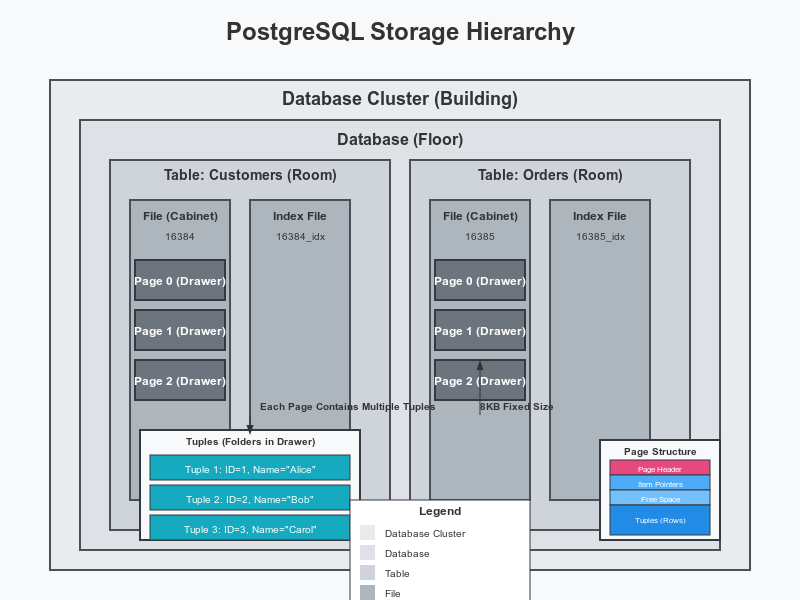
As you can see, at the lowest level, a database is simply a collection of files on a disk. The database management system (DBMS) is responsible for interpreting the contents of these files. But why is it structured this way, with files, pages, and tuples? The answer lies in the physics of computer hardware.
Let's watch a segment from a lecture by the CMU Database Group that explains the foundational concepts of database storage architecture.
#03 - Database Storage: Files, Pages, Tuples (CMU Intro to Database Systems)
This video introduces the 'disk-oriented' database architecture and the storage hierarchy. It highlights the massive performance difference between accessing data from disk versus memory, which is the primary reason databases are designed the way they are.
Watch from 00:02:39 to 00:16:52. Pay close attention to: The distinction between volatile (memory) and non-volatile (disk) storage. The concept of block-addressable vs. byte-addressable access. The incredible latency differences between accessing data from CPU caches, RAM, and disk. The analogy of replacing nanoseconds with seconds makes this very clear.
The key takeaway is that reading from disk is orders of magnitude slower than reading from memory. Therefore, a primary goal of a database system is to minimize the number of times it has to access the disk. This principle influences every aspect of its design.
Pages: The Fundamental Unit of I/O
As you just learned, disks are block-addressable, meaning they read and write data in fixed-size blocks, not one byte at a time. A database system is designed to work efficiently with this hardware reality. It does so by organizing its files into fixed-size chunks called pages (or blocks).
A page is the smallest unit of data that the database moves between the disk and memory. Even if you only need to read a single row, the database must load the entire page containing that row from the disk into its memory buffer.
Understanding Database Internals
This article from 'Understanding Database Internals' provides a concise explanation of pages and their role as the unit of I/O.
Read the sections 'Pages: The Unit of I/O in Databases' and 'Database Pages'. Focus on understanding why pages exist and the performance implications of this design. Note the default page sizes for common databases like PostgreSQL (8KB) and MySQL (16KB).
This page-based approach has a profound impact on performance. The fewer pages a query needs to touch, the fewer slow disk I/O operations it will perform, and the faster it will run.
From Tables to Pages: Heap Files
Now that we understand pages, how does a table relate to them? In many relational databases, including PostgreSQL, a table's data is stored in a structure called a heap file.
The term "heap" in this context simply means an unordered collection. The rows within a heap file are not stored in any particular order (like by primary key). A new row is typically inserted into the first page that has enough free space.
A heap file is essentially a sequence of pages containing the rows of a single table.
How Postgres stores data on disk – this one's a page turner
The blog post 'How Postgres stores data on disk' offers a practical look at how tables map to files and pages in PostgreSQL.
Read the sections 'Show me the files', 'What’s the heap?', and 'So what’s a page?'. This will show you how a table is represented by a physical file on disk (the 'relfilenode') and how that file is composed of 8KB pages.
Inside a Page: The Slotted Page Layout
We've established that a table is a heap file, and a heap file is a sequence of pages. Now, let's zoom in and look at the internal structure of a single page. How does it store multiple rows, especially when they can be of different sizes?
Most databases use a clever organization method called the slotted page layout.
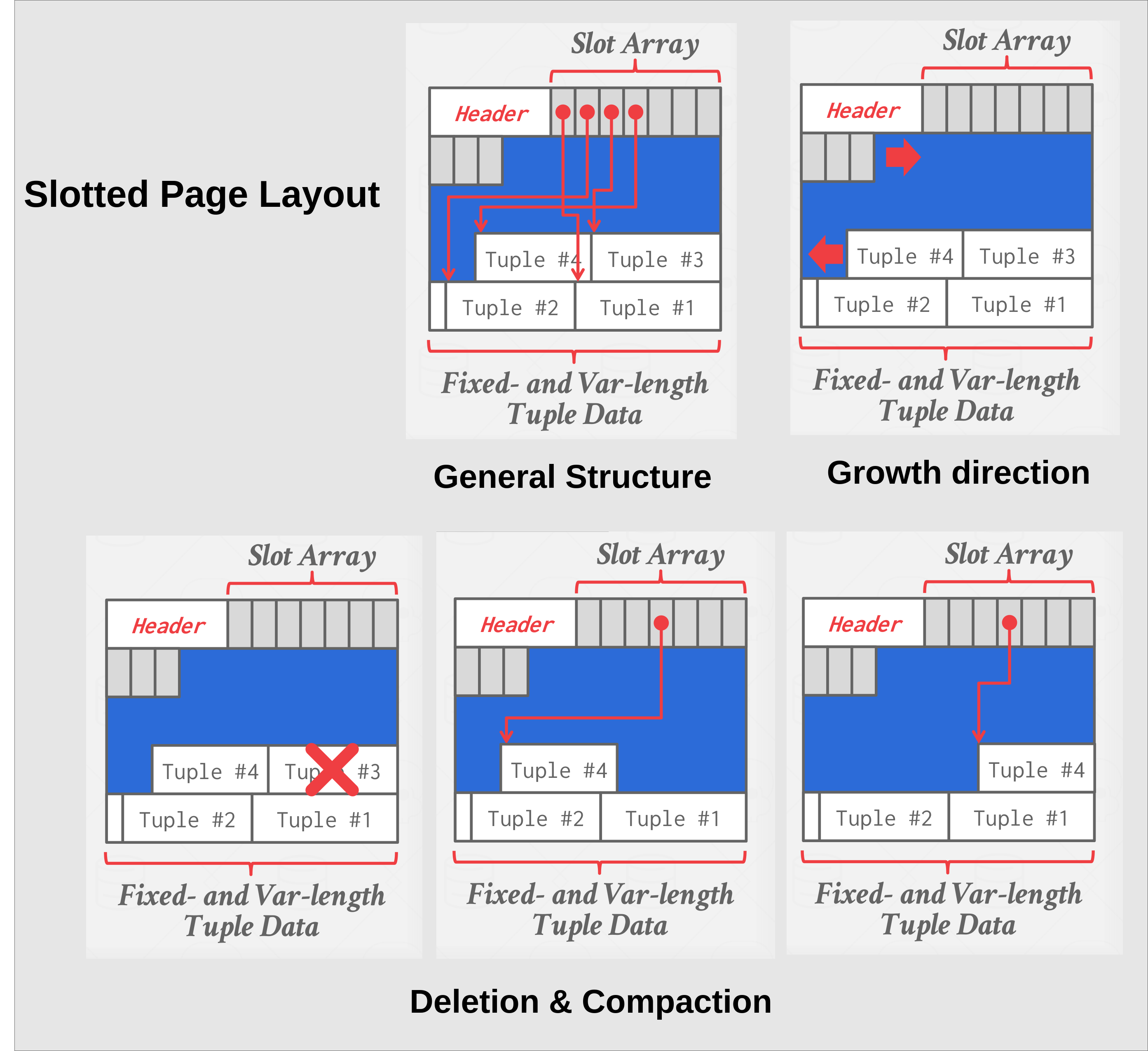
This structure has several key advantages:
- Indirection: The slot array acts as a layer of indirection. An external reference to a row (e.g., from an index) points to a specific slot on a specific page (
(page_id, slot_number)), not to the physical byte offset of the row data. - Variable-Length Rows: Because the pointers store both the offset and length, rows of varying sizes can be packed efficiently.
- Efficient Updates & Deletes: If a row is updated and its size changes, it can be moved within the page. Only the pointer in the slot array needs to be updated. The external reference remains valid. When a row is deleted, its slot can simply be marked as unused. This avoids costly reorganization of other pages or indexes.
Let's return to the CMU lecture for a detailed explanation of this layout.
#03 - Database Storage: Files, Pages, Tuples (CMU Intro to Database Systems)
This segment explains the slotted page architecture in detail, highlighting why it's a superior approach to naively packing tuples one after another.
Watch from 00:45:48 to 00:49:30. Focus on how the slot array provides indirection that allows for tuple compaction within a page without affecting anything outside of that page.
Inside a Row: The Tuple Structure
We've reached the most granular level: the individual row, which is called a tuple in database terminology. A tuple is essentially a sequence of bytes representing the data for a single row.
A tuple consists of two main parts:
- Tuple Header: Contains metadata about the row. This is crucial for database operations. For example, in PostgreSQL, the header includes transaction identifiers (
xmin,xmax) which are fundamental to its Multi-Version Concurrency Control (MVCC) system. It also often contains a bitmap to track which columns areNULL. - User Data: The actual column values, laid out one after another as bytes. The database's catalog contains the schema information needed to interpret these bytes correctly (e.g., these 4 bytes are an integer, the next 20 are a string).
What happens if a column's value is very large, like a long blog post or a user-uploaded image, and won't fit on a single page? Databases have a mechanism for this. In PostgreSQL, it's called TOAST (The Oversized Attribute Storage Technique).
99% of Developers Don't Get PostgreSQL
The video '99% of Developers Don't Get PostgreSQL' provides a great, concise explanation of tuples and the TOAST mechanism.
Watch from 00:02:33 to 00:05:26. The first part quickly reviews pages and tuples in Postgres. The second part provides an excellent explanation of TOAST, covering both compression and out-of-line storage for large values.
TOAST works by automatically compressing large field values or moving them to a separate "toast table," leaving only a pointer in the main table row. This ensures that the main table's pages remain compact and fast to scan.
Conclusion
In this lesson, we have journeyed from the logical concept of a table down to its physical representation on disk. You now understand the fundamental building blocks that all relational databases use to store data.
Key Takeaways:
- Databases store data in files, which are managed by the operating system.
- These files are divided into fixed-size pages (e.g., 8KB in PostgreSQL). The page is the basic unit of I/O, a design choice driven by the high latency of disk access.
- A table's rows are stored in an unordered heap file, which is a collection of pages.
- Inside a page, rows (or tuples) are organized using a slotted page layout. This involves a header, a slot array of pointers, and the tuple data itself, allowing for efficient management of variable-sized data.
- A tuple contains a header with metadata and the raw byte data for each column.
- Large values that don't fit on a page are handled using techniques like PostgreSQL's TOAST, which uses compression and out-of-line storage.
Preview of the Next Lesson:
We've answered the question of how data is stored. But a database with unordered data in heap files would be incredibly slow to search; you'd have to scan every single page for every query (a "full table scan"). This leads to our next critical topic: How do we find data quickly? In the next lesson, we will explore the answer: B-tree indexes, and learn how they work internally to speed up lookups, insertions, and deletions.