Hello! Welcome to your first lesson in our deep dive into backend engineering.
Given your experience with Python and Django, you've already built applications that communicate over networks. Our goal in this course is to peel back the layers of abstraction provided by frameworks and libraries, and understand what's happening at the most fundamental level.
We'll start this journey with our first module, "Networking Fundamentals." Before a single line of your Django code runs, a huge amount of work has already been done by the network to deliver a request to your server. This lesson focuses on the foundational framework that makes all of this possible.
Today's Goal: By the end of this 60-minute lesson, you will be able to describe the TCP/IP model layers and the role each layer plays in transmitting data. This is the bedrock upon which all internet communication is built.
1. Why We Need a Model for Communication
Imagine trying to have a conversation where one person speaks only English and the other speaks only Mandarin, with no shared rules for grammar, turn-taking, or even what constitutes a word. It would be chaos.
Computers face a similar problem. For a Dell laptop running Windows to communicate with a server running Linux built by a different company, they need a common "language" and a set of rules—a protocol. The TCP/IP model is a suite of such protocols, organized into a layered stack, that governs how data is sent and received over the internet.
Let's watch a short video that introduces this idea and gives a high-level overview of the TCP/IP model.
TCP IP Model Explained | TCP IP Model Animation | TCP IP Protocol Suite | TCP IP Layers | TechTerms
This video from TechTerms provides a clear and animated introduction to the TCP/IP model. It explains why protocols are necessary and gives a first look at the layers we'll be discussing.
Please watch the first three minutes of the video (from 00:05 to 03:08). Pay attention to the analogy of communication and the introduction of TCP/IP as a practical model compared to the OSI model.
As the video mentions, TCP/IP is the practical, working model of the internet. It's often presented as a 4-layer or 5-layer model. We'll use the 5-layer version as it's more descriptive and maps cleanly to how networking is often taught and implemented.
The five layers are:
- Layer 5: Application
- Layer 4: Transport
- Layer 3: Network
- Layer 2: Data Link
- Layer 1: Physical
The genius of this layered approach is separation of concerns. Each layer is responsible for a specific part of the communication process and only needs to interact with the layers directly above and below it. An application developer working at the Application layer doesn't need to know if the data is being sent over a Wi-Fi (radio signals) or an Ethernet cable (electrical signals).
2. The Core Concept: Encapsulation
So how does data actually travel through these layers? The process is called encapsulation on the sending side and de-encapsulation on the receiving side.
When your application sends data (like an HTTP request), it passes it down to the Transport layer. The Transport layer wraps the data in a header containing information it needs (like port numbers) and passes the new, larger chunk of data down to the Network layer. The Network layer does the same, adding its own header (with IP addresses). This continues all the way down.
Think of it like sending a letter:
- You write the letter (Application data).
- You put it in an envelope with the recipient's name/apartment number (Transport header - port).
- You put that envelope in a larger package with the full street address (Network header - IP address).
- The local post office puts a label on it for the specific mail truck it goes on (Data Link header - MAC address).
The data at each layer has a specific name, called a Protocol Data Unit (PDU).

3. A Deep Dive into Each Layer (Bottom-Up)
To align with your goal of understanding things from the "root," let's examine the layers from the bottom up. The following sections are all covered in the "TCP IP Model Explained" video. You can either watch the relevant parts as we go or watch the full video from where you left off (03:54) to the end (19:18) and then read my summaries.
Layer 1: The Physical Layer
- Purpose: To transmit raw bits (0s and 1s) across a physical medium.
- How it works: This layer is all about the physics of communication. It converts binary data into physical signals—electrical pulses for copper Ethernet cables, light pulses for fiber optics, or radio waves for Wi-Fi. It's not concerned with what the bits mean, only with moving them.
- PDU: Bits.
- Examples: Ethernet cables, network interface card (NIC) hardware, Wi-Fi radio transmitters.
(Covered in video LINK from 03:54 to 05:08)
Layer 2: The Data Link Layer
- Purpose: To provide reliable communication between two directly connected devices on the same local network (e.g., your laptop and your Wi-Fi router).
- How it works: It takes the packets from the Network Layer and wraps them into frames. It adds a header containing the physical hardware addresses (MAC addresses) of the source and destination devices. It's also responsible for error checking to detect if data was corrupted during physical transmission.
- PDU: Frame.
- Addressing: MAC (Media Access Control) address. This is a globally unique identifier burned into the network hardware by the manufacturer.
- Key Concept: This layer's world is a single, local network segment. It doesn't know how to get data to a different network.
(Covered in video LINK from 05:08 to 08:35)
Layer 3: The Network Layer (or Internet Layer)
- Purpose: To move packets from a source host to a destination host that may be on different networks, anywhere in the world. This is the layer that makes the internet work.
- How it works: This layer introduces logical addressing using IP addresses. Its primary job is routing—figuring out the best path for a packet to take across multiple routers to reach its final destination. The main protocol here, the Internet Protocol (IP), is "best-effort," meaning it doesn't guarantee delivery. That's a job for the layer above.
- PDU: Packet.
- Addressing: IP (Internet Protocol) address. Unlike a fixed MAC address, an IP address is a logical address assigned to a device.
- Key Concept: While a MAC address gets a frame to the next device in the chain (e.g., your router), the IP address ensures the packet reaches its ultimate destination server, even if it's across the globe.
(Covered in video LINK from 08:35 to 12:40)
Layer 4: The Transport Layer
- Purpose: To provide process-to-process communication. While the Network Layer gets a packet to the right computer, the Transport Layer gets it to the right application running on that computer.
- How it works: It uses port numbers. When a web browser makes a request, it's assigned a source port, and it sends the data to a destination port on the server (e.g., port 443 for HTTPS). This layer takes large chunks of data from the application and breaks them into smaller segments (for TCP) or datagrams (for UDP).
- PDU: Segment (TCP) or Datagram (UDP).
- Addressing: Port Number.
- Key Protocols:
- TCP (Transmission Control Protocol): Reliable and connection-oriented. It establishes a connection before sending data, guarantees that all segments arrive, and ensures they're reassembled in the correct order. This reliability comes with some overhead.
- UDP (User Datagram Protocol): Unreliable and connectionless. It just sends datagrams without establishing a connection or guaranteeing delivery. It's much faster and is used for applications like video streaming or DNS where speed is more critical than perfect reliability.
(Covered in video LINK from 12:40 to 17:30)
Layer 5: The Application Layer
- Purpose: This is the layer that user applications interact with. It provides the high-level protocols that we use every day.
- How it works: It defines the rules for specific types of communication. For example, your Django app speaks HTTP to a web browser.
- PDU: Message.
- Examples: HTTP/HTTPS (web browsing), SMTP (email), DNS (domain name resolution), FTP (file transfer).
(Covered in video LINK from 17:43 to 19:18)
4. From Abstract Model to OS Internals
This layered model isn't just a theoretical concept. It's directly implemented within operating systems like Linux, which dominate the server world. As a backend developer, understanding this mapping is crucial.
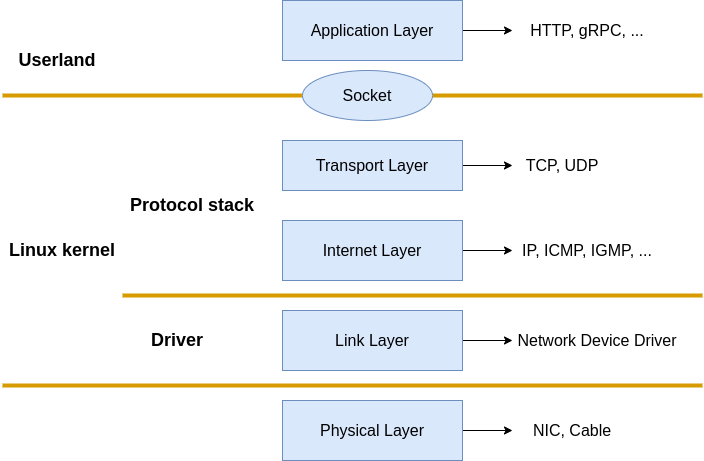
When your Django application wants to send a response, it doesn't build the TCP and IP headers itself. Instead, it uses a high-level function that eventually makes a system call (like send()) to the kernel. It hands the data to the kernel, and the kernel's highly-optimized networking stack takes over, performing the encapsulation through Layers 4, 3, and 2 before handing the data to the network card's driver.
To connect this theory to the real world of a Linux server, let's read the introduction of a paper that traces this exact journey.
[PDF] The Path of a Packet Through the Linux Kernel
This paper, 'The Path of a Packet Through the Linux Kernel', provides a detailed look at how the Linux networking stack works. We'll just read the introduction and background to solidify the concepts we've learned and see how they apply in a real OS.
Please read Section 1 ('Introduction') and Section 3.1 ('Linux Networking Stack'). Focus on how the authors frame the problem and how Figure 1 in the paper visualizes the stack, which is very similar to the diagram we just saw.
This reading gives you a taste of the depth we're aiming for. In later modules, we will trace this entire path ourselves, observing the specific kernel functions that get called when a single network packet is sent or received.
Conclusion
Congratulations on completing your first lesson! We've laid the essential groundwork for our entire course.
Key Takeaways:
- Network communication is governed by a layered model, with TCP/IP being the standard for the internet.
- The five layers (Physical, Data Link, Network, Transport, Application) each have a distinct responsibility, from sending physical signals to providing application-level services.
- Data is encapsulated with headers as it travels down the stack from the sender and de-encapsulated as it travels up the stack at the receiver.
- Three key addressing schemes work together:
- MAC Addresses (Layer 2): Get data to the next device on a local network.
- IP Addresses (Layer 3): Get data to the correct destination computer globally.
- Port Numbers (Layer 4): Get data to the correct application on that computer.
- These abstract layers have a concrete implementation within the operating system kernel, which handles the heavy lifting of network I/O.
Preview of the Next Lesson:
Now that we have a map of the network, our next step is to understand how we find our way around. Before your browser can send an HTTP request to google.com, it first needs to know Google's IP address. In the next lesson, we will explore the Domain Name System (DNS), the internet's global phonebook that translates human-readable domain names into machine-usable IP addresses.