Hello! In our last lesson, we took a deep dive into the TCP three-way handshake, the process that establishes a reliable, stateful connection. We saw how features like sequence numbers, acknowledgments, and connection states (SYN_SENT, ESTABLISHED) are fundamental to TCP's design.
That reliability, however, is not free. The handshake introduces latency before any data can be sent, and the constant tracking of every byte adds overhead to each packet. This raises a crucial question for any backend developer or system designer: What if you don't need that level of reliability? What if your application prioritizes speed above all else?
This is where the transport layer offers us a choice. Today, we will compare TCP with its main alternative, the User Datagram Protocol (UDP).
Today's Goal: By the end of this lesson, you will be able to compare TCP and UDP, understand their fundamental trade-offs, and explain when each protocol is the appropriate choice for a given application.
1. TCP vs. UDP: The Fundamental Differences
As you learned, TCP is a feature-rich protocol that provides a reliable, ordered, and error-checked stream of data. Think of it as a premium delivery service that tracks your package, ensures all parts arrive in the correct order, and gets a signature upon delivery.
UDP, on the other hand, is a "bare-bones" protocol. It takes data from the application, wraps it in a minimal header, and sends it out. It's like dropping a postcard in the mail: it's fast and has low overhead, but there's no guarantee it will arrive, no confirmation of receipt, and no specific order if you send multiple postcards.
To get a precise, engineering-level understanding of these differences, let's watch a video that systematically breaks down the comparison.
TCP vs UDP - Explaining Facts and Debunking Myths - TCP Masterclass
The video 'TCP vs UDP - Explaining Facts and Debunking Myths' from the Practical Networking channel provides an exceptionally clear breakdown. It moves beyond simple definitions to explore the core design choices that separate the two protocols.
Please watch the first four major points of comparison (01:33 - 13:36): Connection Oriented (TCP) vs. Not (UDP): This directly relates to the handshake we studied. Reliability: Focus on the three sub-components discussed: confirmation, error awareness, and in-order delivery. Flow Control: Understand how TCP 'politely' adjusts to network capacity while UDP does not. Overhead: Note the difference in header size and why TCP's header is larger.
To summarize and reinforce what you just watched, here are the core distinctions:
| Feature | TCP (Transmission Control Protocol) | UDP (User Datagram Protocol) |
|---|---|---|
| Connection | Connection-oriented: Uses a three-way handshake to establish a connection. | Connectionless: No handshake; just sends data. |
| Reliability | Reliable: Guarantees delivery via acknowledgments and retransmissions. | Unreliable ("Best-Effort"): No acknowledgments or retransmissions. |
| Ordering | Ordered: Guarantees that data is delivered to the application in the order it was sent. | Unordered: Packets (datagrams) may arrive out of order. |
| Flow Control | Yes: Prevents the sender from overwhelming the receiver. | No: Sender can send data as fast as it wants. |
| Congestion Control | Yes: Slows down transmission when network congestion is detected. | No: Does not react to network congestion. |
| Header Size | 20 bytes minimum (up to 60 with options) | 8 bytes (fixed) |
2. Debunking Common Myths for a Deeper Understanding
Your goal is to understand these concepts at the deepest level, so it's important to move beyond common oversimplifications. The same video does an excellent job of debunking a few myths that can lead to imprecise thinking.
TCP vs UDP - Explaining Facts and Debunking Myths - TCP Masterclass
Let's continue with the 'Practical Networking' video to address some common misconceptions about TCP and UDP.
Watch the segment on 'Myths' (13:36 - 17:57). Pay close attention to the nuanced corrections it offers.
Here's a summary of those crucial corrections:
- Myth: "UDP is faster."
- Reality: The network latency (time for a packet to travel) is the same for both. UDP has less overhead and avoids delays from connection setup, retransmissions, and congestion control, which often results in lower end-to-end latency. The correct term isn't "faster," but "lower overhead."
- Myth: "TCP is more secure."
- Reality: Neither protocol provides any encryption or security at Layer 4. Security is handled by upper-layer protocols like TLS (Transport Layer Security), which typically runs over TCP. You can also secure UDP traffic (e.g., using DTLS).
- Myth: "UDP is unreliable."
- Reality: It's more precise to say UDP does not provide reliability at the transport layer. The underlying network's reliability is the same for both. An application using UDP can (and often does) implement its own reliability mechanisms if needed.
- Myth: "TCP provides guaranteed delivery."
- Reality: TCP cannot magically make a packet arrive if a router is down. It provides informed delivery. It tells your application whether the data was delivered successfully or if the connection failed after multiple retries.
3. When to Choose Which? A Practical Guide
Now for the most important part: applying this knowledge. The choice between TCP and UDP is a fundamental system design decision. As a general rule, TCP is the default choice, but certain use cases strongly favor UDP.
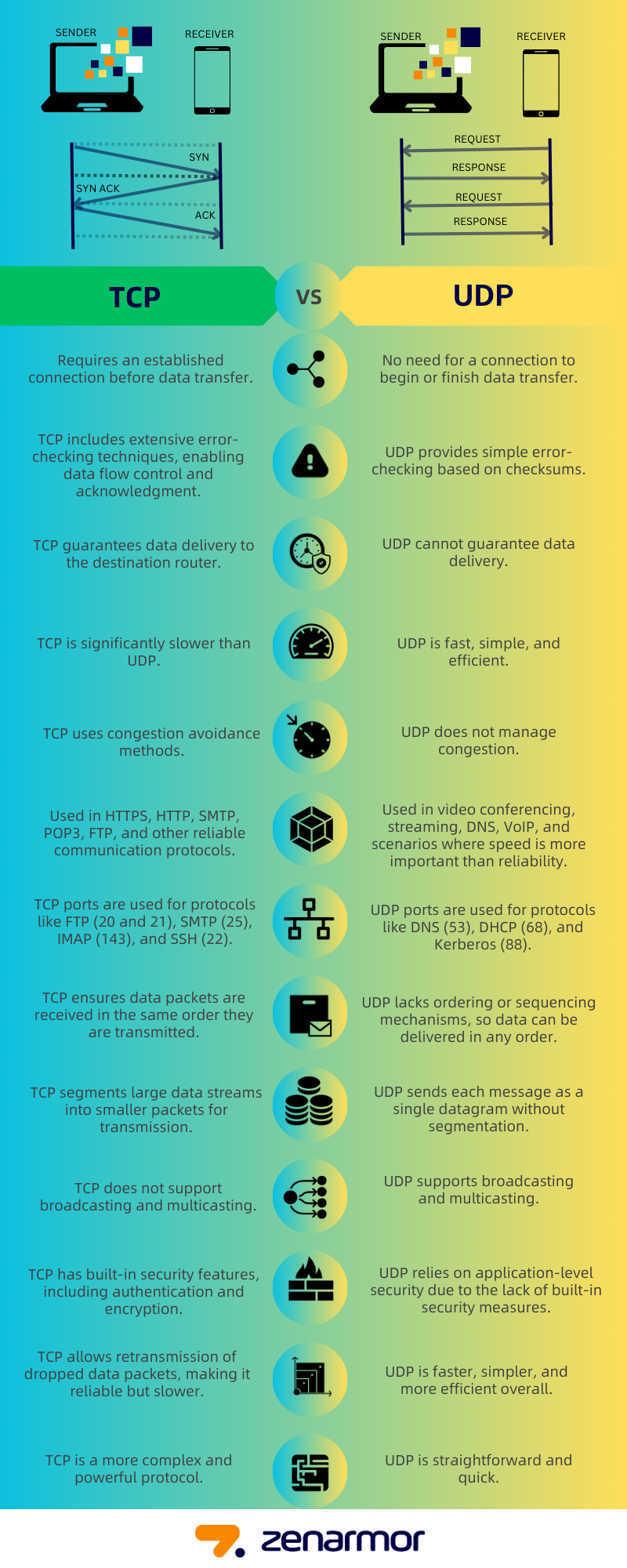
This infographic provides a great at-a-glance summary of the key differences and common applications.
To explore this in more detail, let's start with a concise article that frames the decision-making process.
Networking Essentials - System Design in a Hurry
The article 'Networking Essentials' from HelloInterview gives a clear, system-design-oriented perspective on when to choose each protocol.
Read the sections 'UDP: Fast but Unreliable,' 'TCP: Reliable but with Overhead,' and 'When to Choose Each Protocol.' The final comparison table is an excellent summary.
The article gives us a great framework. Now, let's look at a collection of real-world examples and nuanced arguments from experienced developers.
When is it appropriate to use UDP instead of TCP?
This Stack Overflow discussion, 'When is it appropriate to use UDP instead of TCP?', is a treasure trove of practical insights.
Read through a few of the top-voted answers. You don't need to read all 24. Focus on the answers that discuss specific use cases: The top answer by 'drudru' discusses DNS, real-time data (weather, stocks, gaming), and multicast traffic. The answer by 'Stephan202' focuses on VoIP and video streaming. The answer by 'Andy' gives an excellent explanation of why UDP can achieve higher throughput by avoiding TCP's congestion control. The answer from Hacker News (quoted by 'Marc Gravell') explains TCP's 'head-of-queue blocking' and why that's bad for telephony.
Synthesizing from these resources, here are the main scenarios for choosing one over the other.
Choose TCP when Data Integrity and Order are Critical (The Default)
TCP is the workhorse of the internet for a reason. Its reliability guarantees are essential for:
- Web Browsing (HTTP/HTTPS): You need the entire HTML, CSS, and JavaScript files to render a page correctly. A single missing packet could break the page.
- Email (SMTP, IMAP): You can't afford to have words or sentences missing from an email.
- File Transfers (FTP, SFTP): The transferred file must be a perfect copy of the original.
- Database Connections: SQL queries and their results must be transmitted with 100% accuracy. This is why your Django application connects to PostgreSQL or MySQL over TCP.
Choose UDP when Speed and Low Latency are Paramount
You should consciously choose UDP when you can tolerate some packet loss and speed is the primary concern.
- Real-time Streaming & Gaming (VoIP, Video Calls, Online Games): In these applications, a delayed packet is often worse than a lost one. If a video frame or audio snippet from a VoIP call is lost, it's better to just skip it and move on to the next one than to pause the entire stream waiting for a retransmission. This is the classic example of avoiding TCP's head-of-line blocking.
- Query-Response Protocols (DNS): A DNS query is a small request, and the response is a small answer. The overhead of setting up a TCP connection is unnecessary. If the UDP request packet is lost, the client simply times out after a short period and sends it again.
- Monitoring & Metrics: When sending high-volume telemetry data from thousands of servers, losing a few data points is usually acceptable. The simplicity and low overhead of UDP make it a good fit.
- Multicast/Broadcast: TCP connections are strictly one-to-one. UDP supports broadcasting (sending a packet to all devices on a subnet) and multicasting (sending a packet to a specific group of subscribed devices), which is efficient for things like service discovery or streaming to multiple viewers on a local network.
Conclusion
You've now explored the fundamental trade-off at the heart of the internet's transport layer. The choice between TCP and UDP is not about which is "better," but which is the right tool for the job.
Key Takeaways:
- TCP offers a reliable, ordered, connection-oriented stream. It's your default choice for applications where data integrity is non-negotiable (e.g., web, email, file transfers). This reliability comes at the cost of higher overhead and potential latency from handshakes and retransmissions.
- UDP provides a simple, fast, connectionless datagram service. It's the right choice for applications where speed and low latency are more important than perfect reliability (e.g., streaming, gaming, DNS). It pushes the responsibility for handling loss and ordering up to the application layer.
- The decision is a core architectural trade-off. By understanding the "why" behind each protocol, you can make more informed decisions when building or analyzing backend systems.
Preview of the Next Lesson:
We've talked about how data is packaged for its journey (TCP vs. UDP). But how does that data actually travel across the vast, complex network of the internet? In the next lesson, we will get hands-on and use tools like ping and traceroute to trace the path of a packet across a network, giving us our first look at the routers and hops that connect you to servers around the world.