Hello! Welcome to the third lesson in our "Networking Fundamentals" module.
In our last lesson, we demystified the Domain Name System (DNS), learning how it translates a human-friendly domain name like myapi.com into a machine-readable IP address. We now have the "street address" of the server we want to contact.
However, a single server can run many different network applications simultaneously. For instance, a server at IP address 104.18.32.124 might be running a web server, a database, and an SSH service for remote administration. When your client application sends data to that IP address, how does the server's operating system know which application—the web server, the database, or something else—is the intended recipient?
This is the problem we'll solve today.
Today's Goal: By the end of this lesson, you will be able to explain what IP addresses, ports, and sockets are, and how they work together to uniquely identify a specific connection to a specific application.
1. IP Addresses and Ports: The Host and the Service
We've already established that an IP address is a unique numerical label assigned to each device on a network. It acts like the street address for a building, ensuring data packets are routed to the correct machine.
But once the data arrives at the building, it needs to be delivered to the right "apartment." This is where ports come in.
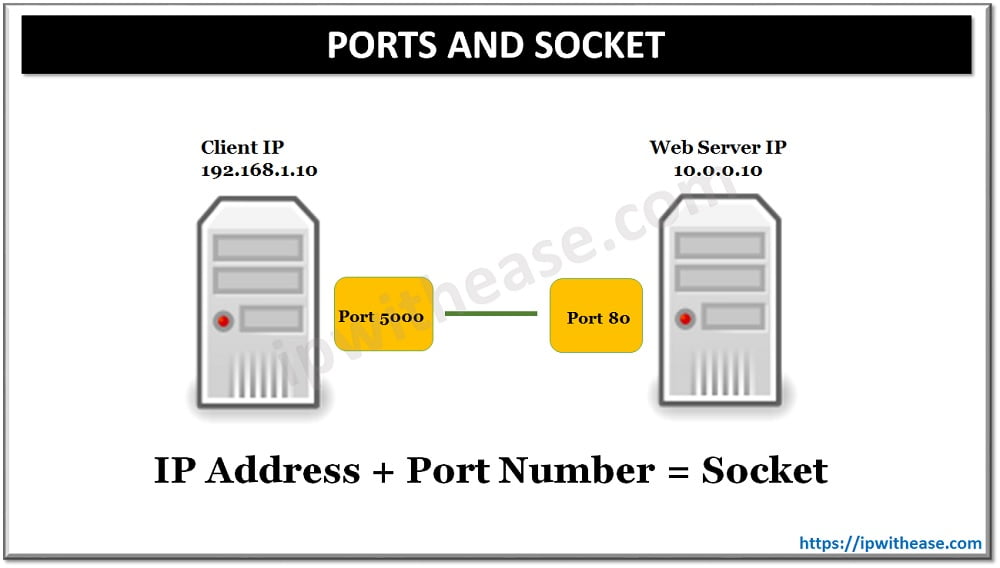
A port is a 16-bit number (from 0 to 65535) that identifies a specific application or process running on a machine. You can think of it as an apartment number. By combining an IP address with a port number, we can specify not just the machine, but the exact service on that machine we want to communicate with.
The Internet is Cool. Thank you, TCP
This article, 'The Internet is Cool. Thank you, TCP', uses a great analogy to explain the relationship between IP addresses and ports.
Please read the section titled 'Why TCP', focusing on the paragraph that begins 'IP (Layer 3) operates at the host level...'. This will reinforce the building/apartment analogy.
Ports are generally divided into three ranges:
- Well-Known Ports (0-1023): These are reserved for standard, system-level services. For example, HTTP servers listen on port 80, HTTPS on port 443, and SSH on port 22. A server application will "listen" on one of these predictable ports so clients know where to find it.
- Registered Ports (1024-49151): These can be registered for specific services by organizations.
- Dynamic or Ephemeral Ports (49152-65535): When a client (like your web browser) wants to connect to a server, its operating system assigns it a temporary port from this range for the duration of the communication. The server then knows where to send the response back to.
2. Sockets: The Endpoint for Communication
Now we can address a specific application on a specific machine. But how does your code actually send or receive data through this IP:Port combination?
This is where sockets come into play. A socket is a software object created and managed by the operating system that serves as an endpoint for communication. It's not a physical thing, but an abstraction that your application uses to talk to the network. Think of it as the door to the apartment: it's the specific entry/exit point for all communication with that apartment.
Let's watch a short video that introduces this concept.
How Sockets Actually Work – From Your Browser to the Backend ⚙️
This video from ByteMonk provides a concise introduction to what a socket represents.
Watch the first 39 seconds of the video, which defines a socket as a combination of an IP address and a port number.
From a developer's perspective (which will resonate with your background in Computer Engineering and software development), a socket is something you request from the operating system.
How Sockets Actually Work – From Your Browser to the Backend ⚙️
Let's continue with the same video to see how this works at a lower level. It explains the relationship between your code, the OS, and the socket.
Now watch the section from 03:06 to 04:00. Pay close attention to the concepts of the socket as a 'software object' and the OS providing a 'file descriptor' as a handle for communication.
As the video explained, when your program creates a socket, the OS provides a file descriptor (in the Unix/Linux world) or a handle. This is just an integer that acts as a reference to the underlying kernel structures that manage the connection. Your program can then use this descriptor to read and write data to the network, just as it would use a file descriptor to read from or write to a file on disk.
This is the "root level" you wanted to explore: you don't just send data to an IP and port. You ask the OS for a socket, and the OS gives you a handle to an endpoint that you use for all further network I/O.
3. The 5-Tuple: Uniquely Identifying a Connection
This leads to a crucial question: if a web server is listening on IP:443, and thousands of clients are connecting to it at the same time, how does the server's OS keep all those conversations separate?
The answer lies in the 5-tuple. The operating system uniquely identifies every TCP connection using five pieces of information:
- Protocol: (e.g., TCP)
- Source IP Address: The IP of the client.
- Source Port: The ephemeral port on the client.
- Destination IP Address: The IP of the server.
- Destination Port: The well-known port on the server (e.g., 443).
Even though the destination IP and port are the same for all clients connecting to the web server, each connection will have a unique combination of a source IP and source port. This 5-tuple guarantees that every single connection is unique, allowing a single server to handle tens of thousands of simultaneous clients.
99% of Developers Don't Get Sockets
This video explains exactly how the OS uses the 5-tuple to manage multiple connections.
Please watch from 08:16 to 09:04. This segment clearly explains how the 5-tuple allows a single server to handle many simultaneous connections to the same port.
4. The Connection Lifecycle: bind, listen, accept, connect
Let's walk through the lifecycle of a typical TCP connection to see how these concepts fit together. We'll use the standard Berkeley Sockets API functions, which are the foundation for networking in most operating systems and programming languages (including the socket module in Python).
Difference between a socket and a port
One of the best ways to understand the distinct roles of sockets and ports is to see how a server uses them. This answer from Stack Exchange provides an exceptionally clear, step-by-step walkthrough.
Read the first and most upvoted answer by the user 'Useless'. Pay close attention to the sequence of events: creating a socket, binding it, and then the critical difference between the 'listening' socket and the 'new' socket returned by accept.
Let's summarize that excellent explanation:
On the Server Side:
socket(): The server application first asks the OS for a socket. This creates the initial endpoint object but isn't associated with any address yet.bind(): The server then callsbind()on this socket, telling the OS, "I want this socket to be responsible for traffic arriving at this IP address and this port" (e.g.,0.0.0.0:8080, meaning port 8080 on any of this machine's network interfaces).listen(): The server callslisten(). This marks the socket as a passive, listening socket, ready to receive incoming connection requests. It is not used for data transfer itself.accept(): This is the magic. When a client tries to connect, theaccept()call does two things:- It creates a brand new socket that is dedicated to communicating with that specific client. This new socket is identified by the full 5-tuple of the connection.
- It returns the file descriptor for this new socket to the server application. The original listening socket remains unchanged, free to
accept()more connections.
The server application then uses this new socket to send() and recv() data with that one client. This is how a single server process can manage multiple client connections concurrently.

On the Client Side:
The client's job is simpler:
socket(): The client asks the OS for a socket. The OS automatically assigns it an available ephemeral port on one of its network interfaces.connect(): The client callsconnect(), providing the server's IP address and the well-known port it wants to connect to. This single call initiates the entire process of establishing a connection with the server's listening socket.
Once connect() succeeds on the client and accept() completes on the server, a reliable two-way communication channel is established.
Conclusion
Today, we've drilled down into the fundamental addressing mechanism that makes communication with specific applications possible. You've gone from knowing just the machine's address (IP) to understanding the complete address of a connection.
Key Takeaways:
- An IP Address gets your data to the right machine (the "street address").
- A Port gets your data to the right application on that machine (the "apartment number").
- A Socket is the software endpoint (
IP:Port) that an application uses to send and receive data. It's an OS abstraction represented by a file descriptor. - A server creates a listening socket on a well-known port to await connections.
- For each new client, the server
accepts the connection, which creates a new, dedicated socket for that conversation. - A unique connection is identified by the 5-tuple (Protocol, Src IP, Src Port, Dst IP, Dst Port), allowing a server to handle thousands of clients on the same port.
Preview of the Next Lesson:
We've seen the connect() and accept() calls that establish a connection, but we've treated them as black boxes. What actually happens on the network when a client calls connect()? In our next lesson, we will dissect the TCP three-way handshake to understand how a reliable, error-checked connection is meticulously established before a single byte of application data is sent.