Hello! In our last lesson, we saw how the Authorization header carries sensitive credentials like API tokens. This immediately raises a critical question: what prevents an attacker on the same network from simply intercepting your HTTP traffic and stealing those credentials?
The answer is HTTPS. The 'S' stands for 'Secure', and it's the mechanism that encrypts your entire HTTP conversation, protecting not just the request body but also the headers and the start-line.
Today's Goal: Our objective is to understand how HTTPS works at a high level. We will focus on the two most important components: the TLS handshake, which is the process of establishing a secure channel, and certificate verification, which is how you know you're talking to the right server.
This knowledge is fundamental for any backend developer. It's the bedrock upon which all modern web security is built.
The Problem: Communication in the Clear
First, let's establish why plain HTTP is insecure. HTTP messages are sent as plaintext. Imagine sending a postcard through the mail—anyone who handles it along the way can read its contents. In networking, this is known as a man-in-the-middle (MITM) attack, where an eavesdropper can read, and even modify, your data.
To see a clear demonstration of this vulnerability, let's start with a short video.
HTTPS, SSL, TLS & Certificate Authority Explained
The video 'HTTPS, SSL, TLS & Certificate Authority Explained' from Laiture starts by perfectly illustrating why HTTP is insecure by showing how easily data can be intercepted.
Please watch from 00:28 to 07:44. This section shows a practical example of eavesdropping on an HTTP connection and how the data, including a password, is transmitted in a readable format.
As the video showed, anyone between your computer and the server (e.g., someone on the same public Wi-Fi) can potentially intercept your network packets and read your data. This is why you should never enter sensitive information on a site that only uses http://.
The Solution: A Tale of Two Encryptions
HTTPS solves this problem by layering HTTP on top of a security protocol called TLS (Transport Layer Security), the modern successor to SSL (Secure Sockets Layer). TLS has three main goals:
- Confidentiality: Preventing eavesdropping through encryption.
- Integrity: Preventing data tampering using message authentication codes.
- Authentication: Proving the server's identity, so you know you're not talking to an imposter.
To achieve these goals, TLS uses a clever combination of two types of encryption: symmetric and asymmetric.
HTTPS, SSL, TLS & Certificate Authority Explained
Let's continue with the same video, which now explains the concepts of symmetric and asymmetric encryption and highlights the challenge each one presents.
Watch the segment from 11:49 to 18:02. Focus on understanding: Symmetric Encryption: Why is it fast but has a key-sharing problem? Asymmetric Encryption: How does the public/private key pair work, and how does it solve the key-sharing problem?
Let's recap the core ideas:
-
Symmetric Encryption: Uses a single shared secret key to both encrypt and decrypt data. It's extremely fast and efficient, making it ideal for encrypting the bulk of our HTTP traffic.
- The Problem: How do the client and server agree on the secret key without an eavesdropper also getting it? If you send it in plaintext, the whole system is compromised.
-
Asymmetric Encryption: Uses a key pair: a public key and a private key.
- The public key is shared openly. Anyone can use it to encrypt data.
- The private key is kept secret by its owner.
- Data encrypted with the public key can only be decrypted by the corresponding private key.
- The Solution: This elegantly solves the key-sharing problem. The client can use the server's public key to encrypt a secret and send it to the server. Only the server, with its private key, can decrypt it.
So, the plan is: use slow asymmetric encryption to securely establish a fast symmetric key, then use that symmetric key for the rest of the conversation.
But there's a catch...
The Trust Problem: Certificates and Certificate Authorities (CAs)
How do you know the public key you received actually belongs to api.yourbank.com and not a man-in-the-middle attacker who intercepted the connection and swapped in their own public key?
This is the authentication problem, and it's solved by Digital Certificates and Certificate Authorities (CAs).
- A Digital Certificate is like a digital passport. It's a data file that binds an identity (like the domain name
www.google.com) to a public key. - A Certificate Authority (CA) is a highly trusted third-party entity (like Let's Encrypt, DigiCert, or GoDaddy) that issues and signs these certificates. Your browser and operating system come with a built-in list of CAs they trust.
The process for verifying a server's identity works like this:
- The server presents its certificate to your browser.
- The certificate contains its domain name, its public key, and a digital signature from the CA that issued it.
- Your browser checks the signature using the CA's public key (which it already has in its trusted store).
- If the signature is valid, the browser trusts that the public key in the certificate genuinely belongs to the server.
- The browser also checks that the domain name in the certificate matches the one you're trying to connect to and that the certificate hasn't expired.
An attacker can't fool this system because they can't get a trusted CA to issue them a certificate for a domain they don't own.
Let's see how this all fits together, including the concept of a "chain of trust."
HTTPS, SSL, TLS & Certificate Authority Explained
The next part of the video explains the role of CAs, the structure of a certificate, and how the chain of trust works to validate the server's identity.
Watch from 19:29 to 39:15. This is a crucial section that walks through: How a man-in-the-middle attack works against simple asymmetric encryption (19:29 - 24:44). How certificates and CAs solve this by verifying the server's public key (24:44 - 33:21). The concept of a 'Chain of Trust' with intermediate CAs (33:21 - 39:15).
The TLS Handshake: Putting It All Together
Now that we have all the building blocks—symmetric encryption, asymmetric encryption, and certificates—we can understand the TLS handshake. The handshake is the negotiation process between the client and server at the beginning of an HTTPS connection.
The primary goal is for both sides to:
- Authenticate the server's identity.
- Agree on encryption algorithms (the "cipher suite").
- Securely generate and exchange identical session keys (symmetric keys) to be used for encrypting the application data (the HTTP messages).
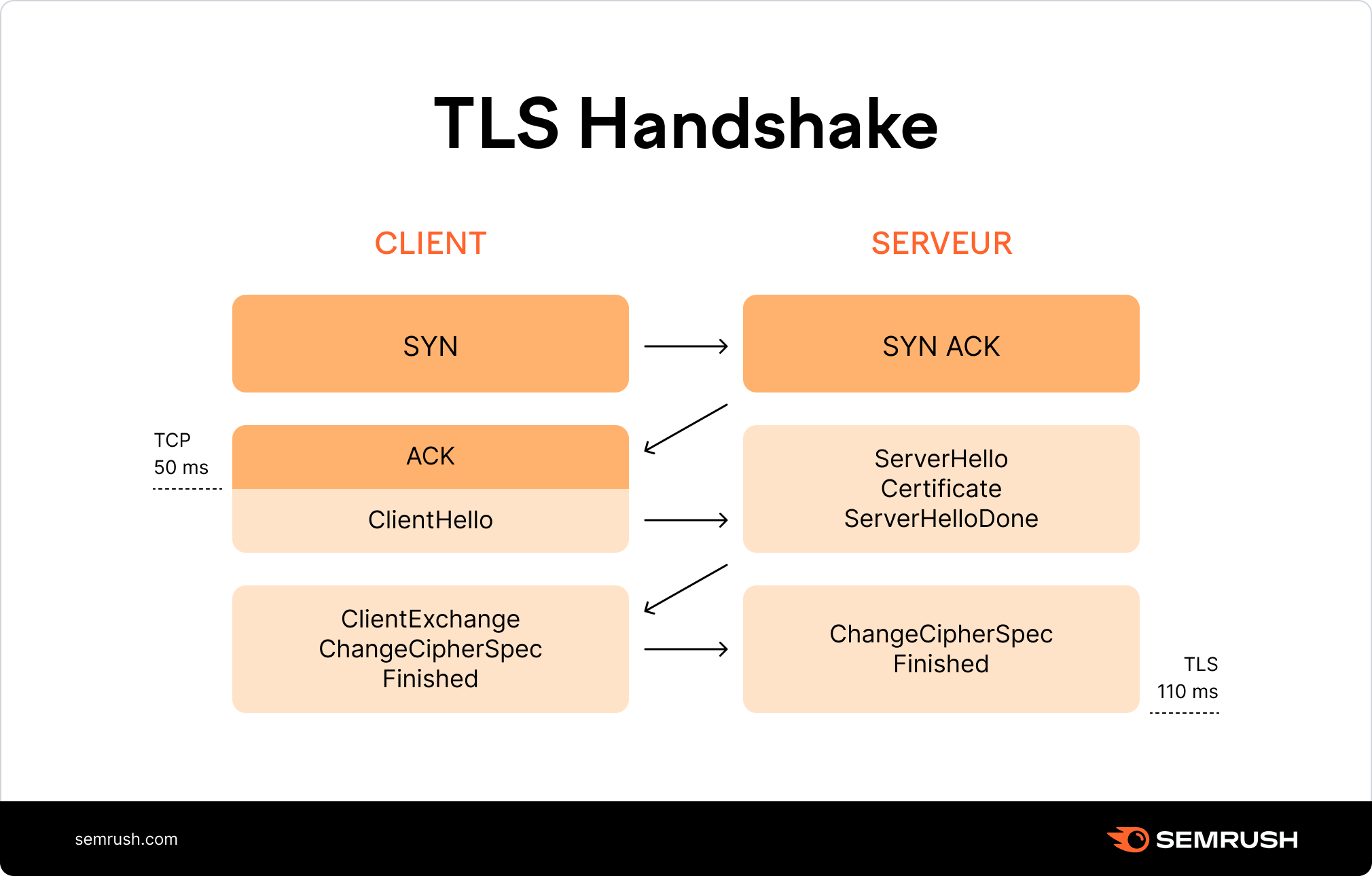
Let's dive deep into the step-by-step process. The following video provides a very detailed, technical walkthrough of a TLS 1.2 handshake, which is perfect for your goal of understanding the system from the root.
TLS Handshake Deep Dive and decryption with Wireshark
The video 'TLS Handshake Deep Dive' by David Bombal provides a thorough, step-by-step analysis of the handshake messages. It explains the purpose of each message and the cryptographic operations involved.
This is a dense but rewarding video. Watch the following key segments that cover the entire handshake flow (TLS 1.2 with RSA key exchange, which is conceptually a great place to start): Client Hello & Server Hello (20:56 - 27:59): Understand what the client and server initially propose (TLS version, random data, cipher suites). Certificate & Server Hello Done (33:46 - 36:49): See how the server sends its certificate for authentication. Client Key Exchange (36:49 - 40:09): This is the magic step. See how the client creates a 'pre-master secret' and encrypts it with the server's public key. Deriving Session Keys (40:09 - 46:55): Learn how both sides use the randoms and the pre-master secret to independently generate the same session keys. Finished Messages (46:55 - 55:50): Understand how both parties confirm the handshake was successful and not tampered with.
Let's summarize that complex process:
- Hello Messages: The client and server exchange
Hellomessages. They agree on a TLS version and a cipher suite (a specific set of algorithms for key exchange, encryption, and integrity checks). They also each generate and send a random string of bytes. - Certificate Exchange: The server sends its certificate chain. The client verifies it against its trusted CA store to authenticate the server. Now, the client has the server's authentic public key.
- Key Exchange:
- The client generates a third random value called the pre-master secret.
- It encrypts this pre-master secret using the server's public key (from the certificate).
- The server receives the encrypted value and decrypts it with its private key.
- Session Key Generation: Both client and server now possess the same three pieces of information: the
client_random, theserver_random, and thepre-master_secret. They each feed these values into the same algorithm (a Pseudo-Random Function or PRF) to independently derive the same set of symmetric session keys. - Finishing Up: Both sides exchange
Finishedmessages, encrypted with the newly created session keys. This confirms that the handshake was successful and that an attacker didn't tamper with any of the handshake messages.
From this point forward, all HTTP application data is encrypted using the fast, symmetric session keys. The slow, expensive asymmetric cryptography is no longer needed.
Conclusion
We've covered a lot of ground, moving from the insecurity of HTTP to the robust, multi-layered defense of HTTPS.
Key Takeaways:
- HTTPS is HTTP over TLS: It encrypts communication to provide confidentiality, integrity, and authentication.
- Hybrid Encryption: The TLS handshake uses slow asymmetric encryption (public/private keys) primarily to authenticate the server and securely establish a shared secret.
- Certificate Authorities (CAs): They are the foundation of trust on the web. A certificate signed by a trusted CA proves that a server's public key is legitimate, preventing man-in-the-middle attacks.
- Session Keys: After the handshake, all data is encrypted using fast symmetric session keys that were derived from the initial exchange. The handshake creates two secure, unidirectional tunnels (client-to-server and server-to-client), each with its own keys.
Preview of the Next Lesson:
Now that we understand the overhead and process of establishing a secure connection with TLS, we are perfectly positioned to understand one of the biggest motivators behind the evolution of the HTTP protocol. In the next lesson, we will compare HTTP/1.1, HTTP/2, and HTTP/3, focusing on how they handle connections and multiplexing, which has profound implications for performance, especially over secure HTTPS connections.