Hello! Welcome back to our second module, "The HTTP Protocol Inside Out."
In the last lesson, we deconstructed HTTP messages and saw that every client request begins with a method on its start-line, like GET or POST. We learned that this method signals the client's intent.
Today, we'll dive deep into the meaning, or semantics, of these methods. You'll learn what actions GET, POST, PUT, PATCH, and DELETE represent, what rules govern their behavior, and how choosing the right method is fundamental to designing clean and predictable APIs. Understanding this is a cornerstone of backend development, moving beyond just making things work to building systems that are robust, logical, and maintainable.
Today's Goal: By the end of this lesson, you will be able to explain the semantics of common HTTP methods (GET, POST, PUT, PATCH, DELETE) and when to use each.
The Verbs of the Web: CRUD, Safety, and Idempotence
At a high level, the primary HTTP methods map directly to the four basic operations of persistent storage: Create, Read, Update, and Delete (CRUD). This provides a powerful mental model for designing APIs that interact with resources (like users, products, or blog posts in a database).
- Read:
GET - Create:
POST - Update:
PUT/PATCH - Delete:
DELETE
However, to truly understand these methods, we need to go deeper and define two critical properties that distinguish them: safety and idempotence.
Idempotence in HTTP Methods – Explained with CRUD Examples
This article from freeCodeCamp, 'Idempotence in HTTP Methods', provides excellent, clear definitions for idempotence and safety. It's a great place to start.
Please read from the beginning of the article down to the end of the section 'Why is POST not idempotent?'. Pay close attention to: The definition of an idempotent operation. The definition of a safe method. The relationship between safety and idempotence (i.e., all safe methods are idempotent, but not all idempotent methods are safe).
Let's summarize those key concepts:
- Safe Method: A method is considered safe if it does not alter the state of the resource on the server. Essentially, it's a read-only operation.
GETis a safe method. Safe methods can be pre-fetched by browsers or aggressively cached by intermediaries without risk. - Idempotent Method: A method is idempotent if sending the same request multiple times has the exact same effect on the server as sending it once.
DELETE /users/123is idempotent. The first time, it deletes the user. The second, third, and subsequent times, it does nothing new—the user is already gone. The final state of the system is the same.- This property is crucial for building reliable systems over unreliable networks. If a client sends a request and the connection times out, it can safely resend the request without fear of creating duplicate actions.
As you read, POST is a notable exception—it is neither safe nor idempotent. Sending the same POST request to /orders twice will likely create two separate orders.
The following images provide a fantastic visual summary of these properties for the most common methods.

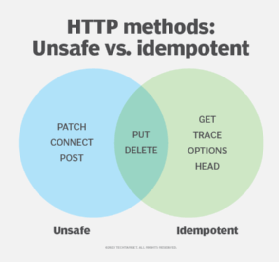
Now, let's explore each method in detail.
The Method Breakdown
We'll now go through the five core methods one by one. For each, we'll look at its purpose and its properties.
Mastering HTTP Methods: A REST API Deep Dive
The video 'Mastering HTTP Methods: A REST API Deep Dive' from the ByteMonk channel provides a concise and practical overview of how these methods map to CRUD operations in the context of a REST API.
Please watch from 01:24 to 09:25. The video is clearly chaptered, covering GET, POST, PUT, PATCH, and DELETE in sequence. As you watch, focus on the intended purpose of each method and the best practices mentioned.
That video gave a great overview. Let's cement the concepts, especially the important distinction between PUT and PATCH.
1. GET: Retrieve a Resource
- Purpose: To read a representation of a target resource.
- CRUD: Read
- Safe: Yes
- Idempotent: Yes
- Body: Should not have a body. Data is passed via URL parameters (e.g.,
/users?status=active).
The GET method is the workhorse of the web for fetching data. Because it's safe and idempotent, responses to GET requests are highly cacheable, which is critical for performance.
2. POST: Create a Resource
- Purpose: To submit data to be processed, which often results in the creation of a new resource.
- CRUD: Create
- Safe: No
- Idempotent: No
- Body: Contains the data for the new resource.
When you POST to a collection endpoint like /users, you are asking the server to create a new user. The server is responsible for generating the ID and determining the final URL of the new resource (e.g., /users/456), which it typically returns in a Location header with a 201 Created status.
3. PUT vs. 4. PATCH: The Update Methods
This is one of the most important semantic distinctions to understand in API design. Both are used for updates, but they do so in fundamentally different ways.
5. Understanding HTTP for backend engineers, where it all starts
The video 'Understanding HTTP for backend engineers' from the channel Sriniously offers a very clear and precise explanation of the difference between PUT and PATCH, and why idempotence matters for them.
Watch the segment from 00:16:12 to 00:20:05. The speaker gives a great analogy: think of PATCH as an 'append action or a selective replacement,' while PUT is a 'complete replacement.'
Let's formalize that distinction:
PUT: Replace a Resource
- Purpose: To replace the entire state of a target resource with the new representation provided in the request body. If the resource doesn't exist, it can be created (an "upsert" operation).
- CRUD: Update (wholesale)
- Safe: No
- Idempotent: Yes
- Body: Contains the complete new representation of the resource.
Because PUT replaces the entire resource, it is idempotent. If you send the same PUT request with a full user profile twice, the end result is the same: the user profile is updated to that state. Any fields you omit from the PUT request body should be removed or set to null, because you are defining the resource's complete new state.
PATCH: Partially Update a Resource
- Purpose: To apply a partial modification to a resource. You only send the fields you want to change.
- CRUD: Update (partial)
- Safe: No
- Idempotent: No (generally)
- Body: Contains a set of instructions or the specific fields to change.
PATCH is not guaranteed to be idempotent. Imagine a request like PATCH /accounts/123 with the instruction {"operation": "add", "amount": 100}. Sending this twice would add 200, not 100. It's more efficient than PUT for small changes as you don't need to send the entire resource representation.
5. DELETE: Remove a Resource
- Purpose: To remove a specified resource.
- CRUD: Delete
- Safe: No
- Idempotent: Yes
- Body: Can have a body, but it's uncommon and often not implemented by servers.
DELETE is idempotent because deleting a resource that's already been deleted has no new effect. A best practice often seen in production systems is soft deletion, where a DELETE request doesn't permanently remove the record from the database but instead marks it as inactive (e.g., by setting a deleted_at timestamp). This is often implemented with a PATCH request under the hood (e.g., PATCH /users/123 with {"status": "deleted"}).
Beyond the Big Five: HEAD and OPTIONS
Two other methods are important for a backend developer to know.
HEAD: This method is identical to GET, but the server must not send a message body in the response. It's used to retrieve the headers for a resource without transferring the entire content.
- Use Case: Checking if a large file exists before downloading it, or checking its
Content-LengthorLast-Modifieddate for caching purposes.
OPTIONS: This method is used to describe the communication options (e.g., which HTTP methods are allowed) for the target resource.
- Use Case: Its primary modern use is in CORS (Cross-Origin Resource Sharing). Before a browser sends a complex cross-origin request (like a
PUTor a request with custom headers), it first sends anOPTIONS"pre-flight" request to the server to see if the actual request will be permitted.
The following video provides an excellent, in-depth explanation of the OPTIONS pre-flight request flow. We'll cover CORS in detail in a future lesson, but this is a perfect opportunity to see a real-world application of the OPTIONS method.
5. Understanding HTTP for backend engineers, where it all starts
Let's return to the 'Understanding HTTP' video, which has a fantastic deep-dive on the OPTIONS method and its role in CORS.
Watch from 00:19:52 to 00:29:43. You don't need to memorize every detail of CORS yet, but focus on how the browser uses the OPTIONS method to ask the server for permission before sending the 'real' request (e.g., PUT or POST).
Conclusion
You've now learned the precise meaning and rules behind the verbs of the web. Using these methods semantically—that is, using the right method for the right job—is a hallmark of a professional developer. It leads to APIs that are predictable, cache-friendly, and resilient to network errors.
When you work with frameworks like Django REST Framework, you'll see how its ViewSet classes naturally map these methods to actions on your database models (list, create, update, partial_update, destroy), helping you adhere to these conventions.
Key Takeaways:
- HTTP methods map to CRUD operations:
GET(Read),POST(Create),PUT/PATCH(Update),DELETE(Delete). - Safe methods (
GET,HEAD) are read-only and don't change server state. - Idempotent methods (
GET,PUT,DELETE,HEAD) produce the same result even if called multiple times, which is vital for network retries. POSTcreates a new resource and is neither safe nor idempotent.PUTreplaces an entire resource (idempotent), whilePATCHapplies a partial update (not necessarily idempotent).OPTIONSis used to query server capabilities, most notably for CORS pre-flight requests.
Preview of the Next Lesson:
We now understand the client's side of the conversation: the request's structure and the meaning of its method. But what about the server's reply? In the next lesson, we will explore HTTP status codes, learning how the server communicates the outcome of a request—from success (200 OK) and redirection (301 Moved Permanently) to client errors (404 Not Found) and server failures (500 Internal Server Error).