In our last session, we covered the absolute fundamentals of Python: variables, control flow, and functions. These are the essential tools for writing any program. Now, we will build on that foundation by exploring several of Python's more expressive and powerful features that allow you to write more efficient and elegant code.
This lesson focuses on list comprehensions, generators, and decorators. These are hallmarks of "Pythonic" programming—idioms that leverage the language's features to their fullest. For an AI research engineer, mastering these concepts is not just about writing shorter code; it's about managing large datasets efficiently (generators), improving code readability, and creating reusable, modular tools for experimentation (decorators).
1. List Comprehensions: A Concise Way to Build Lists
In the previous lesson, you learned to build a new list by iterating over an existing one with a for loop, applying some logic, and appending results to an empty list. This pattern is extremely common. Python provides a more concise and often more efficient syntax for this called a list comprehension.
A list comprehension allows you to create a new list from an iterable in a single, readable line. The basic syntax is [expression for item in iterable if condition].
The video below from the Indently channel provides an excellent walkthrough of this syntax, comparing it directly to the for loop method you already know.
4 Types of List Comprehensions in Python Explained
Watch this segment explaining the basic structure of list comprehensions.
Focus on the comparison between the traditional for loop approach and the equivalent list comprehension. The presenter does a great job of breaking down how the list comprehension syntax maps to the parts of a for loop: the expression to return, the loop itself, and the optional condition. Note the example of applying a transformation (.upper()) within the comprehension.
Let's break down the components:
- Expression: The value to be included in the new list (e.g.,
item * 2,item.upper()). for item in iterable: The loop over the source iterable (e.g., a list, a range).if condition(Optional): A filter to decide which items to include.
Here's an example relevant to data processing: squaring a list of numbers, but only if they are even.
numbers = [1, 2, 3, 4, 5, 6, 7, 8, 9, 10]


# The traditional for-loop way
squared_evens_loop = []
for num in numbers:
    if num % 2 == 0:
        squared_evens_loop.append(num ** 2)
print(squared_evens_loop)


# Output: [4, 16, 36, 64, 100]


# The list comprehension way
squared_evens_comp = [num ** 2 for num in numbers if num % 2 == 0]
print(squared_evens_comp)


# Output: [4, 16, 36, 64, 100]
The comprehension is not just shorter; it's also generally faster. Given your background in computer science, you might be interested in why. It's not just a simple syntax transformation; the CPython interpreter uses a more optimized execution path for comprehensions.
The following video explains this performance difference by examining the underlying Python bytecode.
THIS is Why List Comprehension is SO Efficient!
This video delves into the CPython implementation to explain the efficiency of list comprehensions.
First, watch the demonstration of the performance difference between a for loop and a list comprehension. Next, review the overview of how Python code is executed, introducing the concept of bytecode. The core of the explanation lies in the bytecode comparison. The key insight is that list comprehensions use a specialized LIST_APPEND bytecode instruction, which is faster than the more general LOAD_METHOD -> CALL_METHOD sequence used to call .append() in a for loop.
While powerful, list comprehensions can be overused. If the logic becomes too complex with multiple nested loops or complicated conditions, a standard for loop is often more readable.
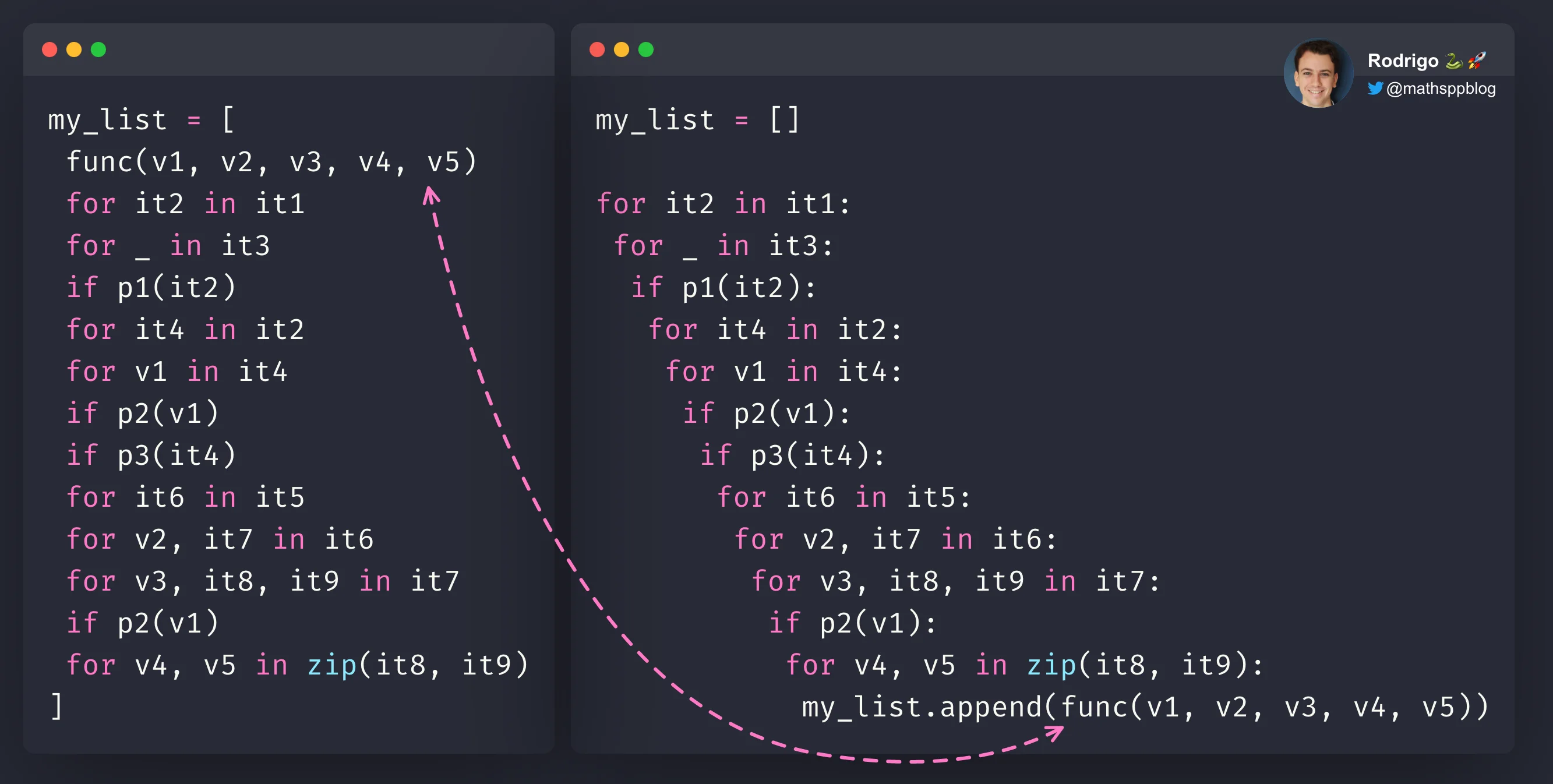
Python also supports set comprehensions ({x for x in iterable}) and dictionary comprehensions ({key: value for k,v in iterable}), which follow the same principle to build sets and dictionaries.
2. Generators: Memory-Efficient Iteration
List comprehensions are great, but they have one significant drawback: they build the entire list in memory at once. What if you're working with a dataset that has millions, or even billions, of items? Loading it all into memory could be slow or even crash your program. This is a common scenario when processing large log files, streaming data from an API, or working with massive datasets in machine learning.
Generators solve this problem through lazy evaluation. A generator produces items one by one, on demand, without creating the entire collection in memory.
There are two primary ways to create a generator:
2.1. Generator Functions
A generator function looks like a regular function, but instead of using return to send back a value, it uses the yield keyword. When a function contains yield, calling it doesn't run the function. Instead, it returns a generator object.
The yield statement pauses the function, saves its state, and gives a value back to the caller. The next time a value is requested from the generator, the function resumes execution right where it left off.
Generators in Python Explained: Lazy, Powerful, and Surprisingly Fun
This article from Codeling provides an excellent deep dive into generators.
First, read the foundational sections to understand how generators work: Start with the section on Iterators and Iterables to understand the protocol that generators are built on. Then, read Where Do Generators Fit In to see how generators are a shortcut for creating iterators. Finally, focus on the sections Generator Functions and yield and the comparison with regular functions to solidify your understanding of the pause-and-resume behavior of yield.
Here is a practical example: a generator to read a large file line by line without loading the whole file into memory.
def read_large_file(file_path):
    """A generator function to read a large file line by line."""
    with open(file_path, 'r') as file:
        for line in file:
            yield line.strip()


# Create the generator. No data is read yet.
log_lines_generator = read_large_file('large_log_file.txt')


# You can iterate over the generator with a for loop.
# Each iteration pulls one line from the file.
# for line in log_lines_generator:
#     if "ERROR" in line:
#         print(line)
2.2. Generator Expressions
Just as list comprehensions offer a concise syntax for lists, generator expressions offer a concise syntax for generators. The syntax is nearly identical, but you use parentheses () instead of square brackets [].
# List comprehension (builds a list of 10 million numbers in memory)
list_comp = [i*i for i in range(10_000_000)]


# Generator expression (creates a generator object, uses minimal memory)
gen_exp = (i*i for i in range(10_000_000))
This is extremely useful for operations like sum(), max(), or min() on large sequences, as the intermediate collection is never created.
4 Types of List Comprehensions in Python Explained
Return to the Indently video for a clear explanation of generator comprehensions.
Watch the segment from this point. The key takeaway is the syntax difference (parentheses vs. brackets) and the memory-efficient nature of generators for large datasets.
Consuming and Understanding Generators
Generators are single-pass iterators. Once you have looped through all the items, the generator is exhausted. If you need to iterate again, you must create a new generator object.
Generators in Python Explained: Lazy, Powerful, and Surprisingly Fun
Let's continue with the Codeling article to understand how to use and when to choose generators.
Read the section on Consuming Generators to see how for loops and next() are used. Review the Memory and Performance comparison, which provides a helpful table summarizing the trade-offs between list comprehensions and generator expressions. Finally, read the guide on When to Use Generators (and When Not To). This provides excellent heuristics for choosing the right tool for the job.
3. Decorators: Modifying Functions Without Changing Them
Decorators are a powerful feature for meta-programming. A decorator is a function that takes another function as an argument, adds some functionality (wraps it), and returns the modified function. This allows you to extend the behavior of functions without permanently modifying their source code.
This is incredibly useful in research and engineering for tasks like:
- Timing how long a function takes to run.
- Logging function calls and their arguments for debugging.
- Implementing caching (memoization) to speed up expensive computations.
- Enforcing access control or validation.
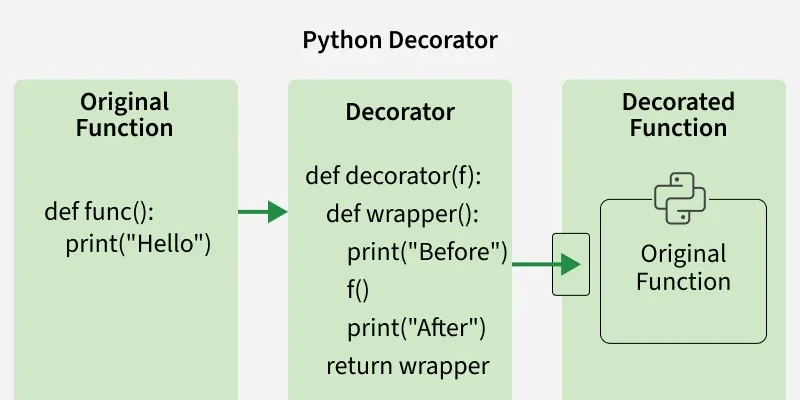
To understand decorators, you must first grasp that in Python, functions are first-class objects. This means they can be treated like any other variable: passed to other functions, returned from them, and assigned to variables.
The Real Python article on decorators is a comprehensive guide. We'll walk through the essential parts.
First, read the "Python Functions" section, which covers the prerequisite concepts: functions as first-class objects, inner functions, and returning functions from functions. These are the building blocks of decorators. Next, read the "Simple Decorators in Python" section. It shows how these concepts combine to manually create a decorator. Finally, learn about the @ symbol, which is just syntactic sugar for applying a decorator: @my_decorator above a function definition is the same as writing my_function = my_decorator(my_function) after it.
Writing a Practical Decorator
When writing decorators, there are two crucial best practices to follow to ensure they work with any function.
- Use
*argsand**kwargs: Your wrapper function should accept arbitrary positional and keyword arguments and pass them to the original function. This makes your decorator generic. - Use
@functools.wraps: Decorators inherently obscure the metadata of the original function (like its name and docstring). The@functools.wrapsdecorator copies this metadata from the original function to your wrapper, which is essential for debugging and documentation.
Let's look at how to implement these.
Let's continue with the Real Python article to make our decorators robust.
Read the section on Decorating Functions With Arguments to understand why *args and **kwargs are necessary. Read Returning Values to ensure your decorator correctly passes through the return value of the wrapped function. Finally, read about functools.wraps in the section Finding Yourself. This is a critical best practice.
Here is a complete, practical example of a @timer decorator that you could use in your ML experiments:
import functools
import time

def timer(func):
    """A decorator that prints the execution time of the decorated function."""
    @functools.wraps(func)
    def wrapper_timer(*args, **kwargs):
        start_time = time.perf_counter()    # 1. Do something BEFORE
        value = func(*args, **kwargs)       # 2. Call the original function
        end_time = time.perf_counter()      # 3. Do something AFTER
        run_time = end_time - start_time
        print(f"Finished {func.__name__!r} in {run_time:.4f} secs")
        return value
    return wrapper_timer

@timer
def train_model(epochs, learning_rate):
    """Simulates a model training process."""
    print(f"Training for {epochs} epochs with lr={learning_rate}...")
    time.sleep(2) # Simulate work
    return {"loss": 0.1, "accuracy": 0.95}


# Call the decorated function as usual
results = train_model(10, 0.001)
print(f"Training results: {results}")


# Output:
# Training for 10 epochs with lr=0.001...
# Finished 'train_model' in 2.00xx secs
# Training results: {'loss': 0.1, 'accuracy': 0.95}
This pattern is extremely versatile and forms the basis for many powerful libraries and frameworks in Python.
Conclusion
In this lesson, we moved beyond basic syntax to explore some of Python’s most expressive features. You've learned how to:
- Write List Comprehensions: A concise, readable, and efficient way to create lists from iterables.
- Use Generators: A memory-efficient tool for lazy evaluation, perfect for handling large-scale data via generator functions (
yield) and generator expressions. - Implement Decorators: A powerful technique to add functionality to existing functions without altering their code, using the
@syntax and best practices like*args,**kwargs, and@functools.wraps.
These tools are fundamental to writing high-quality, professional Python code. They promote conciseness without sacrificing readability and provide elegant solutions for common problems in data processing and software design.
In the next lesson, we will shift our focus to object-oriented programming in Python. You will learn how to implement a class hierarchy with inheritance and special "dunder" methods, applying these concepts to build a flexible base class for a machine learning model. This will give you another powerful way to structure and organize complex code.