Welcome back! In our last lesson, we explored how to create and manage S3 buckets, using features like storage classes, versioning, and lifecycle policies to handle data efficiently and cost-effectively. You now have a solid foundation for storing data in AWS.
Today, we shift our focus to a topic of paramount importance in any production environment: security. Simply storing data isn't enough; we must control who can access it and what they can do with it. This lesson addresses the learning outcome of securing S3 buckets. We'll dissect the primary mechanisms AWS provides for this purpose: S3 Block Public Access, IAM policies, S3 bucket policies, and Access Control Lists (ACLs). Understanding how these layers interact is a non-negotiable skill for a DevOps engineer, especially in the security-conscious environments of FAANG-level companies.
1. The Layers of S3 Access Control
Controlling access to S3 resources involves multiple overlapping mechanisms. At first, this can seem complex, but each tool has a specific purpose. Grasping the distinction between them is the first step toward mastering S3 security.
Let's begin with a high-level overview. The following cheat sheet provides an excellent comparison of the three main policy and list-based mechanisms.
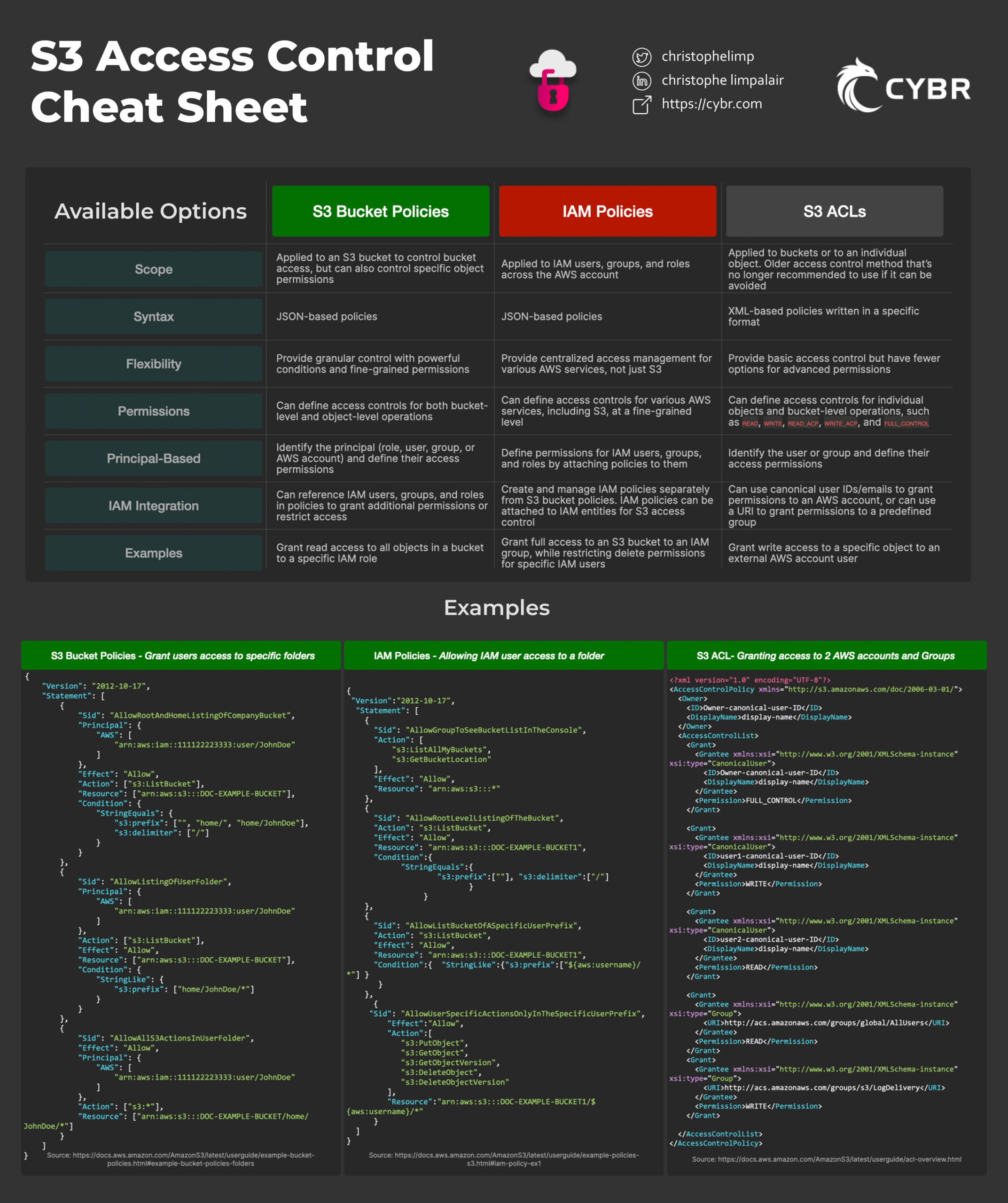
As the cheat sheet shows, we have:
- IAM Policies: Attached to identities (users, groups, roles). They answer the question, "What can this user/role do across AWS?"
- S3 Bucket Policies: Attached to a resource (the S3 bucket itself). They answer the question, "Who can access this specific bucket?"
- Access Control Lists (ACLs): A legacy mechanism for managing access at the bucket or object level. As we'll see, their use is now discouraged in favor of policies.
Before we dive into the details of these policies, we must discuss the most critical security feature of all: S3 Block Public Access.
2. The First Line of Defense: S3 Block Public Access
Think of Block Public Access as a master safety switch for your buckets and your entire account. By default, AWS now enables this feature for all new buckets and accounts, preventing accidental public exposure of data. It acts as an umbrella protection that can override any policies that might otherwise allow public access. When troubleshooting S3 permissions, especially when public access isn't working as expected, this is the very first place you should check.
The official AWS Security Blog provides an excellent explanation of this feature.
Please read the section on S3 Block Public Access from this AWS blog post. It explains how this feature provides centralized controls at both the bucket and account levels.
Focus on the part titled Blocking public access. Pay attention to the distinction between applying settings at the bucket level versus the account level.
3. Identity vs. Resource: IAM and Bucket Policies
With the primary safeguard of Block Public Access in place, let's turn to the fine-grained tools: policies. Both IAM and Bucket Policies are written in JSON and use a similar structure, but their focus is different. This distinction is crucial.
- IAM Policies are identity-based. You attach them to a user, group, or role. They are ideal for managing permissions for your internal users and services, especially when a single identity needs access to multiple AWS resources (e.g., an EC2 instance and an S3 bucket).
- Bucket Policies are resource-based. You attach them directly to an S3 bucket. They are perfect for managing cross-account access, making a bucket selectively public (for a static website, for instance), or enforcing bucket-wide rules like IP address restrictions.
The blog "S3 Policies Explained" offers a clear and practical breakdown of these concepts.
S3 Policies Explained: Bucket Policies vs IAM Policies vs ACLs | Ratn Labs
This article provides a concise guide to the different policy types and when to use them.
Please read the first three main sections of the article. Start with the introduction to the layers. Then, read the anatomy of a policy to understand the JSON structure. Finally, review the section Bucket policy vs IAM policy which includes a helpful table comparing their use cases.
To hear these concepts explained, the following video offers a good verbal summary.
Amazon S3 Access Control - IAM Policies, Bucket Policies and ACLs
This video from Digital Cloud Training provides a clear distinction between the different access control mechanisms.
Watch the segment from the beginning, which explains IAM policies and S3 bucket policies. Then, jump to the section on use cases, which reinforces when to choose one type of policy over the other.
4. Writing a Bucket Policy in Practice
Let's move from theory to practice. A common DevOps task is to enforce a security rule on a bucket, such as requiring all uploaded files to be encrypted. This is a perfect use case for a bucket policy.
The official AWS channel has a great tutorial showing how to create a bucket policy from scratch in the AWS console, following the principle of least privilege.
Amazon S3 Security Tutorial | Amazon Web Services
This video demonstrates the practical steps of creating and applying a bucket policy to secure an S3 bucket.
Watch the main demonstration from this section. The presenter walks through the policy editor in the console, explaining how to select the principal (the user), the actions (like ListBucket), and the resource (the bucket ARN) to craft a policy with minimal permissions.
After watching the video, consider this practical example of a bucket policy that denies any upload that doesn't specify server-side encryption. This kind of preventative security control is a hallmark of a well-managed cloud environment.
{
  "Version": "2012-10-17",
  "Statement": [
    {
      "Sid": "DenyUnencryptedObjectUploads",
      "Effect": "Deny",
      "Principal": "*",
      "Action": "s3:PutObject",
      "Resource": "arn:aws:s3:::YOUR-BUCKET-NAME/*",
      "Condition": {
        "StringNotEquals": {
          "s3:x-amz-server-side-encryption": "AES256"
        }
      }
    }
  ]
}
This policy is powerful. It uses a Deny effect with a Condition. It says: deny any PutObject action on any object in this bucket if the s3:x-amz-server-side-encryption header is not present and equal to AES256. This effectively forces encryption on all incoming data.
5. The Legacy Player: Access Control Lists (ACLs)
You will encounter ACLs in your work, so it's important to know what they are. However, for most modern use cases, you should avoid them. ACLs predate IAM and are a less flexible, less auditable way to control access.
With the introduction of the "Bucket owner enforced" setting for S3 Object Ownership (which is now the default), ACLs are disabled, and all access control is managed through IAM and bucket policies. This simplifies security management significantly.
The AWS blog post we looked at earlier has a succinct explanation.
This section of the AWS blog clarifies the role of ACLs and why AWS recommends disabling them.
Please read the section titled What about S3 ACLs?. The key takeaway is the recommendation to keep ACLs disabled and use policies exclusively.
6. How AWS Evaluates Policies: The Final Decision
Now for the most important part: how do all these rules work together? When an S3 request is made, AWS evaluates all applicable settings and policies—Block Public Access, IAM policies, bucket policies, and ACLs (if enabled)—to make an authorization decision.
The logic follows a clear, conservative sequence designed for security:
- Starts with a
Deny: By default, access is denied. - Check Block Public Access: If the request is blocked by a Block Public Access setting, it's denied immediately.
- Check for an Explicit
Deny: AWS then evaluates all applicable policies. If any policy statement has anEffectofDenythat matches the request, the request is denied. An explicitDenyalways wins. - Check for an Explicit
Allow: If there are no explicit denies, AWS looks for anAllow. At least one policy statement (from an IAM policy, bucket policy, etc.) must explicitlyAllowthe request. - Final
Deny: If noAllowis found, the initial defaultDenyremains, and the request is denied.
This flowchart visualizes the process perfectly.

For a final review of this crucial logic, this short video segment provides a great animated summary.
Amazon S3 Access Control - IAM Policies, Bucket Policies and ACLs
This segment concisely explains the policy evaluation logic.
Watch the quick explanation from this clip. It walks through the flow from default deny to checking for explicit denies and allows.
Conclusion
In this lesson, we've navigated the landscape of S3 security, moving from the high-level safety of Block Public Access to the granular control of IAM and bucket policies. You now have the conceptual framework to secure data in one of AWS's most fundamental services.
Key Takeaways:
- Block Public Access is your first and strongest defense. Always start here and ensure it's enabled unless you have a specific, verified need for public access.
- Policies are the primary tool for fine-grained control. Use IAM policies to define what your users and roles can do, and use S3 bucket policies to define who can access a specific bucket and under what conditions.
- ACLs are legacy. For new buckets, stick to the "Bucket owner enforced" setting and manage all permissions with policies.
- The evaluation logic is simple but critical: an explicit
Denyalways overrides anyAllows.
In our next lesson, we will explore another core pillar of cloud operations: monitoring. Now that we've provisioned, managed, and secured our resources, we'll learn how to use Amazon CloudWatch to create dashboards, set alarms, and analyze logs to gain visibility into the health and performance of our AWS environment.