Welcome to the next lesson in our journey through AWS core infrastructure.
In our last session, we designed and built a custom VPC, creating a secure and isolated network environment. We now have the foundational "real estate" in the cloud. Today, we'll start populating it with one of the most fundamental and powerful AWS services: Amazon Simple Storage Service, or S3.
This lesson will focus on creating and managing S3 buckets. We'll go beyond simply storing files; you'll learn how to use S3's features to build cost-effective and resilient data management strategies. We will cover the different S3 storage classes, how to protect your data with versioning, and how to automate data management using lifecycle policies. Mastering these concepts is essential for any DevOps engineer, as managing data cost-efficiently and safely at scale is a core responsibility in any large tech organization.
1. Understanding S3: Infinite Storage in the Cloud
At its heart, Amazon S3 is a service that provides object storage. Unlike the block storage used for your EC2 instance's root volume (EBS), which behaves like a hard drive, S3 is designed to store and retrieve any amount of data, such as documents, images, logs, and backups, from anywhere on the web.
The key characteristics you need to know are its immense scalability, performance, and, most famously, its durability.
To get a solid overview, let's watch a segment from a video by Abhishek Veeramalla. It provides an excellent introduction to what S3 is, its core purpose, and introduces the concept of its legendary durability.
Day-9 | AWS S3 Buckets Deep Dive | 2 Demo Projects with Code | #aws #s3 #abhishekveeramalla
Start watching this "AWS S3 Buckets Deep Dive" video.
Pay close attention to the introductory explanation of S3 from the beginning. Then, jump to the section that explains S3's famous "11 nines" durability, starting from this point. The speaker clearly explains how AWS achieves this by replicating your data across multiple physical locations.
The "11 nines" of durability (99.999999999%) is a number you'll often hear associated with S3. It means that if you store 10,000,000 objects, you can on average expect to lose one of them every 10,000 years. For all practical purposes, when you put data in S3 (in its standard configuration), it's not going to be lost due to hardware failure.
2. Creating and Managing Your First S3 Bucket
The fundamental container in S3 is called a bucket. You can think of a bucket as a top-level folder. Each bucket must have a globally unique name across all AWS accounts. Objects, which are the files you store, reside within these buckets.
Let's continue with the same video, as it provides a clear, hands-on demonstration of creating a bucket and uploading your first object.
Day-9 | AWS S3 Buckets Deep Dive | 2 Demo Projects with Code | #aws #s3 #abhishekveeramalla
Watch this segment of the "AWS S3 Buckets Deep Dive" video.
Follow along with the demonstration from this section, where the presenter walks you through creating a bucket and uploading a file via the AWS Management Console. Pay attention to the discussion around bucket naming conventions and choosing a region.
As you saw, creating a bucket and uploading a file is straightforward. However, to use S3 effectively, especially in a professional environment, you need to manage your data with an eye toward cost and access patterns. This is where storage classes come in.
3. Optimizing Costs with S3 Storage Classes
Not all data is created equal. Some data, like the front page of a popular website, is accessed constantly. Other data, like monthly log archives, might be accessed once a year, if at all. AWS provides different S3 storage classes, each offering a different trade-off between storage price, retrieval speed, and retrieval cost.
Choosing the right storage class is a critical DevOps task for cost optimization. Storing terabytes of rarely accessed logs in the most expensive, high-performance tier is a waste of money.
This image provides a great high-level comparison of the most common storage classes and their intended use cases.
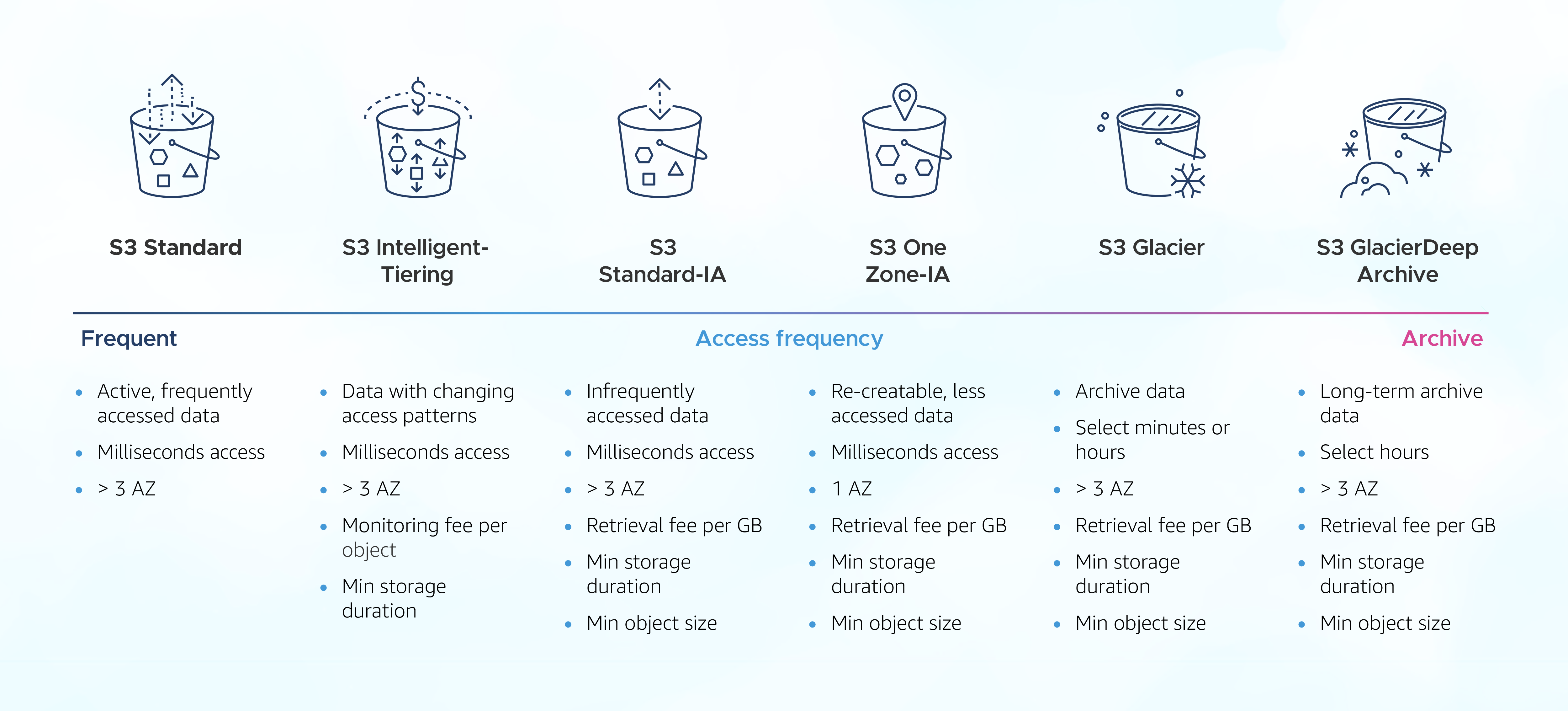
Here's a breakdown of the key players:
- S3 Standard: The default. It's for frequently accessed data that needs millisecond access. It has the highest storage cost but the lowest access cost.
- S3 Intelligent-Tiering: A smart choice when access patterns are unknown or change over time. It automatically moves your data to the most cost-effective tier (from a frequent access tier to an infrequent access tier) without any performance impact or operational overhead.
- S3 Standard-Infrequent Access (Standard-IA): For data that is accessed less frequently but requires rapid access when needed. It has a lower storage cost than S3 Standard but charges a per-GB retrieval fee.
- S3 One Zone-IA: A cheaper version of Standard-IA because it only stores data in a single Availability Zone. It's good for non-critical, easily reproducible data.
- S3 Glacier Storage Classes: These are for data archiving.
- Glacier Instant Retrieval: For archives that need immediate, millisecond access (e.g., medical images).
- Glacier Flexible Retrieval: A low-cost option for archives where retrieval times of minutes to hours are acceptable.
- Glacier Deep Archive: The cheapest storage option in AWS. For long-term data retention (7-10 years) where a retrieval time of 12+ hours is fine.
Manually moving objects between these classes would be tedious. Fortunately, AWS provides two powerful features to automate this: Versioning and Lifecycle Policies.
4. Protecting Data with S3 Versioning
Versioning is a safety net. When you enable versioning on an S3 bucket, S3 stores all versions of an object, including all writes and even deletes. This means if you accidentally overwrite or delete an object, you can easily restore the previous version. Given your experience with tools like Git, you can think of it as an automatic commit for every change made to your files.
Enabling versioning is a best practice for any bucket containing important data.
Day-9 | AWS S3 Buckets Deep Dive | 2 Demo Projects with Code | #aws #s3 #abhishekveeramalla
Let's return to the "AWS S3 Buckets Deep Dive" video to see versioning in action.
Watch the section from this timestamp. The presenter demonstrates how to enable versioning on a bucket and what happens when you upload a new version of the same file. Notice how S3 keeps both the old and new copies.
While versioning is great for data protection, it can lead to increased storage costs, as you're now storing multiple copies of your objects. How do we manage this? This is where lifecycle policies become indispensable.
5. Automating Data Management with Lifecycle Policies
S3 Lifecycle Policies are rules that you define to automate the management of your objects' lifecycles. They are the key to implementing a cost-effective data management strategy. You can create policies that automatically:
- Transition objects to cheaper storage classes as they age.
- Expire (delete) objects after a certain period.
These rules can apply to both the current versions of objects and the non-current (older) versions created by versioning.
This image shows a simple visual of a lifecycle transition.

To understand the mechanics and best practices of lifecycle policies, the article "S3 Lifecycle Policies: Optimizing Cloud Storage in AWS" from CloudOptimo is an excellent resource.
S3 Lifecycle Policies: Optimizing Cloud Storage in AWS - CloudOptimo
This article provides a comprehensive guide to designing and implementing S3 Lifecycle Policies. It's a great reference for understanding the theory and strategy behind data lifecycle management.
Read the introduction, Why They Matter, to get a high-level overview. Then, focus on the section Key Components, which breaks down the building blocks: Rules, Filters, Actions, and Transitions. Finally, read through Crafting Effective Policies to understand the step-by-step process of designing a policy, from analysis to monitoring.
Now, let's see how to configure this in the AWS console. The official AWS channel has a very clear demonstration.
Understanding Amazon S3 Lifecycle Management Policies | Amazon Web Services
This video, "Understanding Amazon S3 Lifecycle Management Policies," is a definitive guide from AWS on how to set up these rules.
Watch the entire video. It's short but packed with information. Pay close attention to: The two main actions: Transition and Expiration, and the "waterfall" rule for transitions. Using filters to limit a rule's scope (e.g., by prefix like logs/). Applying rules to current versions of objects. Applying rules to non-current versions—this is key for managing costs in versioned buckets. Cleaning up delete markers and incomplete multipart uploads.
As you can see, by combining versioning with a well-designed lifecycle policy, you can achieve both data protection and cost optimization, automatically managing your data from creation to archival and final deletion.
Conclusion
In this lesson, we've taken a deep dive into Amazon S3. You now understand its core purpose and have the practical knowledge to create buckets and manage the data within them using key features for cost and data management.
Key Takeaways:
- S3 is durable and scalable object storage. A bucket is your main container, and its name must be globally unique.
- Storage Classes offer a spectrum of cost and performance options. Matching your data's access patterns to the right storage class is crucial for cost optimization.
- Versioning is a critical safety feature that protects you from accidental data loss by keeping a history of all object versions.
- Lifecycle Policies are the automation engine for S3. They allow you to define rules to automatically transition objects between storage classes and expire them, putting your data management strategy on autopilot.
We've laid the groundwork for storing data. However, a crucial piece is missing: security. In our next lesson, we will focus on securing your S3 buckets. We'll explore bucket policies, Access Control Lists (ACLs), and how IAM principles apply to S3, ensuring that only authorized users and services can access your valuable data.