In our previous lesson, we explored the physical "where" of AWS—its global network of Regions, Availability Zones, and Edge Locations. Now, we turn our attention to the critical question of "who" can do "what" within that infrastructure. This brings us to AWS Identity and Access Management (IAM), the service that forms the security backbone of your entire cloud environment.
For your goal of joining a top-tier company like a FAANG, mastering IAM is non-negotiable. These organizations operate at a scale where security cannot be an afterthought; it must be ingrained in every action. Understanding how to grant permissions securely and apply the principle of least privilege is a fundamental skill that interviewers will probe for deeply. This lesson will equip you with that foundational knowledge, focusing on implementing IAM users, groups, roles, and policies.
The Core Components of IAM
IAM allows you to manage access to AWS services and resources securely. At its core, it revolves around a few key components: principals, who are the actors; policies, which define their permissions; and a structure for organizing them.
- Principals (The "Who"): An entity that can make a request for an action or operation on an AWS resource. The main types are:
- IAM Users: An identity you create in AWS for a person or application. They have long-term credentials (a password for console access and access keys for programmatic access).
- IAM Roles: An identity with specific permissions that doesn't have its own long-term credentials. Roles are meant to be assumed by trusted principals, which can be IAM users, applications running on AWS services (like an EC2 instance), or users from an external identity provider.
- Policies (The "What"): A JSON document that formally states one or more permissions. You attach policies to principals or resources to define what they are allowed or denied to do.
- Groups (For Organization): A collection of IAM users. You can attach a policy to a group, and all users in that group inherit those permissions. This is a convenient way to manage permissions for multiple users.
Let's begin with a video that provides a clear overview of these fundamental building blocks.
AWS IAM Crash course, AWS IAM Tutorial, IAM Deep dive
Watch this segment from the "AWS IAM Crash course" by LoveToCode. It introduces the purpose of IAM and then breaks down the core concepts of users, policies, roles, and groups.
Please watch the introduction from the beginning and then jump to the section that defines the components. This will give you a solid conceptual map before we dive into the details of each.
Principals: Users, Groups, and Roles
Your first step in securing an AWS account is to stop using the root user for daily tasks. The root user has unrestricted access to everything, including your billing information, and cannot be limited. A compromised root account is a catastrophic event. The best practice is to create an IAM "Admin" user for yourself and lock away the root credentials.
From there, you'll create other principals based on who or what needs access.
IAM Users and Groups
An IAM user is typically for a human who needs to interact with AWS. For example, you might create an IAM user for each developer on your team. However, attaching policies directly to each user quickly becomes unmanageable.
This is where IAM groups come in. Instead of assigning permissions one-by-one, you create groups that represent job functions (e.g., Developers, Testers, Admins), attach the necessary policies to those groups, and then add users to them.
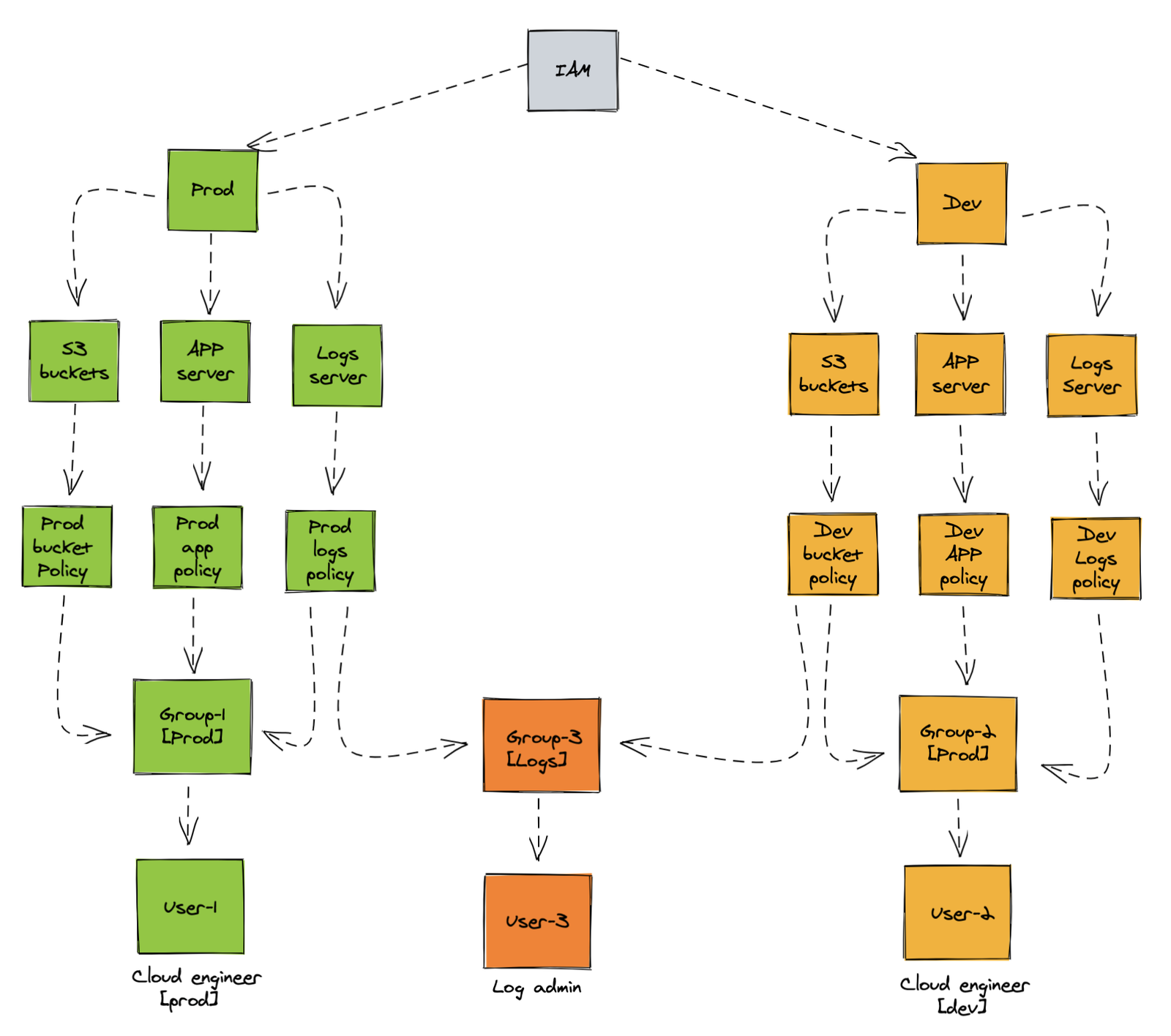
The diagram below illustrates a common structure. You can see separate groups for production and development engineers, plus a shared group for log administrators. This ensures that a development engineer (User-2) cannot accidentally impact production resources.
IAM Roles: The Modern Standard
While users are for people, IAM roles are designed for both people and automated processes. A role is a set of permissions that a trusted entity can temporarily assume to perform tasks. This is the preferred method for granting permissions for several reasons:
- For AWS Services: An application running on an EC2 instance might need to read files from an S3 bucket. Instead of hardcoding credentials into the application (a major security risk), you attach a role to the instance. The application can then automatically retrieve temporary credentials from that role to access S3.
- For Human Users: In large organizations, you don't create individual IAM users in every AWS account. Instead, you use an identity provider (like Okta, Azure AD, or AWS IAM Identity Center) to manage your users centrally. Users sign in there and then assume a role in an AWS account to get temporary access.
This use of temporary, auto-rotating credentials via roles is a cornerstone of modern AWS security. Given your experience with Ansible, you can think of roles as being similar in name but different in function. In Ansible, a role is a way to organize content (tasks, handlers, etc.). In AWS, an IAM Role is an identity that provides a mechanism for acquiring temporary permissions.
The following practical guide explains the initial setup of moving away from the root user and creating both an admin and a restricted user.
Stop Using Your Root User: A Practical Guide to AWS IAM Roles & Least Privilege | AWS Builder Center
This article provides a clear, real-world example of securing an AWS account by creating specific IAM users with tailored permissions. It demonstrates the core logic of least privilege.
Read the introduction, The Architecture, and the proposed Solution. Then, review Step 1 on creating an Admin user and Step 2 on creating a restricted QA Tester user with a custom policy. Pay close attention to the JSON policy that grants minimal permissions.
IAM Policies and the Principle of Least Privilege
Policies are the heart of IAM. They are JSON documents that define permissions. The core principle you must follow is the principle of least privilege: granting only the permissions required to perform a task and nothing more.
Let's watch a video demonstration that shows the creation of a new user with no permissions, then adds a read-only S3 policy, clearly illustrating what happens when the principle of least privilege is (and isn't) applied.
AWS IAM Crash course, AWS IAM Tutorial, IAM Deep dive
This part of the "AWS IAM Crash course" video provides a hands-on walkthrough of creating a user and applying an identity-based policy.
Watch the section from the beginning of the demo. Notice how the user can't perform any actions initially. After the AmazonS3ReadOnlyAccess policy is attached, the user can list buckets but gets an "Access Denied" error when trying to create one. This is least privilege in action.
How AWS Evaluates Policies
When a principal makes a request to AWS, a complex evaluation process happens in the background to determine if it should be allowed or denied. Understanding this logic is crucial for troubleshooting permission issues, a common task for a DevOps engineer.
At a high level, all requests are denied by default. For a request to be allowed, there must be an explicit Allow in a relevant policy. However, a single explicit Deny in any applicable policy will always override any Allow.
The evaluation logic proceeds through several types of policies in a specific order. The flowchart below, published by AWS, provides an excellent mental model for this process.
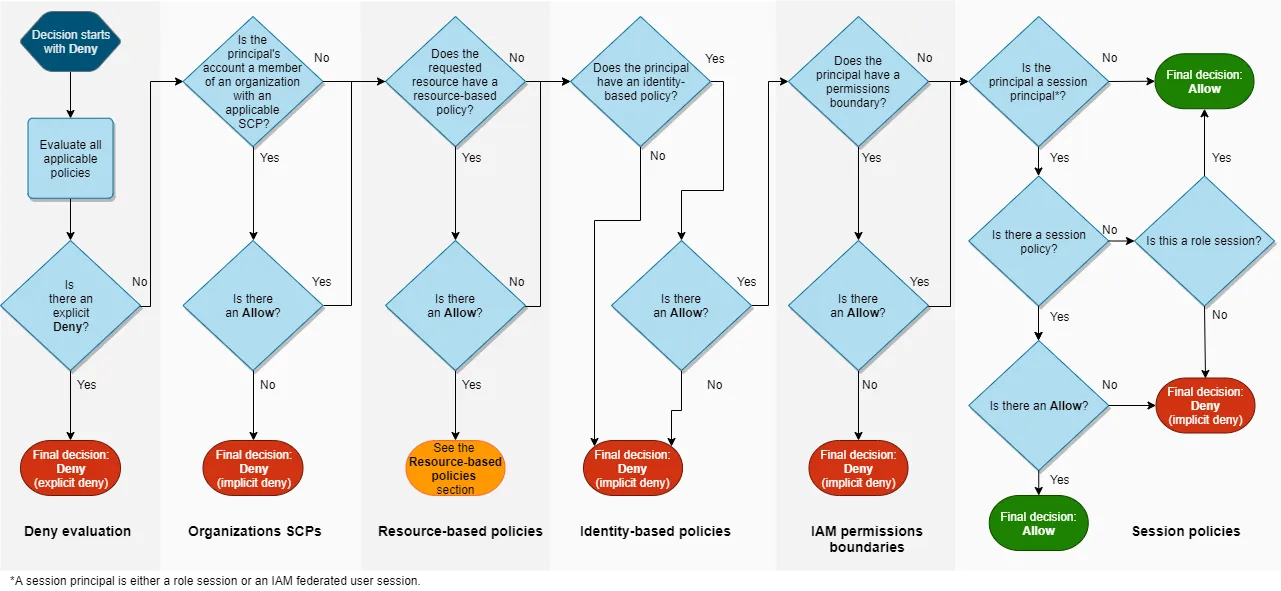
Let's break down the key steps shown in the chart:
- Explicit Deny: IAM first checks all applicable policies (Service Control Policies, permissions boundaries, identity policies, resource policies) for an explicit
Denystatement that matches the request. If one is found, the request is immediately denied. - Organization SCPs: Service Control Policies (SCPs) act as guardrails for your entire AWS Organization. They can restrict the maximum permissions for all accounts within the organization.
- Resource-based policies: These are attached directly to a resource (like an S3 bucket). They specify who can access that specific resource.
- Identity-based policies: These are attached to the user, group, or role making the request. They define what that identity can do.
- Permissions Boundaries & Session Policies: These are advanced features that set the maximum permissions a role or a temporary session can have.
If, after all these checks, there is no explicit Deny and at least one policy explicitly allows the action, the request is allowed. If there is no Allow, the request is implicitly denied.
For a deeper dive into the "why" behind this process, the following video explains IAM from first principles, including the concepts of control planes, data planes, and how the request context is built and evaluated. This level of understanding is what separates senior candidates in interviews.
AWS re:Inforce 2022 - AWS Identity and Access Management (IAM) deep dive (IAM301)
This AWS re:Inforce talk provides a deep dive into the internal workings of IAM.
Watch the section on IAM's data plane to understand how IAM authenticates and authorizes requests at a massive scale. Then, focus on the section explaining the policy evaluation logic. The speaker explains how AWS assembles a "request context" and performs string matching against your policies.
Achieving Least Privilege: A Practical Workflow
Defining least privilege is easy; implementing it is hard. How do you know exactly which permissions an application needs? Granting s3:* is easy but dangerous. Manually listing every required action is tedious and error-prone.
A professional, data-driven approach is required, which aligns perfectly with the DevOps mindset of monitoring and iteration.
- Deploy with Broad Permissions: In a development environment, you might start with a broader policy (e.g.,
s3:GetObjecton a whole bucket). - Monitor API Activity: Use AWS CloudTrail, which records every API call made in your account. Configure a trail to log data events for the services your application uses (e.g., S3 object-level operations).
- Analyze the Logs: The CloudTrail logs, often stored in S3, contain a precise record of every action your application actually performed. You can use Amazon Athena to run SQL queries against these logs to identify the exact set of actions and resources used.
- Refine the Policy: Based on your analysis, create a new, tightly-scoped IAM policy that grants only the permissions you observed being used.
- Test and Deploy: Attach the new, hardened policy to your IAM role and thoroughly test the application to ensure it still functions correctly. Then, deploy the change.
This iterative workflow transforms security from a guessing game into an evidence-based engineering practice. The following article provides an excellent walkthrough of this exact scenario.
Review and Secure a Lambda Function with an IAM Least ...
This article details a professional workflow for securing a Lambda function's permissions. It showcases the use of CloudTrail and Athena to move from an overly permissive policy to one based on the principle of least privilege.
Read the introduction to understand the goal. Then, skim the sections on creating the Lambda function and using Athena to understand the setup. Finally, focus on the sections that review and update the policy and the final Conclusion, which summarizes the security benefits of this data-driven approach.
Conclusion
In this lesson, we moved from the physical world of AWS to the logical world of identity and access. You've learned about the fundamental components of IAM—users, groups, roles, and policies—and the critical importance of using them to enforce the principle of least privilege.
Here are the key takeaways:
- IAM Principals: Use the root user only for initial setup. Create an IAM Admin user for daily administration. Leverage groups to manage user permissions at scale. Prefer IAM roles with temporary credentials for both services and federated human access.
- IAM Policies: These JSON documents are the heart of AWS security. They explicitly define what actions are allowed or denied on which resources.
- Evaluation Logic: AWS follows a strict evaluation path, starting with an implicit deny. An explicit
Denyalways wins. For a request to succeed, it must pass through all boundaries (SCPs, Permissions Boundaries) and find an explicitAllowin an identity or resource-based policy. - Principle of Least Privilege: This is a core security principle you must master. A professional workflow involves monitoring actual API usage with tools like CloudTrail and Athena to craft policies that grant only the necessary permissions.
You now have the foundational security knowledge needed to start building on AWS. In our next lesson, we will apply this by learning how to launch and manage EC2 instances, where you'll see firsthand how IAM roles are used to provide secure access for your virtual servers.