Welcome to the next step in building your Midday Meal Quality Monitoring project. In our last two lessons, we focused on data acquisition, using PRAW for structured text from Reddit and requests with BeautifulSoup for unstructured files like images and documents from the web. You should now have a collection of raw data files ready for processing.
Before we dive into manipulating this data, we need to address a critical, often-overlooked aspect of any serious data science project: organization. A jumble of files in a single downloads folder is a recipe for confusion and makes your work nearly impossible to reproduce. In this lesson, we will design and implement a structured file system for your project. This will provide a clean, logical, and scalable foundation for all the complex components—image analysis, text processing, and geospatial mapping—that you'll be building.
Drawing from your experience with web frameworks like Django, you'll recognize the value of a standardized directory structure. Just as Django separates models, views, and templates, a good data science project structure separates data, source code, notebooks, and outputs. This separation of concerns is key to managing complexity and ensuring your project remains maintainable as it grows.
Principles of a Well-Structured Data Science Project
A good project structure isn't just about tidy folders; it's about enforcing practices that lead to better science. The goal is to make your work logical, transparent, and reproducible.
The following article from Innovatiana outlines several best practices for organizing a dataset. While the original is in French, the key ideas are universal and crucial for us to adopt.
Optimize your datasets for AI: tools and practices - Innovatiana
This article highlights the fundamental principles of effective data organization in AI projects.
Please read through the main best practices outlined in the section How to organize a dataset. As you read, focus on these core concepts: Clear Nomenclature: Using descriptive names for files and folders. Logical Hierarchy: Grouping files into a sensible tree of directories. Standardization: Using consistent file formats. Documentation: Creating README files to explain the project. Metadata: Storing information about your data alongside the data itself.
These principles help ensure that anyone (including your future self) can understand the project, trace data from its raw form to the final results, and reproduce your findings.
A Standard Template: Cookiecutter Data Science
Rather than reinventing the wheel, we can start with a widely accepted template. The "Cookiecutter Data Science" project structure is a popular, logical, and comprehensive template for data science work.
The following video by Dave Ebbelaar provides an excellent introduction to why a consistent structure is important and demonstrates how to use the Cookiecutter template.
Data Science Tutorial - Project Structure
This video introduces the concept of a standardized project structure and walks through the popular "Cookiecutter Data Science" template.
Please watch the following segments: The Problem of Inconsistency (0:27 - 1:58): The presenter explains the common issue of having disorganized projects, which you might recognize from personal or academic work. Introducing Cookiecutter (2:59 - 5:10): This part shows how to generate the project structure and gives an overview of the key folders like data, notebooks, and src. Why It Works (5:10 - 6:58): The presenter discusses the benefits of this structure and how he customizes it. A Look Inside VS Code (7:42 - 8:41): Pay attention to the mention of the .gitignore and environment files, which are crucial for security and version control—concepts you're already familiar with from your development experience.
While you don't need to install and run the cookiecutter command yourself, the structure it proposes is the model we will adapt for your project.
Designing a Structure for the Midday Meal Project
Let's apply these principles and create a concrete structure for your multimodal project. This structure clearly separates raw data, processed data, source code, and exploratory notebooks.
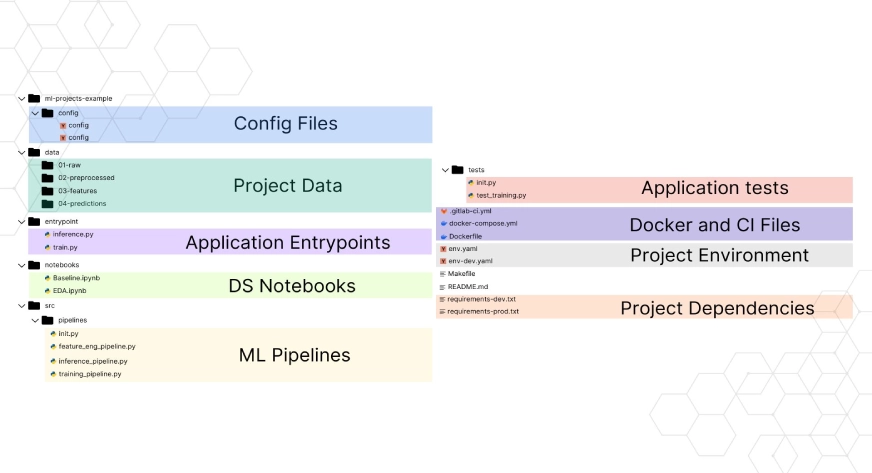
Here is the directory structure we will use. You should create these folders within your main project directory.
midday-meal-monitoring/
├── README.md
├── requirements.txt
├── .gitignore
│
├── data/
│   ├── 01_raw/
│   │   ├── images/         # Scraped meal photos (.jpg, .png)
│   │   ├── text_complaints/ # Scraped text data (.csv, .json)
│   │   └── documents/        # Scraped reports (.pdf)
│   │
│   ├── 02_interim/         # Resized images, cleaned text
│   │
│   └── 03_processed/       # Annotated data for modeling
│
├── notebooks/
│   └── 01_eda.ipynb        # Notebook for exploratory data analysis
│
└── src/
    ├── __init__.py
    ├── data_processing/    # Scripts for processing data
    └── models/             # Scripts for training models
Let's break down the key components:
data/: This is the heart of your data management. The numbered prefixes (01_,02_,03_) enforce the workflow.01_raw/: This folder is immutable. It holds the original, untouched data you scraped. You should never modify files in here. This ensures you can always go back to the source. We've subdivided it by data type.02_interim/: This folder holds intermediate data. For example, after you resize all images to a standard dimension, you would save them here.03_processed/: This folder contains the final, clean datasets that are ready to be fed into your machine learning models. For instance, your annotated image dataset will live here.
notebooks/: This is where you do your exploratory work. Jupyter notebooks are excellent for iteration, visualization, and initial analysis, but they are not ideal for reproducible pipelines. Your goal is to explore in notebooks and then move mature code into Python scripts within thesrc/directory.src/: This directory contains all your Python source code. By organizing code into modules and packages, you make it reusable and maintainable. Your data cleaning scripts, model training pipelines, and utility functions will live here.README.md: The front page of your project. It should explain what the project is, how to set it up, and how to run the code..gitignore: As you know from your Git experience, this file tells Git what to ignore. It is crucial to adddata/to your.gitignoreto avoid committing large data files to your repository. You should also ignore environment files, model artifacts, and Python cache directories (__pycache__).
Automating Organization with a Python Script
Manually sorting hundreds or thousands of scraped files is tedious and error-prone. We can automate this process with a simple Python script. The script will look at files in a "source" folder (e.g., your unsorted downloads) and move them to the correct location within data/01_raw/ based on their file extension.
Python's built-in os and shutil libraries are perfect for these file system operations.
This article from Python Engineer provides concise code examples for common file operations.
Review the following sections to understand the tools we'll use: Creating Directories: See the example for pathlib.Path.mkdir(exist_ok=True) or os.mkdir(). This is how we'll ensure our target folders exist. Moving Files: The shutil.move() function is the key operation for sorting files. Full Example Script: The final section, Organize and clean up, shows a complete script that categorizes files by type and moves them. We will adapt this logic for our project.
Now, let's create our own organization script. Create a new file named organize_raw_data.py inside your src/ directory.
import os
import shutil


# --- Configuration ---
# The folder where your scraped files are currently located.
# Change this to your actual downloads folder path.
SOURCE_DIR = "/path/to/your/downloads"


# The root directory for your project's raw data.
# This assumes you run the script from the project's root folder.
RAW_DATA_DIR = "data/01_raw"


# Define mappings from file extensions to destination folders.
# Keys are tuples of extensions (lowercase), values are the folder names.
EXTENSION_MAP = {
    ('.jpg', '.jpeg', '.png', '.gif'): 'images',
    ('.csv', '.json', '.txt'): 'text_complaints',
    ('.pdf', '.doc', '.docx'): 'documents',
}


# --- Script Logic ---

def organize_files(source_path, base_dest_path, mapping):
    """
    Organizes files from a source directory into a structured destination directory
    based on their file extensions.
    """


    # 1. Create all necessary destination subdirectories
    for dest_folder in set(mapping.values()):
        os.makedirs(os.path.join(base_dest_path, dest_folder), exist_ok=True)

    print(f"Scanning source directory: {source_path}")


    # 2. Iterate over files in the source directory
    for filename in os.listdir(source_path):
        source_file_path = os.path.join(source_path, filename)


        # Skip if it's a directory
        if os.path.isdir(source_file_path):
            continue


        # Find the correct destination folder
        file_ext = os.path.splitext(filename)[1].lower()
        destination_folder = None

        for extensions, folder_name in mapping.items():
            if file_ext in extensions:
                destination_folder = folder_name
                break


        # 3. Move the file if a mapping was found
        if destination_folder:
            dest_dir = os.path.join(base_dest_path, destination_folder)
            dest_file_path = os.path.join(dest_dir, filename)

            print(f"Moving '{filename}' to '{dest_dir}'...")
            shutil.move(source_file_path, dest_file_path)
        else:
            print(f"Skipping '{filename}' (unrecognized extension).")

if __name__ == "__main__":


    # Ensure the base raw data directory exists
    os.makedirs(RAW_DATA_DIR, exist_ok=True)

    organize_files(SOURCE_DIR, RAW_DATA_DIR, EXTENSION_MAP)
    print("\nFile organization complete!")
To use this script:
- Save it as
src/organize_raw_data.py. - Crucially, update the
SOURCE_DIRvariable to the absolute path of the folder containing your scraped files. - Open your terminal, navigate to the root of your
midday-meal-monitoringproject folder. - Run the script using the command:
python src/organize_raw_data.py.
The script will automatically create the subdirectories inside data/01_raw/ and move your images, text files, and documents into their designated homes, leaving your downloads folder cleaner and your project perfectly organized.
Conclusion
In this lesson, we transitioned from being data collectors to being project architects. By establishing a clean, logical, and standard project structure, you've laid a critical foundation that will pay dividends throughout the project lifecycle. This organization prevents chaos, ensures reproducibility, and makes your workflow more efficient.
Key Takeaways:
- A standardized project structure (like the one adapted from Cookiecutter) separates concerns:
data,src,notebooks. - The
datadirectory should be organized into a pipeline:01_raw(immutable),02_interim, and03_processed. - Always add your data directories to
.gitignoreto keep your repository lean. - File system operations can be easily automated with Python's
osandshutillibraries, saving time and reducing errors.
Now that your raw data is neatly organized, we are ready to begin processing it. In our next lesson, we will focus on the image data. We will start with fundamental preprocessing tasks using libraries like OpenCV and Pillow, such as loading, resizing, and converting images to prepare them for the annotation and modeling stages.