Welcome to the next lesson in our journey to build the Midday Meal Quality Monitoring system. In our previous session, we successfully tackled the task of converting meal images into numerical feature vectors using your fine-tuned CNN. This was the first critical step in preparing our data for a multimodal model.
Today, we'll complete the other half of this preparation by focusing on the textual data from parent complaints. Your learning outcome is to extract CLS token embeddings from the fine-tuned BERT model in evaluation mode. By the end of this lesson, you will understand how BERT represents the meaning of an entire sentence in a single vector and be able to implement the code to extract these vectors from your complaint dataset. This will give us the two key ingredients needed for our fusion model: one vector per image and one vector per text complaint.
Understanding BERT's Sentence Representation: The [CLS] Token
Before we dive into the code, let's establish what we're trying to extract and why. When you fine-tuned your BERT model for complaint classification in Module 5, you were using a model that had been pretrained to understand the intricate relationships between words in a sentence.
BERT processes text by first converting it into a specific format. A special token, [CLS] (short for "classification"), is added to the beginning of every input sequence. The input fed to the model looks something like this: [CLS] a complaint about stale food [SEP].
The power of the Transformer architecture inside BERT lies in its self-attention mechanism, which allows every token to look at every other token in the sequence to build a contextual understanding. Because the [CLS] token is present from the very beginning and participates in all 12 of BERT's Transformer layers, its final output vector (or "hidden state") becomes a rich, aggregated representation of the entire sentence's meaning.
The following diagram illustrates the journey of the [CLS] token through the BERT architecture. The input text (at the bottom, "輸入文字" means "Input Text") is tokenized, with [CLS] prepended. These tokens are converted into embeddings and processed by the main BERT layers. The final output corresponding to the [CLS] token is then used for downstream tasks.
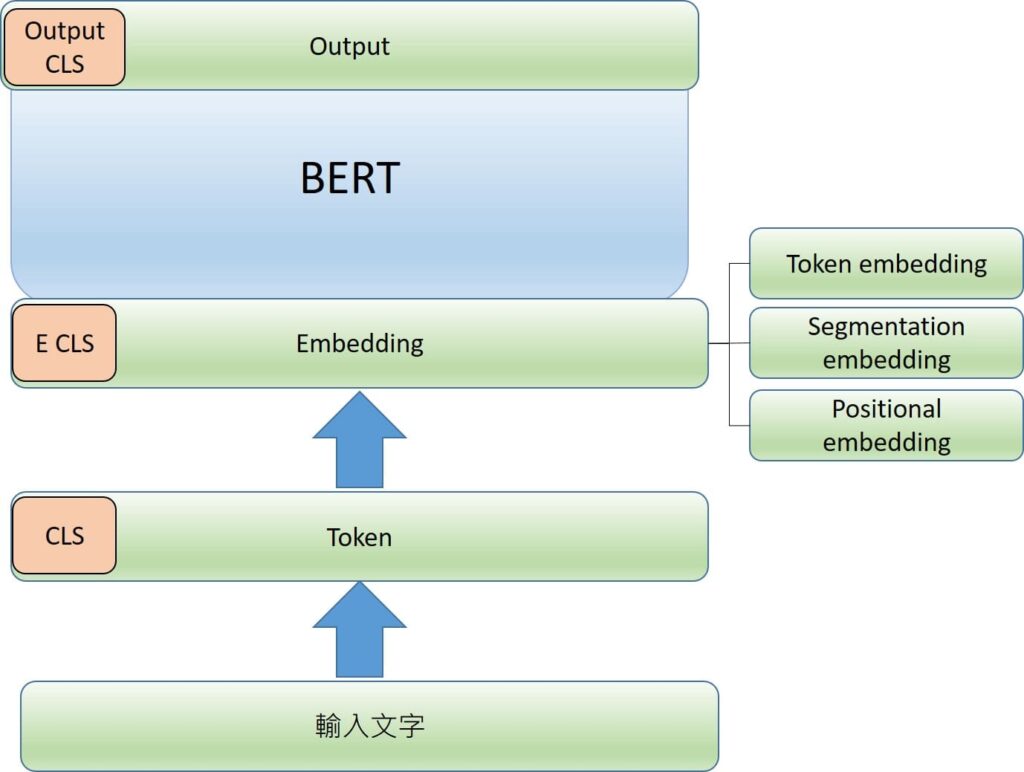
A high-level view of the BERT processing pipeline. The [CLS] token is introduced at the input stage and its final, context-rich embedding is extracted at the output stage.
For classification tasks, this single vector from the [CLS] token is typically fed into a simple linear layer to produce the final class predictions. For our current goal—feature extraction—we intercept this vector before it goes into the classifier. This 768-dimensional vector is the feature embedding we need.
The article "Feature Extraction with BERT for Text Classification" provides a concise explanation of this concept.
Feature Extraction with BERT for Text Classification
This article clearly explains why the [CLS] token is suitable for representing a whole sentence.
Please read the section Bert in a nutshell. Focus on the paragraph that begins, "For classification problems such as ours...", which directly states that the hidden state of the [CLS] token captures the semantics of the entire sentence and can be used as an input for a classifier.
Accessing the [CLS] Embedding in PyTorch
Now, how do we get this embedding programmatically? When you pass a tokenized sentence through a Hugging Face BERT model, it returns several outputs. The one we're interested in is called last_hidden_state.
This last_hidden_state is a tensor with the shape (batch_size, sequence_length, hidden_size).
batch_size: The number of sentences processed at once.sequence_length: The maximum length of the sequences (e.g., 128 tokens).hidden_size: The size of the embedding for each token (768 forbert-base).
Since the [CLS] token is always the very first token in the sequence (at index 0), we can get its embedding by simply slicing this tensor. Given a last_hidden_state tensor, the slice last_hidden_state[:, 0, :] will give us the [CLS] token's embedding for every sentence in the batch.
The blog post "Fine-tuning BERT for Sentiment Analysis" by Chris Tran, which you may have seen before, contains a clear example of this within a custom BertClassifier module.
Fine-tuning BERT for Sentiment Analysis - Chris Tran
This resource demonstrates the exact slicing technique required to isolate the CLS token's embedding.
In the article, find the section "3.1. Create BertClassifier" and examine the forward method within the BertClassifier class definition. The key line is this one. Here, outputs[0] is the last_hidden_state, and the slice [:, 0, :] is precisely what isolates the [CLS] token's embedding.
For a more dynamic explanation, the following video also walks through this process, showing how to get the model outputs and select the correct embedding.
How to code BERT Word + Sentence Vectors (Embedding) w/ Transformers? Theory + Colab, Python
This video by Discover AI demonstrates how to get hidden states from BERT and specifically how to extract the sentence vector corresponding to the [CLS] token.
First, watch the segment from running the model to understand how to call the model with output_hidden_states=True to access all layer outputs. Then, jump to the crucial part about extracting the final sentence vector from CLS token embedding. The presenter clearly shows how to take the last_hidden_state and slice it to get the vector for the first token, which is our desired [CLS] embedding.
Implementing the Text Feature Extractor
Let's consolidate this knowledge into a practical script. Similar to the FeatureExtractor for images, we will create a TextFeatureExtractor class. This class will handle loading your fine-tuned model and its tokenizer, processing raw text, and returning the [CLS] embedding.
Important Note: To extract features, we need the output from the base BERT model, not the final classification output. When you built your classifier in Module 5, you likely used a class like BertForSequenceClassification. We can load this full model, but we will only use its underlying bert component for the forward pass.
Here is the implementation. You will need to provide the path to the directory where you saved your fine-tuned classifier from Module 5.
import torch
from transformers import BertTokenizer, BertForSequenceClassification
from pathlib import Path

class TextFeatureExtractor:
    def __init__(self, model_path: str, device: str = 'cuda'):
        """
        Initializes the text feature extractor.

        Args:
            model_path (str): Path to the directory containing the fine-tuned
                              Hugging Face model and tokenizer.
            device (str): The device to run the model on ('cuda' or 'cpu').
        """
        self.device = torch.device(device if torch.cuda.is_available() else "cpu")

        # Load the tokenizer from the saved model directory
        self.tokenizer = BertTokenizer.from_pretrained(model_path)

        # Load the full fine-tuned classification model
        full_model = BertForSequenceClassification.from_pretrained(model_path)

        # We only need the base BERT model for feature extraction
        self.model = full_model.bert.to(self.device)

        # Set the model to evaluation mode
        self.model.eval()
        print(f"Text feature extractor loaded on {self.device}.")

    def extract(self, text: str) -> torch.Tensor:
        """
        Extracts a [CLS] token embedding from a single text string.

        Args:
            text (str): The input complaint text.

        Returns:
            torch.Tensor: The extracted feature vector (768-dim for base models).
        """
        # Tokenize the text, adding special tokens, padding, and truncating
        inputs = self.tokenizer(text,
                                return_tensors='pt',
                                truncation=True,
                                padding='max_length',
                                max_length=128) # Use the same max_length as in training

        # Move inputs to the correct device
        inputs = {k: v.to(self.device) for k, v in inputs.items()}

        # Perform a forward pass with no gradient calculation
        with torch.no_grad():
            outputs = self.model(**inputs)

        # The output we want is the last_hidden_state
        last_hidden_state = outputs.last_hidden_state

        # The [CLS] token embedding is the first token's embedding
        # Squeeze to remove the batch dimension
        cls_embedding = last_hidden_state[:, 0, :].squeeze()

        # Return the embedding on the CPU
        return cls_embedding.cpu()

# --- Main execution block ---
if __name__ == "__main__":
    # IMPORTANT: Update this path to your fine-tuned model directory from Module 5
    MODEL_DIR = 'path/to/your/fine-tuned-bert-classifier'

    # Example complaint text
    complaint_text = "The rice was uncooked and the dal was just water. Terrible quality."

    if not Path(MODEL_DIR).exists() or MODEL_DIR == 'path/to/your/fine-tuned-bert-classifier':
        print("!!!!!!!!!!!!!!!!!!!!!!!!!!!!!!!!!!!!!!!!!!!!!!!!!!!!!!!!!!!!!!!")
        print("!!! PLEASE UPDATE 'MODEL_DIR' to point to your saved BERT model !!!")
        print("!!!!!!!!!!!!!!!!!!!!!!!!!!!!!!!!!!!!!!!!!!!!!!!!!!!!!!!!!!!!!!!")
    else:
        # Initialize the extractor
        extractor = TextFeatureExtractor(model_path=MODEL_DIR)

        # Extract the feature vector
        feature_vector = extractor.extract(complaint_text)

        print(f"\n--- Extracted Feature Vector for text: '{complaint_text}' ---")
        print(f"Shape: {feature_vector.shape}")
        print(f"Vector (first 10 elements): {feature_vector[:10]}...")
        # The output shape should be torch.Size([768]) for a 'bert-base' model
Code Walkthrough:
__init__: We load both thetokenizerand theBertForSequenceClassificationmodel from the directory you saved them in. We then extract just the base model (full_model.bert), move it to the GPU, and set it to evaluation mode with.eval().extract: This method takes a raw text string.- It uses the
tokenizerto convert the text into the numerical format BERT expects.return_tensors='pt'ensures the output is a PyTorch tensor. - It runs the tokenized inputs through the base model within a
torch.no_grad()context for efficiency. - It accesses the
last_hidden_statefrom the model's output object. - It slices this tensor (
[:, 0, :]) to get the[CLS]embedding and removes the batch dimension with.squeeze()since we're processing one text at a time. - Finally, it returns the vector on the CPU.
- It uses the
Conclusion
Congratulations! You have now mastered the text-based counterpart to the image feature extraction we performed in the last lesson. You've equipped yourself with the skills to convert any parent complaint into a dense, meaningful numerical vector.
Here are your key takeaways:
- The
[CLS]token's final hidden state acts as a semantic summary of an entire input sentence, making it an ideal feature vector. - To extract this vector, you perform a forward pass on the base BERT model (not the full classifier) in evaluation mode.
- The desired embedding is found by slicing the
last_hidden_stateoutput tensor at the first token's position:output.last_hidden_state[:, 0, :]. - This process yields a fixed-size vector (e.g., 768 dimensions) that is ready to be used in a downstream task.
You are now fully prepared for the next major step in your project: multimodal fusion. In the upcoming lesson, we will take the image feature vectors and these new text feature vectors and combine them. You will learn how to build a simple "fusion model" that concatenates these vectors and trains a final classifier to predict violation severity, bringing together the different streams of data for a more powerful and accurate system.