Hello! Welcome back to your journey into Shopify App Development.
In our last lesson, we established the fundamental difference between theme customizations (for presentation) and custom apps (for functionality). You learned that when you need to add new features, store custom data, or integrate with other systems, you need to build an app.
Today, we'll take our first look at the primary tool apps use to perform these functions: the Shopify Admin API. This API is the bridge that allows your custom application to read and write a store's private data, like products, orders, and customers.
Given your full-stack development experience, you're likely familiar with RESTful APIs. This lesson will build on that knowledge to introduce GraphQL, a powerful alternative that Shopify has fully embraced. Our goal is to compare the REST and GraphQL Admin APIs and identify when to use each, a critical piece of knowledge for any professional Shopify developer.
1. What is the Admin API?
Before we compare the different "flavors" of the Admin API, let's clarify its purpose and, crucially, its security model. The Admin API gives you powerful access to a store's backend data. With great power comes great responsibility, and Shopify enforces a strict security flow.
Shopify API for Beginners (2026) – Full Guide for Theme & App Developers
The video 'Shopify API for Beginners' by Coding with Jan gives an excellent overview of this concept. Let's watch a segment that explains why you can't just call the Admin API from a storefront's JavaScript.
Watch from 02:54 to 04:31. Focus on understanding the secure flow: a user action on the front end triggers a request to your app's server, which then securely communicates with the Shopify Admin API.
As the video explained, all Admin API requests must originate from a secure, server-side environment. Your app's server holds the secret credentials (API keys) needed to authenticate with Shopify. This prevents any possibility of a malicious user on the front end gaining access to sensitive store data. This is a core architectural pattern you'll use throughout app development.
Now, let's look at the two architectural styles available for this server-to-server communication: REST and GraphQL.
2. The Tale of Two APIs: REST vs. GraphQL
For years, REST (Representational State Transfer) was the de facto standard for building APIs. It's built on a resource-based model using standard HTTP methods (GET, POST, PUT, DELETE) and distinct endpoints for each resource (e.g., /products, /orders).
However, as applications became more complex and interconnected—especially in e-commerce—some of REST's limitations became apparent. This led to the development of GraphQL.
Understanding the Core Difference
The best way to grasp the conceptual difference is to see it.
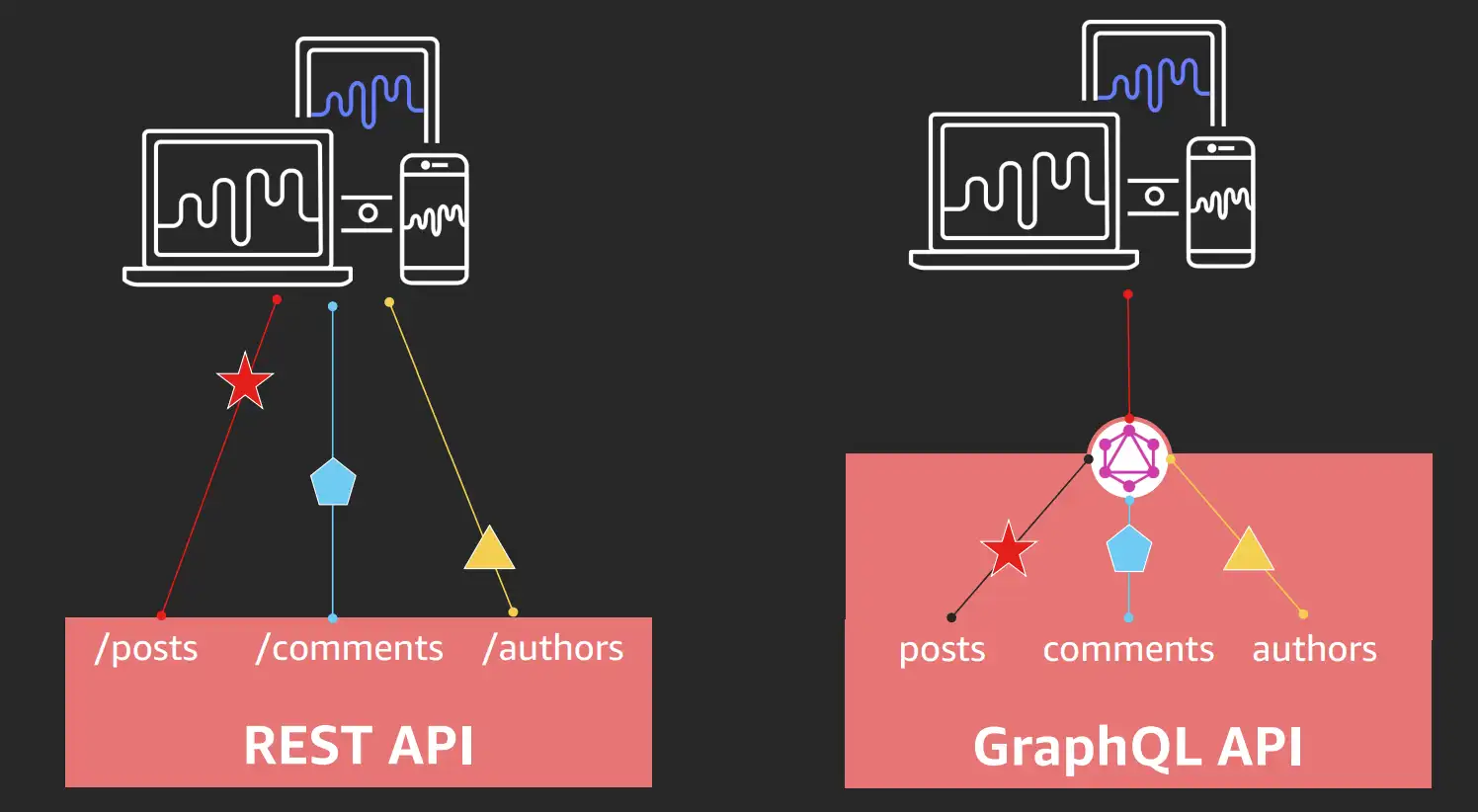
This visual highlights the core idea:
- REST: Multiple endpoints, where the server decides the structure of the data returned from each.
- GraphQL: A single endpoint, where the client specifies the exact structure of the data it needs.
To deepen your understanding of GraphQL's origins and principles, let's turn to a general-purpose explanation.
GraphQL vs REST: what you need to know
The video 'GraphQL vs REST: what you need to know' from Kodaps Academy provides excellent first-principles explanations of GraphQL's design. This will give you the 'why' behind its creation.
Watch the segment from 01:26 to 04:43. Pay attention to: How GraphQL was created at Facebook to handle complex, relational data (a 'graph' of friends, posts, and likes). How GraphQL is a query language that allows the client to define the shape of the response, preventing the over-fetching common in REST.
A Direct Comparison in the Shopify Context
Now that we have the general theory, let's apply it directly to Shopify. Shopify provides official documentation that compares the two and, more importantly, states its strategic direction.
Shopify's official documentation, 'About GraphQL', is the most important resource for this lesson. It contains a direct comparison and a clear statement about Shopify's API strategy.
Please read the following sections from this document: Start at the top, paying close attention to the Note box. This is Shopify's official stance. Read the section 'Benefits of GraphQL over REST' and study the comparison table carefully. Finally, review the 'Example' section to see a concrete demonstration of how a single GraphQL query replaces multiple REST requests.
The resources you've just reviewed are dense with critical information. Let's break down the key comparison points for a Shopify developer:
| Feature | REST Admin API (Legacy) | GraphQL Admin API (Modern) |
|---|---|---|
| Data Fetching | Multiple requests are often needed to gather related data (e.g., get order, then get customer, then get product). This is called under-fetching. | A single, well-formed query can retrieve an object and all its related data (e.g., an order with its customer and line item details) in one network call. |
| Payload Size | Endpoints return a fixed, large set of data. You might only need a product's title but you get the body_html, all images, tags, etc. This is called over-fetching. |
You specify exactly which fields you need. If you only ask for the title, that's all you get. This leads to smaller, faster responses. |
| Developer Experience | Relies on external documentation. Data types are loosely enforced (JSON strings), which can lead to parsing errors. | Strongly typed. The API has a schema that defines every object and field. This allows for validation, autocompletion in IDEs, and safer code. |
| API Evolution | When Shopify wants to change a REST endpoint, they can't be sure which fields developers are using, making breaking changes risky for the ecosystem. | Because you specify fields, Shopify knows exactly what data each app uses. This allows them to deprecate specific fields with clear warnings, making the API more stable and easier to evolve. |
The example from the Shopify docs is a perfect illustration. To get the order total, customer name, and related product variant titles with REST, you'd need at least three separate API calls. With GraphQL, it's one query. This isn't just a minor convenience; at scale, the reduction in network latency is significant.
3. The Verdict: When to Use Each
So, we come to the core of the learning outcome: When do you use REST, and when do you use GraphQL?
Based on Shopify's official position, the answer is unambiguous:
For all new Shopify app development, you must use the GraphQL Admin API.
The REST Admin API is now considered legacy. While it still functions for existing apps, Shopify requires new apps submitted to the App Store to use GraphQL. As a freelancer building new solutions, your default and primary choice should always be GraphQL.
You may still encounter the REST API when maintaining or migrating older, existing client projects. Therefore, understanding its principles is still valuable, but your active development work should be focused entirely on GraphQL.
GraphQL vs. REST: Why GraphQL Wins for Enterprise ...
This article from Shopify's enterprise blog, 'GraphQL vs. REST', frames the decision as a strategic choice for performance and future-proofing. It solidifies the 'why' behind Shopify's GraphQL-first strategy.
Read the sections 'Six advantages of using GraphQL for enterprise commerce' and 'Shopify and GraphQL'. This will reinforce the benefits we've discussed and confirm Shopify's long-term commitment.
Test your understanding!
A client asks you to build a new feature. They need a dashboard that shows the top 5 best-selling products from the last 30 days, and for each product, it should display the product's title, main image, and the total number of orders it appeared in.
Why is GraphQL significantly better suited for this task than the legacy REST API?
Show answer
GraphQL is superior for this task for two main reasons:
- Data Fetching Efficiency: With REST, you would need to make many API calls. First, you'd likely fetch all orders from the last 30 days. Then, you would have to process them in your code to count product occurrences. Finally, for each of the top 5 products, you would probably need to make another API call to
/products/{product_id}.jsonto get its title and image. This is a classic N+1 problem. - Payload Efficiency: With GraphQL, you can construct a single, sophisticated query. You could potentially query the
ordersconnection with date filters, and within that query, access thelineItems,product,title, andfeaturedImageall in one go. Shopify's GraphQL implementation is highly optimized to handle such queries efficiently on their end, returning only the data you requested in a single network round trip.
Conclusion
You've now explored the two main ways an app can communicate with the Shopify backend and, more importantly, you understand why one has become the clear standard.
Key Takeaways:
- The Admin API is the secure, server-to-server interface for your app to interact with store data.
- REST is the legacy, resource-based API. It's characterized by multiple endpoints and fixed data responses, often leading to inefficient data fetching (over-fetching and under-fetching).
- GraphQL is the modern, query-based API. It uses a single endpoint and allows the client to request exactly the data it needs in a specific shape, leading to highly efficient and performant applications.
- For all new Shopify development, GraphQL is the required standard. You should only expect to work with the REST API when maintaining legacy projects.
Understanding this distinction is not just a technical detail; it's a fundamental aspect of building modern, performant, and future-proof Shopify applications.
In our next lesson, we will address the logical next question: How does my app get permission to make these API calls in the first place? We'll dive into the OAuth 2.0 grant flow, the standard mechanism for app authentication and authorization.