Hello and welcome back to our module on Advanced Theming & Performance Optimization.
In the last lesson, we dove into advanced Liquid filters like map, where, and sort, which allow for powerful and elegant data manipulation directly within your templates. While these tools help you write cleaner code, every piece of logic, every asset, and every app you add contributes to the final product a user experiences. This brings us to a crucial, overarching topic: performance.
This lesson addresses the learning outcome: Explain why theme performance is critical for user experience and SEO.
Your background in web development has already introduced you to the importance of a fast website. Here, we will frame that knowledge specifically within the e-commerce context of Shopify. Understanding this is not just a technical exercise; it's fundamental to the success of the merchants you'll work with. For a freelance developer, delivering a high-performing site is a primary value proposition.
We'll start with the "why"—the direct impact of speed on business goals—and then explore "how" this performance is measured using industry-standard metrics.
1. The Business Case for Speed: CRO, Loyalty, and SEO
A slow website doesn't just feel bad; it actively harms a business's bottom line. The impact can be broken down into three critical areas.
To begin, let's read an article from Shopify's own blog that clearly articulates the stakes.
Why Site Speed Is So Important For CRO, SEO, and Loyalty
This article, 'Why Site Speed Is So Important For CRO, SEO, and Loyalty', provides a concise and compelling overview of the business implications of website performance. It directly connects speed to tangible outcomes.
Please read the section titled 'Why is site speed important?'. It's broken down into three subsections: 'Conversion', 'Loyalty (repeat business)', and 'Google Search ranking'. Focus on the statistics and the core argument in each part.
As you've just read, the relationship between speed and success is undeniable. Let's summarize the key points.
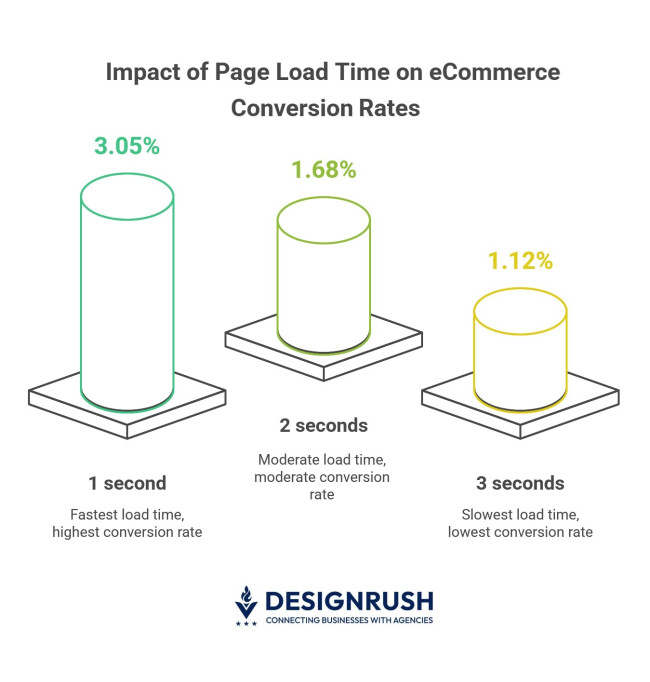
- Conversion Rate Optimization (CRO): This is the most immediate impact. As the article highlights, even a one-second improvement can boost mobile conversions by up to 27%. In e-commerce, where every sale counts, this is a massive lever for revenue. A slow site causes users to abandon their journey before they even see the products, let alone purchase them.
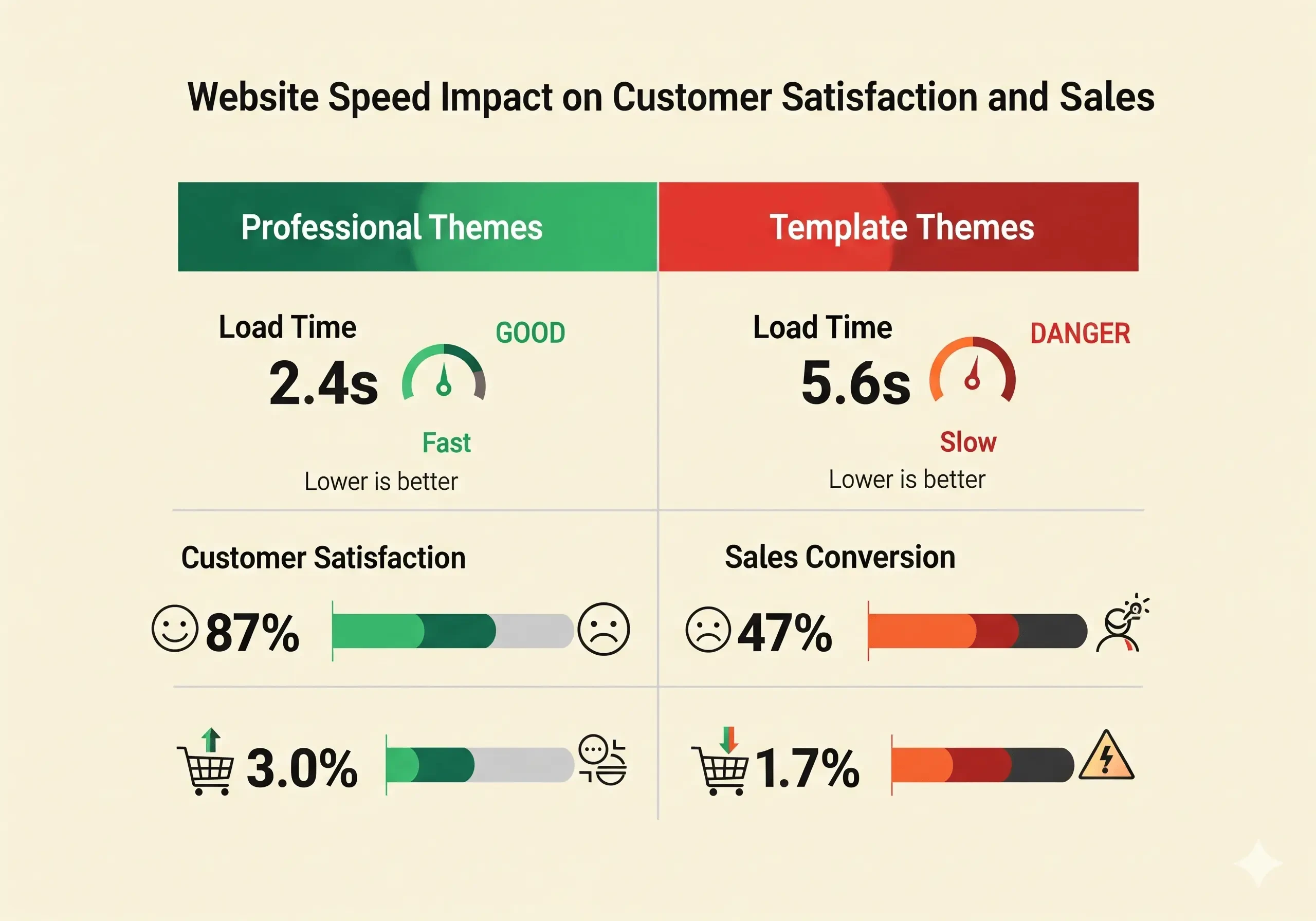
- Customer Loyalty: A fast, seamless experience builds trust and encourages repeat business. The statistic that 79% of customers are less likely to repurchase from a slow site is telling. Performance is a core part of the user experience (UX) that determines whether a customer's first purchase becomes their last.
- Search Engine Optimization (SEO): Google's primary goal is to provide users with the best possible results. A fast and stable website is considered a high-quality website. As such, Google uses site speed as a direct ranking factor. A faster site will rank higher in search results, leading to more organic traffic and potential customers, while a slower site will be penalized.
2. How Performance is Measured: Core Web Vitals
Now that we've established why speed is critical, let's discuss how it's measured. Google has standardized performance measurement around a set of metrics called Core Web Vitals. These are not abstract numbers; they are designed to quantify key aspects of the real user experience.
Shopify has recently integrated these metrics directly into the admin dashboard, replacing the old, more generic "speed score." This is a significant shift, as the new metrics are based on real user data from the past 28 days, not a one-off lab test.
The following video provides an excellent, Shopify-centric introduction to Core Web Vitals and the new performance dashboard.
Intro to Shopify Speed Optimization 2024 - The New Performance Dashboard & Core Web Vitals
The video 'Intro to Shopify Speed Optimization 2024' by Ed Codes explains Shopify's new performance dashboard, which is built around Google's Core Web Vitals. It's a perfect guide to understanding what these metrics are and how they apply to a Shopify store.
Please watch the video from the beginning until 18:49. The video is divided into logical sections that cover: The shift from the old Lighthouse score to the new Core Web Vitals dashboard (00:00 - 06:15). Largest Contentful Paint (LCP), which measures loading speed (06:15 - 12:20). Interaction to Next Paint (INP), which measures interactivity (12:20 - 15:14). Cumulative Layout Shift (CLS), which measures visual stability (15:14 - 18:49). Pay close attention to the real-world Shopify examples used to illustrate each metric.
Let's distill the key concepts from the video.
A. Largest Contentful Paint (LCP): Perceived Loading Speed
- What it is: LCP measures the time it takes for the largest single element (usually a hero image or a large block of text) to become visible within the viewport.
- Why it matters: This metric is a proxy for perceived load time. A fast LCP (under 2.5 seconds is 'Good') tells the user that the page is working and the content they came for is arriving quickly. A slow LCP results in a blank screen and is a primary cause of high bounce rates.
- Common Causes in Shopify: Large, uncompressed hero images; slideshows that require extra JavaScript to load; and an excessive number of apps loading resources at the top of the page.
B. Interaction to Next Paint (INP): Responsiveness
- What it is: INP measures the latency of all user interactions on a page, reporting the worst one. It captures the time from when a user clicks, taps, or types until the next frame is painted on the screen, providing visual feedback. A good INP is under 200 milliseconds. (Note: INP recently replaced First Input Delay (FID) as a more comprehensive measure of interactivity).
- Why it matters: When a user clicks "Add to Cart" or opens a menu, they expect an immediate reaction. A high INP means the site feels sluggish or broken, causing frustration. The user might click again, triggering unintended actions.
- Common Causes in Shopify: Heavy JavaScript execution from third-party apps, complex theme-level scripts blocking the main thread, or inefficient 'add to cart' logic that doesn't provide instant feedback.
C. Cumulative Layout Shift (CLS): Visual Stability
- What it is: CLS measures the sum of all unexpected layout shifts that occur during a page's lifespan. A layout shift happens when a visible element changes its position from one frame to the next. A good CLS score is below 0.1.
- Why it matters: This is deeply frustrating for users. Imagine trying to click a button, only for an ad or an announcement bar to load above it, pushing the button down and causing you to misclick. This creates a jarring and untrustworthy experience.
- Common Causes in Shopify: Apps injecting UI elements (like search bars or announcement banners) after the initial page load without reserving space for them, images loading without defined dimensions, or web fonts loading late and causing a flash of re-styled text.
Test your understanding!
A merchant installs a "Live Chat" app on their store. They notice that after the page loads, the chat bubble icon appears in the bottom-right corner, and at the same time, a "SALE" banner added by another app pops in at the top of the page, pushing all the main content down by 50 pixels.
Which Core Web Vital is most affected by the "SALE" banner, and why is this a poor user experience?
Show answer
The Core Web Vital most affected is Cumulative Layout Shift (CLS).
The "SALE" banner loads after the initial page render and is injected at the top, causing the existing content to be pushed down. This unexpected movement is exactly what CLS measures. It creates a poor user experience because it's visually jarring and can cause users to lose their reading place or misclick on an element that suddenly moves.
3. Performance as a Standard
Given its importance, performance is not just a recommendation; it's a requirement in many parts of the Shopify ecosystem.
Performance best practices for Shopify themes
The official Shopify developer documentation, 'Performance best practices for Shopify themes', sets a clear benchmark for themes sold on the official marketplace.
Read the introductory paragraphs of this document. Note the specific requirement for themes to be accepted into the Shopify Theme Store.
As you saw, to be accepted into the Shopify Theme Store, a theme must achieve a minimum Lighthouse performance score of 60. While Core Web Vitals (field data) are now the primary focus for real-world performance, this Lighthouse score (lab data) remains a key gateway benchmark. It signals that Shopify holds developers to a high standard of performance from the outset.
Conclusion
In this lesson, we established the fundamental reasons why theme performance is non-negotiable for a successful Shopify store. It's the bedrock upon which good user experience, high conversion rates, and strong search engine visibility are built.
Key Takeaways:
- Performance is Revenue: Faster sites directly lead to higher conversion rates and more sales.
- Performance is Loyalty: A fast, responsive experience builds user trust and encourages repeat business.
- Performance is Visibility: Google uses Core Web Vitals (LCP, INP, CLS) as a direct ranking factor in search results, making performance a key part of SEO.
- Measure What Matters: LCP measures loading, INP measures interactivity, and CLS measures visual stability. These metrics quantify the user's actual experience.
- It's a Professional Standard: Shopify requires themes on its marketplace to meet minimum performance benchmarks, reinforcing its importance for all developers in the ecosystem.
Now that you understand why performance is so critical, the following lessons will focus on the how. We will dive into practical, hands-on techniques to optimize a Shopify theme, starting with one of the most common and impactful areas: images. Our next lesson will cover how to optimize image loading using lazy loading techniques and responsive image attributes.