Hello! Welcome back to our course on building a web application.
In the last lesson, you successfully created the most important part of our user interface: a form with a text area and a submit button. Your webpage can now accept user input. However, right now all our HTML elements (h1, p, form, etc.) are just sitting one after another. To build a real application, we need a way to group these elements into logical containers.
Today, we'll learn how to use div and span elements to group and organize page content. Think of these as the fundamental building blocks for creating layouts. Understanding them will allow you to structure your page and prepare it for the styling we'll add with CSS in the next module.
Block vs. Inline: The Two Families of HTML Elements
Before we dive into div and span, we need to understand a core concept in HTML: every element belongs to one of two main display families.
-
Block-level elements: These elements always start on a new line and take up the full width available to them. They are like the paragraphs in a book, each starting fresh. Examples include headings (
<h1>,<h2>), paragraphs (<p>), and lists (<ul>). -
Inline elements: These elements do not start on a new line and only take up as much width as their content needs. They flow along with the text around them. Examples include links (
<a>), emphasized text (<em>), and bold text (<strong>).
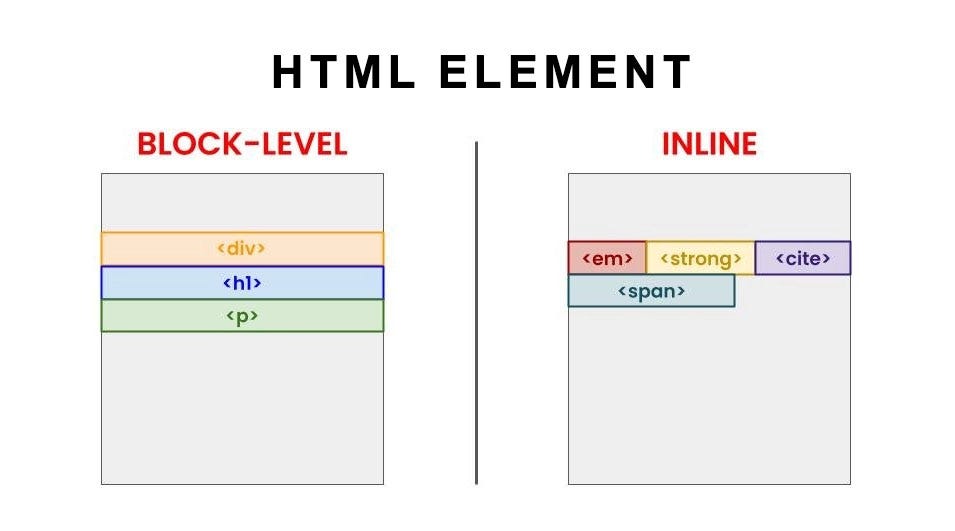
This distinction is the key to understanding why we use div and span.
HTML Block and Inline Elements
For a quick reference on this topic, the W3Schools page on Block and Inline Elements provides a clear, concise summary.
Read the introductory section, the 'Block-level Elements' section, the 'Inline Elements' section, and the 'Chapter Summary'. This will give you a solid definition of these two concepts.
The <div> Tag: A Generic Block Container
The <div> (short for "division") element is the most common block-level container. By itself, it does nothing visible. Its purpose is to group larger sections of content together so you can treat them as a single unit.
Imagine you want to put a border around your entire form, or give the form and its heading a shared background color. Instead of applying that style to each element individually, you can wrap them all in a <div> and style that single container.
This video gives a fantastic visual introduction to <div> and its counterpart, <span>.
HTML & CSS for Beginners Part 10: Divs & Spans
Kevin Powell's video provides a great hands-on look at div and span. You'll see exactly how they behave and why the block vs. inline distinction is so important.
Please watch these two key parts: The introduction to divs (00:12 - 01:35). Focus on how a div acts as a container for other elements. The segment illustrating the difference between div (block) and span (inline) (05:28 - 07:46). Pay close attention to what happens when he incorrectly tries to use a div inside a paragraph.
As you saw in the video, a <div> is perfect for creating the main sections of a webpage, like a header, a sidebar, or a main content area.
The <span> Tag: A Generic Inline Container
The <span> element is the inline equivalent of a <div>. It's a inline-level container used to group small pieces of content within a block-level element, without disrupting the flow of the content.
When would you use it? Let's say in our heading, <h1>AI Writing Assistant</h1>, you want to make the word "AI" a different color. You can't wrap it in a <div> because that would force "AI" onto its own line. Instead, you wrap it in a <span>: <h1><span>AI</span> Writing Assistant</h1>. Now you have a hook to style just that word.
Test your understanding!
You have the following paragraph: <p>Our tool helps you write better and faster.</p>
You want to be able to change the color of the words "better and faster" later with CSS. Which tag should you use to wrap those words, and why?
Show answer
You should use the <span> tag: <p>Our tool helps you write <span>better and faster</span>.</p>.
The <span> tag is the correct choice because it is an inline element. It allows you to group words within a paragraph for styling without forcing them onto a new line, which a <div> would do.
Applying div and span to Our Project
Let's apply this to your index.html file. We are going to make two changes:
- Wrap the entire form and its introductory text in a
<div>. This creates a main "application" container that we can style as a whole unit later. - Wrap the word "AI" in our
<h1>in a<span>so we can give it special styling in the future.
Open your index.html file. Replace the entire content inside the <body> tags with this updated code:
<body>
  <h1><span>AI</span> Writing Assistant</h1>

  <div class="app-container">
    <p>Enter the text you want to analyze or improve in the box below.</p>

    <form>
      <label for="user-text">Your Text:</label><br><br>

      <textarea id="user-text" name="user-text" rows="10" cols="60" placeholder="Paste your text here..."></textarea><br><br>

      <input type="submit" value="Analyze Text">
    </form>
  </div>
</body>
Let's break down the changes:
<h1><span>AI</span> Writing Assistant</h1>: We've wrapped "AI" in a<span>. Visually, nothing changes yet! This is purely a structural change for future styling.<div class="app-container"> ... </div>: We've created adivand placed the<p>tag and the entire<form>inside it. This groups everything related to our application into one block.class="app-container": This is aclassattribute. It's like giving ourdiva name. We don't styledivtags directly because you'll use many of them. A class lets us target this specificdivwith CSS later. We'll cover classes in detail in the next module.
If you save the file and refresh your browser, you won't see any visual difference. This is expected! <div> and <span> are invisible containers. Their power is in providing a structure that we can later target with CSS to create layouts and visual styles.
Conclusion
Great job today! You've learned about the fundamental organizational tools in HTML. While they might not seem exciting on their own, div and span are the backbone of virtually every modern website's layout.
Key Takeaways:
- HTML elements are either block-level (stacking vertically) or inline (flowing horizontally).
- The
<div>tag is a block-level container used to group large sections of content. It's the primary tool for creating page layouts. - The
<span>tag is an inline container used to group small pieces of content, like a few words in a sentence, for targeted styling. - Both
divandspanare "non-semantic," meaning they don't describe the content they hold. They are generic containers for styling and grouping.
In our next lesson, we will explore semantic HTML tags like <header>, <main>, and <footer>. These are special tags that work like divs but also describe the meaning of the content inside them, which improves both code readability and accessibility.