Hello! Welcome to the first lesson of our new module, "Implementing Core Application Features."
In the last module, you successfully built a robust backend endpoint to interact with the Gemini AI. You learned how to send a prompt, parse the response, and most importantly, handle potential errors gracefully. Your backend can now communicate reliably with an external AI service, which is a fantastic achievement.
Now, we're going to expand the capabilities of your web application. Your goal is to build a text analysis tool, and while AI-powered features are exciting, many useful tools also provide more straightforward, quantitative analysis.
In this lesson, you will create a new Flask endpoint that performs basic text analysis, specifically calculating word and character counts. This is a fundamental feature for any writing assistant and will give you more practice in building API endpoints—this time without relying on an external service.
Step 1: Creating a New Endpoint for Text Analysis
Just as we created an endpoint at /api/summarize for the AI feature, we'll now create a new one at /api/analyze for our basic analysis. This keeps our application organized, with different URLs handling different tasks.
Recall from our work with Flask that creating a new endpoint involves using the @app.route() decorator.
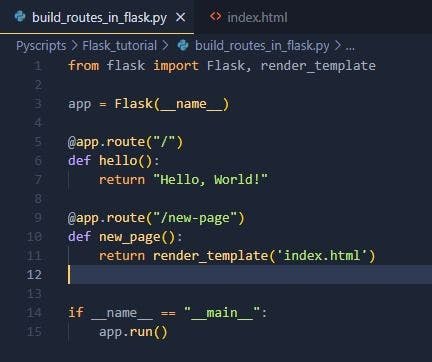
Let's set up the basic structure for our new endpoint in your app.py file. It will need to:
- Be accessible at the URL
/api/analyze. - Accept
POSTrequests, since the user will be sending text to it. - Get the text from the incoming JSON request, just like our
summarize_endpointdid. - Handle cases where no text is provided.
Here is the initial code for your new function. You can add this right below your summarize_endpoint function in app.py:
@app.route('/api/analyze', methods=['POST'])
def analyze_endpoint():
    # Get the text from the request's JSON body
    user_text = request.json.get('text')

    # Basic validation: return an error if no text is provided
    if not user_text:
        return jsonify({'error': 'No text provided'}), 400

    # We will add the analysis logic here!

    # For now, let's just return a placeholder
    return jsonify({'message': 'Analysis endpoint is working!'})
This structure should feel familiar. We're reusing the same patterns for creating routes and handling request data that you've already mastered.
Step 2: Calculating Character and Word Counts
Now for the main task: analyzing the user_text. We need to calculate two things:
- The total number of characters.
- The total number of words.
Character Count
In Python, this is very straightforward. The built-in len() function, when used on a string, returns the number of characters in it.
user_text = "Hello world"
char_count = len(user_text)  # char_count will be 11
Word Count
Counting words requires a bit more work. We need to break the string apart wherever there is a space or a newline. Python's string split() method is perfect for this. It returns a list of substrings (the words), and we can then use len() on that list to find out how many words there are.
To see exactly how this works, please read the following brief article.
Python program to calculate the number of words and characters in the string
This article from GeeksforGeeks, 'Python program to calculate the number of words and characters in the string', demonstrates the simplest way to perform these counts.
Please read the first section titled 'Using split()'. Focus on how len(s.split()) is used to count words and len(s) is used to count characters. You can ignore the other sections for now.
As the article explained, the logic is simple and powerful:
char_count = len(user_text)word_count = len(user_text.split())
The split() method is smart enough to handle multiple spaces between words or leading/trailing spaces, which makes it very reliable for this task.
Test your understanding!
Consider the string my_string = " Python is fun! ". What would len(my_string.split()) evaluate to?
Show answer
It would evaluate to 3. The split() method first splits the string into ['Python', 'is', 'fun!'] by treating consecutive spaces as a single delimiter and ignoring leading/trailing whitespace. The length of this list is 3.
Step 3: Returning the Results as JSON
Now that we have our two values, char_count and word_count, we need to send them back to the user. As with our previous endpoint, the standard way to do this is to package them in a Python dictionary and use Flask's jsonify function to create a proper JSON response.

We will create a dictionary containing our results and return it. Let's combine all the pieces into our final analyze_endpoint function.
# In app.py

# Make sure you have these imports at the top of your file
from flask import Flask, request, jsonify
# ... other imports like genai, etc.

# ... your Flask app initialization and summarize_endpoint ...

@app.route('/api/analyze', methods=['POST'])
def analyze_endpoint():
    # 1. Get the text from the request
    user_text = request.json.get('text')

    # 2. Validate the input
    if not user_text:
        return jsonify({'error': 'No text provided'}), 400

    # 3. Perform the analysis
    char_count = len(user_text)
    word_count = len(user_text.split())

    # 4. Create a dictionary with the results
    analysis_results = {
        'character_count': char_count,
        'word_count': word_count
    }

    # 5. Return the results as a JSON response
    return jsonify(analysis_results)
And that's it! You have successfully created a new, functional API endpoint.
To test it, you can run your Flask app and use a tool like Postman to send a POST request to http://127.0.0.1:5000/api/analyze. Set the body to raw JSON and enter the following:
{
    "text": "This is a test to count words."
}
You should receive a 200 OK response with the following JSON body:
{
    "character_count": 31,
    "word_count": 7
}
Conclusion
In this lesson, you've added a new core feature to your application by creating a text analysis endpoint. This reinforces your Flask skills while introducing fundamental Python string manipulation techniques.
Key Takeaways:
- You can add multiple, independent API endpoints to a single Flask application to handle different tasks.
- Python's built-in
len()function is used to get the length of strings (character count) and lists (word count after splitting). - The
.split()string method is an effective tool for breaking a string into a list of words. - The process of receiving JSON data, processing it, and returning a JSON result is a common pattern in web development.
In our next lesson, we'll build on this by adding a more advanced analysis feature. You will learn how to integrate a Python library to calculate a readability score and expose it via an endpoint, making your text analysis tool even more powerful.